
Best Ways to Record Vinyl to Mp3: A Practical Guide for Analog to Digital Conversions
If you’re looking to convert vinyl records into MP3 files, you want reliable hardware that delivers clear transfer without added complexity. This guide highlights five top options that cater to different needs—from simple USB capture to all-in-one turntables with built-in MP3 recording. Whether you’re a casual listener, a collectors’ enthusiast, or a tech-savvy drawer of analog archives, there’s a model here that fits your workflow and budget.
Buyer types: casual listeners may prefer simple plug-and-play devices; aspiring digital archivists may want devices with direct USB encoding or SD card storage; travel-friendly users will appreciate compact, portable turntables. The table below compares key picks to help decide quickly which to choose.
| Product | Best For | Format | Notes |
|---|---|---|---|
| DigitPro USB 2.0 Audio Capture Card | Home archivists needing direct PC/Mac capture | MP3/WAV | USB audio capture, supports multiple Windows versions and Mac OS |
| LP&NO.1-9-in-1 Bluetooth Vinyl Record Player | All-in-one digitizing, no computer needed | MP3 via USB | Built-in SD/USB recording, all-in-one design |
| FEKTIK Bluetooth Record Player 10 in 1 | Multi-function with built-in MP3 recording | USB/SD | 10-in-1 features; records vinyl to USB/SD |
| DIGITNOW Bluetooth Record Player | Compact home setup with CD and tape options | MP3 | Multiple playback channels; USB/SD encoding |
| VICTRESS Vinyl Record Player with Bluetooth | Bluetooth-enabled listening with MP3 conversion | USB/MP3 | Built-in speakers; BT in/out; 3-speed |
DigitPro USB 2.0 Audio Capture Card

This device is designed for direct computer capture of analog sources such as vinyl, cassette, and radio. It records to MP3 or WAV via USB and works with PC or Mac. The setup is plug-and-play, requiring no extra power supply. It supports Windows 7/8/10/11 and Mac OS 10.7-10.14. It is best for buyers who want a simple path from analog to digital without built-in playback features.
Best for: home archivists who want straightforward capture to MP3 on a computer. Better for: users comfortable with USB audio interfaces rather than standalone recorders. Caution: Mac OS versions beyond 10.14 may not be supported.
Xixian Turntable to MP3 Converter

A portable turntable that converts vinyl directly to MP3 or WAV files, without requiring a PC. It can be USB-powered or battery-powered, with a simple plug-and-play approach. The device is compact for travel and focuses on quick digital preservation of a vinyl collection. It’s ideal for listeners who want a quick, PC-free transfer and who value portability over advanced editing features.
Best for: music lovers who want immediate, PC-free digitization. Better for: quick migrating of classic records to portable devices. Caution: USB or battery power may limit continuous operation for large collections.
LP&NO.1-9-in-1 Bluetooth Vinyl Record Player

This all-in-one unit combines a wood-tone record player with built-in stereo speakers and support for 33/45/78 RPM. It digitizes vinyl directly to MP3 on a USB drive, with no computer required. The built-in RCA output lets you connect external speakers for larger sound. It’s best for buyers who want a self-contained package for archiving vinyl to MP3 without software.
Best for: users seeking a single device for playback and MP3 recording. Choose this if you want USB recording without a computer. Limitation: automatic end-of-recording features may vary by model and firmware.
FEKTIK Bluetooth Record Player 10 in 1

This 10-in-1 unit combines a vinyl player with CD, cassette, FM radio, and Bluetooth streaming. It also supports USB/SD for recording vinyl to USB/SD and is designed for easy digitization on a single device. Note that CD playback is supported, but recording from CD may require DVD/USB transfer. Best for: households that want a multi-functional entertainment hub with MP3 capture from vinyl.
Best for: buyers who want a multi-functional system with built-in recording to USB/SD. Better for: those who value integrated Bluetooth and radio features. Caution: CD recording capability is limited to transfer from disc to USB/SD, not direct vinyl-to-CD conversion.
DIGITNOW Bluetooth Record Player
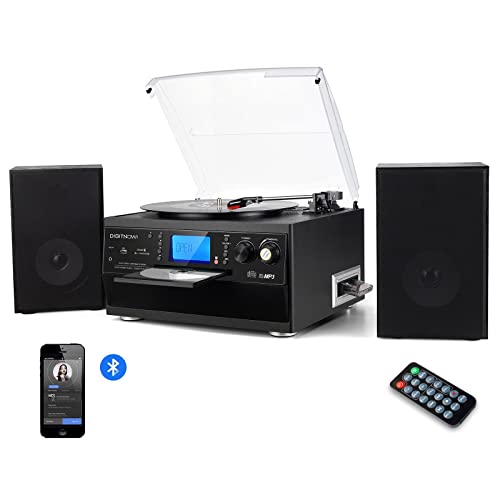
This model combines a CD player and recorder with Bluetooth connectivity and detachable twin speakers. It supports vinyl playback and provides USB/SD encoding options to digitize records. It’s best for buyers who want a mid-range system with built-in amplification and multiple playback modes.
Best for: those who want an all-in-one playback and digitization solution with Bluetooth. Caution: Built-in speakers may not satisfy audiophiles seeking expansive soundstage.
Mini Record Player by CRIDENG

A compact, portable option with a direct recording feature to MP3 via built-in SD card or USB. It emphasizes digital vinyl conversion in a small footprint. It’s best for travelers or space-conscious listeners who want simple digitization for a few records.
Best for: on-the-go digitization with direct SD/USB storage. Better for: limited collections or casual archiving. Caution: Smaller chassis may compromise record stability and sound quality on heavy grooves.
EfforPrac 33/45 PRM LP Vinyl to MP3 Converter Turntable

This compact turntable emphasizes portable design with a built-in SD/USB slot for direct MP3 conversion. It highlights vinyl-to-MP3 recording and a built-in forSD card slot for simplified storage. It suits readers seeking a lightweight, space-saving way to digitize records directly to MP3 on SD/USB.
Best for: those who want a straightforward, portable converter with SD card storage. Caution: SD card performance and compatibility may vary with firmware updates.
Buying Guide: How To Choose The Right Vinyl-To-MP3 Converter
What’s your digitization goal? If you need high-quality archival transfers to a PC, a USB capture device like DigitPro is a solid choice. For simple, stand-alone digitization without a computer, look to all-in-one turntables such as LP&NO.1 or FEKTIK. If you want compact travel-friendly options, consider DIGITNOW or CRIDENG mini units. When evaluating, consider input options (3.5mm, RCA, USB, SD), output formats (MP3 vs WAV), power needs (USB vs battery), and whether you require Bluetooth functionality for wireless playback or streaming.
Direct recording vs. post-processing: Some devices record directly to MP3 on USB/SD without software, while others require you to capture via a computer and convert later. If you want pristine, editable edits, a PC-based workflow with a capture card may be preferable. For simple backups, built-in recording is convenient, but it may limit editing capabilities.
Compatibility and future-proofing: Check supported operating systems and any noted limitations. Some devices list Mac OS versions that are compatible, while others may have firmware constraints. Consider the longevity of the format you’re capturing to; MP3 remains widely supported, but WAV files offer higher fidelity for preservation, requiring more storage.
FAQ
- Do I need a computer to digitize vinyl? Some devices record directly to USB/SD without a computer, while others require PC software or drivers. Choose based on whether you want PC-free operation or full editing capabilities.
- Which format is best for archiving? WAV offers higher fidelity for long-term archival storage, while MP3 saves disk space for casual listening.
- Can Bluetooth features interfere with recording quality? Bluetooth is convenient for playback, but direct wired connections generally yield more stable, higher-quality captures for archival work.
- Are there limitations with Mac compatibility? Some USB capture devices specify Mac OS versions they support; verify the exact OS compatibility before buying if you’re a Mac user.
- What RPM settings matter for vinyl transfers? Most devices support common speeds (33/45 RPM); some also support 78 RPM. Matching the record’s speed is essential to avoid pitch changes.
- Which option is best for travel? Portable turntables with USB/SD recording are ideal for on-the-go digitization and small collections.