
The best retro iPod docking station depends on whether you need a simple charging cradle, an alarm-clock speaker, or a digital audio dock for a home stereo. The iClassic is best for buyers seeking an all-in-one speaker and radio, while the iHome iA90 suits people who want a dual-alarm clock. The Onkyo ND-S1 is the better fit for a compatible audio setup, and the USB cradle is aimed at charging or syncing older iPods. Check the connector and exact iPod generation before buying; older Apple devices do not all use the same dock connection.
| Product | Best for | Key feature listed |
|---|---|---|
| USB Charger Sync Docking Station Cradle | Basic charging and syncing | Lists several iPod generations and models |
| iClassic Docking Speakers Alarm AM/FM Station | Listening, alarms, and radio | 30-pin iPod/iPhone dock |
| iHome iA90 | Dual-alarm bedside use | Speaker, clock radio, and charger |
| Onkyo ND-S1 | Digital audio transport use | Docking station for iPod |
USB Charger Sync Docking Station Cradle
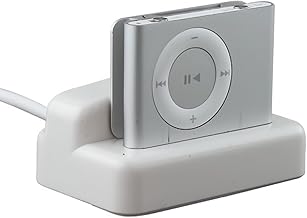
This cradle is best for buyers looking for a straightforward dock to charge or sync a compatible older iPod rather than a speaker system. Its product name lists iPod Shuffle 2nd generation and 3rd generation, iPod nano, and iPod classic, making it the broadest-model option among these picks. The listing also describes it as a charger and sync station.
Choose this if your priority is a compact charging or syncing cradle and your exact iPod model is among those supported. Why it was selected: it directly targets multiple older iPod families instead of focusing on audio playback or clock features.
Check before buying: the title names several models, but it does not establish that one connector fits every listed generation. Confirm the cradle’s connector and your iPod’s model before ordering. The listing does not provide speaker, radio, or alarm features.
iClassic Docking Speakers Alarm AM/FM Station

The iClassic is best for someone who wants an iPod dock combined with speaker, alarm, and radio functions. The product name identifies an AM/FM station and says it is for 30-pin iPod and iPhone models. That makes connector verification especially important for buyers whose device uses a different connection.
Choose this if you want one retro-style device for docking a compatible 30-pin player, listening through speakers, and using an alarm or AM/FM radio. Why it was selected: it combines several common bedside and listening functions in one product rather than serving only as a charger.
Limitation: the stated 30-pin connection narrows its intended compatibility. Do not assume it works with Lightning-connector iPhones or with every iPod generation; confirm your device and the full listing details first.
iHome iA90 Dual Alarm Clock Radio

The iHome iA90 is best for buyers who want a bedside clock radio with two alarms and an iPod or iPhone charging dock. Its name lists a speaker, dual alarm clock radio, and charger. The product is described as a mint-condition item, so buyers should review the listing’s condition notes and included components rather than assuming it is new.
Choose this if alarm-clock functionality is as important as docking an older Apple device. The dual-alarm description may suit households or sleepers who use separate wake times. Why it was selected: it offers a more clock-focused alternative to a basic cradle and a radio-focused alternative to a standalone dock.
Limitation: the supplied title does not specify connector type or the exact iPod generations supported. Verify compatibility before purchase, particularly if your iPod has a different dock connector or requires a particular adapter.
Onkyo ND-S1 Digital Media Dock

The Onkyo ND-S1 is best for buyers specifically seeking a digital media transport dock for an iPod. The product name identifies it as an Onkyo digital media transport docking station and lists the ND-S1(S) model in silver. It is a more specialized choice than the alarm-clock and speaker products above.
Choose this if you are shopping for the named Onkyo model to use within a compatible home audio setup. Why it was selected: its stated purpose is digital media transport, which distinguishes it from simple charging docks and all-in-one clock radios.
Limitation: the provided product information does not identify supported iPod generations, connection types, or the audio equipment required. Check the full listing and your existing system before deciding that it will fit your setup.
Buying Guide: How To Choose A Retro iPod Dock
Which connector does your iPod use?
Start with the exact iPod model and generation, then identify its dock connector. A product title that says “iPod” does not prove compatibility with every iPod. The iClassic listing specifically says 30-pin iPod and iPhone, while the USB cradle title names several generations but does not clarify whether all use the same connection. Compare the connector shown in the listing with your device before purchasing.
Also distinguish between a dock connector and a cable or adapter. A product may physically hold one device while failing to charge or sync another. If the full listing does not clearly state support for your model, contact the seller or choose a listing that names the exact generation.
Do you need charging, speakers, an alarm, or stereo integration?
- For charging or syncing: The USB Charger Sync Docking Station Cradle is the most direct match among these products, provided your model is supported.
- For speakers and radio: The iClassic listing combines speaker, alarm, and AM/FM station functions with a stated 30-pin dock.
- For bedside alarms: The iHome iA90 is the clock-focused choice because its name specifies a dual alarm clock radio and charger.
- For a digital media dock: The Onkyo ND-S1 is the specialized option; verify what connections your audio setup needs.
Decide which function matters most. A basic cradle may be simpler when you only need charging, while a speaker dock may take up more space but combine multiple uses. Do not assume that a product with speakers also offers every alarm, radio, or stereo connection you need.
What should you check on a used or older dock?
Older docking stations may be sold in varying conditions. Read the item condition, included-accessory details, and seller’s description carefully. For the iHome iA90, the supplied title calls it mint condition, but that label does not establish which accessories are included or confirm the condition of every function.
Look for clear information about power supply, remote control, cables, and any required adapters. The product information provided here does not confirm those items for these models, so treat them as details to verify rather than included features.
How can you compare sound and playback claims?
The product names identify speaker or digital media functions for some models, but they do not provide measured sound specifications or detailed audio performance information. Compare only the functions the listing explicitly states. If sound quality or audio connections are priorities, consult the complete product description for supported outputs, controls, and device requirements.
For a retro setup, practical fit matters as much as appearance. Check the dock’s dimensions and placement requirements in the full listing, especially if it will sit on a nightstand or crowded shelf. No dimensions are included in the supplied product details.
Frequently Asked Questions
Will any 30-pin iPod dock work with every iPod?
No. Compatibility depends on the iPod model, generation, and the dock’s supported connection. Confirm the exact model in the product listing before buying.
Which product is best for charging an older iPod?
The USB Charger Sync Docking Station Cradle is the most directly described charging and syncing option. Its title names several iPod families, but buyers should verify connector fit for their specific generation.
Which dock includes an AM/FM radio?
The iClassic Docking Speakers Alarm AM/FM Station is the product whose title explicitly lists AM/FM radio. It is described for 30-pin iPod and iPhone models.
Which option is designed for dual alarms?
The iHome iA90 title identifies it as a dual alarm clock radio and charger. Check the full listing for device compatibility and included accessories.
Is the Onkyo ND-S1 a regular speaker dock?
The supplied product name describes it as a digital media transport docking station. It does not provide enough information to confirm speaker features or the connections needed for a particular stereo system.
Should I buy a dock if my iPod model is not named?
Verify the connector and model support with the complete listing or seller first. If compatibility is not clearly stated, do not assume the dock will charge, sync, or play audio from your device.