
A self-powered sound bar has built-in amplification and needs an external power source; it does not necessarily run on batteries. Among these options, the ULTIMEA Poseidon M60 is best for buyers seeking a multi-speaker surround setup, while the Bose TV Speaker suits a simpler, compact TV upgrade. FUNLOGY offers multiple wired inputs, Saiyin emphasizes a small footprint, and the detachable soundbar adds flexible placement and three equalizer modes.
| Sound bar | Best for | Standout details |
|---|---|---|
| ULTIMEA Poseidon M60 | Surround-style home theater | 5.1-channel system, subwoofer, Dolby Atmos |
| FUNLOGY 100W 2.1ch | TVs, projectors, and wired connections | HDMI ARC, optical, AUX, Bluetooth |
| Saiyin 11.7-inch | Compact setups | 48W peak power, AC adapter, Bluetooth 5.3 |
| Detachable 2-in-1 soundbar | Flexible placement and sound modes | Three EQ modes, multiple inputs |
| Bose TV Speaker | Simple, compact TV audio | Bluetooth and HDMI ARC connectivity |
ULTIMEA Poseidon M60 5.1-Channel Sound Bar

The ULTIMEA Poseidon M60 is best for buyers who want a more involved home-theater arrangement than a single bar. Its listed specifications include a 5.1-channel system, Dolby Atmos, a subwoofer, and 300W output. VoiceMX and BassMX are named sound features, and Bluetooth 5.4 and an app are included in the product description.
Choose this system if you value a subwoofer and multi-channel configuration for movies or other TV content. The included components make it a more feature-rich choice than the compact all-in-one options in this list. It is also described as a sound system for smart TVs.
Limitation: A multi-part system may take more space and setup than a single compact soundbar. Check the product details and your room layout before choosing it; the listed information does not specify connection compatibility with every TV.
FUNLOGY 100W 2.1-Channel Sound Bar

This FUNLOGY model is best for buyers who want several ways to connect a TV, projector, or other compatible audio source. The product description lists 100W output, 2.1-channel sound, Bluetooth 5.0, HDMI ARC, optical, and AUX inputs. A remote control is also listed.
Choose it if HDMI ARC or a wired optical or AUX connection matters alongside Bluetooth. Its 2.1-channel design offers a middle ground between a basic bar and a larger surround system. The white finish may also suit buyers looking for an alternative to a black soundbar.
Limitation: The listing identifies several connection types, but it does not establish that every TV or projector supports them. Confirm the ports on both devices before buying, especially if you intend to use HDMI ARC.
Saiyin 11.7-Inch Compact Sound Bar
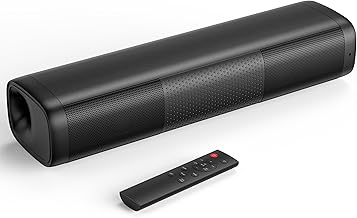
The Saiyin is best for a desk, small TV area, or other setup where soundbar length is a priority. Its name specifies an 11.7-inch size, 48W peak power, and an AC adapter. Bluetooth 5.3, optical, and auxiliary inputs are listed, and the product is described for smart TVs, PCs, and gaming.
Choose this model if you want a powered soundbar with a particularly compact stated length and both wireless and wired input options. Its listed connections offer flexibility for a small entertainment or computer setup, while the AC adapter makes clear that it uses an external power source.
Limitation: Its compact size may not suit buyers looking for a wide, room-filling home-theater system. The listing gives peak power, not a directly comparable continuous-power figure, so avoid comparing the 48W peak rating with other models as if the measurements were equivalent.
Detachable 2-in-1 Sound Bar With Three EQ Modes

This soundbar is best for buyers who want placement flexibility and simple sound adjustments. The product description identifies it as a 2-in-1 detachable soundbar and lists Bluetooth, ARC, optical, and AUX connections. It also includes auto volume boost and three equalizer modes, with TV, PC, gaming, and projector use named in the listing.
Choose this option if you want to switch between a combined bar and a separated arrangement, or if preset EQ choices are useful for different content. Its range of listed connections can help accommodate several types of source equipment, subject to matching ports.
Limitation: The provided product details do not specify the soundbar’s output power or exact dimensions. Buyers who need a particular loudness level or a precise fit should check those specifications before deciding.
Bose TV Speaker Compact Soundbar

The Bose TV Speaker is best for buyers looking for a compact, all-in-one soundbar with straightforward TV and wireless audio options. Its listed features include Bluetooth, HDMI ARC connectivity, and a remote control. The product description presents it as a compact soundbar for TV rather than a multi-speaker surround package.
Choose it if you prefer a single-bar arrangement and want Bluetooth as well as HDMI ARC listed among the connections. It is a simpler alternative to the ULTIMEA system for shoppers who do not specifically want a subwoofer and multi-channel configuration.
Limitation: The provided details do not list an optical or AUX input, so check the full product specifications if your TV lacks HDMI ARC or if you need a particular wired connection. Do not assume every connection type is included based on this summary.
Buying Guide: How To Choose A Self-Powered Sound Bar
What does “self-powered” mean for a sound bar?
In audio shopping, “powered” usually means the soundbar has built-in amplification and needs an external power source, such as an AC adapter or power cable. It does not automatically mean the unit has a rechargeable battery or works without being plugged in. Check the product specifications for its power method, included adapter, and cable requirements if portability is important.
Which connection should you use with your TV?
Start by checking the ports on the TV and soundbar. HDMI ARC can carry TV audio through a compatible HDMI port; optical and AUX are other wired options when available. Bluetooth can be useful for wireless audio from compatible devices, but it does not replace a wired TV connection in every setup. Match the available ports before choosing a model, and confirm the required cable is included if that matters to you.
Do you need a compact bar or a surround system?
Choose a compact model such as the Saiyin if a short soundbar is a main requirement. A compact design can fit desk or smaller TV spaces, but the listed size alone does not establish how it will perform across a room. For buyers who prioritize a subwoofer and a multi-channel configuration, the ULTIMEA M60 is the more relevant option among these picks. Its additional components may need more placement space.
How should you compare power ratings?
Do not compare wattage numbers without checking what each listing measures. The FUNLOGY product lists 100W, the ULTIMEA lists 300W, and the Saiyin lists 48W peak power. Peak power is not necessarily measured the same way as another model’s rating. Wattage by itself also does not describe room coverage, dialogue clarity, or bass quality. Use ratings as one specification, then consider the configuration, size, and connection options.
What features matter for TV dialogue and everyday use?
If you want an easy setup, prioritize a soundbar with a connection that matches your TV and a remote if you want separate control. Some listings name features such as VoiceMX, auto volume boost, or EQ modes, but product names alone do not provide a full description of how those features operate. Review the manufacturer’s details to confirm the controls and settings you need.
What should you check before ordering?
- Confirm that the soundbar’s input ports match your TV, computer, projector, or gaming device.
- Check dimensions and leave enough room for the bar, subwoofer, and any separated speakers.
- Verify the power source and whether a power adapter or required cables are included.
- For a detachable model, review how the separated sections are arranged and connected.
- Look for the exact channel configuration and distinguish a single bar from a system with a subwoofer or additional speakers.
Frequently Asked Questions
Does a self-powered sound bar need a separate amplifier?
Generally, no. A powered soundbar has built-in amplification. It still needs an external power source, and it must receive audio through a compatible connection.
Does “self-powered” mean the soundbar is wireless?
No. “Self-powered” does not mean battery-powered or cable-free. A model may use an AC adapter for power and still need a wired connection to the TV. Bluetooth describes wireless audio connectivity, not necessarily power.
Which option has a subwoofer?
The ULTIMEA Poseidon M60 product description explicitly lists a subwoofer as part of its 5.1-channel sound system. Check the other product listings if a separate subwoofer is a requirement.
Which soundbar is the most compact by listed measurement?
The Saiyin product is described as 11.7 inches long. Compare that measurement with your available space and check the full product dimensions before purchasing.
Can I connect any of these soundbars to any TV?
Not necessarily. Connection compatibility depends on the ports and supported audio formats of both devices. Check the TV and soundbar specifications for a matching HDMI ARC, optical, AUX, or Bluetooth connection.