Best Simple DVD Players for Elderly: Easy, Gentle-Use Options for Comfortable Viewing
Finding a straightforward DVD player that’s easy for seniors to operate can improve every movie night. The following selections emphasize large controls, clear displays, minimal setup, and reliable playback across regions. Each model supports common formats, offers simple remotes, and provides dependable performance for households prioritizing ease of use, accessibility, and compatibility with standard TVs.
Quick Overview Of Selected Models
| Product | Key Benefit | Type | Region Support |
|---|---|---|---|
| Electcom Pro DVD Players for TV with HDMI (Big Buttons Remote) | Large-button remote with LED backlight for easy dark-room use | Region-free DVD player | All regions |
| MEGATEK Region-Free HDMI DVD Player | 1080p upscaling for crisp picture; multi-region playback | HDMI, USB, remote included | Regions 1–6 |
| Electcom Pro HDMI Region Free DVD Player (Compact) | Compact design with simple controls and reliable playback | HDMI, DVD/CD player | Region-free |
| WSJSYH DVD Player (HDMI, All Regions) | Multi-format support including USB playback | HDMI, USB | All regions |
| Majority 2025 Model HDMI DVD Player | 1080p HDMI output with universal compatibility | HDMI, USB | Region-free |
These options emphasize simple operation, readable controls, and compatibility with standard TVs. The list below explores each product’s strengths and how they may fit into a household seeking a dependable, user-friendly DVD experience for an elderly family member.
Electcom Pro DVD Players For TV With HDMI
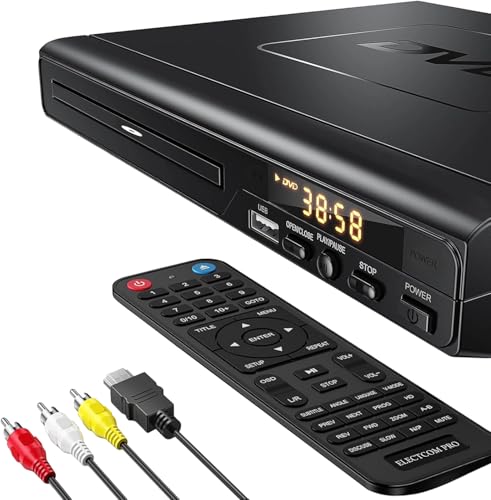
This HDMI DVD player is designed for simplicity and broad compatibility. It functions as a DVD and CD player, plus supports USB playback, giving a straightforward way to enjoy movies and music. The compact design pairs well with most living room setups, and the product notes indicate support for multiple disc formats, which can reduce the need for specialized hardware. While Blu-ray discs are not supported, the unit delivers clear 1080p output with solid sound, making it a practical choice for those who want a no-fuss experience.
MEGATEK Region-Free HDMI DVD Player

MEGATEK’s model emphasizes multi-region playback and 1080p HDMI upscaling, which can improve picture quality for older discs. It supports a broad range of video formats and is designed to work with both PAL and NTSC standards, increasing compatibility with DVDs from around the world. The included remote and metal housing convey a sense of durability, and the bundle approach makes it a solid all-in-one option for seniors who prefer a single device for discs and digital files.
Electcom Pro HDMI DVD Player With Big Buttons Remote

This bundle centers on accessibility, combining a standard remote with an upgraded large-button remote that includes LED backlighting. The design aims to simplify operation in low-light environments, a common scenario for evening movie sessions. The 1080p output and region-free functionality remain consistent with the original Electcom Pro model, delivering a reliable, straightforward viewing experience for seniors who value easy control and clear visuals.
Electcom Pro Region-Free DVD Player (10ft Cable Included)
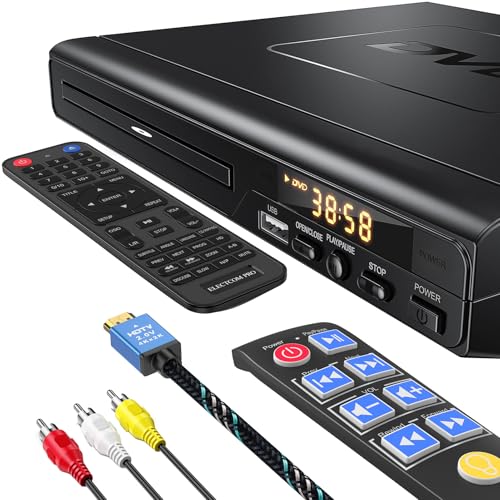
This version adds a long HDMI cable, offering flexibility in seating arrangements and easier setup away from the TV. The feature emphasis remains on region-free playback and simple controls, making it a practical option for households where the TV is mounted or placed in a room that requires a bit more cable reach. The big remote option still aligns with the goal of a user-friendly experience for the elderly audience while maintaining compatibility with a wide range of discs and formats.
Together, these five models cover a range of preferences—from large-button remotes and long cables to compact enclosures and multi-region flexibility. Each option prioritizes straightforward operation, reliable playback, and clear output, essential for seniors who want to enjoy familiar movies without technical hurdles.
Buying Guide: Key Considerations For Choosing A Simple DVD Player For Elderly
- Remote control design: Large buttons, high-contrast labels, and backlighting improve visibility in dim rooms. Some bundles include an additional oversized remote for easier access.
- Region compatibility: Region-free or multi-region players expand disc compatibility, reducing the need to swap devices when family members share discs from different regions.
- Video and audio quality: 1080p upscaling provides crisper images on older DVDs, and solid audio output ensures clear sound without distortion at moderate volumes.
- Format support: Look for players that handle common formats (DVD, DVD-R/RW, DVD+R/RW, CD, MP3, JPEG) and USB playback for photos or music libraries.
- Connectivity: HDMI is standard for modern TVs, but composite or RCA outputs remain useful for older televisions. A long cable option can improve placement flexibility.
- Setup and interface: A simple menu, straightforward on-device controls, and quick-start options help reduce setup time and confusion for first-time users.
- Durability and reliability: Metal housings and well-rated components contribute to longevity, a desirable trait for devices used regularly by seniors.
- Size and footprint: A compact unit saves space on a TV stand or shelf, while a larger unit may be easier to manage for some users depending on their mobility.
- Customer support and warranty: Access to responsive support and a reasonable warranty duration can provide peace of mind for seniors and caregivers alike.
Usage Scenarios And Feature Tradeoffs
For households prioritizing minimal setup, a region-free model with a single remote and a simple on-screen menu minimizes confusion. If picture clarity is particularly important, 1080p upscaling can improve the viewing experience but may come at a slightly higher price. Large-button remotes make night-time usage significantly more accessible, though some users may prefer a traditional layout with standard-sized buttons. USB playback adds a convenient way to view photo slideshows or listen to music without swapping discs.
Installation Tips
- Connect HDMI to the TV for the best balance of simplicity and quality; use RCA/AV if HDMI isn’t available.
- Position the DVD player within easy reach of the remote and power source to avoid cable clutter.
- Label remotes with large stickers or color codes to help differentiate between devices if multiple players are used in the same space.
When choosing among these options, consider the user’s comfort with remotes, the TV compatibility, and how often discs are used. The selected models provide a balance of region freedom, easy controls, and reliable performance, which are central to a frictionless, enjoyable viewing experience for elderly viewers.