
Best Single Ear USB Headset for Clear Calls and Focused Work
Looking for a single-ear USB headset that delivers clear voice for calls, conferences, and online classes? This guide highlights top options designed for comfort, portability, and reliable mic performance. It’s ideal for professionals, students, and remote workers who prefer a compact mono headset over a full headset. Below you’ll find five strong choices, with who they’re best for and why they stand out. A quick buyer’s table at the top summarizes key points for fast viewing.
| Product | Best For | Key Benefit |
|---|---|---|
| USB-A Wired Single Earbud (Right) with Boom Mic | Call centers and Windows/macOS users | Detachable boom mic for flexible voice capture |
| Yealink UH34 | Teams/Zoom meetings | Noise-cancelling mic and busy-light |
| Jabra Evolve 20 (2026 Edition) | All-platform calls | Crystal calls and easy USB setup |
| Poly Blackwire 3210 | Office work with Teams/Zoom | Dynamic EQ and inline controls |
| BINNUNE Wired Headset | Call centers and flexible connectivity | USB-A/USB-C/3.5mm options |
USB-A Wired Single Earbud With Boom Mic

The USB-A wired single-ear option from DUNGZDUZ is designed for clear voice capture with a detachable 6″ boom mic. When the boom mic is removed, the in-line microphone takes over, offering flexible mic setup. This device is compatible with Windows, Mac, Linux, and major gaming consoles, making it a versatile pick for office work, homework, or light gaming. The mono design reduces weight and improves comfort during long calls. Best for: users who want a compact headset with a reliable boom mic and optional in-line mic.
Selected for its straightforward mono form factor and adjustable mic, this headset minimizes headset bulk while prioritizing voice clarity. A potential limitation is that some users may prefer a wireless solution for mobility. Best for desk-based work where a wired connection ensures stable audio.
Yealink UH34 Wired Headset
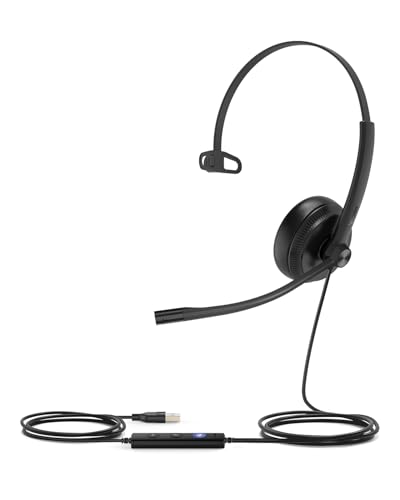
The Yealink UH34 is a USB-A wired headset with a noise-canceling microphone and in-line controls. It features a Teams-certified design suitable for major conferencing platforms and includes a visual busy light to minimize interruptions during calls. All-day comfort comes from an adjustable metal headband and soft leather ear pads, making it a strong pick for long meetings. Best for: office workers and remote teammates who need reliable call quality with quick mute and volume access. Caution: non-wireless design limits movement freedom during calls.
Jabra Evolve 20 (2026 Edition) Mono Headset

The Jabra Evolve 20 (2026 Edition) offers a lightweight, all-platform USB-C/A headset with easy plug-and-play setup. It emphasizes crystal-clear calls through advanced noise-canceling microphones and comfortable cushions for extended use. The headset is designed for a simple call experience across Teams, Zoom, and other platforms, with straightforward call management controls. Best for: users who want universal compatibility and dependable call clarity. Caution: some users may prefer higher-end models for extensive daily use.
Poly Blackwire 3210 Wired Headset

The Poly Blackwire 3210 provides a single-ear design with a noise-canceling microphone and dynamic EQ to optimize voice quality during calls. It supports both USB-C and USB-A connections, with inline controls for seamless call management. This headset is well-suited for teams that rely on visual-friendly online meetings and require consistent audio across platforms. Best for: office workers who need reliable voice performance on multiple devices. Caution: some users may miss full stereo audio for entertainment.
BINNUNE Wired Headset With Mic

The BINNUNE headset offers USB-A, USB-C, and 3.5mm connections, designed for call centers and busy offices. It emphasizes comfortable wear with ergonomic cushions and a secure fit for long shifts. The multi-port connectivity makes it a flexible option for mixed devices. Best for: workplaces with varied hardware ecosystems. Caution: feature set highlights emphasize compatibility over premium sound quality.
Buying Guide: Key Purchase Considerations
- Compatibility: Check whether USB-A or USB-C is required and confirm platform support (Windows, macOS, Linux, Teams/Zoom, etc.).
- Microphone Performance: Look for noise-canceling capabilities and a flexible boom mic if you need precise voice capture in noisy environments.
- Comfort and Fit: Consider weight, ear cushion material, and headband adjustability for all-day use.
- Connectivity: Decide between wired reliability and wireless flexibility; note if a dongle or multiple connection options are provided.
- Mobile/Desktop Suitability: If you commute or move around, portability and a mono design can reduce fatigue and heat buildup.
- Controls: Inline controls for mute, volume, and call management can streamline meetings.
Frequently Asked Questions
- What is a single-ear USB headset best used for? Answer: It is ideal for focused, one-ear listening during calls, meetings, and online classes, keeping one ear open to the environment.
- Do I need noise-canceling mic for meetings? Answer: Yes, to reduce background noise and improve speech clarity in busy spaces.
- Is USB-C or USB-A more future-proof? Answer: USB-C is becoming more common, but USB-A remains widely supported; check your devices before purchase.
- Are these headsets suitable for all-day wear? Answer: Many options emphasize lightweight design and soft padding intended for long sessions, but comfort varies by user.
- Can these headsets work with conference software like Teams or Zoom? Answer: Most listed models are designed for common platforms with inline controls and sometimes a busy light for status visibility.
- What’s the advantage of a boom mic vs. a built-in inline mic? Answer: A boom mic tends to offer clearer voice capture and better noise rejection in dynamic environments.