
A single headrest DVD player gives one rear-seat passenger a dedicated screen without requiring a two-screen system. For a portable player that can also be used outside the car, consider the MEGATEK 10.5-inch model; for a suction-loading design, compare the DESOBRY 10.5-inch player. The WONNIE offers a larger 12-inch screen and HDMI connections but requires external power. The Arafuna listing identifies a 12.5-inch player with headphones and auto-load discs, while the two-screen monitor is a display alternative, not a DVD player.
| Product | Best suited for | Key distinction |
|---|---|---|
| MEGATEK Portable DVD Player | Travel beyond the car | Rechargeable battery and swivel screen |
| Arafuna 12.5-inch Car DVD Player | Shoppers seeking a larger screen and headphones | Auto-load disc design stated in product name |
| DESOBRY 10.5-inch Car DVD Player | Easy disc loading and device connections | Suction loading, HDMI input, and last memory |
| WONNIE 12-inch Headrest DVD Player | Large-screen viewing with external power | 1080p display and HDMI input/output |
| Two 7-inch Headrest Monitors | Buyers needing screens for two seats | Monitor set; DVD playback is not specified |
MEGATEK Portable DVD Player
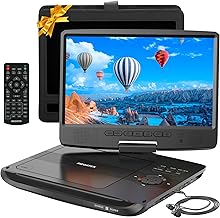
Best for: Families and travelers who want one DVD player for car trips and use away from the vehicle. Its built-in rechargeable battery is listed for up to six hours of playback, and the screen swivels 270 degrees and flips 180 degrees for flexible positioning.
The 10.5-inch HD LCD screen has a listed 1024 × 600 resolution. The player supports DVD and CD formats, including DVD±R/RW, VCD, audio CDs, MP3 CDs, and JPEG discs. It is described as region-free, which is useful for discs from different regions.
Why it was selected: Unlike models whose supplied details emphasize car mounting, this unit combines a portable screen, battery power, and broad disc-format support. Limitation: It does not support Blu-ray Discs, and the listed resolution is lower than the 1080p display specified for the WONNIE.
Arafuna 12.5-Inch Car DVD Player

Best for: Buyers prioritizing a larger listed screen size and a product described as including headphones. The name also identifies auto-load discs, a feature that may appeal to passengers who need to change discs from the back seat.
Why it was selected: Its 12.5-inch screen makes it the largest DVD player screen named in this selection, and its product title points to features relevant to a single-seat car setup. These details provide a useful comparison with the 10.5-inch DESOBRY and 12-inch WONNIE models.
Limitation: The supplied listing information does not provide screen resolution, battery life, supported formats, connection details, or installation hardware. Check the current product listing for those specifications before choosing it, especially if you need a particular mounting method or playback format.
DESOBRY 10.5-Inch Car DVD Player

Best for: Families who want a player with suction-style disc loading and a last-memory feature. The product description says the disc loads automatically and playback can resume from the previous stopping point.
This model has a 10.5-inch screen and supports HDMI input for compatible external devices. It also lists AV input and output, including the option to send the screen to a TV through an RCA cable. Disc support includes CD, DVD, CD±R, DVD±R, DVD±RW, VCD, and SVCD; Blu-ray is not supported. USB and SD playback is listed for several media formats, up to 128GB FAT32 and 1920 × 1080 pixels.
Why it was selected: It offers more connection and playback details than the Arafuna listing, making it a stronger option for buyers comparing disc, USB, and HDMI use. Limitation: The listing specifies standard 12 cm discs only. It also advises confirming that a phone supports HDMI output before relying on phone playback.
WONNIE 12-Inch Headrest DVD Player

Best for: Buyers who value a larger screen and a listed 1920 × 1080 resolution. The package description specifies two mounting methods, using customized brackets or headrest straps, and says the player can be moved between seats or vehicles.
The clamshell design is described as allowing disc changes without removing the player. HDMI input supports syncing video from listed devices such as computers, game systems, and some phones; the phone must support HDMI output. HDMI output and AV out can send playback to a larger display.
Why it was selected: It combines a 12-inch display with stated mounting options and both input and output connections, making it a better fit for buyers seeking a feature-rich single-screen setup. Limitation: The listing says it has no built-in battery and includes an AC adapter and car charger, so it is less suitable for use away from a power source.
Two 7-Inch Headrest Monitors

Best for: Buyers exploring a dual-screen display arrangement rather than a single DVD player. The product name describes two 7-inch LCD monitors with 800 × 480 resolution, adjustable headrest mounting, a wireless remote, and two video inputs.
Why it was selected: It is relevant as an alternative for households that want screens at two seats, or for a buyer comparing a monitor-based system with a portable DVD player. However, the supplied product details do not say that these monitors include a DVD drive.
Limitation: Do not choose this product if you need a standalone DVD player based on the available information. Confirm what video source, cables, and installation components are included before purchase.
Buying Guide: How To Choose A Single Headrest DVD Player
Do you need a DVD player or only a screen?
Start by confirming that the product includes a DVD drive. A headrest monitor displays video from a connected source but may not play discs on its own. The two-monitor product above is described as an LCD display set, not as a DVD player. If you want to insert a movie disc directly, choose a model whose product details explicitly list DVD playback.
A portable DVD player can be a practical single-seat solution when one passenger needs a screen. A two-screen kit may make more sense when two passengers need separate displays, but it is not automatically a substitute for a player. Check whether a compatible video source is included or must be supplied separately.
Which screen size and resolution suit your passenger?
Screen size affects how much of the passenger’s view the display occupies, while resolution describes image detail. The products here range from 7-inch monitors to a 12.5-inch DVD player. The WONNIE listing specifies 1920 × 1080 resolution, while the MEGATEK lists 1024 × 600. Compare both measurements rather than choosing by screen size alone.
Consider the passenger’s seating position and viewing distance. A larger screen may be easier to see from farther away, but it can take up more space around the headrest. Before ordering, compare the product’s dimensions and mounting arrangement with the available room in your vehicle.
Will you use the player away from the car?
For road trips that include stops, hotel rooms, or other off-car use, battery life and power options matter. The MEGATEK listing states up to six hours of playback from its rechargeable battery. The WONNIE listing specifically says there is no built-in battery and describes an included car charger and AC adapter.
Do not assume that a car-oriented player can run without a power connection. Check whether a battery is listed, how long it is specified to last, and which power accessories are supplied. If you expect to use the device only in a vehicle, a car power connection may be sufficient.
What disc formats and media sources do you need?
Check the format list against the discs and files you already own. The MEGATEK supports several DVD and CD formats, while the DESOBRY listing adds USB and SD playback for specified file types. Both the MEGATEK and DESOBRY descriptions say Blu-ray is not supported. A DVD player should not be treated as a Blu-ray player unless its specifications explicitly state that capability.
If you plan to connect a phone, tablet, computer, or game device, review the input ports and the source device’s output requirements. The DESOBRY and WONNIE listings include HDMI input, but the descriptions caution that a phone must support HDMI output. A port alone does not guarantee that every phone can send video to the player.
How important are disc loading and playback memory?
Disc loading can affect convenience for back-seat passengers. The Arafuna product name identifies auto-load discs, and the DESOBRY description specifies suction-type loading. DESOBRY also lists last memory, which is intended to resume playback from the stopping point. Confirm these features in the current listing if they are essential to your purchase.
Look for details about which disc sizes are supported. The DESOBRY listing specifies standard 12 cm discs. This limitation matters if your collection includes a different size. Also consider who will operate the player: easy-to-reach controls and straightforward loading can be more useful than extra connections for a child traveling in the back seat.
How should you compare mounting and installation?
Mounting methods vary by product. The WONNIE listing names two mounting approaches: customized brackets and headrest straps. Other product details supplied here do not fully specify mounting hardware. Check the included accessories and installation instructions rather than assuming that a portable DVD player attaches directly to every headrest.
Before buying, consider whether you may move the player between vehicles or seats. A removable strap or bracket may be useful for that purpose, but vehicle headrests differ in shape and spacing. Verify fit using the manufacturer’s current measurements and instructions. Do not rely only on the phrase “universal” unless the listing provides fit details for your vehicle.
Do you need headphones, speakers, or output to another display?
Headphones can help keep movie audio from disturbing the driver or other passengers. The Arafuna product name says it includes a headphone, but the supplied details do not specify headphone type or connection. Confirm what is included and whether it works with the listener’s existing headphones.
For shared viewing, outputs such as AV out or HDMI out can connect a player to another display when supported. The DESOBRY listing includes AV output, and the WONNIE listing names HDMI output and AV out. These connections are less important if the player will be used only by one passenger in the car.
What should you verify before ordering?
- Confirm that the product plays DVDs if disc playback is required.
- Check screen size, resolution, dimensions, and the mounting method.
- Look for a stated battery or confirm which power accessories are included.
- Match supported disc and file formats to your media collection.
- Verify HDMI or AV input and output needs, including source-device compatibility.
- Review limitations such as Blu-ray support, disc size, or missing specification details.
Frequently Asked Questions
What is a single headrest DVD player?
It is a DVD player with a screen intended for viewing from one vehicle seat, commonly mounted near a headrest. Some portable DVD players can also be used outside the car, depending on their power options and design.
Can a headrest monitor play DVDs by itself?
Not necessarily. A monitor displays video from a source, while a DVD player reads discs. Check the product specifications for an integrated DVD drive before buying if you need direct disc playback.
Which listed player has a rechargeable battery?
The MEGATEK product description lists a built-in rechargeable battery with up to six hours of playtime. The WONNIE listing states that its player has no built-in battery.
Do these players support Blu-ray discs?
The MEGATEK and DESOBRY descriptions explicitly say they do not support Blu-ray. The supplied details for the other products do not establish Blu-ray compatibility, so verify the listing rather than assuming support.
Can I connect a phone to a car DVD player?
Some models list HDMI input, including the DESOBRY and WONNIE. The phone must support video output through HDMI, and the required adapter or cable may depend on the phone and player. Confirm the connection details before purchase.
Is a larger screen always the better choice?
No. A larger screen may be easier to view, but the screen’s resolution, mounting space, power needs, and passenger position also matter. Compare those details together to find the best fit for your vehicle and intended use.