
The best small but powerful computer speakers balance compact size with useful volume, clear sound, and simple connections. The Creative Pebble V2 is best for buyers who want a higher-power USB-C option; FUNLOGY suits shoppers looking for a compact 14W stereo speaker with a tilt design. For a simple USB setup, consider the Creative Pebble 2.0, while the 1Mii is a fit for buyers who prefer a front volume knob and 3.5mm connection.
| Speaker | Best For | Connection Highlight |
|---|---|---|
| Creative Pebble V2 | More power and USB-C | USB-C power and AUX-in |
| FUNLOGY 14W | Compact stereo output | USB power and 3.5mm audio |
| Creative Pebble 2.0 | Simple desktop setup | Single USB cable |
| 1Mii 3.5mm Speakers | Easy manual volume control | 3.5mm AUX and USB power |
| Creative Pebble | Angled drivers and bass radiators | USB power and AUX-in |
Creative Pebble V2

The Creative Pebble V2 is best for buyers who want a compact pair of desktop speakers with a USB-C power connection and a higher-output mode. Its minimalist design is intended to fit office desks, home workspaces, and gaming setups, and a longer cable connects the left and right speakers.
The V2 uses USB-C for power and a 3.5mm AUX connection for audio. Creative includes a USB-C-to-USB-A converter for older computers. When connected to a 10W USB-C or USB-A port, the built-in gain switch enables high-gain mode. The listed output is up to 8W RMS total and 16W peak.
- Best for: Buyers who want more output options in a small desktop format.
- Why it stands out: USB-C power, AUX-in, a gain switch, and a front-facing volume knob.
- Consider: Audio and power use separate connections, and high-gain mode depends on a suitable 10W port.
FUNLOGY 14W Stereo PC Speakers

FUNLOGY is best for shoppers seeking a compact speaker with a stated 14W total output and an upward-tilted design. The product uses dual 48mm full-range drivers and passive radiators, which the manufacturer says help deliver clear mids, crisp highs, and punchy bass. Its 30-degree tilt is designed to direct sound toward the listener while taking up less desk space.
Setup uses the included USB and 3.5mm cables. The listed device range includes desktop computers, laptops, monitors, smartphones, and gaming consoles. The product does not require driver installation or Bluetooth pairing, making it a straightforward wired option for a desk.
- Best for: Buyers who prioritize compact placement and a stated 14W stereo output.
- Why it stands out: The angled layout, dual full-range drivers, passive radiators, and simple wired setup.
- Consider: It requires both USB power and a 3.5mm audio connection, so it is not a single-cable audio setup.
Creative Pebble 2.0 USB Speakers
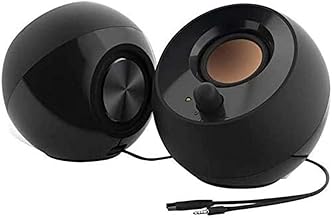
The Creative Pebble 2.0 is best for a buyer who wants a simple USB-powered speaker pair for a computer or laptop. Its listed design uses far-field drivers and rear-facing passive radiators for audio projection and bass reproduction. The drivers are angled upward by 45 degrees to direct sound toward the listener.
The product description highlights a single USB cable and says a separate power adapter is not needed. That can simplify a desk setup when the computer has a suitable USB port. The Pebble 2.0 is a practical choice for everyday computer audio when ease of connection matters more than having a listed high-power mode.
- Best for: Buyers who want a compact pair with a straightforward USB connection.
- Why it stands out: Angled drivers and rear passive radiators in a small desktop design.
- Consider: This model’s listed features do not specify a separate AUX input, so check the computer’s available audio connections before choosing it.
1Mii 3.5mm Computer Speakers

The 1Mii speakers are best for buyers who want a physical volume knob and a standard 3.5mm audio connection. The product lists compatibility with devices that have a 3.5mm AUX audio output, including Windows and Linux PCs, MacOS laptops, desktop monitors, tablets, and other devices with that output.
Built-in dual 3W stereo speakers are specified for vocals and general media, including movies, videos, music, and games. A front rotary knob adjusts volume directly without using the device’s software controls. The manufacturer recommends a USB power adapter to reduce static for the best audio quality.
- Best for: Buyers who value a front-mounted, continuously adjustable volume control.
- Why it stands out: Dual 3W stereo speakers, a 3.5mm input, and a simple physical dial.
- Consider: It needs USB power, and the listed audio connection requires a standard 3.5mm output.
Creative Pebble USB Desktop Speakers

This Creative Pebble model is best for buyers who want angled drivers and passive radiators with both USB power and a 3.5mm audio input. Its 45-degree elevated drivers are designed for upward sound projection, while rear-facing passive radiators support bass reproduction. It is a compact two-speaker option for computer desks where screen-level placement can help direct sound toward the user.
Unlike a USB-only connection, this model uses USB for power and AUX-in for audio playback. The listed setup does not require a separate power adapter, but it does involve connecting both cables. That makes it better suited to users who have an available USB port and 3.5mm audio output.
- Best for: Buyers who want a small pair with AUX audio input and angled drivers.
- Why it stands out: It combines a USB power connection, 3.5mm AUX-in, and rear passive radiators.
- Consider: Both the USB power and AUX audio connections are needed for the described setup.
Buying Guide: How to Choose Small Computer Speakers
Small speakers can make a desk less crowded, but compact dimensions alone do not determine whether a model fits your needs. Compare connection types, stated output, controls, and speaker orientation. Also consider how you use your computer: spoken calls and video may call for clear voices, while games and music can make stereo placement and bass reproduction more relevant.
Do you need one cable or separate power and audio?
Check what each cable carries before buying. The Creative Pebble 2.0 is described as using a single USB cable for its computer connection. Other models separate power from audio: Creative Pebble V2 and the AUX-equipped Pebble use USB for power and 3.5mm AUX for sound, while FUNLOGY also lists USB and 3.5mm cables. The 1Mii uses a 3.5mm audio connection and USB power.
A USB port may supply power, but that does not mean every speaker sends audio over USB. If you want to avoid a 3.5mm audio cable, verify that the specific model supports the connection method you plan to use. For a computer without a 3.5mm output, check the computer’s available audio options before choosing an AUX-based speaker.
How much output do you need?
Look for stated output figures when comparing models, but do not treat wattage alone as a complete measure of sound quality or loudness. The 1Mii lists dual 3W speakers, while FUNLOGY lists 14W total output. Creative Pebble V2 specifies up to 8W RMS total and 16W peak in high-gain mode with a 10W USB port. The other listed Creative Pebble models do not provide comparable output figures in the supplied product details.
For near-field listening at a desk, placement and listening distance also matter. If you regularly listen at higher volume, compare the manufacturer’s power information and any power requirements. Do not assume that a peak figure represents continuous output.
Will angled speakers help at your desk?
Driver direction affects where sound is aimed. Creative Pebble models in this selection have drivers elevated by 45 degrees, while FUNLOGY lists a 30-degree upward-facing design. These layouts are intended to project audio toward a seated listener. Speaker positioning still depends on monitor height, desk depth, and where you sit, so leave enough room to place the speakers at a useful angle.
Which controls are useful?
A physical volume control can be convenient when you frequently change listening levels. The 1Mii has a front rotary volume knob, and Creative Pebble V2 lists a front-facing knob. A gain switch, as specified on Pebble V2, serves a different purpose: it enables amplified audio when the speaker is connected to a suitable power port. Consider whether you want quick access to volume, a higher-output mode, or both.
What should you check for calls, games, and music?
- Calls and spoken video: Prioritize clear vocal reproduction and convenient volume adjustment. The 1Mii description specifically highlights vocals.
- Games and movies: Consider stereo speakers, sound direction, and whether the wired connection works with your computer or console. FUNLOGY lists gaming consoles among its supported device types.
- Music: Compare bass-related design details, such as the passive radiators listed for Creative Pebble models and FUNLOGY.
- Small desks: Consider the speaker layout, cable routing, and the space needed to position a pair on either side of a monitor.
How should you compare power and compatibility?
Make a short checklist before selecting a model: available USB ports, whether the device has a 3.5mm audio output, and whether you want one or two cables. The 1Mii’s listed compatibility depends on a standard 3.5mm AUX audio output. The Creative Pebble V2 includes a USB-C-to-USB-A converter, while its audio connection is separately listed as AUX-in. FUNLOGY lists USB and 3.5mm cables and a broad range of device types.
For the best match, compare the exact model’s connection and power details with your computer rather than relying on a general assumption about USB speakers. If a product recommends a particular power source, follow that guidance; the 1Mii description, for example, recommends a USB power adapter to reduce static.
Frequently Asked Questions
What makes computer speakers small but powerful?
Compact speakers can still offer useful desktop audio through their driver design, power arrangement, and placement. Compare listed output and features such as passive radiators, angled drivers, and stereo configuration. A high wattage figure alone does not establish overall sound quality.
Are USB-powered computer speakers easy to set up?
They can be simple to connect, but check whether USB carries power, audio, or both. Some models use USB for power and a separate 3.5mm cable for audio. The Creative Pebble 2.0 is described as using a single USB cable, while several other models require separate power and audio connections.
Do these compact speakers need a subwoofer?
The supplied product details do not state that these models include a separate subwoofer. Some list passive radiators to support bass reproduction, but that does not establish subwoofer performance. Buyers who need dedicated low-frequency output should check the exact system configuration before purchasing.
Can I use 3.5mm speakers with a laptop?
Yes, if the laptop has a compatible 3.5mm audio output. The 1Mii specifically lists devices with a standard 3.5mm AUX audio jack. Check the laptop’s ports and the selected speaker’s power requirements before setup.
Which compact speaker has a physical volume knob?
The 1Mii speakers list a front rotary volume control, and Creative Pebble V2 lists a front-facing knob. A physical control lets you adjust speaker volume directly rather than navigating a computer’s software settings.