
The best small speakers with optical input depend on whether you need stereo speakers for a desk or a compact soundbar for a TV. The Edifier M90 is best for buyers wanting optical, HDMI eARC, and USB-C connections in a desktop speaker system. The Saiyin is a short soundbar with optical input and a subwoofer output, while the LARKSOUND adds HDMI ARC and several listening modes. The Edifier M60 and 1Mii are compact alternatives, but neither listing specifies optical input.
| Product | Best for | Optical input listed? |
|---|---|---|
| Edifier M90 | Desktop or TV use with several wired inputs | Yes |
| Saiyin 11.7-inch Sound Bar | Small TV setups and future subwoofer expansion | Yes |
| LARKSOUND 16-inch Mini Soundbar | TV buyers wanting HDMI ARC and EQ modes | Yes |
| Edifier M60 | Compact desktop listening over USB-C or AUX | No optical input listed |
| 1Mii Computer Speakers | Simple, wired computer audio | No optical input listed |
Edifier M90

The Edifier M90 is best for buyers who want compact desktop speakers with optical input and several other ways to connect devices. Its listed connections include HDMI eARC, optical, USB-C, and AUX, so it can serve a TV or computer setup when the source supports the matching output. The product listing also identifies 100W RMS, Bluetooth 6.0, LDAC, a remote control, and a subwoofer output.
Choose this model if you want more input flexibility than a basic optical-only speaker and value the option to connect a subwoofer. It was selected because optical is explicitly included alongside multiple wired inputs. The main limitation is that its larger set of features may be unnecessary if you only need a simple speaker for one optical source. Check your available connections and placement space before buying.
Saiyin 11.7-Inch Sound Bar
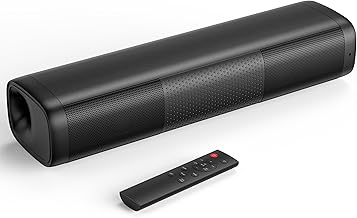
The Saiyin is best for a TV, computer, or gaming setup where a short soundbar is easier to place than separate speakers. It measures 11.7 by 3.5 by 2.5 inches and lists optical, Bluetooth 5.3, and 3.5mm AUX connections. Its stated peak power is 48W, and it includes a subwoofer output for connecting a powered subwoofer.
Choose this model if compact dimensions and a dedicated subwoofer connection are priorities. Optical input makes it a direct match for buyers whose TV or other source has an optical audio output. The listing describes balanced audio for movies, music, and gaming, but does not specify HDMI connectivity. Avoid choosing it if HDMI ARC is a requirement or if you need a speaker system with separate left and right cabinets.
LARKSOUND 16-Inch Mini Soundbar

The LARKSOUND is best for TV owners who want optical input plus HDMI ARC as another wired connection option. The 16-inch soundbar also lists AUX, USB, and Bluetooth 5.0. Its four EQ modes are Music, Movie, Voice, and Normal, and it includes a Night Mode described as lowering volume by 50% immediately.
Choose this model if sound modes and a compact bar format matter as much as optical connectivity. HDMI ARC can be useful when the TV supports ARC and you want to connect with an HDMI cable; the listing says the cable is not included. Bluetooth is listed with a transmission range of up to 33 feet. One limitation is that the supplied information does not list a subwoofer output, so buyers planning a powered-subwoofer upgrade should verify that requirement before selecting it.
Edifier M60

The Edifier M60 is best for a compact desktop setup when optical input is not essential. Its listed connections are USB-C and AUX, with Bluetooth 5.3 for wireless playback. The product information specifies 66W RMS, LDAC, a 3-inch mid-bass driver, and a 1-inch tweeter.
Choose this model if your computer or other source can connect through USB-C, AUX, or Bluetooth and you prefer a pair of multimedia speakers. It was included as a useful small-speaker comparison, not as a direct optical-input pick. The important limitation is that optical input is not listed. Do not select it as a direct replacement for an optical speaker unless you have another supported way to connect your source.
1Mii Compact Computer Speakers

The 1Mii speakers are best for a basic wired computer setup that has a standard 3.5mm audio output. They are USB-powered and use a 3.5mm audio plug, with a front rotary volume control. The listing describes dual 3W stereo speakers and compatibility with Windows, Linux, and macOS devices that have the required AUX audio jack.
Choose this option if simplicity and direct volume adjustment matter more than optical connectivity. It is a relevant compact-speaker alternative for a computer desk, but it is not a direct match for a buyer specifically seeking optical input. The listing does not specify an optical connection. It also notes that using a USB power adapter can reduce static, so the power arrangement may affect setup.
Buying Guide: How to Choose Small Speakers With Optical Input
Does your source have an optical audio output?
Before choosing a speaker, check the connection panel or manual for the TV, computer, game console, or other source. An optical cable only helps when the source provides an optical audio output and the speaker has a compatible optical input. Confirm both ends of the connection before ordering. Optical audio is a wired digital connection; Bluetooth, AUX, USB-C, and HDMI ARC are separate options, not interchangeable ports.
Should you choose a soundbar or separate speakers?
A soundbar is a single, narrow unit designed to sit below or near a display. The Saiyin is the shortest listed bar at 11.7 inches, while the LARKSOUND measures 16 inches. A pair of desktop speakers can be positioned on either side of a monitor and may suit desk listening better. The Edifier M90 is the only listed pair in this selection that explicitly combines optical input with several other wired inputs.
When is HDMI ARC or eARC useful?
HDMI ARC and eARC are TV connection features that may provide an alternative to optical when both the TV and speaker support the relevant connection. The M90 lists HDMI eARC, while the LARKSOUND lists HDMI ARC. Check the port labels and the TV’s settings before relying on this option. The LARKSOUND listing notes that its HDMI cable is not included. If you specifically need optical, confirm that the product’s input list names optical rather than assuming HDMI is sufficient.
Do you need a subwoofer output?
A subwoofer output matters if you plan to add a compatible powered subwoofer for more bass. The M90 and Saiyin listings specify a subwoofer output. The information provided for the LARKSOUND, M60, and 1Mii does not list one. Treat that as an important comparison point: if future bass expansion is part of your plan, favor a model with the connection clearly stated and confirm the subwoofer requirements.
Which other connections should you compare?
Consider how many devices you expect to connect and which ports they use. The M90 lists optical, HDMI eARC, USB-C, and AUX; the Saiyin lists optical, Bluetooth, and AUX; and the LARKSOUND lists optical, HDMI ARC, AUX, USB, and Bluetooth. The M60 lists USB-C, AUX, and Bluetooth, while the 1Mii uses a 3.5mm audio plug and USB power. Match these details to your actual devices rather than paying attention to connection count alone.
What should you check for a desk or TV setup?
Measure the available space before choosing a compact speaker. Compare the stated soundbar dimensions with the gap under your screen or the depth of your shelf. For separate desktop speakers, allow room on both sides of the monitor and for the cables. Also consider whether you want a remote, a front volume control, Bluetooth playback, or sound modes. The M90 lists a remote, the 1Mii has a front rotary knob, and the LARKSOUND lists several EQ modes plus Night Mode.
Frequently Asked Questions
Which products in this list explicitly have optical input?
The Edifier M90, Saiyin 11.7-inch Sound Bar, and LARKSOUND 16-inch Mini Soundbar list optical input. The Edifier M60 and 1Mii product information does not specify an optical connection.
Can I connect optical speakers to a TV?
Yes, if the TV has an optical audio output and the speaker has an optical input. Check the TV’s audio-output settings and the speaker’s connection instructions, since the required setup can vary by device.
Is optical the same as HDMI ARC?
No. Optical and HDMI ARC are different connection types. The M90 lists optical and HDMI eARC, and the LARKSOUND lists optical and HDMI ARC. Choose a connection that both your source and speaker support.
Which option is shortest?
The Saiyin soundbar is listed as 11.7 inches long, making it the shortest of the two soundbars in this selection. Confirm the full stated dimensions against your shelf or display space before purchase.
Which listed model supports adding a subwoofer?
The M90 and Saiyin listings specify a subwoofer output. The provided details for the other products do not list one, so check the product information if adding a powered subwoofer is important.