
The best small USB speaker for a PC depends on how you connect it and where it will sit. The XKX compact soundbar is a fit for buyers who want USB-C flexibility and touch control, while the LIELONGREN model suits shoppers seeking a simple plug-and-play speaker. For monitor mounting, consider the clip-on XKX; for a USB-and-3.5mm connection, consider the Uakinat pair. Check the connection requirements before choosing: USB power and USB audio are not always the same thing.
| Product | Best For | Standout Detail |
|---|---|---|
| Cirqon Computer Speakers | Buyers seeking a compact, clamp-style option | Volume knob and USB/USB-C adapter |
| XKX Compact USB Soundbar | USB-C flexibility and touch controls | Dual drivers and passive radiator |
| LIELONGREN Mini Sound Bar | Simple desktop setup | Plug-and-play operation |
| XKX Clip-On Soundbar | Monitor-edge placement | Clip-on design and USB-C adapter |
| Uakinat USB and Aux Speakers | USB power with 3.5mm audio | Separate USB and audio cables |
Cirqon Computer Speakers With Volume Knob
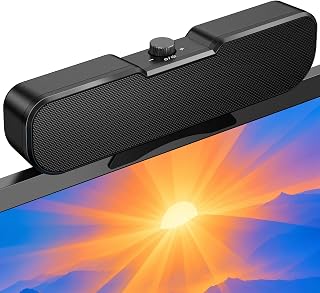
Best for: Buyers who want a compact speaker with a physical volume control and a clamp-style mounting option. The product name lists a sturdy clamp, a compact design, and USB/USB-C adapter support for power and audio.
This model is a practical choice when desk space is limited and adjusting volume directly on the speaker is preferable to using computer controls. Its listed clear, loud sound is aimed at desktop and laptop use. It was selected because the combination of a clamp, compact form, and volume knob addresses common space and access needs.
Limitation: The supplied product details do not specify operating-system support or explain the exact audio connection setup. Confirm that the included connection method works with your computer before buying.
XKX Compact USB Soundbar With Touch Control

Best for: Buyers who want a small wired speaker with a USB-C adapter and touch controls. The listed compatibility includes Windows, macOS, ChromeOS, and Linux computers, along with certain USB-C devices such as MacBook, Mac mini, iMac, iPad, Android phones, and tablets.
The speaker has dual drivers and a passive radiator, which the product description associates with clear, loud sound and punchy bass. Choose this model if you value a compact soundbar format and want USB-C connectivity options alongside USB. It was selected for its stated range of computer operating systems and its combination of touch control and audio features.
Limitation: The listing says it is incompatible with monitors and TVs. A USB port on a display should not be assumed to provide a supported audio connection.
LIELONGREN Plug-And-Play Mini Sound Bar

Best for: Buyers seeking a straightforward USB speaker for a compatible computer. The listing names Windows, macOS, Linux, and ChromeOS support and describes the product as plug-and-play.
For Windows, the instructions say to connect the speaker to a computer USB port, open the taskbar speaker settings, and select “USB2.0 device” as the playback device. This makes it a useful option for shoppers who want a simple setup process rather than a separate audio-control feature. Its stated compatibility across several common computer systems also makes it a flexible desktop pick.
Limitation: The product instructions note that the latest audio driver should be installed for the computer. If a computer does not recognize it immediately, playback-device selection and driver status may need checking.
XKX Clip-On USB Soundbar With Deep Bass

Best for: Buyers who prefer to attach a compact speaker to a monitor rather than place it on the desk. The listing specifically describes an easy-to-clip design and includes a USB-C-to-USB adapter.
This wired model is listed as compatible with Windows, macOS, ChromeOS, and Linux computers. Its dual ultra-magnetic drivers and dual passive radiators are described as producing loud sound and deep bass. Choose it if monitor-edge placement and USB-C device support are more important than a freestanding speaker shape. It was selected for its distinct mounting style and listed audio components.
Limitation: The product information excludes monitors, TVs, and projectors as compatible devices, despite the clip-on mounting description. Treat the clip as a placement feature, not proof that a monitor can supply audio or power.
Uakinat USB-Powered Speakers With 3.5mm Aux

Best for: Buyers whose computer has a 3.5mm audio output and a USB port available for power. Unlike products described as using USB audio, this model lists a USB cable and a separate 3.5mm audio cable.
The listing describes a column-shaped design, anti-slip foot pads, a matte metal panel, and plug-and-play setup without drivers. It is intended for watching movies, listening to music, and gaming, with the seller describing its output as loud and clear. This model was selected because its separate power and audio connections can suit buyers who specifically want an aux-based setup.
Limitation: The 3.5mm audio connection is a requirement. A computer without a compatible audio output may need a separate solution, which is not included in the supplied product details.
Buying Guide: How To Choose A Small USB Speaker For PC
A compact PC speaker can connect through USB audio, a 3.5mm audio cable, or a combination of USB power and another audio connection. These arrangements are not interchangeable. Before choosing a model, identify the ports on your computer and read whether the speaker uses USB for both audio and power or only for power.
Does USB Mean Audio And Power?
Not necessarily. Some computer speakers use a USB connection for power and digital audio. Others use USB to receive power while a 3.5mm aux cable carries sound. The Uakinat model in this list specifies both a USB cable and a 3.5mm audio cable. Check the product’s connection description and your computer’s available ports instead of relying on the words “USB speaker” alone.
USB-C is also a connector type, not a guarantee of a particular audio setup. Some listed models include a USB-C-to-USB adapter, but shoppers should verify that the connection arrangement suits their device. An adapter changes the connector; it does not automatically make every display or device compatible.
Which Connection Works With Your Computer?
- USB-A computer: Look for a speaker with a USB connection supported by your computer. Confirm whether that port handles audio, power, or both.
- USB-C-only computer: Check for an included USB-C adapter or a stated USB-C connection. The XKX models list an adapter.
- Computer with a 3.5mm audio jack: An aux-based speaker such as the Uakinat may be appropriate, provided USB power is also available.
- Monitor USB port: Do not assume it supports speaker audio. The XKX listings specifically state that monitors are incompatible devices.
Should You Choose A Soundbar Or Separate Speakers?
A small soundbar generally takes a horizontal position under or near a monitor, while a pair of separate speakers can be placed on either side of the screen. The products here include compact soundbar-style designs and a column-shaped pair. Choose based on desk layout, cable routing, and where you want sound to come from. A clip-on design may free desk surface, but check that the intended mounting location is suitable and that the connection still runs to the computer.
How Much Space Do You Have?
Measure the space around the monitor and keyboard before selecting a speaker. A compact footprint matters on a crowded desk, while a clamp or clip can offer another placement option. The Cirqon listing highlights a sturdy clamp and compact design; the XKX clip-on listing describes attachment to a monitor. Product details do not provide measurements, so check the seller’s current specifications if exact dimensions matter.
Do You Need A Volume Knob Or Touch Controls?
Physical controls can make volume changes accessible without opening computer settings. The Cirqon product name lists an easy volume knob, while one XKX model lists touch control. Buyers who prefer tactile adjustment may lean toward the knob. Those who want a touch interface may prefer the XKX option. If you do not need speaker-side controls, a simpler plug-and-play model may be a better match.
What Sound Features Should You Compare?
Product descriptions mention drivers, passive radiators, loudness, and bass. These are useful distinctions to compare, but they do not provide a standardized measurement of sound quality. The XKX compact soundbar lists dual drivers and a passive radiator; the clip-on XKX lists dual drivers and dual passive radiators. The LIELONGREN listing describes stereo sound and enhanced bass. Match the stated features to your needs, but do not treat descriptive claims as a substitute for independent measurements.
For everyday computer audio, think about the main use: video calls, streamed shows, music, or games. A small USB speaker is designed for convenience and a compact setup; the supplied product information does not establish that any model replaces a larger speaker system or headphones.
How Important Is Operating-System Compatibility?
Check compatibility before buying, especially if you use Linux, ChromeOS, or a newer USB-C device. The LIELONGREN and XKX listings name several operating systems, while the Cirqon details supplied here do not specify them. A broad compatibility claim does not remove the need to select the correct playback device or confirm that the computer recognizes the speaker.
For the LIELONGREN model, the listing gives a Windows setup step: select “USB2.0 device” from the playback choices. This is a useful reminder that a connected speaker may not become the active output automatically. If sound does not play, verify the selected output and follow the product’s setup directions.
Frequently Asked Questions
Can I plug a USB speaker into my monitor?
Only if the speaker and monitor support that connection for audio and power. The two XKX listings in this selection state that monitors are incompatible devices. Connecting a cable to a monitor’s USB port alone does not establish audio compatibility.
Do USB speakers need drivers?
It depends on the model and computer. The Uakinat listing says no drivers are needed, while the LIELONGREN listing advises having the latest audio driver installed. Follow the specific product instructions and check the computer’s playback-device settings.
Can a USB-C adapter make a speaker work with every USB-C device?
No. An adapter changes the connector shape, but device compatibility depends on the speaker’s supported audio and power connection. Check the product listing and confirm that the computer or mobile device supports the required connection.
Is a USB-powered speaker the same as a USB audio speaker?
No. A USB-powered speaker may use USB only for electrical power and a separate cable for audio. The Uakinat model lists USB power plus a 3.5mm audio cable. Read the cable and connection details to tell the difference.
Which small PC speaker is best for a crowded desk?
Consider a compact soundbar or a model with a clamp or clip-on placement feature. The Cirqon listing highlights a clamp, and the XKX clip-on model is described as easy to attach to a monitor. Check the placement and connection requirements before choosing.
Which option is best if my computer has no 3.5mm audio jack?
Look for a model that supports USB audio or a compatible USB-C audio connection. The Uakinat speaker lists a 3.5mm audio cable, so it may not suit a computer without that output unless you have a separately supported audio adapter.