
The best smart key access system depends on what you need to secure: a residential deadbolt, a commercial door, or an online account. The Schlage Encode is the most direct fit for a smart home deadbolt, while the magnetic-lock kits are better suited to access-control setups with app, keypad, card, or remote entry. The YubiKey is included as a digital-account security key, not a door lock.
| Product | Best For | Access Method Highlight |
|---|---|---|
| Schlage Encode Smart WiFi Deadbolt | Residential deadbolt access | Smart WiFi deadbolt |
| XYBkey TUYA Security Access System | Multi-method entry in one kit | App, keypad, RFID, temporary password |
| 600lb Magnetic Lock Access Control System | Configured single-door access | RFID, app, exit button |
| 2.4GHz WiFi Magnetic Lock Kit | Remote and smartphone control | WiFi, app, remote, push switch |
| YubiKey 5C NFC | Online account authentication | USB-C and NFC |
Schlage Encode Smart WiFi Deadbolt
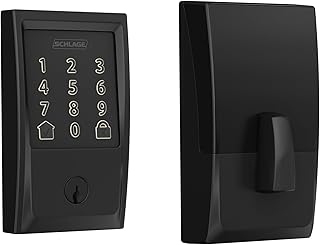
Best for: Homeowners looking for a smart deadbolt rather than a separate magnetic-lock access-control assembly. The product name identifies it as a Schlage Encode Smart WiFi Deadbolt with Century Trim in Matte Black, making it the clearest residential lock option in this list.
Choose this if your project calls for a deadbolt form factor. It is a more direct match for a typical home entry door than the access-control kits, which are described around magnetic locks, readers, and control panels. The listing information provided does not specify individual access methods, installation requirements, or connectivity details beyond the WiFi wording in the product name.
Limitation: Check the product listing and your door setup before buying; the supplied details do not establish fit or compatibility with a particular door.
XYBkey TUYA Complete Access System Kit

Best for: Buyers who want several entry methods packaged in one WiFi access-control kit. Listed components include a WiFi access-control host, power supply, 280kg magnetic lock with ZL bracket, sensor switch, doorbell, remote control, and IC keychain.
The system supports five listed ways to open the door: Tuya app, temporary password, RFID card, password, or RFID card plus password. Its keypad is described as IP68 outdoor waterproof, with a blue backlight, support for up to 1,000 users, always-on mode, and the ability to add or delete cards. The listing says installation uses six terminal connections, but wiring should still be completed according to the product instructions and local requirements.
Why it stands out: It combines multiple credential types and named accessories in one kit, which can reduce the need to source those listed parts separately.
Limitation: Confirm that the magnetic-lock format and included parts suit the intended door and installation before purchase.
600lb Magnetic Lock Access Control System

Best for: A buyer setting up a single-door access-control system with multiple listed components. The product name describes a 600-pound magnetic lock, access-control panel, 110V power supply box, RFID reader, no-touch exit button, USB enrollment reader, and phone-app remote opening.
Choose this over a basic smart deadbolt if you specifically need a magnetic lock and reader-based access. The listed RFID reader and enrollment reader point to card or fob credential administration, while the app feature provides a remote-opening option. The no-touch exit button is another distinct component for the inside of the access setup.
Limitation: This is a more involved system than a standalone residential lock. Review the power, mounting, door, and wiring requirements in the listing before planning installation.
2.4GHz WiFi Magnetic Door Lock Kit

Best for: Buyers prioritizing smartphone and remote access in a magnetic-lock kit. The product name lists 2.4GHz WiFi, 400lb holding force, remote and smartphone app control, and a wireless slim push switch.
This kit is a more compactly described option than the 600lb system above: its listed highlights focus on app and remote operation plus an exit push switch. It may suit a buyer who wants those controls without selecting a kit based on an RFID reader or enrollment device.
Limitation: The product name identifies an electric magnetic lock, not a conventional deadbolt. Verify the intended door type, installation details, and whether the listed holding force meets your application’s requirements.
YubiKey 5C NFC Security Key

Best for: People looking to secure online accounts rather than unlock a physical door. The product is described as a multi-factor authentication security key and passkey device that connects via USB-C or NFC.
This item is included because “key access” can refer to digital account access as well as building entry. Its listed FIDO certification and two connection methods make it distinct from the door-lock products. It is not described as a smart lock, RFID door credential, or access-control panel.
Limitation: Do not choose this for controlling a home or business door. Check whether the online services you use support the authentication method before relying on it.
Buying Guide: How To Choose A Smart Key Access System
A smart key access system can mean several different things. A residential smart deadbolt replaces or supplements a door lock. A magnetic-lock access system uses separate hardware such as a lock, reader, control panel, and exit button. A security key like the YubiKey protects online accounts, not building entry. Decide which meaning matches your project before comparing features.
Do you need a deadbolt or a magnetic lock?
Start with the door and the type of hardware you intend to use. The Schlage listing identifies a WiFi deadbolt. The other door-entry kits describe magnetic locks, brackets, readers, or control units. These are different product categories and should not be treated as interchangeable. Confirm that the lock format is appropriate for the door and that installation can be completed safely.
Which entry methods should the system support?
List the credentials users actually need. App control can help with remote operation, while RFID cards or key fobs can provide a physical credential. A keypad can allow password entry, and a temporary password may be useful when access needs to be shared for a limited period. The XYBkey kit explicitly lists app, temporary password, RFID card, password, and card-plus-password access. Other listings specify fewer details.
Is remote access important?
Look for explicit smartphone app or remote-control wording rather than assuming every electronic lock offers remote access. The 2.4GHz kit lists smartphone app and remote control. The 600lb system lists phone-app remote opening. The XYBkey system specifies Tuya app operation. Check the complete product listing for setup requirements and any network limitations; the supplied information does not establish every connectivity detail.
What should you verify before installation?
- Check the lock type, mounting arrangement, and door requirements.
- Review the listed power supply and wiring information for access-control kits.
- Confirm which credentials and controls are included, rather than assuming accessories are part of the package.
- Read the installation instructions and follow applicable building and electrical requirements.
- For a multi-user setup, check whether the stated user capacity and credential-management options meet your needs.
The XYBkey listing states support for up to 1,000 users and card addition and deletion. The other provided product details do not specify comparable user limits. If those administrative functions matter, verify them directly in the relevant listing before choosing.
How should you compare lock strength claims?
Some product names state a holding-force figure: 400lb for the 2.4GHz magnetic-lock kit and 600lb for the other magnetic-lock system. These figures are product specifications, not a complete assessment of suitability or security. Compare the exact product documentation and installation conditions, and do not assume that a higher stated figure makes a system right for every door.
Are you securing a door or an online account?
For a building entrance, compare the deadbolt and access-control kits. For online services, consider a dedicated authentication key such as the YubiKey. The YubiKey product description focuses on multi-factor authentication and passkeys via USB-C or NFC. It does not operate a physical door, so it is not a substitute for a smart lock or entry system.
Frequently Asked Questions
What is a smart key access system?
It is a system that uses electronic credentials or controls to manage access. Depending on the product, it may refer to a smart deadbolt, a magnetic-lock access-control kit, or a digital security key for online accounts.
Which product in this list is a residential deadbolt?
The Schlage Encode product is identified as a Smart WiFi Deadbolt with Century Trim. The other door products are described as magnetic-lock access-control kits.
Which listed system supports the most entry methods?
The XYBkey TUYA kit lists five methods: app, temporary password, RFID card, password, and RFID card plus password.
Can a YubiKey unlock a door?
The listed YubiKey is an online-account authentication key. Its product description does not identify it as a door lock credential or physical access-control device.
What does a magnetic lock holding-force figure mean?
It is a stated product specification for the magnetic lock. The figure alone does not establish whether the lock fits a particular door or installation, so review the product documentation and requirements.