
The best sound system for a computer depends on whether you want a compact 2.1 setup, stronger bass, Bluetooth, or a speaker bar that can also serve a TV. The Logitech Z313 is a straightforward pick for everyday listening, while the Klipsch ProMedia 2.1 is suited to buyers prioritizing stated sound and bass features. Nylavee and Bluedee offer named Bluetooth and lighting features; Saiyin is a sound-bar alternative with several listed input options.
| Product | Best For | Standout Listed Features |
|---|---|---|
| Logitech Z313 | Everyday computer audio | 2.1 system, subwoofer, 3.5mm input |
| Klipsch ProMedia 2.1 | Gaming, movies, and music | THX certification, horn technology, 6.5-inch subwoofer |
| Nylavee 2.1 Computer Speakers | Bluetooth and desktop lighting | Bluetooth 5.4, eight lighting modes, USB/USB-C/AUX |
| Bluedee 2.1 Computer Speakers | Named DSP tuning and deep bass | Bluetooth 5.4, DSP-tuned sound, USB/USB-C/AUX |
| Saiyin Sound Bar With Subwoofer | Computer and TV use | Optical, AUX, Bluetooth 5.3, adjustable bass |
Logitech Z313 2.1 Multimedia Speaker System

The Logitech Z313 is a 2.1 multimedia speaker system with a subwoofer and full-range audio. Its listed 3.5mm input supports connection to a range of named devices, including a PC, game consoles, TV, smartphone, tablet, and music player. This makes it a flexible choice for a desk where speakers may serve more than one source.
Best for: Buyers who want a conventional computer speaker setup with a separate subwoofer and a familiar analog input. It was selected for its direct PC relevance and explicitly listed device compatibility.
Choose this if a 3.5mm connection meets your needs and you want a system described for both computer and general multimedia use. Limitation: The provided product information does not list Bluetooth, USB audio, or detailed power and driver specifications, so buyers seeking those features should compare alternatives carefully.
Klipsch ProMedia 2.1 THX Computer Speakers

The Klipsch ProMedia 2.1 combines two satellite speakers with a 6.5-inch side-firing, ported subwoofer. The listed features include THX certification, Klipsch MicroTractrix horn technology, and 3-inch midrange drivers in the two-way satellites. Klipsch describes the horn design as supporting clarity and directing sound toward the listener.
Best for: Computer users who want a 2.1 arrangement for games, movies, and music, with a clearly specified subwoofer and satellite-driver design. It was selected because its listed details give buyers more information about the speaker configuration and sound-related technologies.
Better for a desk or room where a dedicated subwoofer is part of the plan. The product description emphasizes room-filling sound and bass response, but those descriptions are not a substitute for checking the system’s physical size and connection requirements. Limitation: The supplied features do not specify input types, so confirm that the available connection matches your computer before choosing it.
Nylavee 2.1 Computer Speakers With Subwoofer

The Nylavee system is described as a 2.1 PC speaker setup with a subwoofer, Bluetooth 5.4, and eight lighting modes. Its named inputs include USB, USB-C, and 3.5mm AUX, and the product title specifies AC-adapter power. The title also states 60W peak power; peak power should not be treated as a direct measure of sound quality or continuous output.
Best for: Desktop users who want several stated connection options and adjustable visual lighting as part of their setup. It was selected because it combines a subwoofer-based arrangement with Bluetooth and multiple named inputs.
Choose this if Bluetooth and lighting modes matter alongside wired connections. The USB, USB-C, and AUX options may help buyers match a preferred connection, but check the product’s detailed instructions to confirm how each input works with your particular computer. Limitation: The available product information does not describe driver sizes, sound tuning, or the included cable details.
Bluedee 2.1 Computer Speakers With Subwoofer

The Bluedee 2.1 computer speaker system is listed with Bluetooth 5.4, USB, USB-C, and AUX inputs. Its product title also identifies DSP-tuned sound, deep bass, RGB desktop speakers, adapter power, and 80W peak power. These details make it a feature-focused option for buyers comparing wireless connectivity, wired inputs, and a subwoofer arrangement.
Best for: Buyers who want a computer speaker system with named DSP tuning and multiple connection types. It was selected because its listed feature set addresses both connection flexibility and the desire for bass from a separate subwoofer.
Better for users who prefer Bluetooth as an option but still want USB, USB-C, or AUX listed for wired use. Consider the available space for the subwoofer and desktop speakers before selecting any 2.1 system. Limitation: The supplied details do not explain the DSP settings, RGB controls, or whether every input supports every listed device. Confirm those specifics if they affect your setup.
Saiyin Sound Bar With Subwoofer
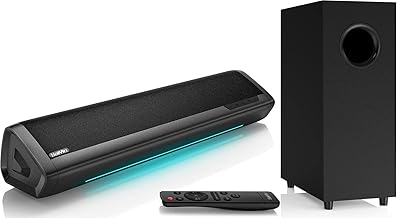
The Saiyin is a sound bar and subwoofer system described for TV and PC use. Its listed connection options are optical, AUX, and Bluetooth 5.3. Other named features include a 5-inch subwoofer, dual bass reflex ports, adjustable bass, and a volume indicator.
Best for: Buyers considering one sound bar for a computer or TV, especially if they want a choice of optical, AUX, or Bluetooth connections. It was selected as an alternative to separate desktop satellite speakers and because its product title explicitly names TV and PC use.
Choose this if a bar-shaped speaker fits your desk or entertainment area better than two satellites. Adjustable bass may appeal to listeners who want a control for bass level, while the volume indicator provides a named visual feature. Limitation: A sound bar has a different form factor from a pair of satellite speakers. Check its dimensions and your computer’s available output before buying; the supplied details do not provide either measurement.
Buying Guide: How To Choose Computer Speakers
Do you want a 2.1 system or a sound bar?
A 2.1 system uses two speakers and a separate subwoofer. The Logitech, Klipsch, Nylavee, and Bluedee products in this selection are described as 2.1 systems. This arrangement may suit buyers who have room for separate components and want a dedicated subwoofer. The Saiyin is a sound bar with a subwoofer, so it offers a different layout for a desk or TV area.
Measure the available space before choosing. Consider where the speakers can sit, where the subwoofer can fit, and whether cables can reach the computer. A system’s format does not by itself guarantee that it will fit comfortably on a crowded desk.
Which connection should you check first?
Start with the audio outputs available on your computer. The Logitech lists a 3.5mm input. Nylavee and Bluedee list USB, USB-C, and AUX, as well as Bluetooth 5.4. Saiyin lists optical, AUX, and Bluetooth 5.3. The supplied Klipsch details do not name its inputs, so check its current product specifications before purchasing.
Bluetooth can be useful when you want wireless audio from a compatible source, but a wired connection may be simpler when the computer is stationary. Do not assume that USB-C means every USB-C port or device will work in the same way; verify the connection requirements for the speaker and computer.
How much should bass features influence your choice?
All five selections are described as including a subwoofer. The Klipsch listing specifies a 6.5-inch side-firing, ported subwoofer, while the Saiyin listing names a 5-inch subwoofer and dual bass reflex ports. Nylavee and Bluedee titles also identify a subwoofer, but the supplied details do not give its size.
Bass level is only one part of computer audio. For dialogue, calls, and general desktop use, clear placement and convenient volume control may matter just as much. If you share a room or work at a close distance, consider whether you can adjust the bass and listening level to suit your environment.
Are power and peak-watt claims comparable?
Nylavee lists 60W peak power, and Bluedee lists 80W peak power. These are peak figures in the product titles. They should not be treated as directly comparable measures of sustained loudness or sound quality. The listed information for those systems also identifies AC-adapter or adapter power, so plan for a nearby outlet.
Compare the full product specifications rather than selecting a speaker based on one number. Driver configuration, controls, input options, placement, and the size of your room all affect whether a system suits your use.
Which features matter for gaming, movies, and music?
The Klipsch description specifically mentions gaming, movies, and music, along with THX certification and horn technology. For other systems, the provided product titles emphasize connections, subwoofers, or lighting rather than a particular listening use. Think about what you play most often, then prioritize the details that match it.
For example, a separate subwoofer may be a deciding feature for bass-focused entertainment. If you switch between a computer and other devices, the Logitech’s listed 3.5mm compatibility or the multi-input options on Nylavee, Bluedee, and Saiyin may be more relevant. Confirm the exact connection path before ordering.
What should you check before placing an order?
- Confirm the speaker’s input matches an output or supported connection on your computer.
- Check the dimensions and plan where satellites, a sound bar, and a subwoofer will sit.
- Determine whether you need Bluetooth, a wired input, or both.
- Review the current product specifications for included cables, controls, and power requirements.
- For shared spaces, consider whether bass adjustment and convenient volume control are useful.
Frequently Asked Questions
What does 2.1 mean for computer speakers?
A 2.1 speaker system has two main speakers and one subwoofer. Four products in this selection are identified as 2.1 systems; the Saiyin is described as a sound bar with a subwoofer.
Can I connect computer speakers to a TV?
Some products in this selection are described for TV use. Logitech lists TV among its compatible device types, and Saiyin is described for TV and PC. Check the connection types on both the TV and speaker before buying.
Are Bluetooth computer speakers better than wired speakers?
Neither connection is automatically better for every buyer. Bluetooth provides a wireless option when supported, while a wired input can suit a fixed desktop setup. Choose based on your computer’s connections and how you plan to use the speakers.
Do all these computer speaker systems include a subwoofer?
Yes. Each of the five selected product names or descriptions identifies a subwoofer. The listed subwoofer details vary, so compare the product specifications if size or placement matters.
Which option lists the most connection types?
Nylavee and Bluedee each list Bluetooth 5.4, USB, USB-C, and AUX. Saiyin lists optical, AUX, and Bluetooth 5.3. Confirm the specific input requirements for your computer before choosing.
Should I choose a sound bar or separate desktop speakers?
Choose a sound bar if its horizontal form fits your desk or entertainment space. Choose a 2.1 satellite arrangement if you want separate left and right speakers and have space for them. Compare dimensions and connection options before deciding.