
The best soundbar for a 24-inch monitor is compact enough to fit below the display and suits the way you connect your computer. The Cyber Acoustics CA-2890 is best for a tidy USB-powered setup, while the Redragon GS560 suits buyers who want lighting effects. The Saiyin offers multiple connection options, and the LENRUE is a straightforward wired choice. The Dell AC511M is another model to compare, but the supplied product information does not specify its features.
| Product | Best For | Key Detail |
|---|---|---|
| Cyber Acoustics CA-2890 | Clipping a speaker bar to a monitor | Single USB connection for power and audio |
| Dell Stereo SoundBar- AC511M | Buyers considering this named model | Check the listing for dimensions and connection details |
| Redragon GS560 | RGB lighting and desktop use | About 16 inches wide; USB power and 3.5mm cable |
| Saiyin 11.7-inch Sound Bar | Multiple audio connection choices | Bluetooth, optical, and 3.5mm AUX inputs |
| LENRUE A39PRO | Simple wired computer audio | USB power and 3.5mm audio |
Cyber Acoustics CA-2890 USB Speaker Bar

Best for: People who want a compact speaker attached directly to a monitor rather than taking up desk space. The clip-on design is listed to fit monitors up to 1 inch thick, making this the most specifically monitor-oriented option in this group.
The CA-2890 is a 10W USB-powered speaker bar. Its single USB cable carries power and audio, avoiding a separate 3.5mm audio connection. The product information describes plug-and-play use with PC, Mac, and Chromebook systems. It also has volume, mute, and play/pause controls on the speaker, plus an LED mute indicator.
Choose this if you prioritize a simple, low-clutter setup and the monitor’s lower edge is compatible with the clip. It can also sit on a desk as a standalone desktop speaker. The stated fit limit is 1 inch thick, so measure the monitor edge before choosing it. Its clip is not a universal fit for every display shape.
Dell Stereo SoundBar- AC511M

Best for: Buyers who are already considering the Dell AC511M and can confirm its fit and connection requirements from the current listing. The available product information provides the product name but does not include features, dimensions, power requirements, or connection details.
Because those specifications are not provided here, this model cannot be compared reliably with the other picks on monitor attachment, cable count, or audio inputs. Do not assume that it clips to a 24-inch monitor or connects to a computer in a particular way based only on its name.
Before choosing it, check the listing for its width, mounting method, monitor requirements, and whether it uses USB, an audio cable, or another connection. It may be a candidate if those details match your desk and computer, but the missing specifications are an important limitation for a monitor-specific purchase.
Redragon GS560 RGB Desktop Soundbar

Best for: Desk setups where colorful lighting is a priority alongside compact computer audio. The GS560 is described as an approximately 16-inch desktop soundbar, so it may fit below many 24-inch monitors, subject to the available desk width and stand arrangement.
Redragon lists a 2.0-channel design, USB power, and a 3.5mm cable. Its features include four backlight modes, with dynamic and static illumination, and lighting that can sync with audio. The product description also highlights an upgraded driver and bass-forward sound, but it does not provide enough detail to compare measured audio performance with the other models.
Choose this if you want visible lighting and a bar that sits beneath a screen. Check the space between the monitor stand and other desk items before buying. It is not the best fit if you want a clip-on mount or prefer a single cable for both power and audio; the listed setup uses USB power and a separate 3.5mm audio cable.
Saiyin 11.7-Inch Compact Sound Bar
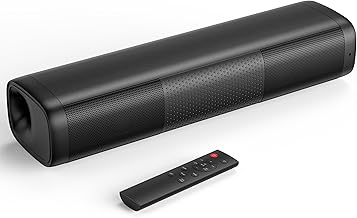
Best for: Buyers who want more than one way to connect a computer or other audio source. The Saiyin measures 11.7 by 3.5 by 2.5 inches, according to the supplied details, and its compact length can suit a narrow space below a monitor.
Connection choices include Bluetooth 5.3, optical, and 3.5mm AUX. The soundbar is powered by an AC adapter and is listed with 48W peak power. It also has a subwoofer output for connection to a powered subwoofer. The stated use cases include a smart TV, PC, and gaming, making it more flexible than a USB-only computer speaker.
Choose this if you need the listed input options or want the option to add a powered subwoofer. Its 11.7-inch length is shorter than the Redragon’s stated approximate 16-inch size, which may help on a crowded desk. The limitation is that it requires an AC adapter, so it is not a USB-powered, single-cable choice. Confirm your computer has an appropriate output for the connection you plan to use.
LENRUE A39PRO Wired Computer Soundbar

Best for: Computer users who want a straightforward wired speaker bar with a physical volume knob. LENRUE lists the A39PRO for desktop computers, laptops, and tablets with a standard 3.5mm headphone jack.
The speaker is USB-powered, while its 3.5mm AUX line carries audio. That means it needs both a USB power connection and an audio connection, unlike the CA-2890’s stated single-USB setup. LENRUE describes the output as 2 x 5W stereo and includes a volume knob on top of the speaker for direct adjustment. The product description also mentions colorful lighting.
Choose this if your computer has a 3.5mm headphone jack and you want simple on-speaker volume control. It is described as suitable for movies, videos, music, and games. Avoid it if you need a one-cable USB audio connection or your device lacks the specified headphone jack. The provided details do not state its width, so measure available desk space against the current listing before ordering.
Buying Guide: How To Choose A Soundbar For A 24-Inch Monitor
Will it fit beneath the monitor?
A 24-inch screen’s diagonal measurement does not tell you how much usable space is below it. The monitor’s stand, the shape of its lower bezel, and other desk equipment affect fit. Compare the soundbar’s listed width and height with the clear space available on your desk, rather than relying on screen size alone.
For a bar that attaches to the monitor, check the mounting method and the thickness or shape it supports. The Cyber Acoustics CA-2890 lists a clip-on design for monitors up to 1 inch thick. The other products should not be assumed to clip on unless their current product details explicitly say so.
Do you want a monitor-mounted speaker or a desk soundbar?
A clip-on model can reduce desk clutter and keep audio close to the display. It is a practical choice when the monitor’s lower edge is compatible with the mount. A freestanding soundbar is easier to position independently, but it uses desk space and must fit around the monitor stand.
Measure the usable space from the front edge of the monitor stand to the edge of the desk. Also consider whether the soundbar could block buttons, ports, or other items. A short model such as the Saiyin may suit a narrow space, while the Redragon is listed at about 16 inches long.
Which connection type suits your computer?
Check both the audio connection and the power source. These are not always the same cable. The CA-2890 is listed as using one USB cable for power and audio. The LENRUE uses USB for power and 3.5mm AUX for audio, while the Redragon is listed with USB power and a 3.5mm cable.
The Saiyin offers Bluetooth, optical, and 3.5mm AUX inputs, and it uses an AC adapter for power. Those options may be useful when a soundbar will serve more than one type of device, but the selected input must match the source. For the Dell AC511M, check its current listing because the supplied specifications do not identify its connections.
How important are controls and lighting?
Consider where you want to adjust volume or mute sound. The CA-2890 lists volume and mute controls, an LED mute indicator, and play/pause buttons. The LENRUE lists a top-mounted volume knob. The Redragon has touch-control backlighting and a volume knob, according to its product name and features.
Lighting is a design feature, not a substitute for checking fit or connections. The Redragon and LENRUE descriptions mention colorful illumination. If you prefer a plain desk appearance, compare product images and current listing details before choosing a model with lighting.
What audio features should you compare?
Use the listed specifications to make like-for-like comparisons, but do not treat wattage alone as a complete measure of sound quality. The CA-2890 is listed at 10W, the LENRUE at 2 x 5W, and the Saiyin at 48W peak power. These figures are described differently, so they do not establish a direct performance ranking.
Think about your primary use. For spoken content and everyday computer audio, connection convenience and controls may matter more than a high peak-power figure. If you want the option of added bass, the Saiyin’s listed subwoofer output is a relevant feature; it requires a powered subwoofer, which is not included in the supplied product details.
Which soundbar is the simplest choice?
For fewer cables, the CA-2890 is the clearest match among the products with detailed specifications because it is listed with one USB connection for both power and audio. For a conventional wired setup, the LENRUE uses USB power and a 3.5mm audio cable. Choose based on the ports available on your computer and whether an additional cable is acceptable.
Before ordering any model, verify its current dimensions, inputs, power needs, and mounting instructions. Those checks are especially important when product details are limited, as with the Dell AC511M information provided here.
Frequently Asked Questions
Can a soundbar made for a computer fit a 24-inch monitor?
Often, but screen size alone does not guarantee fit. Compare the soundbar’s dimensions with the clear space under the display and around its stand. For a clip-on model, also check the monitor’s edge thickness and shape against the stated mounting requirements.
What is the most monitor-focused option in this list?
The Cyber Acoustics CA-2890 is the most explicitly monitor-focused option because its features describe a clip-on design for monitors up to 1 inch thick. Confirm that your monitor’s lower edge meets that stated limit before choosing it.
Does USB power mean USB audio?
No. A product may use USB only for power and require a separate audio cable. The LENRUE, for example, lists USB power and a 3.5mm audio line. The CA-2890 is specifically described as using one USB cable for power and audio.
Which option has Bluetooth input?
The Saiyin 11.7-inch soundbar lists Bluetooth 5.3, optical, and 3.5mm AUX inputs. It uses an AC adapter for power, so Bluetooth input does not mean the speaker is powered wirelessly.
Should I choose a soundbar with a subwoofer output?
Choose that feature if you want the option to connect a separate powered subwoofer. The Saiyin lists a dedicated subwoofer output. The supplied information does not say that a subwoofer is included, so check the listing and plan for a compatible powered unit if you need one.
What should I check before buying the Dell AC511M?
Check its current listing for dimensions, mounting method, audio inputs, and power requirements. Those details were not included in the product information provided for this comparison, so fit and connection compatibility cannot be confirmed from the model name alone.