
The best S/PDIF-to-line-out converter for most setups is a digital-to-analog audio converter with an optical input and the analog output your equipment accepts. The PROZOR 192kHz DAC is a fit for RCA or 3.5mm connections, while the PROZOR 7-foot model is suited to a longer optical-to-RCA run. The OREI model is an option when you need optical or coaxial input. The other listed products convert in the wrong direction or between digital formats, so check their limitations carefully.
| Product | Best suited for | Key distinction |
|---|---|---|
| PROZOR 192kHz DAC | RCA or 3.5mm analog output | Optical digital to analog |
| PROZOR 7ft DAC | Optical-to-RCA with more cable reach | Built-in amplifier chip; PCM setting noted |
| OREI DAC | Optical or coaxial input options | RCA and 3.5mm output listed |
| PROZOR bi-directional converter | Digital optical/coaxial conversion | Does not provide analog line out |
| LiNKFOR 3.5mm-to-optical converter | Analog source to digital optical | Opposite direction from this article’s main use |
PROZOR 192kHz Optical DAC With RCA And 3.5mm

This PROZOR converter is best for a buyer who needs to turn a digital optical S/PDIF signal into analog sound for RCA or 3.5mm-connected equipment. Its listed name identifies both output types, making it a flexible option when the receiving device has one or the other. It is selected because the stated conversion direction matches the central need: digital input to analog line-level output.
Choose this if you want one converter for an optical source and have not settled on an RCA or 3.5mm connection. Confirm the exact ports and included accessories on the product listing before ordering, because the supplied product details do not specify those particulars. As with any DAC, the source’s output format must be compatible; do not assume that a high sample-rate label alone guarantees support for every audio format.
PROZOR 7-Foot Optical-To-RCA Converter
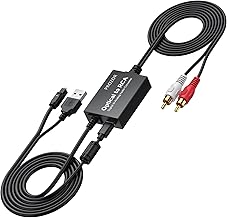
This model is best for a setup that needs optical S/PDIF converted to stereo RCA and benefits from the listed 7-foot cable. PROZOR specifies a built-in audio amplifier chip and dual-channel operational amplifier, and says the converter supports sampling rates of 32, 44.1, 48, 96, and 192kHz, with a 24-bit incoming SPDIF bitstream on left and right channels.
Choose this if the analog device accepts RCA and cable reach matters. The manufacturer’s supplied instructions say to set the TV’s audio output to PCM and adjust TV volume through settings. The listing also states that it does not support optical output, so it should not be used to convert an analog signal into optical digital audio. It is not the best fit if you need a 3.5mm output or a converter with an onboard volume knob.
OREI Optical And Coaxial To Analog DAC

The OREI converter is best for buyers who want to choose between optical and coaxial digital input while sending audio to RCA or 3.5mm analog equipment. Its listed features include a 24-bit PCM signal, support up to 96kHz, headphone and amplifier use, and plug-and-play operation. Those connection options make it a useful choice when a source provides coaxial S/PDIF rather than Toslink optical.
Choose this if both the input connection and analog output options match your system. The 96kHz maximum named in the listing is lower than the 192kHz claims on the two PROZOR DAC listings, but a higher maximum is only relevant if the source actually outputs that rate and the whole system supports it. The available product information does not establish support for every surround-sound format, so check the source’s audio settings and the full listing before purchase.
PROZOR Bi-Directional Optical And Coaxial Converter

This PROZOR unit is best for someone who needs to convert between two digital connection types: optical S/PDIF and coaxial S/PDIF. The product name describes bi-directional conversion, meaning optical-to-coaxial or coaxial-to-optical, and lists DTS and Dolby-AC3 support. It is included as a comparison because its S/PDIF terminology may look relevant to shoppers searching for a line-out converter.
Important limitation: this is a digital-to-digital converter, not a digital-to-analog DAC. It does not meet the main need if you want RCA or 3.5mm analog output for an amplifier, powered speakers, or another analog input. Choose it only when the destination also accepts a digital signal but uses the other digital connector. Verify that the source and destination formats align with the converter’s stated support.
LiNKFOR 3.5mm Analog-To-Optical Converter

The LiNKFOR converter is best for the reverse task: sending sound from a 3.5mm analog source to a Toslink optical digital input. The product name describes analog-to-digital conversion and lists an optical output and optical cable. It may suit a buyer connecting an analog source to a digital-input amplifier or soundbar, provided the receiving device accepts the resulting optical signal.
For this article’s main purpose, this is the wrong direction. It will not convert an optical S/PDIF output into analog RCA or 3.5mm line out. Choose it only when the source is analog and the destination is optical digital. Check the full product information for supported input and output formats before relying on it for a particular audio setup.
Buying Guide: How To Choose An S/PDIF Line-Out Converter
Does the converter go in the right direction?
For a TV, streaming device, or other digital source connected to analog equipment, the signal path should be digital input to analog output. Look for a digital-to-analog converter, often labeled DAC. A product that converts analog to optical or changes optical to coaxial will not create an analog line out.
Trace the signal from its starting device to its destination before choosing. The source’s optical or coaxial output connects to the converter’s corresponding digital input. Then the converter’s RCA or 3.5mm output connects to the analog input on the receiving equipment.
Should you choose RCA or 3.5mm output?
Match the converter’s output to the input on the receiving device. Stereo RCA uses separate left and right connectors. A 3.5mm connection is a single small plug commonly used for compatible analog inputs. Do not assume the two types are interchangeable without the correct cable or adapter, and confirm that the destination input is analog rather than digital.
Do you need optical, coaxial, or both?
Toslink is the common optical S/PDIF connection; coaxial S/PDIF uses a different connector and cable. Select a converter with an input that matches the source’s actual output. If you have more than one type of digital source, a model listing both optical and coaxial inputs may provide more flexibility, but check whether those inputs can be used as needed.
Which audio format and sample rate should you check?
Check the audio output settings of the source and the supported formats listed for the converter. The PROZOR 7-foot model specifically instructs users to set the TV output to PCM. This is a useful setup clue: when a converter does not support the source’s selected signal format, audio may not work as expected. Follow the converter’s instructions instead of assuming every S/PDIF format is supported.
Sample-rate figures describe supported digital input rates, not a guarantee that every source sends audio at the highest listed rate. Compare the source’s settings with the converter’s documented range. A higher maximum can matter for a compatible source, but output connection, audio format, and direction remain essential.
Is a longer cable or more output gain important?
Measure the path between devices and choose a cable length that reaches without pulling connectors tight. The PROZOR model in this list specifies a 7-foot cable. If the receiving equipment has low input sensitivity or the output level is a concern, look for clear documentation about amplifier circuitry or output level. The PROZOR 7-foot listing describes an amplifier chip, but its instructions also say to adjust TV volume through settings.
Finally, check what is included and how the converter is powered in the full product listing. The supplied descriptions do not give complete accessory and power details for every model, so confirm those items before purchase.
Frequently Asked Questions
What does an S/PDIF-to-line-out converter do?
It converts digital S/PDIF audio into an analog signal, usually through stereo RCA or 3.5mm output. This lets a digital-output source connect to equipment with a compatible analog input.
Is an optical-to-RCA converter the same as an optical-to-coaxial converter?
No. Optical-to-RCA conversion changes digital audio into analog audio. Optical-to-coaxial conversion changes one digital connection type into another and does not provide analog line out.
Why might a DAC produce no sound from a TV?
Check that the TV is connected to the converter’s digital input, the analog output reaches the correct destination input, and the TV’s audio format matches the converter’s requirements. The listed PROZOR 7-foot model specifically calls for PCM output.
Can a 3.5mm-to-optical converter replace an optical-to-3.5mm DAC?
No. A 3.5mm-to-optical converter sends analog audio toward a digital optical output. An optical-to-3.5mm DAC converts in the opposite direction.
Does a higher sample-rate rating guarantee better sound?
No. The source, converter, and connected equipment must support the signal format and rate. Select a model based on the actual connections and formats in your system, not the maximum rate alone.