Best Speaker Bar for Computer: Top Desktop Soundbars for Clear Audio
Choosing a speaker bar for your computer can simplify your desk setup while delivering crisper dialogue, richer music, and immersive game sound. The following five options cover USB-powered, Bluetooth-enabled, and USB-C compatible models suitable for desktops, laptops, and consoles. Each product highlights strong audio performance, easy mounting, and practical controls for everyday use.
| Product | Brand | Connection | Notable Feature |
|---|---|---|---|
| Nylavee Computer Speakers | Nylavee | Bluetooth 5.0 / AUX | Dual bass diaphragms, multi-driver design |
| Cyber Acoustics CA-2890 | Cyber Acoustics | USB | Monitor clamp, compact footprint |
| XKX Computer Speakers | XKX | USB / USB-C | Adaptive-channel-switching, touch control |
| Dell SP3022 USB Speaker Bar | Dell | USB | MS-Teams certified, AI noise cancellation |
| Redragon GS560 | Redragon | USB | RGB lighting, 2.0 channel |
Note: The list emphasizes compatibility with PCs and laptops, ease of installation, and features that enhance voice clarity and media playback. Each model offers a balance between compact design and sound quality to suit different desk environments.
Nylavee Computer Speakers With Rich Stereo
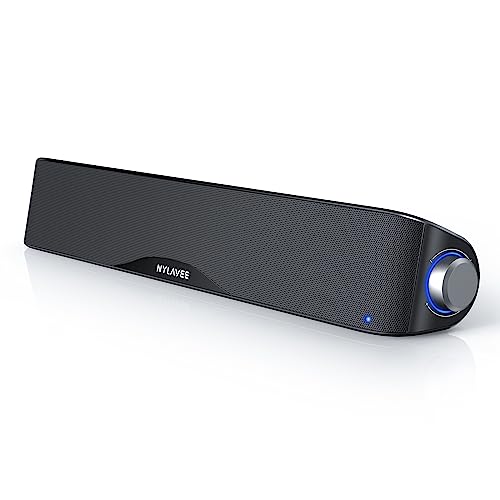
The Nylavee sound bar integrates four speaker units and two independent bass diaphragms to deliver a full-spectrum sound with pronounced highs and solid bass. Its cavity design enhances loudness and clarity for multimedia use on desktops and laptops. The system supports Bluetooth 5.0 and a 3.5mm AUX input, enabling easy wireless or wired connection to PCs, phones, tablets, or gaming consoles. Built with non-toxic materials, this model emphasizes safety and durability for long-term use.
Cyber Acoustics CA-2890 USB Speaker Bar

The CA-2890 USB speaker bar clamps to a monitor, saving desk space while delivering a surprisingly loud and clear stereo output. It uses a single USB connection to power both audio and control signals, simplifying setup on PCs, Macs, or Chromebooks. Its compact form factor makes it ideal for small workstations, dorms, or shared desks. Volume control, mute, and LED indicators provide quick status checks during calls or video streams.
XKX USB-C Computer Sound Bar

The XKX computer speaker bar offers an aggressive, high-volume sound from dual ultra-magnetic drivers and dual passive radiators, delivering clear highs and deep bass. Adaptive-channel-switching helps maintain accurate stereo imaging whether mounted on the top or bottom of a monitor. Front-facing touch controls provide simple muting and volume adjustments, making it a practical choice for busy workstations and gaming setups.
Dell SP3022 USB Computer Speaker Bar

Dell’s SP3022 USB speaker bar emphasizes clarity for business communications with AI noise cancellation and full duplex audio. Its compact form fits under most monitors, and LED indicators reflect Teams status, calls, and mic mute controls. The device is designed for corporate and conference environments where clear voice capture and simple integration with Teams and other platforms are essential.
Redragon GS560 RGB Desktop Soundbar

The Redragon GS560 combines 2.0 channel audio with dynamic RGB lighting that syncs to music or in-game sound. It offers a compact footprint with an RGB-lit backlit bar, enhancing desk aesthetics while delivering crisp audio and a satisfying bass response. The integrated volume knob and USB power provide straightforward setup for both work and leisure activities on a computer setup.
Cyber Acoustics CA-2890BT USB & Bluetooth

This model adds Bluetooth 5.0 alongside USB connectivity, enabling simultaneous two-device pairing with smartphones and computers. The space-saving design clamps to the monitor’s edge, preserving desk space for keyboards and peripherals. A multifunction button handles USB/Bluetooth switching, with play/pause, volume, and mic mute controls, suitable for calls, music, and streaming tasks.
Tylubio Monitor LED USB/Bluetooth Speaker

The Tylubio speaker system features 4 LED lighting modes and supports USB and Bluetooth inputs. Its 2x5W stereo configuration aims to deliver clear midrange and present percussion for a balanced desktop audio experience. The control knob toggles inputs and lighting modes, with quick access to power and Bluetooth reconnect features for a seamless, distraction-free workflow.
XKX USB-C Desktop Speakers With Clip

This XKX model emphasizes compatibility with USB-C devices via a built-in USB-C to USB adapter. It delivers powerful stereo sound through dual drivers and a passive radiator, designed for laptops and desktops. The compact bar can be clipped to monitors, saving space while maintaining robust audio performance ideal for multimedia and productivity tasks.
Buying Guide: Key Purchase Considerations
- Compatibility: Most options support USB and AUX connections, with several offering Bluetooth and USB-C compatibility. Consider your primary device (PC, Mac, laptop, console) and whether you need wireless use.
- Sound Quality: Look for dual drivers, passive radiators, and bass response suitable for your space. For video calls, prioritize models with clear vocal reproduction and noise handling.
- Mounting and Footprint: If desk space is tight, monitor-clamp or clip-on designs (like the CA-2890 and CA-2890BT) save room. Check dimensions to ensure it fits beneath your monitor or on the edge of your desk.
- Controls and Usability: Front-facing controls, volume knobs, mute, and Bluetooth pairing buttons should be intuitive for quick adjustments during calls or gaming sessions.
- Power and Connectivity: USB-powered bars are convenient for laptops and desktops, while USB-C models ensure compatibility with newer devices. Bluetooth provides wireless flexibility but may introduce occasional pairing delays.
- Intended Use: For conferencing, look for AI noise cancellation and full duplex audio. For gaming and media, prioritize dynamic range and bass depth. For general productivity, clarity and balanced sound are key.
- Aesthetics and Build: A slim profile and subtle RGB lighting can complement modern desks, but ensure the build is sturdy enough for daily use and quick setup.
Across these options, the choice depends on priorities: compactness and USB-only use, or flexible wireless listening with multisystem compatibility. All selections provide straightforward setup, useful controls, and sound enhancements suitable for work, study, and entertainment on a computer desk.