
The best speaker for Skype meetings depends on your room size and how you connect: the Jabra Speak 510 is a portable USB or Bluetooth option, the Anker PowerConf emphasizes multi-microphone pickup and long call time, and the EMEET M1A lists 360-degree pickup for groups of five to eight. For a simple wired setup, consider the USB speakerphone with noise reduction and echo cancellation. The three-microphone conference model adds portable use and one-touch mute.
| Product | Best suited for | Connection or key feature |
|---|---|---|
| Jabra Speak 510 (2026 Edition) | Portable individual or small-room meetings | USB or Bluetooth |
| USB Speakerphone | Wired home-office calls | 360-degree pickup, noise reduction, echo cancellation |
| Anker PowerConf | Personal workspaces and longer calls | Six microphones, up to 24-hour call time, USB-C or Bluetooth |
| Conference Speakerphone with 3 AI Mics | Small-team video meetings | 360-degree voice pickup, one-touch mute |
| EMEET M1A | Wired group meetings | USB-C and C-A adapter, two omnidirectional microphones |
Jabra Speak 510 (2026 Edition)

Best for: People who need a speakerphone they can move between desks or meeting spaces. The listed USB and Bluetooth connection options make it a flexible choice for users who prefer wired setup at one desk but want wireless pairing as another option.
The product listing describes crystal-clear sound and identifies compatibility with Microsoft Teams, Google Meet, and Zoom. Its portable speakerphone format is relevant to Skype users who want a dedicated audio device rather than relying on a computer’s built-in speaker and microphone. The title does not specifically name Skype, so check the device and Skype setup requirements before buying if Skype compatibility is essential.
Why it was selected: It combines portability with two connection methods and is presented for online meeting platforms. Limitation: The supplied product information does not state microphone pickup range, battery life, or group-size guidance, so it is difficult to compare its room coverage with models that list those details.
USB Speakerphone With 360-Degree Pickup

Best for: A home-office user who wants a straightforward wired speakerphone for calls. The product title lists USB connectivity, 360-degree enhanced voice pickup, noise reduction, and echo cancellation, making those features the main reasons to consider it for Skype meetings.
360-degree pickup is designed to capture voices from around the speaker, which can be useful when more than one person is speaking from different sides of a desk. Noise reduction and echo cancellation are also listed, addressing common call issues such as background sound and audio feedback. The product title names Skype, Zoom, and Teams compatibility.
Why it was selected: Its listed features align directly with users who need an external microphone and speaker for computer calls. Limitation: The provided details do not identify battery operation, a wireless connection, microphone count, or supported group size. Choose another listed model if Bluetooth or stated portable call time is a priority.
Anker PowerConf Speakerphone
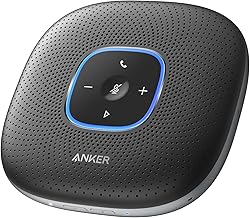
Best for: Users seeking a portable speakerphone for personal workspaces and calls that may run for extended periods. The listing specifies six microphones, 360-degree enhanced voice pickup, Bluetooth 5.3, USB-C, and up to 24 hours of call time.
The six-microphone array and 360-degree pickup are relevant when a call involves voices coming from around the device. Bluetooth and USB-C give users two listed connection approaches, while the stated call time can matter for people who need to move the speakerphone or use it away from a charging connection. The product is described as Zoom Certified and compatible with leading platforms, but Skype is not named in the supplied title.
Why it was selected: It offers specific microphone, connection, and call-time details that help buyers compare it with simpler USB-only options. Limitation: The listing does not state a recommended room size or exact Skype support. Confirm platform requirements and whether the intended device supports the selected connection before purchase.
Three-Microphone AI Conference Speakerphone

Best for: Small teams that want a portable meeting speakerphone with a dedicated mute control. The product title lists three AI microphones, 360-degree voice pickup, AI noise reduction, plug-and-play operation, one-touch mute, and up to 12 hours of portable use.
The stated 360-degree pickup is intended for meetings where participants sit around the speakerphone rather than directly in front of it. Noise reduction may be useful in a home office or shared work area, while one-touch mute makes it easier to silence the microphone during a call. Skype is specifically named alongside Zoom and Teams in the listing.
Why it was selected: The listed controls and portability features suit small-team calls and users who value quick muting. Limitation: The product information does not specify a participant count, connection types, or charging details. Check the complete listing if those details affect your setup.
EMEET M1A USB Conference Speaker

Best for: Wired meetings with several people gathered around one device. EMEET describes the M1A for groups of five to eight and lists USB-C with a C-A adapter, two omnidirectional microphones, and 360-degree voice pickup.
The listed VoiceIA features include noise reduction, echo cancellation, voice amplification, and full duplex. Full duplex is intended to let participants speak and hear one another without taking turns in the same way as older half-duplex calling systems. The speaker has nine volume levels, adjusted from the control panel, with a blue LED indicator. The supplied details specifically include Skype for Business and list other meeting platforms.
Why it was selected: It provides unusually clear group-size guidance and a detailed set of audio features for wired conference calls. Limitation: The supplied information describes USB connections, not Bluetooth, so it is better suited to a desk-based setup than buyers who require wireless operation.
Buying Guide: How To Choose A Speaker For Skype Meetings
Should you choose a speakerphone or a headset?
A speakerphone is useful when you want to hear calls without wearing headphones, or when several people need to speak from the same room. A headset is often a more suitable comparison if you need private listening or want to keep call audio from playing into the room. These five products are speakerphones, so consider the room and privacy needs before choosing one.
How many people will join from the room?
For one person at a desk, portability and connection options may matter more than group coverage. For a group, prioritize a product that identifies 360-degree pickup or gives a recommended participant count. The EMEET M1A lists a five-to-eight-person use case, while the three-microphone model is described for small-team meetings but does not specify a number. Treat these descriptions as selection guidance, not a guarantee for every room.
USB, USB-C, or Bluetooth: which connection fits?
A wired USB connection can be a practical choice for a fixed computer setup. USB-C may suit a device with that port, while an included C-A adapter, as listed for the EMEET M1A, can provide another connection option. Bluetooth can reduce cable clutter and help with portable use, but confirm that the computer or device you plan to use supports the required Bluetooth connection.
The Jabra Speak 510 and Anker PowerConf list USB and Bluetooth options. The EMEET M1A lists USB-C and a C-A adapter. The other two listings identify USB or plug-and-play use, but the supplied details do not give a full connection specification for every device. Check the complete product details before ordering.
Which audio features matter most for calls?
Noise reduction and echo cancellation can be helpful when a room has background sound or when speaker audio risks feeding back into the microphone. Omnidirectional or 360-degree pickup is relevant when participants sit around the device. A one-touch mute control can make it easier to stop transmitting sound temporarily. Match the feature to the problem you are trying to solve rather than choosing by feature count alone.
Microphone count is another comparison point, but it does not by itself establish how well a product will cover a particular room. The Anker listing names six microphones; the EMEET listing specifies two omnidirectional microphones; and the portable three-microphone speakerphone names three AI microphones. Room layout, distance from the device, and background noise can also affect the call experience.
What should you check for Skype compatibility?
Verify the exact Skype version and device you will use, along with the product’s supported connection method. Some product titles explicitly name Skype, while others name different platforms or refer generally to leading meeting platforms. Skype for Business and Skype are not interchangeable labels for every buyer’s use case, so confirm the specific software support that matters to you.
After connecting the speakerphone, check the audio settings in Skype and select the external device for both microphone input and speaker output if needed. Make a test call or use the software’s audio test before an important meeting. This basic check can identify a wrong input or output selection before other participants join.
Is portability or long call time important?
If the speakerphone will stay on one desk, a wired model may be sufficient. If you expect to move it between rooms or use it without a cable, compare the stated wireless connection and call-time information. The Anker listing gives up to 24 hours of call time, and the three-microphone model lists up to 12 hours of portable use. The other supplied product descriptions do not give a battery duration, so do not assume they have the same operating time.
Frequently Asked Questions
Can I use a speakerphone for Skype meetings?
Yes, a speakerphone can provide the microphone and speaker for a Skype call. Check that the model supports your connection and Skype setup, then select it as the input and output device in Skype’s audio settings.
Is a 360-degree microphone better for group calls?
It can be a useful feature when participants sit around the device because the microphone is designed to pick up voices from different directions. It does not guarantee equal pickup at every distance or in every room.
Do I need Bluetooth for a Skype speakerphone?
No. A USB speakerphone can suit a fixed computer setup. Bluetooth is useful if you prefer a wireless connection, but both the speakerphone and the device used for Skype must support the required connection.
What is echo cancellation for?
Echo cancellation is intended to reduce audio feedback or echo during calls. It is one of several features that may help with call clarity; microphone placement and the room’s acoustics can also matter.
Which listed option gives a group-size recommendation?
The EMEET M1A listing describes use for five to eight people. The other product information provided here does not give a specific participant count, so compare the full listing if room coverage is a deciding factor.