
The best stereo and navigation system depends on whether you want a replacement receiver or a separate screen. The Pioneer DMH-W2770NEX is best for drivers seeking wireless Apple CarPlay and Android Auto from an established receiver brand. The PLZ 10.1-inch and 7-inch double-DIN units suit buyers comparing large touchscreens and audio connections, while the 9-inch screen is an option for shoppers who want a screen-style device rather than a conventional receiver. Check vehicle fit and installation requirements before choosing.
| Product | Best suited for | Screen or format | Navigation approach |
|---|---|---|---|
| Pioneer DMH-W2770NEX | Wireless phone integration | 6.8-inch, double-DIN | Apple CarPlay or Android Auto |
| PLZ Single Din Car Stereo | Large display and listed audio connections | 10.1-inch, single-DIN | CarPlay or Android Auto |
| Upgrade Wireless Double Din Stereo | Double-DIN buyers who want subwoofer ports | 7-inch, double-DIN | CarPlay or Android Auto |
| 9-inch Wireless CarPlay Screen | Drivers considering a separate screen | 9-inch screen | GPS navigation and phone features listed |
| BOSS Audio Systems BV9358B | Buyers seeking a 7-inch touchscreen stereo | 7-inch touchscreen | CarPlay and Android listed |
Pioneer DMH-W2770NEX

This double-DIN digital multimedia receiver has a 6.8-inch capacitive touchscreen, wireless Apple CarPlay and Android Auto, Bluetooth, HD Radio, FLAC support, and a short chassis. Its listed features also include backup-camera support. Using phone integration for navigation can make this a practical choice for drivers who already use mapping apps on a compatible smartphone.
Best for: Drivers who want wireless phone integration in a conventional double-DIN receiver. It was selected because it combines both major phone platforms with Bluetooth, a capacitive display, and a short chassis.
Limitation: The screen is smaller than the 7-, 9-, and 10.1-inch displays in this group. Confirm that the vehicle’s dash and installation setup suit a double-DIN receiver.
PLZ 10.1-Inch Single-DIN Car Stereo

The PLZ receiver pairs a single-DIN format with a 10.1-inch CarPlay touchscreen. Its listed features include wireless Apple CarPlay and Android Auto, Bluetooth 5.3, a 4.2-channel 240-watt output description, subwoofer support, a backup camera, FM/AM radio, and steering-wheel control (SWC). Navigation is listed alongside phone integration, so check the product details to understand which functions depend on a connected phone.
Best for: Buyers who prioritize a large display and want several listed audio and control features. It stands out in this selection for its 10.1-inch screen and specified Bluetooth version.
Limitation: A large screen does not guarantee a straightforward fit. Confirm dashboard space, mounting arrangement, wiring, and steering-wheel-control requirements for the specific vehicle before purchase.
Upgrade Wireless Double-DIN Stereo
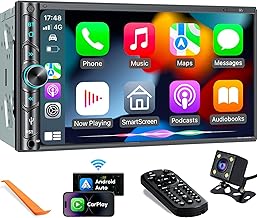
This 7-inch HD capacitive touchscreen receiver lists wireless CarPlay, Android Auto, Bluetooth, four-channel RCA connections, high-power audio, two subwoofer ports, and a backup camera. Phone integration provides a route to navigation features through a compatible phone, while the RCA and subwoofer connections may matter to buyers planning an audio setup that uses those connections.
Best for: Drivers seeking a double-DIN receiver with a mid-size touchscreen and explicitly listed subwoofer ports. It was selected because its feature list combines phone integration with audio connection options.
Limitation: The supplied product information does not specify installation compatibility for individual vehicles or the exact power output. Verify fitment and system requirements rather than relying on the phrase “high power.”
9-Inch Wireless CarPlay Screen

This 9-inch screen lists Apple CarPlay and Android Auto, GPS navigation, voice control, Bluetooth 5.0, mirror link, FM, AUX, a backup camera, and OTA updates. Its screen-style format offers an alternative to the double-DIN and single-DIN receiver designs in this list. The product name describes it as a screen for a car, so review its mounting and power arrangements before deciding whether it fits the intended setup.
Best for: Shoppers comparing a larger screen-style option with built-in GPS navigation listed among its features. It was selected for its 9-inch display and combination of phone integration and navigation functions.
Limitation: The provided information does not explain how it mounts, connects to the vehicle audio system, or receives GPS data. Confirm those details and check whether the listed functions meet your navigation needs.
BOSS Audio Systems BV9358B

The BOSS Audio Systems BV9358B is listed as a CarPlay and Android car stereo with a 7-inch touchscreen. Those core features make it a straightforward option for drivers looking for a screen-based receiver with smartphone integration, rather than a product description focused on a particularly large screen or extensive audio ports.
Best for: Buyers comparing a 7-inch touchscreen stereo with Apple CarPlay and Android integration. It was selected as a simpler alternative to models whose descriptions emphasize subwoofer ports, screen size, or additional navigation features.
Limitation: The supplied product details do not specify wireless connectivity, receiver size, camera support, or audio outputs. Confirm these requirements and vehicle fit before choosing it.
Buying Guide: How To Choose A Car Stereo And Navigation System
Do you need a replacement receiver or a separate screen?
A receiver is designed to be part of the vehicle’s dashboard audio system. The Pioneer and Upgrade models are identified as double-DIN stereos, while the PLZ is described as a single-DIN stereo with a large touchscreen. The 9-inch product is presented as a screen for a car. These formats are not interchangeable by assumption: check the product’s mounting details and your dashboard opening before buying.
A separate screen may appeal to someone who does not want to select a conventional receiver, but the product description alone does not establish how it mounts or connects. Verify whether it can route sound through the vehicle’s speakers and how it is powered. For a receiver replacement, confirm that the car’s dash, wiring, and controls can be accommodated.
How will navigation work?
CarPlay and Android Auto can connect a compatible phone to a receiver for phone-based apps, including navigation apps. The Pioneer, PLZ, Upgrade, and BOSS product names list one or both of these platforms. Check whether the specific connection is wireless or wired; only the Pioneer, PLZ, and Upgrade descriptions explicitly call out wireless integration.
The 9-inch screen’s product name lists GPS navigation directly. That does not, by itself, explain map availability, data requirements, or how navigation guidance reaches the car’s audio system. If you need navigation that works independently of phone projection, check the product documentation for those details before ordering.
Which screen size and receiver format make sense?
The products range from a 6.8-inch Pioneer screen to 7-inch displays, a 9-inch screen, and a 10.1-inch PLZ touchscreen. A larger display can make on-screen elements more prominent, but it also makes physical space and screen placement important considerations. A large screen should not be treated as proof of vehicle compatibility.
Double-DIN and single-DIN refer to receiver formats, while the screen’s size describes its display. A single-DIN receiver with a large screen may have a different dashboard arrangement from a standard double-DIN unit. Compare the receiver format, screen measurements, mounting method, and visibility in the intended vehicle.
What audio and control features should you compare?
Look at the connections that match your planned audio equipment. The Upgrade receiver lists four-channel RCA connections and two subwoofer ports. The PLZ lists subwoofer support and a 4.2-channel 240-watt description. The Pioneer lists FLAC playback and HD Radio. These details differ, so choose according to the equipment and listening sources you actually use.
Drivers who want to retain steering-wheel controls should confirm compatibility and any required interface components. The PLZ description lists SWC, but the information provided does not establish fitment for every vehicle. Backup-camera support is named for several products, but buyers should verify camera compatibility, included components, and installation needs.
What should you check before installation?
- Confirm the receiver format and dashboard fit for the exact year, make, and model.
- Check wiring, mounting hardware, and whether separate adapters or installation parts are needed.
- Verify support for factory steering-wheel controls, cameras, and other retained features.
- Decide whether wireless phone integration, Bluetooth, radio, AUX, or specific audio connections are essential.
- Review how navigation works and whether it relies on a connected smartphone.
- Make sure the screen can be positioned without obstructing the driver’s view or access to vehicle controls.
Frequently Asked Questions
Can a car stereo provide navigation?
Yes. Some systems use Apple CarPlay or Android Auto to display navigation from a compatible phone. The 9-inch screen in this list also names GPS navigation as a feature. Verify whether the system requires a phone or an internet connection for the navigation functions you want.
Is wireless CarPlay the same as built-in GPS?
No. Wireless CarPlay connects a compatible iPhone to the stereo, while built-in GPS navigation is a separate feature claim. A product may offer one, the other, or both. Check the product details to determine how maps are supplied and whether a phone is needed.
Will a double-DIN stereo fit every car?
No. A double-DIN designation describes the receiver format, not universal vehicle compatibility. Dashboard shape, wiring, brackets, and factory controls can vary. Check fitment for the specific vehicle and installation requirements before purchase.
Is a larger touchscreen always the better choice?
No. A larger screen may be easier to see, but the dashboard must have suitable space and the display must not interfere with safe visibility or controls. Compare the screen size and mounting layout with the vehicle interior.
What does a subwoofer port or RCA connection matter for?
These connections matter when planning to connect compatible external audio equipment. The Upgrade model lists four-channel RCA connections and two subwoofer ports, while the PLZ lists subwoofer support. Confirm the specific connections and system requirements against the equipment you intend to use.