
The best PC microphone depends on whether you need straightforward voice chat, a flexible desktop position, streaming controls, or a more advanced recording setup. The five options below offer USB connections or, in one case, USB and XLR, along with features such as mute buttons, noise cancellation, and boom-arm or gooseneck positioning. However, the supplied product details do not confirm true stereo recording for any of them. If stereo capture is essential, check the product’s technical specifications before buying.
| Microphone | Best for | Listed features |
|---|---|---|
| CMTECK G009 | Chatting and general desktop use | USB, noise cancellation, mute function |
| TONOR TC310+ | Gaming and streaming setups | Boom arm, RGB, tap mute, gain control |
| Flexible Gooseneck USB Mic | Adjustable desktop placement | Gooseneck, LED mute button, 6-foot cable |
| MAONO PD200W | Recording and upgrade flexibility | Wireless, USB, XLR, software, noise cancellation |
| 360-Degree Gooseneck USB Mic | Positioning and voice chat | Adjustable gooseneck, mute, LED, noise cancellation |
CMTECK G009 USB Desktop Microphone

The CMTECK G009 is a USB computer microphone described for PC and laptop use, online chatting, home-studio recording, podcasting, gaming, Skype, and YouTube. Its listed features include noise cancellation and a mute function, and the product name identifies Windows and Mac support.
Best for: Buyers who want one desktop USB microphone for everyday communication and a range of basic content-creation tasks. The mute function is useful when you need to stop audio capture quickly, while noise cancellation is a stated feature for users seeking help managing unwanted sound.
Why it is a pick: Its listed use cases cover both casual voice chat and recording-oriented activities, making it a versatile option among the supplied products.
Limitation: The provided details do not specify stereo recording, microphone pickup pattern, connection controls beyond mute, or how much background noise it reduces. Do not assume the noise-cancellation feature guarantees a particular sound result.
Choose this if you want a conventional USB desktop mic and value a physical mute function. If stereo sound is a must-have, confirm that the model records two-channel audio rather than assuming that “microphone” or “recording” means stereo.
TONOR TC310+ Gaming Microphone Set
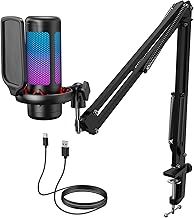
The TONOR TC310+ is presented as a USB gaming microphone set for PC, content creation, Twitch, and streaming. Its name lists a boom arm, a condenser microphone, RGB lighting, tap-to-mute, and gain control.
Best for: Gamers and streamers who want a microphone with an included boom arm and on-mic access to mute and gain controls. The arm can suit a desk arrangement where keeping the microphone positioned near the speaker is more convenient than using a fixed desktop stand.
Why it is a pick: The listed controls and boom arm make this the most explicitly gaming-oriented setup in this selection. Gain control can be useful when adjusting input level, while tap mute provides a quick way to silence the mic.
Limitation: The available product information does not establish stereo capture, the arm’s range of movement, or the exact software and operating-system requirements. RGB lighting is an appearance feature, not evidence of audio quality.
Choose this if desk positioning and streaming controls matter more than a compact footprint. Before buying, check whether its physical layout suits your desk and verify the audio channel specification if you need stereo recording.
Flexible Gooseneck USB Computer Microphone

This plug-and-play desktop microphone is described with a flexible gooseneck, an LED mute button, and a 1.8-meter (6-foot) cable. Its listed uses include gaming, YouTube, and streaming, and the product name identifies Windows and Mac compatibility.
Best for: PC users who want to adjust microphone position without choosing a separate boom-arm set. The flexible neck is the key distinction: it lets the user reposition the mic itself, while the LED mute button gives a visible status indicator according to the product description.
Why it is a pick: Its stated cable length and adjustable neck offer practical placement flexibility for a desktop setup. The plug-and-play description may appeal to buyers looking for a simple connection process, although the supplied information does not detail setup requirements.
Limitation: The product details do not say whether the microphone records in stereo or explain the noise-rejection performance. The 6-foot cable may also be a consideration if your computer is positioned farther away.
Choose this if you prefer a repositionable desktop microphone with a visible mute indicator. Compare its cable length and physical reach with your desk before ordering, especially if you need to place the computer farther from the microphone.
MAONO PD200W Hybrid Wireless Microphone

The MAONO PD200W is described as a hybrid wireless podcast microphone with USB and XLR connections. The product name also lists a desktop stand, software, noise cancellation, and uses such as vocal recording, streaming, content creation, home-studio work, and voiceover.
Best for: Creators who want more than one connection option and may use the microphone across different recording arrangements. USB and XLR are both named, so it offers a connection choice that the USB-only products in this list do not claim.
Why it is a pick: Its combination of wireless operation, USB, and XLR makes it the most connection-flexible option in this selection based on the supplied product description. Software and noise cancellation are also listed features for buyers exploring recording and streaming workflows.
Limitation: The details provided do not specify wireless range, battery life, included software functions, or whether stereo recording is supported. Check the full technical listing for these points before choosing it for a particular recording setup.
Choose this if connection flexibility is a priority or you are comparing USB with XLR options. Avoid assuming that wireless operation means stereo output; verify the channel format and the exact included accessories in the listing.
360-Degree Adjustable Gooseneck USB Microphone

This USB microphone is described with a 360-degree adjustable gooseneck, a mute button, an LED indicator, and noise-canceling technology. The product name lists plug-and-play use and compatibility with Windows and macOS.
Best for: Buyers who want to direct a desktop microphone toward their speaking position and have a mute control with a visual indicator. The 360-degree adjustment is a stated positioning feature, while the USB connection is aimed at computer use.
Why it is a pick: It combines adjustable positioning with mute and noise-canceling features in a product described for both Windows and macOS. That makes it a straightforward comparison for users whose priorities are desktop placement and voice communication.
Limitation: The listed details do not specify stereo recording, microphone pickup pattern, or the degree of noise reduction. Confirm the exact audio specifications if you plan to record music, ambient sound, or other stereo material.
Choose this if a flexible neck and visible mute status fit your setup. Compare it with the other gooseneck model based on cable length and the exact controls you need; the provided information only specifies a 6-foot cable for the other model.
Buying Guide: How To Choose A PC Microphone
Do you need true stereo recording?
A microphone’s connection type does not tell you whether it records in stereo. USB describes a connection, while stereo describes an audio format with separate left and right channels. The supplied details for these five products do not confirm stereo capture, so verify the product specifications for terms such as “stereo,” “two-channel,” or explicit left/right channel output before buying.
For voice chat, streaming commentary, and many voiceover tasks, buyers often prioritize clear speech and convenient controls rather than stereo capture. For recording an instrument, a room, or a sound source whose left-to-right placement matters, confirm that the microphone and recording software can produce the channel format you need.
Should you choose USB, XLR, or wireless?
A USB microphone connects to a computer through USB, as described for the CMTECK, TONOR, and both gooseneck options. This can suit a direct-to-PC setup, but the supplied details do not provide the exact connection requirements for every product. Check the listing and your computer’s available ports before ordering.
The MAONO PD200W is described as offering USB and XLR, as well as wireless operation. That makes it a candidate for buyers who value connection choices, but the product data here does not spell out how the wireless mode works or what equipment each connection requires. Confirm those details if your setup depends on a specific connection.
Which controls and positioning features matter?
- Mute control: The CMTECK, TONOR, and gooseneck microphones list mute functions. An LED or tap control is specifically named for the two gooseneck products and TONOR, respectively.
- Gain adjustment: The TONOR product name lists gain control. This is a relevant feature for buyers who want an on-device level adjustment.
- Flexible placement: The TONOR includes a boom arm, while two options describe adjustable goosenecks. Consider which style fits your desk and how you want to position the mic.
- Cable reach: One gooseneck product lists a 1.8-meter (6-foot) cable. Compare that stated length with the distance between your computer and preferred microphone position.
What should you check for gaming and streaming?
For gaming and live streaming, consider whether the mute control is easy to reach, whether the microphone can be positioned comfortably, and whether gain adjustment is important. The TONOR lists a boom arm, tap mute, and gain control, while the gooseneck choices emphasize adjustable positioning. The CMTECK lists chatting and gaming among its use cases and includes a mute function.
Noise cancellation appears in the descriptions for the CMTECK, MAONO, and 360-degree gooseneck model. The product information does not quantify performance or explain how the feature works. Treat it as a listed capability, not a guarantee that keyboard, fan, or room noise will be removed.
What matters for podcasting and voice recording?
Start by checking the microphone’s audio format, connection method, and intended placement. The CMTECK is described for podcasting and home-studio use; the MAONO is described for podcasting, vocal recording, and voiceover. The TONOR is described as a condenser microphone for content creators. These use descriptions can help narrow choices, but they do not replace specifications for channel count or recording performance.
Also consider whether you need a desktop stand, boom arm, gooseneck, or wireless operation. A convenient position can help keep the microphone near the speaker, but the right arrangement depends on desk space and recording habits. Confirm what is included in the package rather than inferring accessories beyond those named.
How should you compare operating-system support?
Some product names explicitly list operating-system compatibility: the CMTECK identifies Windows and Mac, the flexible gooseneck model names Windows and Mac, and the 360-degree gooseneck model names Windows and macOS. Check the current listing for your exact computer and operating-system version, especially if you plan to use included software or a less common connection setup.
“Plug and play” is a useful description, but it does not establish compatibility with every computer, application, or recording workflow. If you need a microphone for a particular conferencing, streaming, or editing program, confirm that the product and software support your intended setup.
Frequently Asked Questions
Are these PC microphones confirmed to record in stereo?
No. The supplied descriptions do not confirm stereo recording for any of the five options. Check each product’s technical specifications for explicit stereo or two-channel support before buying.
Which option lists both USB and XLR?
The MAONO PD200W is described as a hybrid microphone with USB and XLR, along with wireless operation. Check its full listing for details about connection requirements and wireless use.
Which microphone includes a boom arm?
The TONOR TC310+ product name lists a boom arm. It also lists RGB lighting, tap mute, and gain control.
Which options list an adjustable gooseneck?
The flexible gooseneck USB microphone and the 360-degree adjustable gooseneck USB microphone both list gooseneck positioning. Only the flexible model’s supplied name specifies a 1.8-meter (6-foot) cable.
Which microphones list a mute function?
All five product names or descriptions list a mute function or control. The specific implementation varies: the TONOR lists tap mute, and the two gooseneck options list an LED mute button or indicator.
Is noise cancellation enough to make a microphone suitable for a noisy room?
Not necessarily. Several products list noise cancellation, but the supplied information does not describe its performance or guarantee a particular result. Review the detailed specifications and consider how much background noise your recording environment produces.