
The best way to strip audio from HDMI is to use an extractor that matches your signal path: a standard HDMI extractor takes audio from a source such as a game console or streaming player, while an ARC/eARC extractor takes audio back from a compatible TV. The Avedio Links model is best for separate optical and analog outputs with HDMI pass-through. The eSynic model is designed for TV ARC/eARC and stereo sound. The other options suit simpler setups, but check their input, output, and audio-format limits before buying.
| Product | Best for | Key distinction |
|---|---|---|
| Avedio Links HDMI Audio Extractor | Optical and analog audio options | HDMI pass-through up to 4K at 30Hz |
| eSynic ARC/eARC Audio Extractor | TV ARC/eARC to stereo audio | PCM audio, 3.5mm and L/R outputs |
| VPFET HDMI Audio Extractor | Optical or 3.5mm audio from HDMI | Selectable 2.0CH, 5.1CH, and pass modes |
| HDMI Audio Extractor Splitter | Compact, straightforward source setups | HDMI to 3.5mm; may need USB power |
| XPTSFDU HDMI ARC Adapter | ARC-enabled TVs with stereo equipment | Simultaneous L/R and 3.5mm output |
Avedio Links HDMI Audio Extractor

Best for: A home setup that needs HDMI video pass-through plus a choice of optical digital or analog stereo audio. This extractor has HDMI input and output and supports pass-through up to 4K at 30Hz, 1080p at 60Hz, and 3D.
Its RCA left/right outputs provide two-channel PCM. Optical SPDIF supports two-channel PCM, Dolby Digital 5.1, and DTS. The listed package features include a power adapter and a cable that provides a 3.5mm female audio port from the RCA output. HDCP 1.4 and CEC bypass are also listed.
Choose this if your source connects to the extractor and you want video to continue to a display while audio goes to separate equipment. It is a better fit than an ARC adapter when the signal comes from a console, Blu-ray player, or streaming box. Limitation: It does not support ARC, and its HDMI pass-through is limited to 4K at 30Hz.
eSynic ARC/eARC Audio Extractor

Best for: Sending sound from a TV’s ARC or eARC port to 3.5mm headphones or a left/right stereo audio system. Unlike standard HDMI extractors, this product is specifically described as working with a TV’s ARC/eARC interface rather than other HDMI devices.
The listed features include 3.5mm and L/R outputs, PCM and PCM 2.0 audio support, and a maximum stated sampling rate of 24-bit/192kHz. Audio signal indicators are included to show operating status. This is a focused choice when the television is the audio source and the connected equipment needs analog stereo sound.
Choose this if your TV has an ARC/eARC port and you want a direct stereo output. Limitation: It does not provide optical output and is specified for PCM audio only; Dolby formats are not supported. Confirm that the TV’s audio output is set to PCM.
VPFET HDMI Audio Extractor
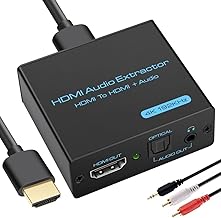
Best for: Buyers who need either optical or 3.5mm audio from an HDMI source and can select the appropriate output mode. The unit offers 2.0CH, 5.1CH, and pass modes. Its 3.5mm output is for PCM 2.0, while optical output supports DTS 5.1.
The product lists HDMI 1.4, HDCP 1.4, a maximum bandwidth of 10.2Gbps, and video support up to 4K at 30Hz. For 3.5mm stereo, select 2.0CH; for optical, select 5.1CH. Pass mode is suggested if the other modes do not produce an audio and video signal.
Choose this if you want mode selection and both analog and optical audio options in one device. Limitation: It does not support 7.1-channel audio, ARC, or eARC. The listing also notes that certain sources, including Fire TV, Apple TV, and PS4/5, are limited to 1080p with this extractor.
HDMI Audio Extractor Splitter

Best for: A basic HDMI-source setup where audio needs to be routed to a 3.5mm connection. The listing names devices such as Roku, Chromecast, Blu-ray and DVD players, cable boxes, game consoles, and HD cameras as examples of compatible source types.
This extractor supports HDMI signals up to 4K by 2K at 30Hz and 3D when the input and output devices support 3D. Its small size and plug-and-play design may suit a simple installation. The listed package includes a USB cable for situations where the HDMI source does not provide enough power.
Choose this if a 3.5mm output is sufficient and you want a compact option for extracting audio from a source device. Limitation: The listing does not specify an optical output or detailed surround-format support. It does not support ARC/eARC or using a TV as the input source, and some devices may require USB power.
XPTSFDU HDMI ARC Adapter

Best for: A TV with an ARC-enabled HDMI port that needs to send sound to stereo equipment with 3.5mm or L/R analog inputs. This adapter is intended for audio returned from a television, not for extracting sound from a console or streaming player connected directly to it.
The listed features include simultaneous output from the 3.5mm and L/R ports. The product supports up to 4K at 60Hz as an ARC adapter, but audio transmission depends on connecting to the TV’s ARC port and enabling the relevant settings. The listing recommends setting the TV’s audio output format to PCM 2.0.
Choose this if your TV’s ARC connection is the source and you want both analog outputs available. Limitation: It only works with compatible TVs and ARC ports; a regular HDMI port will not provide ARC audio. Check the television’s manual and settings before setup.
Buying Guide: How to Choose an HDMI Audio Extractor
Is the audio coming from an HDMI source or from your TV?
This is the most important distinction. A standard HDMI audio extractor sits between a source device and a display. The source sends HDMI video and audio into the extractor; the extractor passes video onward and routes audio through a separate output.
An ARC/eARC extractor works in the opposite direction for TV audio. It receives sound returned from a television through an HDMI port labeled ARC or eARC. Products in this category are not interchangeable with standard source-to-display extractors. Check the connection diagram and the product’s stated input use before choosing.
Which audio output do you need?
- 3.5mm: Choose this for compatible headphones or equipment with an analog auxiliary input. Confirm whether the extractor supports stereo PCM on this output.
- RCA L/R: Choose this for stereo amplifiers or other equipment with left/right analog inputs.
- Optical SPDIF: Choose this when the receiving equipment has an optical input. Check the supported formats, such as PCM, Dolby Digital, or DTS, rather than assuming all formats pass through.
Some products provide only one output type, while others provide more than one. The presence of several ports does not necessarily mean every port supports the same audio format or channel count.
Will the extractor preserve your video resolution?
Compare the extractor’s pass-through limits with the resolution and refresh rate you need. For example, a device rated for 4K at 30Hz may not meet a setup that requires 4K at 60Hz. Also check HDMI version, HDCP support, and any source-specific limits listed by the manufacturer.
Video compatibility depends on the full signal chain: source, extractor, HDMI cables, and display. If you use 3D or a particular color format, verify that the product lists support and that the connected equipment does too.
What audio format and channel count does your system use?
Match the extractor’s output to the receiving speaker, amplifier, or sound system. A stereo 3.5mm output commonly requires a two-channel PCM signal, while optical outputs may support additional formats depending on the product. Do not assume an extractor supports Dolby, DTS, or 7.1 audio unless its features say so.
If there is no sound, check whether the source or TV is outputting a format the extractor accepts. For ARC products that specify PCM 2.0, set the TV’s digital audio output to PCM. For a switchable extractor, test the mode recommended for the output you are using.
Does the unit need power?
Power requirements vary. One compact extractor may usually run from HDMI but need USB power with a low-power source, while another includes a dedicated power adapter. Check the package and setup instructions, and use the appropriate power method if the signal is unstable or the device does not operate.
Will you connect a TV as the input?
Do not connect a television to a standard extractor’s HDMI input unless the product explicitly supports that arrangement. Several products here state that they do not support ARC/eARC or a TV as the input source. To extract sound from TV apps, choose a model designed for ARC/eARC and use the television’s matching port and settings.
Frequently Asked Questions
What does an HDMI audio extractor do?
An HDMI audio extractor separates audio from an HDMI signal and sends it to a separate audio output, such as optical, 3.5mm, or RCA. Many models also pass the video signal through to a display.
Can I use a standard HDMI audio extractor with my TV?
Not necessarily. A standard extractor usually takes its input from a source device. To extract audio from a TV, use an ARC/eARC extractor and connect it to a TV port that supports ARC or eARC.
Can an HDMI extractor send audio to headphones?
Yes, if it has a compatible 3.5mm output. Check the product’s audio-format requirements and the headphone connection. Some models require a two-channel PCM signal for 3.5mm audio.
Why is there no sound after connecting an extractor?
Check that the source is connected to the extractor input, the correct audio output is selected, and the receiving device is connected to the matching output. Also confirm power, TV ARC settings when applicable, and the audio format required by the extractor.
Does an HDMI audio extractor support surround sound?
It depends on the model and output. Some optical outputs support listed formats such as Dolby Digital 5.1 or DTS, while analog 3.5mm outputs may be limited to stereo PCM. Verify the specific format and channel support before buying.