
The best surround sound audio for an HTPC depends on whether you want separate analog speaker outputs or a simpler soundbar connection. The StarTech adapter is best for a computer-based 5.1 or 7.1 analog setup, while the ULTIMEA Poseidon M100 is better for a wireless speaker arrangement with HDMI eARC. The other picks offer additional surround soundbar layouts and connection options for different rooms and systems.
| Product | Best For | Connection Highlight |
|---|---|---|
| StarTech 7.1 USB Audio Adapter | PCs using separate analog speaker inputs | USB, 3.5mm, and SPDIF |
| ULTIMEA Poseidon M100 | Wireless rear speakers and immersive sound | HDMI eARC and Bluetooth |
| ULTIMEA Aura A40 | Adjustable multi-speaker soundbar setup | Wired and wireless speaker connections |
| Maraawa Sound Bar with Subwoofer | Flexible PC or TV audio connections | ARC, optical, AUX, and Bluetooth |
| USB External Sound Card with SPDIF | USB-based 5.1 or 7.1 audio output | USB and SPDIF |
StarTech 7.1 USB Audio Adapter
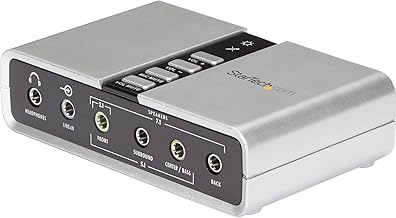
Best for: HTPC owners who need a USB sound card with separate analog outputs for a multichannel speaker system. The adapter adds up to 7.1-channel audio through one USB port and supports 7.1, 5.1, and two-channel output using 3.5mm jacks.
Along with speaker outputs, the listed connections include a headphone port, line-in, and stereo microphone inputs. It also supports analog and digital audio output, so it may suit a setup that needs either analog connections or SPDIF digital output. The bus-powered design and included one-meter USB cable make it an external alternative to an internal sound card.
- Analog playback and recording support 44.1 kHz and 48 kHz sampling rates.
- SPDIF digital output supports 48 kHz playback.
- SPDIF optical input passthrough supports up to two-channel audio at 48 kHz.
Choose this if your HTPC and speakers need multichannel analog outputs from a USB device. A limitation is that SPDIF output is specified for 48 kHz playback, and optical input passthrough is limited to two channels.
ULTIMEA Poseidon M100 Wireless Soundbar

Best for: HTPC users who want a soundbar-based home theater system with wireless rear speakers and a wireless subwoofer. The listed system combines a soundbar, two wireless surround speakers, and a 6.5-inch wireless subwoofer. Its product name also specifies Dolby Atmos, HDMI eARC, Bluetooth 6.0, app control, and 432-watt peak output.
The rear speakers are intended to create sound behind or beside the listening position, while the subwoofer adds low-frequency output for movies, games, and music. This layout can reduce the need to run speaker cables across a room compared with a fully wired speaker arrangement.
Choose this if you want a surround-oriented soundbar package and your HTPC connection plan can use HDMI eARC. The supplied details describe the system as designed for TV audio, so check the connection and audio-format requirements of your specific computer and display before buying. The listed features do not specify the exact format or channel behavior for every input.
ULTIMEA Aura A40 7.1ch Soundbar

Best for: HTPC users who want a 7.1-channel virtual surround soundbar system with multiple speakers and adjustable surround levels. The system lists three dedicated front channels, four surround speakers, and SurroundX technology with AI audio tuning.
Its speaker arrangement includes two wired front surround speakers and two rear surround speakers. The rear speakers connect wirelessly to the soundbar, while the product description also notes a rear surround cable and a hybrid connection setup. There are 13 adjustable surround levels, allowing the surround effect to be changed for the room and listening preference.
The product is designed for TV audio, so it is a better choice when the HTPC is part of a TV-based entertainment setup and the available connection path suits the computer and display. Choose it if you want rear speakers without running every speaker wire back to the soundbar. Avoid assuming every connection is wireless: the listed front speakers are wired, and the rear setup includes a cable.
If rear-speaker pairing does not succeed, the product instructions say to hold the “SURROUND” button on the remote for five seconds until “SUR” flashes, then hold the “PAIR” button on the rear-right speaker for five seconds until the indicator changes to solid.
Maraawa Sound Bar with Wired Subwoofer

Best for: Buyers who want a soundbar and subwoofer with several ways to connect a PC, TV, or projector. The listed inputs are Bluetooth 5.3, ARC, optical, and AUX, and the product is described as suitable for PCs as well as TVs and other devices.
The system is rated at 120 watts of output power and includes a wired subwoofer for low-frequency sound. Its product description highlights dialogue clarity, highs, and bass for movies, TV, music, and gaming. The wired subwoofer is intended to provide a consistent connection rather than relying on a wireless subwoofer link.
Choose this if connection flexibility is more important than a listed 7.1-channel speaker layout. It can be a practical fit for a compact HTPC system that needs a soundbar-style setup, but the supplied features do not state a specific multichannel format or a dedicated rear-speaker arrangement. If true discrete 5.1 or 7.1 speaker outputs are a priority, compare it with a USB sound card or a system that explicitly lists those channels.
USB External 5.1 and 7.1 Sound Card

Best for: HTPC owners looking for an external USB sound card advertised for 5.1 and 7.1 surround systems. The listed features describe a USB multifunction sound card with SPDIF digital sound, an aluminum-alloy body, and a 48 kHz sampling rate.
This is a computer-focused option rather than a complete speaker system. It is intended to expand a computer’s sound capabilities without installing an internal sound card, making it relevant to audiophiles, gamers, and home theater users who need an external audio device.
Choose this if you need a USB-based audio device and your receiver or speaker setup can use its available outputs. The product information does not identify the exact operating systems, connector layout, or detailed channel-routing requirements. Confirm those details before choosing it for a particular HTPC, especially if you need separate analog outputs for each speaker rather than SPDIF.
Buying Guide: How to Choose HTPC Surround Sound
Do you need separate speaker outputs or a soundbar?
Start by deciding whether the HTPC will connect to a traditional multichannel speaker system or a soundbar. A USB sound card is the more direct category to consider when the computer needs to provide multichannel audio through analog jacks or SPDIF. A soundbar is a simpler route when you want one front-facing unit, possibly with a subwoofer and separate surround speakers.
Do not treat every product described as “surround” as equivalent. The StarTech adapter and the external USB card are audio interfaces, not speakers. The soundbars are complete speaker packages, but their listed features differ in speaker layout and connectivity. Check whether you need distinct 5.1 or 7.1 outputs, virtual surround processing, or a soundbar system with rear speakers.
Which connection should your HTPC use?
Match the connection on the audio product to the outputs available from the HTPC, receiver, and display. The StarTech model offers USB, 3.5mm analog connections, and SPDIF. The other USB sound card lists USB and SPDIF. The Maraawa soundbar lists ARC, optical, AUX, and Bluetooth, while the Poseidon M100 lists HDMI eARC and Bluetooth in its product name.
ARC and eARC are connection features, not guarantees that every computer-to-display arrangement will pass the audio format you want. Check the actual ports and audio settings across the full signal chain. If the HTPC connects through a TV or receiver, verify that device’s supported inputs and outputs as well.
Is a listed 7.1 system the same as discrete 7.1?
Not necessarily. A product may describe a virtual 7.1 experience, a multi-speaker layout, or a sound card that supports 7.1-channel output. Those descriptions refer to different parts of an audio setup. The Aura A40 is described as a 7.1-channel virtual surround system with front and rear speakers. The StarTech adapter specifically says it supports 7.1, 5.1, and two-channel output through 3.5mm jacks.
Before buying, determine whether the HTPC software and audio device can send the required channel format. Also confirm whether the speakers accept the output type directly or require a receiver. Product descriptions here do not provide complete format support for every application or operating system.
How should you compare wired and wireless speakers?
Wired connections can make speaker placement and signal routing more predictable, but they require cable runs. Wireless rear speakers can reduce some cable clutter and offer more placement flexibility, but they still need suitable placement and power. The Aura A40 uses wired front surround speakers and a hybrid rear connection arrangement. The Poseidon M100 lists wireless surround speakers and a wireless subwoofer.
For an HTPC room, measure the distance between the listening position, soundbar, and rear-speaker locations. Consider where cables can be routed and whether wireless links are appropriate for the room. “Wireless” describes the speaker connection; it does not mean every component is free of cables.
What should you check for dialogue, bass, and gaming?
For dialogue-focused viewing, look for a product that explicitly describes dedicated front channels or dialogue clarity. The Aura A40 lists three dedicated front channels, while the Maraawa description highlights clear dialogue. For bass, compare the subwoofer details: the Maraawa includes a wired subwoofer, and the Poseidon M100 lists a 6.5-inch wireless subwoofer.
For games, consider whether rear sound placement matters more than a simple connection setup. A multi-speaker arrangement may be appealing for directional effects, but the listed product information does not establish input lag or performance in a specific game. Confirm the HTPC’s audio output settings and the system’s supported connection path before relying on a particular surround mode.
When is a USB sound card the better choice?
Choose a USB sound card when the computer needs additional audio outputs or when you want to connect a speaker system directly to the PC. It can also be useful when the HTPC’s built-in audio connections do not match the equipment. Compare the number and type of outputs, supported sampling rates, and operating-system details.
The StarTech listing provides specific information about analog and SPDIF sampling rates. The other USB card listing gives fewer details about its connectors and operating-system support. When a specification is important to your setup, verify it rather than assuming two USB sound cards have identical features.
Frequently Asked Questions
What is the simplest surround sound option for an HTPC?
A soundbar can simplify speaker setup because it combines multiple speaker elements in one system. A model with rear speakers and a subwoofer adds more components, so it still requires planning for placement and connections.
Can a USB sound card provide 5.1 or 7.1 audio?
The StarTech adapter explicitly supports 5.1 and 7.1 output through 3.5mm jacks. The other listed USB sound card is advertised for 5.1 and 7.1 systems. Check its exact connector layout and compatibility details before purchase.
Is SPDIF enough for every surround sound setup?
No. The supported channel and format behavior depends on the device and signal path. The StarTech adapter’s listing specifies 48 kHz SPDIF output and up to two-channel optical input passthrough, so check whether those limits suit your use.
Are wireless rear speakers completely cable-free?
Not necessarily. Wireless describes the audio link, but speakers may still need power or other connections. The Aura A40 listing describes a hybrid setup, and the Poseidon M100 lists wireless surround speakers.
Should I choose a soundbar or an external sound card?
Choose a soundbar if you need speakers and want a combined home theater system. Choose an external sound card if you already have speakers and need the HTPC to provide additional audio outputs.