Best Surround Sound Gaming Headphones for Immersive Play
Answering what to buy for immersive, positional audio in gaming: choose headsets with solid surround sound drivers, comfortable pads for long sessions, and a reliable microphone. This guide highlights five options that balance audio clarity, comfort, and versatile compatibility for PC and console gamers. Best for competitive shooters, best for long-haul gaming, and best for multi-platform use are covered. The following table compares the five picks to help you decide quickly.
| Product | Brand | Best For |
|---|---|---|
| Razer BlackShark V2 X Gaming Headset | Razer | Competitive play, PC/PS/Xbox Switch users seeking strong isolation |
| Logitech G432 Wired Gaming Headset | Logitech G | Budget-friendly surround sound with clear mic |
| HyperX Cloud III | HyperX | Comfort and durability for long sessions |
| HyperX Cloud II Gaming Headset | HyperX | Pro-level drivers with versatile multi‑platform support |
| Corsair HS80 RGB USB | Corsair | Dolby 7.1 and premium build for multi‑platform use |
Razer BlackShark V2 X Gaming Headset

Best for: PC gamers and console players who want strong isolation and a broad soundstage. This headset features advanced passive noise cancellation with closed-ear cups and 50 mm drivers that can deliver software-enabled surround sound on Windows 10 64-bit. The titanium-coated diaphragms provide clear highs and powerful lows, aiding in pinpointing enemy positions. A caution: full surround fidelity depends on compatible software and platform support.
Logitech G432 Wired Gaming Headset

Best for: gamers seeking expansive sound with easy setup. It uses big 50 mm drivers and DTS Headphone:X 2.0 surround to deliver positional audio beyond standard 7.1. The flip-to-mute mic helps keep voice chat clear. Be aware: DTS Headphone:X 2.0 requires Logitech G HUB software for full features.
HyperX Cloud III

Best for: players who value comfort during marathon sessions. The Cloud III uses angled 53 mm drivers tuned for immersive gaming audio and includes a durable frame. The microphone is ultra-clear with noise-cancelling features. Caution: like many wired headsets, cable wear can occur with heavy use; handle the cord carefully.
HyperX Cloud II

Best for: gamers seeking proven comfort and multi-platform flexibility. The Cloud II features large drivers, memory foam ear pads, and a sturdy aluminum frame. It offers 7.1 surround on supported systems and a reliable microphone. Limitation: some users may prefer newer USB DAC features found in premium lines.
Corsair HS80 RGB USB
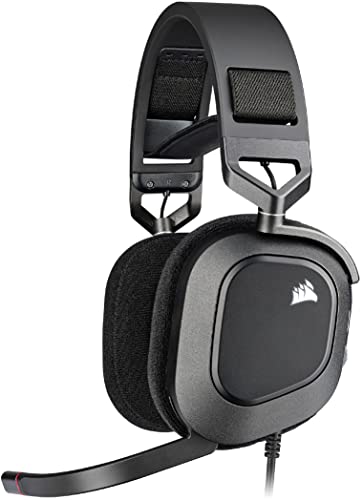
Best for: players who want Dolby 7.1 surround with a premium feel and RGB aesthetics. The HS80 delivers broadcast-grade microphone clarity and memory foam earpads on a durable frame. Caution: the full feature set relies on Corsair software for optimal 7.1 processing.
Buying Guide: Key Considerations For Surround Sound Gaming Headphones
- Platform compatibility: Check if the headset supports PC, PlayStation, Xbox, Switch, or USB connection required by your setup.
- Surround sound format: Decide between true hardware-driven 7.1, software-based surround, or stereo with positional cues. Some headsets require companion software to enable surround features.
- Driver size and tuning: Larger drivers (50 mm or more) can deliver richer bass and more accurate highs; look for tunings that emphasize the genres you play most (FPS vs. RPG).
- Comfort and build: Long gaming sessions demand memory foam ear cushions, adjustable headbands, and durable materials.
- Microphone quality: Detachable mics or noise-cancelling designs help clear voice chat in team play.
- Wired vs. wireless: Wired headsets avoid latency; wireless options favor movement freedom but may introduce latency or require charging.
- Software features: Look for EQ, mic controls, and virtual surround options that integrate with your platform.
- Durability and warranty: A sturdy frame and replaceable parts extend headset life in daily use.
Frequently Asked Questions
- What is surround sound in gaming headsets good for? It helps with spatial awareness, helping you locate footsteps and gunfire direction in competitive games.
- Do I need software to use surround sound? Many headsets offer software-enabled surround; some work with hardware-only drivers. Check the product details for requirements.
- Is a larger driver always better? Not always. While 50 mm drivers can boost output, comfort, seal, and tuning are equally important for overall audio quality.
- Are USB headsets better for consoles? USB headsets can simplify setup on PC and PS5/PC, but ensure your console supports USB audio or specific surround features.
- How important is mic quality? Critical for team coordination. Look for noise-cancelling mics or detachable options.
- Should I buy multiple headsets for different setups? If you play across PC and consoles often, a multi-platform headset with versatile connections is convenient.