
The best choice for surround sound with HDMI depends on whether you need a receiver that connects HDMI sources to speakers, an extractor that sends HDMI audio to another device, or a soundbar system with a TV connection. The Donner receiver is the strongest fit for a multi-speaker setup with HDMI inputs; the Pyle is a compact five-channel amplifier, and the VPFET is an HDMI audio extractor for compatible sources. The soundbars suit buyers prioritizing a simpler TV audio setup, but their listed details do not establish a standard HDMI input.
| Product | Best suited for | HDMI connection type stated |
|---|---|---|
| Donner MAMP8 | Multi-speaker home theater | HDMI inputs, HDMI output, ARC |
| Pyle PFA540BT.6 | Compact five-channel amplification | HDMI mentioned; details are limited |
| VPFET HDMI Audio Extractor | Separating audio from an HDMI source | HDMI input and audio outputs |
| ULTIMEA Poseidon M60 | All-in-one surround-style soundbar system | Not specified in the supplied features |
| Detachable Sound Bar | Basic TV, PC, or gaming audio | ARC listed; standard HDMI input not confirmed |
Donner MAMP8 5.2-Channel Receiver

Best for: Buyers building a speaker-based home theater who want several input choices and HDMI pass-through. The MAMP8 is listed as a 5.2-channel receiver with two HDMI inputs and one HDMI output, along with Audio Return Channel, Bluetooth 5.3, USB, RCA, optical, coaxial, FM, and phono connections.
Donner says the receiver can connect up to five speakers and two active subwoofers. Its listed speaker output figures are 75 watts RMS per left/right channel and 38 watts RMS per surround and center channel, at 4 ohms. It also supports 4K HDR pass-through, which can help route a compatible video source through the receiver to a display.
Why it was selected: It is the clearest match for someone specifically searching for a surround receiver with HDMI inputs and multiple speaker connections.
Limitation: The product information says Dolby and DTS decoding are not supported. Confirm that this limitation suits your sources and desired audio formats before choosing it.
Pyle PFA540BT.6 Five-Channel Amplifier

Best for: Buyers seeking a compact, five-channel amplifier with basic controls and wireless music streaming. Pyle describes this model as a 100-watt, five-channel home theater amplifier with surround sound, HDMI, AUX, FM antenna, and a subwoofer speaker input.
Bluetooth supports wireless streaming from devices such as smartphones, tablets, laptops, and computers. A front control panel includes an LCD display, standby, tuner, surround, mute, and input controls, plus a rotary volume knob. The product listing also mentions EQ controls, a remote control, and a 12-volt adapter.
Why it was selected: It combines a five-channel format with HDMI in the product name and listed feature set, making it a compact alternative to a full-size receiver.
Limitation: The supplied details do not specify the HDMI version, number of HDMI ports, supported video formats, or precise HDMI signal-routing behavior. Check those details before relying on it to switch multiple HDMI sources.
VPFET HDMI Audio Extractor
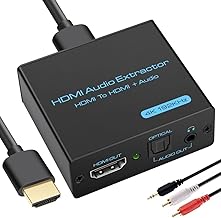
Best for: Buyers who already have an HDMI source and need to send its audio to a separate receiver or audio device. This adapter extracts audio from an HDMI signal and provides optical and 3.5 mm outputs. It is a signal-conversion accessory, not a surround receiver or speaker system.
Three modes are listed: 2.0-channel, 5.1-channel, and pass-through. The product information recommends 2.0-channel mode for 3.5 mm stereo output and 5.1-channel mode for optical output. Optical output supports DTS 5.1; 3.5 mm output supports PCM 2.0. The extractor is specified for HDMI 1.4, HDCP 1.4, and up to 4K at 30 Hz.
Why it was selected: It addresses a common HDMI-audio need when a source and an audio system do not connect directly in the desired way.
Limitation: It does not support 7.1-channel audio. The listing also says it does not support ARC or eARC and that a TV cannot be used as the input source. Check the stated 4K limitations for specific devices before buying.
ULTIMEA Poseidon M60 5.1 Soundbar

Best for: Buyers who want a soundbar-led surround setup with a dedicated subwoofer rather than a conventional AV receiver and separate speakers. ULTIMEA describes the Poseidon M60 as a 5.1-channel system with Dolby Atmos, five built-in speakers, two side-firing drivers, and a wired wooden subwoofer.
The stated features include up to 300 watts of peak power, VoiceMX processing intended to improve dialogue clarity, BassMX, app control, and Bluetooth 5.4. The brand says the system creates a wide surround effect without rear speakers and lists a frequency response of 45 Hz to 18 kHz.
Why it was selected: It is a relevant option for people comparing surround sound products, especially those who prefer an integrated bar-and-subwoofer design over a receiver-based installation.
Limitation: The supplied feature list does not identify an HDMI input, HDMI output, or ARC connection. Do not assume it meets an HDMI-input requirement without confirming the exact connection options.
Detachable Soundbar With ARC

Best for: Buyers comparing straightforward soundbar options for a TV, PC, gaming setup, or projector. The product name lists Bluetooth, ARC, optical, and AUX connections, along with automatic volume boost, three equalizer modes, and a detachable 2-in-1 design.
ARC can be useful when connecting a compatible TV and audio device, but it is not the same buying question as having multiple HDMI inputs for sources such as a game console or streaming device. The listing information provided here does not state the number of HDMI ports or confirm that the soundbar accepts HDMI sources directly.
Why it was selected: It is a relevant comparison for shoppers deciding whether a simpler ARC-equipped soundbar meets their TV audio needs instead of a multi-input surround receiver.
Limitation: Detailed speaker configuration and HDMI port specifications are not included in the supplied product information. Verify the exact connection layout before purchase if HDMI input is essential.
Buying Guide: How to Choose Surround Sound With HDMI
Do you need an HDMI input or HDMI ARC?
An HDMI input on a receiver accepts a source device, such as a game console or media player, and can route its audio to the receiver. HDMI ARC is intended to return audio from a compatible TV to an audio device over an HDMI connection. A product listing that says ARC does not necessarily mean the device has several HDMI inputs for connecting sources.
Before choosing, write down how many sources you need to connect and whether each source will connect to the TV or the audio system. If you need a receiver to handle multiple sources, look for the number of HDMI inputs and output stated explicitly. If you only need TV audio routed to a soundbar, ARC may be the more relevant feature.
Should you choose a receiver, amplifier, extractor, or soundbar?
- Choose a receiver when you want to connect several sources and drive separate speakers. Check channel count, speaker output details, HDMI ports, and audio-format support.
- Choose an amplifier when compact size and speaker amplification are priorities. Confirm what its HDMI connection does, since port count and routing details may not be clear from a short listing.
- Choose an HDMI audio extractor when you need to split audio from an HDMI source and send it to optical or analog audio equipment. It does not replace a receiver or provide speakers.
- Choose a soundbar when you want a simpler audio system with fewer separate components. Confirm whether it uses HDMI ARC, has a direct HDMI input, or relies on optical, AUX, or Bluetooth.
How many channels and speakers do you need?
Channel labels describe the audio system’s intended speaker arrangement, but they do not alone establish what connections or decoding formats a product supports. A 5.1-channel setup generally refers to front, center, and surround speaker channels plus a subwoofer channel. A 5.2 label indicates support for two subwoofer outputs or connections as described by the manufacturer; check whether the subwoofers must be active or passive.
Compare the channel configuration with the speakers you already own. The Donner listing specifies five speakers and two active subwoofers. The Pyle is described as a five-channel amplifier, while the ULTIMEA system uses built-in speakers and a wired subwoofer. These designs serve different installation needs.
Which audio and video formats matter?
Check the formats supported by every device in the signal chain: source, receiver or extractor, and TV. For video, compare the listed HDMI version, resolution, refresh rate, and HDR support with your source and display. For audio, check whether the product supports the formats your content uses. The VPFET extractor is listed for HDMI 1.4 and up to 4K at 30 Hz, and its feature details distinguish optical DTS 5.1 from 3.5 mm PCM 2.0.
Do not assume that all devices described as surround sound decode the same formats. The Donner product information specifically says Dolby and DTS decoding are not supported. Confirm format support before buying if a particular streaming service, disc player, or game console is central to your setup.
What should you check before connecting everything?
- Count the HDMI inputs and outputs you actually need.
- Confirm whether the TV and audio device support ARC or eARC when using TV return audio.
- Check that speaker type, impedance, and channel requirements align with the amplifier or receiver specifications.
- Match optical, coaxial, AUX, or USB connections to the ports on your existing devices.
- For an extractor, verify its input-source restrictions, audio mode, and supported video signal.
- Check whether the system includes the separate speakers, subwoofer, cables, or adapters you need; the supplied product details may not list every included accessory.
Frequently Asked Questions
Does HDMI ARC count as an HDMI input?
ARC is an audio-return feature for sending sound from a compatible TV to an audio device. It does not by itself confirm that the device has a standard HDMI input for connecting multiple source components.
Which product listed has the clearest HDMI input specification?
The Donner MAMP8 is listed with two HDMI inputs, one HDMI output, and ARC. Its product details also state that Dolby and DTS decoding are not supported.
Can an HDMI audio extractor create surround sound?
An extractor separates audio from an HDMI signal; it does not create a speaker system or independently guarantee surround decoding. The VPFET listing specifies optical DTS 5.1 support and does not support 7.1-channel audio.
Is a soundbar a replacement for an AV receiver?
A soundbar can be a simpler alternative for TV audio, but it is not necessarily equivalent to a receiver with separate speaker connections and multiple HDMI inputs. Compare connection types and speaker configuration before choosing.
Will every 4K HDMI audio extractor pass every 4K source?
No. Check the extractor’s specific HDMI version, resolution limits, and source restrictions. The VPFET listing specifies HDMI 1.4 and 4K at 30 Hz, and notes limitations for certain source devices.