
The best surround sound PC headset depends on whether you prioritize positional audio, a lightweight fit, wireless freedom, or a versatile wired connection. The Logitech G432 is best for players who want DTS Headphone:X 2.0 and both USB and 3.5 mm connections. The Razer BlackShark V2 X suits players seeking a closed-ear fit, while the HyperX Cloud III offers multiple connection options and spatial audio. Compare the five picks below, then check which software and connection requirements fit your PC.
| Headset | Best For | Key Consideration |
|---|---|---|
| Logitech G432 | DTS positional audio and connection flexibility | DTS Headphone:X 2.0 requires Logitech G HUB |
| Razer BlackShark V2 X | Closed-ear isolation and Windows surround | Surround feature is limited to Windows 10 64-bit |
| Wireless 7.1 Gaming Headset | Wireless play and long listed battery life | Not for Xbox |
| Razer Kraken V3 X | Lightweight USB gaming | Wired USB connection |
| HyperX Cloud III | Multiple connection types and spatial audio | Check the audio setup you plan to use |
Logitech G432 Wired Gaming Headset

The Logitech G432 is best for PC players who want software-enabled positional audio and the option to connect by USB or 3.5 mm jack. Its listed features include 50 mm audio drivers and DTS Headphone:X 2.0, which is designed to create three-dimensional sound for cues such as footsteps and ability sounds.
A 6 mm boom microphone is intended to make speech clear, and flipping the mic up mutes it. That provides a simple physical mute control during a match or voice chat. The headset’s dual connection options also make it a practical choice for buyers who do not want to rely on only one connector type.
- Best for: PC gamers who want DTS positional audio with USB or 3.5 mm connectivity.
- Why it stands out: It combines large 50 mm drivers, a flip-to-mute mic, and DTS Headphone:X 2.0.
- Limitation: DTS Headphone:X 2.0 requires Logitech G HUB software, so the surround feature depends on software setup.
Choose this if configurable PC surround sound is more important than wireless use. If you prefer a headset that works without installing software for its listed surround feature, check the requirements of the other models before buying.
Razer BlackShark V2 X

The Razer BlackShark V2 X is best for players who want a wired 3.5 mm headset with a closed-ear design and software-enabled 7.1 surround sound. Its earcups fully cover the ears, and the product features describe the cushions as creating a closer seal to help limit noise leakage and provide more sound isolation.
Custom-tuned 50 mm TriForce Titanium drivers divide high, mid, and low frequencies for separate tuning. The manufacturer describes the design as intended to deliver clear highs and stronger lows. For PC gaming, the listed 7.1 surround feature is software-enabled, so the operating system requirement matters as much as the headset itself.
- Best for: Players who prefer a closed-ear fit and a standard 3.5 mm connection.
- Why it stands out: It combines passive noise isolation features, 50 mm drivers, and positional audio support.
- Limitation: The listed 7.1 surround feature is available only on Windows 10 64-bit.
Choose this if your PC setup meets that Windows requirement and you value a closer earcup seal. Avoid choosing it solely for 7.1 surround if you use another operating system; confirm whether the headset’s other audio features meet your needs instead.
Wireless 7.1 Gaming Headset

This wireless headset is best for buyers who want to reduce cable clutter and use a headset across several listed devices. Its product name specifies PC, PS5, PS4, Mac, and Switch, with 2.4 GHz USB, Bluetooth 5.4, and Type-C connections. It also advertises 7.1 surround sound and up to 100 hours of battery life.
Because the listing identifies multiple connection methods, this model may suit a setup where wireless connectivity matters more than a simple wired connection. The listed noise-canceling microphone and RGB lighting may also appeal to gamers who want those features in the same headset.
- Best for: Players seeking wireless connectivity, multiple listed device types, and a long advertised battery life.
- Why it stands out: The product name lists 2.4 GHz USB, Bluetooth 5.4, Type-C, and up to 100 hours of use.
- Limitation: The listing says it is not for Xbox. The provided product information does not specify the software or operating-system requirements for 7.1 audio.
Choose this if wireless operation is a priority and your devices match the listed compatibility. Before purchasing for PC, check the product’s current setup instructions to confirm how its surround feature works and which connection is appropriate for your computer.
Razer Kraken V3 X USB Headset

The Razer Kraken V3 X is best for PC players who want a lightweight wired USB headset with a boom microphone and listed 7.1 surround sound. Its stated weight is 285 grams, making the weight figure a useful point of comparison for buyers who prefer not to wear a heavier headset for long gaming sessions.
The TriForce 40 mm drivers are designed with separate tuning for high, mid, and low frequencies. The HyperClear cardioid microphone has a bendable design and a pickup pattern intended to capture more voice and less surrounding noise. The headset also includes Chroma RGB lighting.
- Best for: Gamers who want a lighter listed weight, USB connection, and a flexible boom mic.
- Why it stands out: The 285 g build, 40 mm TriForce drivers, and cardioid microphone are specific differentiators.
- Limitation: It is a wired USB headset, so it is not the right pick if you need wireless use or a 3.5 mm connection.
Choose this if a lightweight design and USB connection suit your desk setup. If your PC has a connection requirement other than USB, compare the Logitech G432 or another model with the connector you need.
HyperX Cloud III Wired Gaming Headset
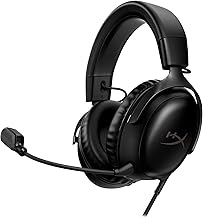
The HyperX Cloud III is best for buyers who want a wired headset with more than one connection option and listed spatial audio. Its product name identifies USB-C, USB-A, and 3.5 mm connections, as well as angled 53 mm drivers and a 10 mm microphone. It is listed for PC, PS5, and Xbox Series X|S.
The product name also specifies memory foam and a durable frame. Those details may help buyers compare comfort-oriented construction and build materials, but fit is personal, so listed materials alone cannot guarantee comfort for every head shape or session length.
- Best for: Buyers who value USB-C, USB-A, and 3.5 mm connection choices in a wired headset.
- Why it stands out: It pairs spatial audio with 53 mm angled drivers and a listed 10 mm microphone.
- Limitation: The provided product information does not explain the setup requirements or software needed for spatial audio.
Choose this if you want connection flexibility and spatial audio in a wired model. Before buying specifically for surround sound, check the current instructions for how spatial audio is enabled on your PC.
Buying Guide: How To Choose A Surround Sound PC Headset
A headset advertised with surround sound does not always produce that effect in the same way. Some models identify a software feature, while others use terms such as spatial audio without listing the setup details in the supplied product information. Check the manufacturer’s instructions for the feature, required software, and operating-system support before relying on surround audio for gaming.
Which connection type fits your PC?
Start by checking the ports on your computer and the connection you prefer. The Logitech G432 lists USB and 3.5 mm. The BlackShark V2 X lists a 3.5 mm jack. The Kraken V3 X uses USB. The HyperX Cloud III lists USB-C, USB-A, and 3.5 mm. The wireless model lists 2.4 GHz USB, Bluetooth 5.4, and Type-C. Match the headset to the ports and connection method you expect to use.
Do you need wired or wireless audio?
Wired headsets avoid battery-life planning and can keep the setup straightforward, but the cable may restrict movement. The wireless headset is the only product in this selection whose name specifies wireless connection types and up to 100 hours of battery life. Battery figures are manufacturer-listed claims, not a guarantee of the same runtime in every use scenario. Confirm the connection mode you plan to use.
What should you check about surround sound?
Look for the exact feature name and its requirements rather than treating “7.1,” “DTS,” and “spatial audio” as interchangeable labels. The Logitech G432’s DTS Headphone:X 2.0 requires Logitech G HUB. The BlackShark V2 X lists software-enabled 7.1 surround sound for Windows 10 64-bit. The wireless model advertises 7.1, but the supplied details do not identify its setup requirements. Verify support for your operating system.
How important are drivers and microphone features?
Driver size is one comparison point, not a standalone measure of sound quality. The listed models include driver sizes from 40 mm to 53 mm, with different tuning descriptions. If you play team games or make calls, compare microphone features too: the G432 has a flip-to-mute boom mic, while the Kraken V3 X lists a bendable cardioid mic. Check microphone controls and connection needs alongside audio features.
How should you compare comfort and isolation?
Consider the stated weight, earcup design, and materials, while remembering that comfort depends on personal fit. The Kraken V3 X lists a 285 g build. The BlackShark V2 X describes closed earcups and cushions intended to create a closer seal. The HyperX Cloud III lists memory foam. These descriptions help narrow the options, but they do not establish how a headset will fit a particular wearer.
Which headset is the most practical match?
- Choose the Logitech G432 if you want DTS Headphone:X 2.0 and the option of USB or 3.5 mm.
- Choose the BlackShark V2 X if a closed-ear design and Windows 10 64-bit surround support fit your needs.
- Choose the wireless model if wireless connections and its listed device support matter most, and you do not need Xbox compatibility.
- Choose the Kraken V3 X if you want a lightweight-listed USB headset with a bendable cardioid mic.
- Choose the HyperX Cloud III if you want several wired connection options and spatial audio.
Frequently Asked Questions
What does surround sound do in a PC gaming headset?
Surround or spatial audio features aim to represent sound direction and position, which can help players distinguish in-game cues. The effect and setup depend on the headset’s specific audio feature, software, and operating-system support.
Does the Logitech G432 need software for surround sound?
Yes. The listed DTS Headphone:X 2.0 feature requires Logitech G HUB software. Check the setup instructions to enable the feature on your PC.
Does the Razer BlackShark V2 X support surround sound on every computer?
The supplied product details say its software-enabled 7.1 surround sound is available only on Windows 10 64-bit. Confirm current support before buying for a different operating system.
Which headset in this list is wireless?
The model named Wireless Gaming Headset lists 2.4 GHz USB, Bluetooth 5.4, and Type-C connections. Its product name also states that it is not for Xbox.
Which headset has the most connection options?
The HyperX Cloud III lists USB-C, USB-A, and 3.5 mm connections. The wireless model lists 2.4 GHz USB, Bluetooth 5.4, and Type-C, but those are different connection types and should be checked against your setup.