
The best computer surround sound system depends on whether you want separate rear speakers or a simpler desktop setup. The ULTIMEA Poseidon M100 is the clearest match for buyers seeking a multi-speaker surround arrangement; the Saiyin soundbar offers a space-saving PC option with several input types. Logitech, Klipsch, and Cyber Acoustics are 2.1 systems, making them better suited to buyers who prioritize a subwoofer and straightforward desktop audio over separate surround channels.
| System | Best For | Configuration or Standout Feature |
|---|---|---|
| ULTIMEA Poseidon M100 | Buyers seeking separate surround speakers | 7.1-channel system with two wireless surround speakers |
| Saiyin Sound Bar | Compact PC or TV setups | Soundbar, subwoofer, optical, AUX, and Bluetooth 5.3 |
| Klipsch ProMedia 2.1 | Desktop listening for games and media | 2.1 computer speaker system |
| Logitech Z313 | Simple, wired desktop audio | 2.1 system with 3.5 mm input |
| Cyber Acoustics CA-3610 | Music, movies, and games with bass | 2.1 system with 62 watts peak power |
What to Know Before Choosing a Computer Surround System
“Surround sound” can describe different speaker arrangements. A 2.1 system has two main speakers and a subwoofer. It can provide stereo sound and bass, but it does not include separate rear speakers. A multichannel system with dedicated surround speakers is a better fit if you want speakers placed around your listening area.
A soundbar is another space-conscious option. It combines much of the front audio in one enclosure, sometimes with a separate subwoofer or additional surround speakers. The number of channels and included speakers matters more than a product’s use of the word “surround.” Check the connection types against your computer, monitor, or other source before buying.
ULTIMEA Poseidon M100 7.1-Channel System

The ULTIMEA Poseidon M100 is the strongest match in this group for a buyer specifically searching for a surround sound system. Its listed configuration includes a soundbar, wireless subwoofer, and two wireless surround speakers. The product name also lists Dolby Atmos, HDMI eARC, Bluetooth 6.0, and app control.
- Best for: Users who want separate surround speakers rather than a basic two-speaker desktop setup.
- Why it stands out: The listed 7.1-channel configuration and two surround speakers provide a more explicitly multichannel arrangement than the 2.1 options here.
- Consider: Its product name specifies HDMI eARC, so check how that connection fits your computer or display setup before choosing it.
Choose this system if surround speakers are a priority and your setup can accommodate a soundbar and multiple speaker components. It is a less direct fit for buyers who want a simple pair of desktop speakers connected by a 3.5 mm cable.
Saiyin Sound Bar With Subwoofer
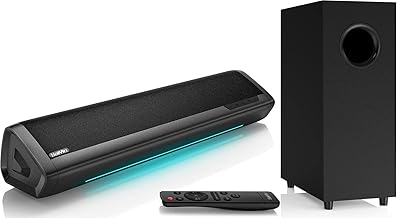
The Saiyin is a soundbar-and-subwoofer system listed for TV and PC use. Its product details name a 5-inch subwoofer, dual bass reflex ports, adjustable bass, and a volume indicator. Listed connections include optical, AUX, and Bluetooth 5.3, giving buyers several ways to connect a compatible source.
- Best for: Buyers who want a compact front-facing speaker arrangement for a computer or TV.
- Why it stands out: Optical, AUX, and Bluetooth input options make it more flexible on connection type than a system described only with a 3.5 mm input.
- Consider: The listed components do not include separate rear surround speakers, so do not select it if physical rear speakers are essential.
Choose the Saiyin if desk or room space favors a soundbar and you want a separate subwoofer. Confirm that your computer or display has a compatible output and that the soundbar’s placement suits your workspace.
Klipsch ProMedia 2.1 Computer Speakers

The Klipsch ProMedia is a 2.1 computer speaker system. That format pairs two main speakers with a subwoofer, making it relevant to PC users who want a dedicated desktop audio setup. It is not a multichannel speaker package with separate rear speakers, so it should be compared with other 2.1 systems rather than treated as a full surround layout.
- Best for: Computer users looking for a conventional 2.1 speaker system for everyday desktop listening.
- Why it was selected: It is specifically identified as a computer speaker system, making its intended use a direct fit for the keyword.
- Consider: The listed product information does not specify connection details here. Check the product listing and your computer’s available outputs before purchasing.
Choose the ProMedia if a subwoofer-based computer setup is more important than separate surround channels. Look elsewhere if you need a clearly stated 5.1- or 7.1-channel package with speakers placed behind the listener.
Logitech Z313 2.1 Speaker System

The Logitech Z313 is a 2.1 multimedia system with a subwoofer, full-range audio, and a 3.5 mm input. Its listed compatible devices include PCs, game consoles, TVs, smartphones, tablets, and music players. This broad device list makes it a practical option for users who want one wired input for several kinds of equipment.
- Best for: Buyers seeking a straightforward 2.1 system for a computer and other devices with a 3.5 mm connection.
- Why it stands out: The listed 3.5 mm input and named device compatibility make its intended connection style clear.
- Consider: The Z313 is not listed as having separate rear speakers, so it does not provide a physical multichannel surround layout.
Choose this Logitech system if simple wired connectivity matters more than surround placement. Check that your source has a compatible 3.5 mm output, especially if you plan to use it with more than one device.
Cyber Acoustics CA-3610 2.1 Speakers

The Cyber Acoustics CA-3610 is a 2.1 multimedia speaker system with a subwoofer. Its product name lists 62 watts of peak power and identifies music, movies, and games as intended uses. Those details make it a candidate for buyers who want a computer-oriented system with a subwoofer for varied media.
- Best for: Desktop listeners who want a 2.1 system for music, films, and gaming.
- Why it was selected: The product is explicitly described as a multimedia speaker system with a subwoofer and names common computer entertainment uses.
- Consider: The listed details do not identify separate surround speakers or connection types. Verify both in the product listing if those are deciding factors.
Choose the CA-3610 if the stated 2.1 format and peak-power specification align with your needs. Avoid assuming that “for games” means it has discrete rear channels; the supplied product description identifies it as a 2.1 system.
Buying Guide: How to Choose Computer Surround Speakers
Do you need true multichannel surround sound?
Start by deciding whether you want sound from speakers positioned around the room or simply stronger desktop audio. A 2.1 system gives you two main speakers and a subwoofer. It can suit games, music, and movies, but it is not the same physical layout as a system with dedicated rear or side speakers.
For separate surround speakers, look for an explicitly stated multichannel configuration and verify which speakers are included. In this selection, the ULTIMEA Poseidon M100 is the system that lists a 7.1-channel setup and two wireless surround speakers. The other listed systems are described as 2.1 products or as a soundbar with a subwoofer.
Which connection should you check first?
Match the system’s inputs to the outputs your computer can provide. The Logitech Z313 lists a 3.5 mm input. The Saiyin lists optical, AUX, and Bluetooth 5.3. The ULTIMEA product name lists HDMI eARC and Bluetooth 6.0. For the Klipsch and Cyber Acoustics products, check the current listing for connection details before ordering because those details are not included in the supplied descriptions.
Do not assume a connection will work just because a system is marketed for computers or TVs. Check the computer, monitor, or audio interface documentation. If you plan to connect a game console or use a display as the audio source, confirm which device will send audio to the speaker system.
Is a soundbar or a pair of desktop speakers better?
A soundbar can reduce the number of front speaker units on a desk, while separate desktop speakers can be positioned on either side of a monitor. A soundbar-and-subwoofer setup may suit a compact station or a computer that also serves as a TV source. Separate surround speakers require additional placement space, even if some components connect wirelessly.
Measure the available desk or room space and consider where the subwoofer can sit. Also consider cable routing and the distance between the listening position and each speaker. Wireless connections can reduce some cable runs, but they do not remove the need to plan speaker placement and power access.
What does the subwoofer add?
A subwoofer is a dedicated component in each of the listed 2.1 systems and in the named soundbar packages. It is intended to handle low-frequency audio separately from the main speakers. A subwoofer does not create surround channels by itself, so compare channel layout and speaker count separately from bass-related features.
If you share a room or use a small desk, consider how much space the subwoofer will occupy and where you can place it. Product names may list features such as bass adjustment or reflex ports, but those details do not replace checking the full specifications for dimensions and controls.
How should you compare the five systems?
- For separate surround speakers: Start with the ULTIMEA system, which lists two wireless surround speakers and a 7.1-channel configuration.
- For a soundbar form factor: Compare the Saiyin and ULTIMEA options, paying attention to their listed inputs and included components.
- For a basic 2.1 desktop setup: Compare Logitech, Klipsch, and Cyber Acoustics by connection needs, subwoofer format, and the information confirmed in each product listing.
- For multiple device types: The Logitech lists compatibility with several device categories, while the Saiyin lists optical, AUX, and Bluetooth inputs.
- For gaming and general media: The Cyber Acoustics description explicitly names music, movies, and games; the other products should be evaluated against your preferred use and setup.
Before buying, confirm the exact model, included speakers, input requirements, and any control features on the product listing. Product descriptions can use “surround” broadly, so rely on the stated channel count and speaker components rather than the label alone.
Frequently Asked Questions
Can a 2.1 computer speaker system provide surround sound?
A 2.1 system has two main speakers and a subwoofer. It can provide stereo audio and bass, but it does not include separate rear speakers for a physical surround layout.
Which listed system includes separate surround speakers?
The ULTIMEA Poseidon M100 product name lists a 7.1-channel system with two wireless surround speakers and a wireless subwoofer.
Which option lists a 3.5 mm input?
The Logitech Z313 product description lists a 3.5 mm input. Check that your computer or audio source has a compatible output.
Which system lists Bluetooth input?
The Saiyin soundbar lists Bluetooth 5.3, and the ULTIMEA Poseidon M100 product name lists Bluetooth 6.0. Verify the connection requirements for your devices before choosing.
Is a soundbar a good choice for a computer desk?
A soundbar can suit a desk when a compact front speaker arrangement is preferred. Check its dimensions, inputs, and whether its included components meet your audio goals. A soundbar with a subwoofer is not automatically a system with separate rear surround speakers.
What should I verify before ordering?
Confirm the input connections, included speaker components, channel configuration, and available placement space. These checks help distinguish a 2.1 desktop system from a multichannel surround setup and reduce the chance of choosing a system that does not connect to your equipment.