
The best surround sound system with wireless satellite speakers depends on your TV setup and how much wiring you can accommodate. The LG S40TR is a straightforward choice with wireless rear speakers and a subwoofer; Bobtot offers four wireless satellites and selectable 5.1 or 2.1 modes; and the ULTIMEA Aura A60 combines Dolby Atmos with rear speakers that pair wirelessly. Roku and Bose systems are better suited to buyers already using compatible products from those brands.
| System | Best For | Wireless Setup Detail |
|---|---|---|
| LG S40TR | Compact soundbar-style surround | Wireless rear speakers and subwoofer |
| Bobtot 1000W | Four separate satellite speakers | Four wireless satellites; 32-foot stated range |
| ULTIMEA Aura A60 | Dolby Atmos and rear surround | Rear speakers pair wirelessly; other speaker connections use cables |
| TCL S65K | Dolby Atmos and DTS:X features | Wireless subwoofer and surround speakers listed |
| Roku Wireless Speakers | Compatible Roku TV or audio owners | Wireless speakers designed for Roku systems |
LG S40TR 4.1-Channel Home Theater Soundbar

The LG S40TR is best for viewers who want a compact soundbar-based system with rear surround speakers and a separate subwoofer. Its listed configuration is 4.1 channels, and LG specifies a wireless subwoofer and wireless rear speakers. That arrangement can reduce the need to run speaker wire from the soundbar to the rear of the room.
Dolby Digital and DTS Digital compatibility are listed for movies, shows, and music. The system also includes AI Sound Pro and LG’s Wow interface, according to the product name. It is a practical choice for buyers who want a simpler system layout rather than a conventional receiver and multiple passive speakers.
- Best for: A living room setup seeking rear speakers with fewer long speaker-wire runs.
- Why it stands out: It combines a soundbar, wireless rear speakers, and a wireless subwoofer in a 4.1-channel system.
- Limitation: The listed configuration is 4.1 channels, not a full 5.1-channel system.
Bobtot Wireless Surround Sound System

Choose the Bobtot system if having four separate wireless satellite speakers is more important than keeping every component in a soundbar-style enclosure. The product lists an 8-inch subwoofer with a built-in receiver, four wireless satellite speakers, and selectable 5.1- or 2.1-channel modes. Its stated wireless speaker range is 32 feet.
The included remote can adjust the volume of individual speakers and the subwoofer, which gives users a way to balance the system around their room. The center speaker connects to the subwoofer using a built-in cable, and the listed center-speaker cable length is 13 feet. The product description says the wireless speakers usually connect automatically when the system is turned on.
- Best for: Buyers who want four wireless satellites and manual control over speaker levels.
- Why it stands out: It offers both 5.1 and 2.1 modes, plus a stated 32-foot wireless range.
- Limitation: The center speaker still requires a cable connection to the subwoofer, so the setup is not entirely wire-free.
ULTIMEA Aura A60 Dolby Atmos System

The ULTIMEA Aura A60 is best for buyers seeking a soundbar system that lists Dolby Atmos and four surround speakers. Its 7.1-channel configuration has three main channels for dialogue and four surround speakers. ULTIMEA describes the result as an immersive sound field with 3D audio effects.
The system uses a mix of connections. The two front surround speakers are wired, while the rear speakers use a rear surround cable and the rear-right speaker pairs wirelessly with the soundbar when powered. This can reduce the need for a long connection back to the soundbar, but it does not mean every speaker is wire-free. The product listing recommends it for rooms measuring 108 to 270 square feet.
- Best for: Buyers who want Dolby Atmos and multiple surround speakers in a soundbar-based system.
- Why it stands out: It combines three main channels, four surround speakers, and wireless pairing for the rear-right speaker.
- Limitation: Front speakers and rear-speaker connections still involve cables, so plan speaker placement before setup.
TCL S65K S Series 5.1 Soundbar System

The TCL S65K is a 5.1-channel soundbar system for buyers interested in Dolby Atmos, DTS:X, and wireless surround speakers. Its product information also lists a wireless subwoofer, Bluetooth music streaming, and AI Sonic Auto Room Calibration. Ray Danz technology is described as creating a broader soundstage.
TCL says the system can connect using a single HDMI cable, which may make the main TV connection simpler. That does not mean the entire setup uses only one cable: the listing also identifies separate wireless surround speakers and a wireless subwoofer. Check the system’s included connection details and your preferred TV connection before choosing it.
- Best for: Viewers seeking a 5.1 soundbar system with Dolby Atmos and DTS:X listed.
- Why it stands out: It combines spatial audio formats, wireless rear speakers, and room-calibration features.
- Limitation: The supplied product details do not specify the wireless range or exact surround-speaker connection arrangement.
Roku Wireless Speakers, Set Of Two
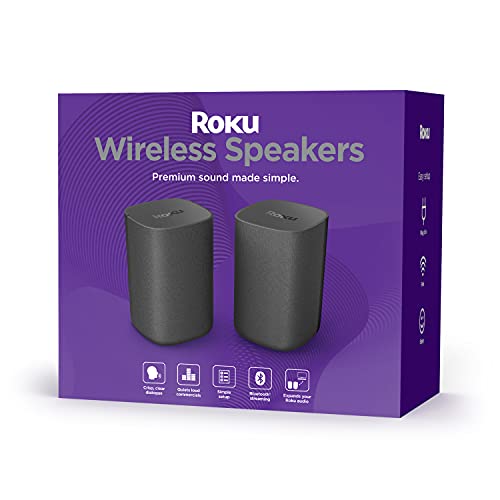
Roku Wireless Speakers are best for people who already have a compatible Roku TV or Roku audio product. Roku says the pair can add cinematic sound to a Roku TV or provide surround sound with a Roku audio system. The listed features include clear dialogue, dynamic bass, high frequencies, and audio-video synchronization.
Compatibility is the deciding factor. The speakers require a Roku TV, Roku Streambar, Roku Streambar Pro, or Roku Smart Soundbar, each sold separately. Roku says they work only with Roku TV or Roku Audio products, and the Roku Streambar SE is not compatible. Choose them for a supported Roku setup, not as a universal wireless satellite-speaker kit.
- Best for: Roku households that want a matching pair of wireless speakers for TV or surround use.
- Why it stands out: The speakers are designed to integrate with supported Roku TV and audio devices.
- Limitation: They require a compatible Roku product and do not work as a general-purpose surround system.
Buying Guide: How To Choose Wireless Satellite Speakers
“Wireless” can describe different parts of a home theater system. It may mean the rear speakers connect to the main soundbar or receiver without a long signal cable, while the speakers still need power cords. Some systems also use cables between speakers. Check the connection layout, not just the wireless label, before deciding whether a product will suit your room.
Do the rear speakers connect wirelessly to the main system?
Look for a clear description of how each speaker connects. LG lists wireless rear speakers, while Bobtot specifies four wireless satellites and a 32-foot range. The ULTIMEA Aura A60 uses a mixed arrangement: wired front surround speakers and a rear connection with wireless pairing for the rear-right speaker. These layouts differ in how much cable must cross the room.
Also check whether wireless speakers require power outlets. Wireless audio connections do not necessarily eliminate power cables. Place the rear speakers near suitable outlets, and confirm that the stated wireless range is adequate for the intended layout. Walls, furniture, and room shape can affect where speakers can practically sit.
How many channels and speakers do you need?
Channel numbers help compare system designs, but they do not alone guarantee a particular listening experience. A 4.1-channel setup such as the LG S40TR differs from 5.1-channel systems such as the TCL S65K and Bobtot. The ULTIMEA Aura A60 lists 7.1-channel virtual surround and four surround speakers. Compare the actual speaker count and connection plan as well as the channel label.
A system with dedicated rear speakers can place sound behind the listening position. A soundbar-only system may use virtual processing instead. If physical rear speakers are a priority, confirm that the product package includes them and review whether they connect wirelessly, by cable, or through a combination of both.
Should you prioritize Dolby Atmos or other formats?
Choose a system based on the formats you want and the content you watch. The TCL S65K lists Dolby Atmos and DTS:X, and the ULTIMEA Aura A60 lists Dolby Atmos. The LG S40TR lists Dolby Digital and DTS Digital compatibility. These format names are not interchangeable, so compare the product’s stated support with the audio formats available from your TV, streaming services, and other devices.
Room layout and speaker placement also matter. A system’s format support does not by itself establish how well it will fit a particular room. Read the connection and placement information, and check any room-size guidance supplied by the manufacturer.
Will the system work with your TV or existing equipment?
Check the available connections before buying. HDMI is listed for the TCL system, while the Roku speakers require a compatible Roku TV or Roku Audio product. The Roku speakers are not universal satellites and are not compatible with Roku Streambar SE. If you already own a soundbar or receiver, confirm whether the new speakers are designed to pair with that exact system.
Do not assume that wireless speakers from different brands can be mixed. The supplied product details describe brand-specific connections for Roku and Bose systems, and compatibility can depend on the main device. For a new soundbar-based kit, use the manufacturer’s stated pairing and connection instructions.
How much setup and cable management are acceptable?
Count the cables you will need at the front and rear of the room. The LG system is a soundbar arrangement with wireless rear speakers and a wireless subwoofer. The Bobtot center speaker connects to its subwoofer by cable. The ULTIMEA Aura A60 has wired front surround connections and a rear cable arrangement, despite wireless pairing for one rear speaker.
For a clean installation, measure the distance between the TV, subwoofer, rear speakers, and available outlets before choosing a system. A wireless connection can reduce long signal-cable runs, but speakers may still need power and some kits require inter-speaker wiring.
Frequently Asked Questions
Are wireless satellite speakers completely cable-free?
No. “Wireless” often describes the audio connection between speakers and the soundbar or receiver. Speakers may still need power cords, and some systems use cables between speakers. Review the individual product’s wiring details before purchase.
Which system in this list has four wireless satellite speakers?
The Bobtot system lists four wireless satellite speakers and a stated 32-foot wireless range. Its center speaker connects to the subwoofer with a cable, so the complete system is not entirely wire-free.
Can Roku Wireless Speakers work with any TV?
No. Roku says these speakers work only with Roku TV or Roku Audio products. They require a compatible Roku TV, Streambar, Streambar Pro, or Smart Soundbar, and they are not compatible with Roku Streambar SE.
Which listed systems include Dolby Atmos?
The TCL S65K lists Dolby Atmos and DTS:X. The ULTIMEA Aura A60 lists Dolby Atmos. Check the rest of each system’s connection and speaker details as well as its audio-format support.
Do wireless rear speakers need to be near a power outlet?
They may. Wireless audio does not necessarily mean battery-powered operation. Check the product’s setup instructions and plan for power access where the rear speakers will be placed.
Is a 5.1 system always better than a 4.1 system?
Not automatically. Channel count is one comparison point, but speaker placement, connection type, room layout, and desired audio formats also matter. Compare the complete configuration against your space and priorities.