
To transmit audio to multiple Bluetooth headphones, connect a dual-link Bluetooth transmitter to your TV, computer, or other audio source and pair both headphones with it. The 1Mii Bluetooth 5.3 transmitter is best for users who want optical, AUX, or RCA inputs; the SOOMFON Bluetooth 5.3 transmitter is a strong fit for TV viewers who value a status display; and the MEE audio Connect supports several TV connection options, including optical. Check your source’s audio output and both headphones’ codec support before choosing.
| Product | Best suited for | Standout detail |
|---|---|---|
| 1Mii Bluetooth 5.3 Transmitter, B0C9J2TQ3R | TVs with multiple audio outputs | Optical, AUX, and RCA inputs |
| SOOMFON Bluetooth 5.3 Transmitter, B09SZ1R6LV | TV viewers who want a display | LCD status indicator and automatic reconnection |
| Monster 2-in-1 Bluetooth Adapter | People who also need receiver mode | TX and RX modes |
| 1Mii Bluetooth 5.3 Transmitter Receiver, B08G8Q7NXZ | TV, travel, and gaming use | Transmitter and receiver modes with aptX Low Latency |
| MEE audio Connect | TVs with different audio outputs | 3.5mm, RCA, and optical connections |
1Mii Bluetooth 5.3 Transmitter With Multiple Inputs

Best for: Households connecting two Bluetooth headphones to a TV or PC that has optical, AUX, or RCA audio output. Its listed inputs give buyers more connection options than an AUX-only adapter.
This 1Mii transmitter uses Bluetooth 5.3 and has two pairing buttons for connecting two headphones. Its volume buttons let users adjust volume from the transmitter. It supports aptX Adaptive, aptX Low Latency, and aptX HD, but codec support on the headphones matters: the receiving devices need compatible codecs to benefit from those options.
Why it was selected: It combines dual-headphone pairing, multiple input types, and several audio codecs in one transmitter. That makes it a flexible choice for a shared TV-listening setup.
Keep in mind: The product is listed as incompatible with hearing aids. When two devices connect together, codec behavior can change, and mismatched codec support may cause noticeable audio delay.
SOOMFON Bluetooth 5.3 TV Transmitter

Best for: TV viewers who want to pair two headphones and check connection status on a visible LCD display. It is also suited to users who want the transmitter to reconnect to previously paired devices automatically.
The SOOMFON supports dual connections for two Bluetooth headphones or speakers at the same time. After initial pairing, the product description says it can reconnect to two devices automatically. Its LCD status indicator makes operating status visible, and built-in volume controls can help when connected headphones lack their own volume controls.
The listed wireless range is 10 to 30 meters in unobstructed conditions and 10 to 20 meters when obstacles are present. Actual performance can depend on the room and the devices in use.
Why it was selected: The display, dual pairing, volume controls, and automatic reconnection address common shared-listening needs.
Keep in mind: For an optical connection, the instructions specify setting the TV’s audio output format to PCM. Confirm that setting before troubleshooting missing or incorrect audio.
Monster 2-In-1 Bluetooth Transmitter And Receiver

Best for: Buyers who want one adapter for sending TV audio to headphones and receiving audio from a phone for wired speakers. Its TX and RX modes make it more versatile than a transmitter-only model.
In transmitter mode, this adapter can send audio to up to two Bluetooth headphones or speakers, subject to compatibility. In receiver mode, it can bring Bluetooth audio to wired speakers or other compatible equipment. The listed connection options include analog and digital audio, and the product description specifies a 33-foot range.
The adapter is also described as supporting low-latency audio for watching TV, gaming, and music. The manufacturer notes that performance may vary with the environment and connected devices. Similar Bluetooth versions and audio codecs are recommended for more stable dual-device use.
Why it was selected: It covers two-way audio use and offers simultaneous pairing for buyers who may want more than TV-to-headphone transmission.
Keep in mind: Dual-device performance depends on compatibility. Check both headphones’ Bluetooth versions and codecs rather than assuming identical timing or sound behavior.
1Mii Bluetooth Transmitter Receiver For TV And Travel

Best for: People who want a dual-mode adapter for sources such as a TV, computer, or airplane audio system, and who may also want to stream phone audio to a wired stereo.
In TX mode, this 1Mii device sends audio from a non-Bluetooth source to Bluetooth headphones. In RX mode, it receives audio from a phone and sends it to wired speakers, a car stereo, or another compatible audio system. Bluetooth 5.3 is listed, with backward compatibility for earlier Bluetooth versions.
The product supports aptX Low Latency and describes reduced audio-video delay for compatible setups. For low-latency results, the headphones also need to support the relevant codec. This can matter when watching movies or playing games, where audio that falls behind the picture can be distracting.
Why it was selected: It combines two-way use, dual-headphone transmission, and a specific low-latency feature for users who want one adapter for home and travel.
Keep in mind: Codec support must match between the transmitter and receiving headphones. A low-latency transmitter alone cannot guarantee low delay with every headset.
MEE Audio Connect Bluetooth Transmitter
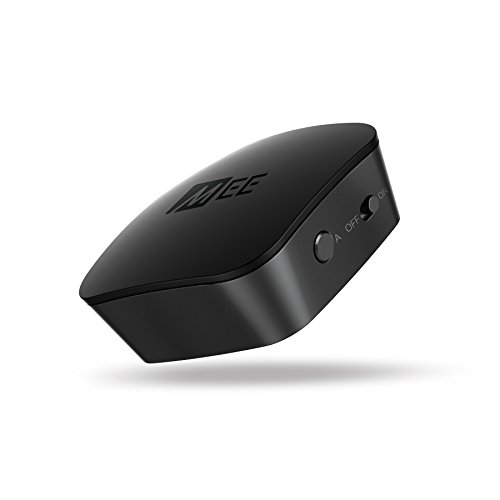
Best for: TV owners who need a transmitter with several audio-input choices, including 3.5mm, RCA, and optical. It is designed to stream TV audio to as many as two wireless headphones or speakers.
The MEE audio Connect supports Qualcomm aptX Low Latency, which is intended to reduce lip-sync issues when the connected headphones also support the technology. The multiple connection options can help when a TV has a different output from the one used by another source in the home.
Why it was selected: It combines dual-device streaming with a broad set of listed TV inputs and a clearly stated low-latency feature. That makes it a practical option for shared viewing when connection type is an important decision.
Keep in mind: The product description says it does not convert Dolby Digital over optical. Set the TV’s audio output to PCM when using optical, and verify that the headphones support aptX Low Latency if minimizing delay is a priority.
Buying Guide: How To Choose A Bluetooth Transmitter For Two Headphones
A Bluetooth transmitter sends audio from a source device to wireless headphones. To listen on two headsets at once, the transmitter must support dual-link or dual-device pairing in transmit mode. A standard Bluetooth transmitter that pairs with only one headphone will not meet that need, even if the TV or computer has Bluetooth built in.
Does your TV have the right audio output?
Check the TV’s audio-output ports before choosing an adapter. Common connections in this product selection include 3.5mm AUX, RCA, and optical digital audio. A transmitter must accept the output available on the source, either directly or with an appropriate connection method. If using optical, check the transmitter’s instructions and the TV’s audio settings; some models in this list specify PCM output.
For a computer, check whether it has a usable analog audio output or another supported connection. For airplane entertainment, the source may use a headphone jack, so an AUX-compatible transmitter is often the relevant format. Do not assume every device uses the same audio connection.
Will two headphones play at the same time?
Look for explicit support for pairing two headphones or speakers simultaneously. A transmitter may remember several devices but still send audio to only one at a time; that is different from dual-link playback. The products listed here describe support for two connected devices in transmitter mode, though the exact setup and compatibility can differ by model.
For the most predictable results, pair the headphones one at a time by following the transmitter’s instructions. If one headset connects but the second does not, clear or reset pairings as directed by the manufacturer, then retry. Keep both headphones charged and within range during initial pairing.
How important is audio delay?
Delay can be noticeable when watching dialogue or playing games. A transmitter that supports aptX Low Latency or another low-latency codec may help, but the headphones must support the matching codec too. When two headphones are connected, the transmitter may use a different codec or operating mode than it uses for one headset.
If the two listeners notice different delays, check whether both headphones support the same codec. Product descriptions may warn that dual-device connections or codec mismatches affect latency. For general listening, small timing differences may matter less than they do for television dialogue.
Should you buy a transmitter-only or 2-in-1 model?
A transmitter-only model is designed to send audio from a TV or other source to Bluetooth headphones. It may be the simpler choice if shared listening is the only goal. A transmitter-receiver model adds RX mode, which can receive audio from a phone and send it to wired speakers, a car stereo, or another compatible system.
Choose a 2-in-1 adapter if you expect to use both directions. Otherwise, compare the transmitter’s input types, dual-pairing controls, display, and codec support instead of paying attention to mode count alone.
What should you check about range and controls?
Wireless range is affected by walls, furniture, other wireless devices, and the placement of the transmitter. A listed range is not a guarantee of the same performance in every home. Keep the transmitter near the listening area and avoid placing it behind equipment or inside a closed cabinet when possible.
Controls can make shared listening easier. A screen can show pairing or connection status, while transmitter-side volume buttons may help when headphones do not offer convenient volume controls. Consider whether automatic reconnection is useful if the same pair of headphones will be used regularly.
How can you avoid setup problems?
- Confirm that the transmitter supports simultaneous audio to two Bluetooth headphones, not just pairing memory.
- Match the transmitter’s input to the TV, computer, or other source output.
- Use the audio format specified by the product instructions, such as PCM for an optical connection when required.
- Check codec support on both headphones if low latency is important.
- Test both headsets together before relying on the setup for a movie or trip.
Bluetooth dual-link setups are convenient, but they do not guarantee identical volume, sound, or timing on both headsets. Differences can come from the headphones, codec support, and the transmitter’s handling of two simultaneous connections. Select a model based on your source connections and listening priorities, then verify its operation with the actual headphones you plan to use.
Frequently Asked Questions
Can I connect two Bluetooth headphones to one TV?
Yes, if the TV’s audio is sent through a Bluetooth transmitter that supports simultaneous dual-device playback. Connect the transmitter to the TV’s audio output, then pair each headphone according to the transmitter’s instructions.
Can I use the TV’s built-in Bluetooth instead?
Possibly, but support varies by TV. Check the TV manual for simultaneous connections to two Bluetooth audio devices. If it supports only one headphone at a time, a dual-link transmitter may provide another option through a compatible audio output.
Will two headphones have the same audio delay?
Not necessarily. Delay can vary with each headphone’s codec support and the transmitter’s dual-device mode. For synchronized TV audio, check codec compatibility for both headsets and the transmitter.
Do both headphones need to be the same model?
Not always, but matching Bluetooth versions and audio codecs can help with compatibility and stable performance. Check the transmitter’s instructions and the headphone specifications before pairing two different models.
Why is there no sound over an optical connection?
Check that the optical cable is connected to the TV’s audio output and that the transmitter is set to the correct input. Some transmitters require the TV’s digital audio format to be set to PCM rather than Dolby Digital or another format.
Can a Bluetooth transmitter send audio to two speakers instead?
Some dual-link transmitters support two Bluetooth speakers as well as two headphones. Check the product’s description for dual-device support and confirm that the connected speakers are compatible.