
You can turn a stereo with an available RCA or 3.5mm audio input into a Bluetooth receiver by connecting a wireless audio adapter and pairing it with a phone, tablet, or computer. The Esinkin adapter is a straightforward choice for basic music streaming, while the KAIY models add features such as NFC, optical audio, or USB playback. The 1Mii options are better suited to buyers prioritizing supported audio codecs and extra sound controls.
| Product | Best For | Notable Connection Options |
|---|---|---|
| Esinkin Bluetooth Audio Adapter | Simple, button-based setup | RCA and 3.5mm |
| KAIY AUX RCA Bluetooth Adapter | NFC pairing and TF card playback | RCA and 3.5mm |
| KAIY Bluetooth 5.4 Receiver | Optical input and USB playback | Optical, RCA, and 3.5mm |
| 1Mii B06T3+ | Codec options and volume control | RCA and 3.5mm |
| 1Mii B06+ | aptX options and 3D audio control | RCA and 3.5mm |
Esinkin Bluetooth Audio Adapter

The Esinkin Bluetooth Audio Adapter adds wireless music streaming to a home stereo or speaker system with a 3.5mm or RCA connection. Pair a phone or tablet with the adapter, then play audio through the connected system. A large Bluetooth button handles connection and disconnection, and the listed setup instructions describe holding the button for three seconds to turn the device on or off.
Best for: Buyers who want a simple adapter for an existing system and prefer a physical pairing button. It was selected because it supports the common RCA and 3.5mm analog inputs and can automatically reconnect to a previously paired device.
The listed indoor wireless range is 30–40 feet without obstacles. Actual range can vary with walls and other obstructions. Limitation: The listed features focus on analog audio connections; choose another model if you need an optical input or USB music playback.
KAIY AUX RCA Bluetooth Adapter

This KAIY adapter is designed to stream audio wirelessly to a home stereo, older receiver, or other wired audio system. Its listed connections include RCA and 3.5mm jacks. It also supports TF card music playback, giving buyers a playback option beyond streaming from a paired device.
Best for: Buyers who want NFC quick connection or the option to play music from a TF card. The NFC feature is intended to simplify connection with an NFC-enabled phone or tablet; NFC availability and behavior depend on the source device.
Choose this model if its extra playback and connection options match your setup. Limitation: The product information does not specify a wireless range or Bluetooth version, so buyers who need those details should check the current listing before choosing it.
KAIY Bluetooth 5.4 Receiver With Optical Audio

This KAIY receiver is a flexible choice for stereo systems that accept digital optical audio or analog RCA and 3.5mm connections. It streams from a phone, tablet, or laptop to a wired audio system. The listed features also include USB flash drive playback, which can be used without a Bluetooth connection.
Best for: Buyers who need an optical audio connection, want multiple output choices, or value USB playback. The listed Bluetooth version is 5.4, and the product description gives a 33-foot connectivity range.
Check the stereo’s available input before buying, then select the corresponding connection. Limitation: The stated range is a product specification, not a guarantee for every room; obstacles and the placement of the devices may affect the connection. The “zero audio delay” wording is a product claim, so do not assume it guarantees synchronization in every setup.
1Mii B06T3+ LDAC Bluetooth Receiver
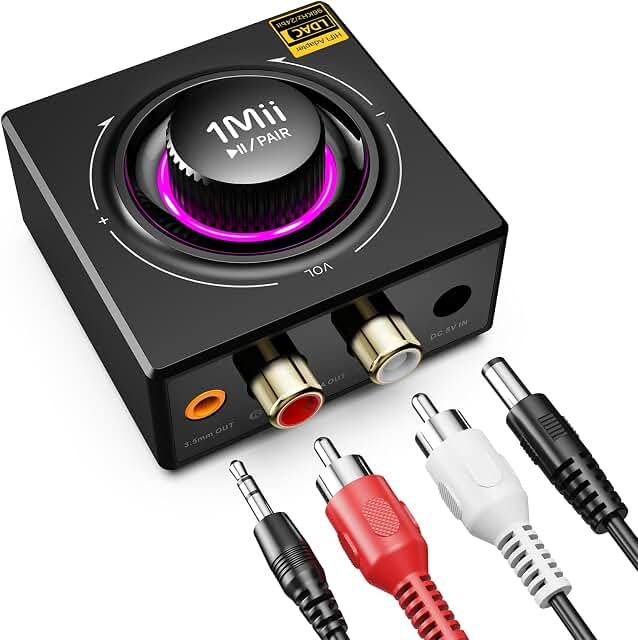
The 1Mii B06T3+ connects to a stereo, wired speakers, or a car stereo using RCA or 3.5mm audio. Its listed codecs include LDAC, aptX HD, and aptX Low Latency. A volume-control knob provides a physical way to adjust level at the receiver.
Best for: Buyers whose source device supports one of the listed codecs and who want to retain an existing wired audio system. It was selected for its combination of common analog outputs, physical volume control, and several named codec options.
Codec support must match on both the receiver and the sending device. The listing specifically notes that LDAC requires a source device that supports LDAC; aptX HD and aptX Low Latency likewise require compatible source support to use those formats.
Limitation: Buyers seeking optical connectivity should choose a model with an optical port instead, as the listed B06T3+ connections are RCA and 3.5mm.
1Mii B06+ Bluetooth Receiver

The 1Mii B06+ adds Bluetooth streaming to an existing home stereo, amplifier, or powered speakers. It connects through RCA or 3.5mm audio and supports Bluetooth 5.3, aptX HD, aptX Adaptive, and a selectable 3D audio effect. The listing describes plug-and-play setup and includes a USB power adapter.
Best for: Buyers who want a receiver-only adapter with aptX options and a button-controlled 3D audio mode. It was selected because its listed features suit music streaming through existing equipment without requiring replacement of the stereo.
To use aptX HD or aptX Adaptive, the source device must support the relevant codec. The product’s 3D audio mode can be switched on or off using its 3D button.
Limitation: This model is a Bluetooth receiver only, not a transmitter. It sends audio from a Bluetooth source to a wired system; it is not intended to send sound from a stereo to Bluetooth headphones.
Buying Guide: How To Choose A Bluetooth Receiver For A Stereo
Which audio input does your stereo have?
Start by checking the back or front panel of the stereo for an available audio input. RCA inputs usually use a pair of red and white connectors. A 3.5mm input is a small round jack. Optical inputs use a digital audio connection and are not interchangeable with analog RCA or 3.5mm inputs.
Match the adapter’s output to an input on the stereo. For example, a receiver with RCA outputs can connect to an available stereo RCA input. If the stereo has only an optical input, choose an adapter that specifically lists optical connectivity, such as the KAIY Bluetooth 5.4 receiver in this selection.
Do you need Bluetooth streaming or a transmitter?
A Bluetooth receiver accepts audio from a phone, tablet, or computer and sends it to a wired stereo. That is the right device type when the goal is to turn a stereo into a Bluetooth receiver for music playback. A transmitter does the reverse: it sends audio from a wired source to Bluetooth headphones or speakers. Check the product description carefully, especially if you want both functions. The 1Mii B06+ is identified as a receiver only.
Are extra connection methods useful for your setup?
Basic adapters use a wired audio connection to the stereo and Bluetooth for the incoming music. RCA and 3.5mm connections cover many analog setups, while optical can suit systems with a digital input. Some models list alternative playback methods: the KAIY AUX RCA adapter supports TF card playback, and the KAIY Bluetooth 5.4 receiver supports a USB flash drive. These features are useful only if they match the way you plan to play audio.
Should you prioritize a particular audio codec?
Codec features matter only when the source device also supports the codec. The 1Mii B06T3+ lists LDAC, aptX HD, and aptX Low Latency, while the 1Mii B06+ lists aptX HD and aptX Adaptive. If the phone or computer does not support a listed codec, do not assume the connection will use it. For basic streaming, connection compatibility and ease of setup may matter more than codec names.
How should you compare setup and wireless range?
Consider how you will pair devices and where the receiver will sit. The Esinkin uses a prominent button and lists automatic reconnection to a previously paired device. The KAIY AUX RCA model lists NFC quick connection for compatible devices. The KAIY Bluetooth 5.4 model states a 33-foot range; the Esinkin lists 30–40 feet indoors without obstacles. Treat ranges as reference specifications because walls and placement can affect wireless performance.
What should you check before ordering?
- Confirm that the stereo has a free input matching the receiver’s output.
- Check whether the receiver needs a power connection and whether its supplied accessories suit your setup.
- Decide whether you need analog RCA, 3.5mm, optical, USB playback, or TF card playback.
- Verify codec support on the phone, tablet, or computer if high-resolution or low-latency audio is important.
- Think about receiver placement and the distance between it and the Bluetooth source.
- Make sure you are buying a receiver, not a transmitter, if the goal is phone-to-stereo streaming.
Frequently Asked Questions
Can I add Bluetooth to an old stereo?
Yes, if the stereo has an available audio input that matches the Bluetooth receiver’s output. Connect the adapter to the stereo, power it as directed, and pair it with a Bluetooth source device.
How do I connect a Bluetooth receiver to a stereo?
Use a compatible RCA, 3.5mm, or optical connection between the receiver and a stereo input. Select that input on the stereo, power the adapter, then pair a phone, tablet, or computer with it.
Will a Bluetooth receiver work with any stereo?
It will work only when the receiver can connect to an available input on the stereo. Check the input type and the adapter’s listed outputs before choosing a model.
Can a Bluetooth receiver send stereo audio to wireless headphones?
Usually not. A receiver takes Bluetooth audio from a source and outputs it to wired audio equipment. Sending audio from a stereo to Bluetooth headphones generally requires a Bluetooth transmitter.
Does my phone need to support aptX or LDAC?
Yes, if you want to use those codecs. The source device and receiver must both support the relevant codec. Otherwise, the connection will not use that codec.
Can I keep using my stereo’s regular wired sources?
Yes, provided the Bluetooth adapter is connected to a separate available input. Switch the stereo’s input selection when you want to use the Bluetooth receiver or another source.