
If you need a CD player for a car without a built-in drive, choose a USB car player only after checking that your stereo supports its playback format and connection type. For a player that may also connect to a TV, the ENVYCLOUD model is the clearest match in this list because its supplied description names TV use. The DBPOWER portable DVD player is a better fit for passengers who want a screen and disc playback. The other options focus mainly on connecting a CD player to a vehicle stereo.
| Product | Best For | Connection or Feature |
|---|---|---|
| ENVYCLOUD Portable Car CD Player | Car use and stated TV compatibility | USB/AUX |
| Jupiter USB CD Player | Compatible car stereos with USB | USB; WAV support required |
| DBPOWER Portable DVD Player | Travel viewing and disc playback | Screen, battery, car charger |
| Rechargeable Portable CD Player | Personal listening on the road | FM transmitter and headphones |
| Portable USB CD Player | Car stereos with supported connections | USB or Bluetooth decoder |
ENVYCLOUD Portable Car CD Player

The ENVYCLOUD is a compact external CD player intended for use with car audio systems and other listed devices, including laptops, computers, and TVs. Its description says it connects through USB or AUX and is designed for vehicles without a built-in CD player. That makes it the most direct match for shoppers looking for one CD player that may serve more than one setting.
- Best for: Drivers who want a small external player and buyers who also want a model whose description mentions TV use.
- Why it was selected: The listed features cover both car stereo connections and TV compatibility, and the compact design is described as easy to store.
- Controls: The product description claims touchscreen and steering-wheel control support when connected to a car system.
Limitation: The listing does not specify TV connection requirements or explain which TV models support playback. Check the available ports and instructions before buying, and confirm the car stereo recognizes the player.
Jupiter USB CD Player for Cars

The Jupiter player connects to a car stereo through USB. Its listed operation is straightforward: connect the player, insert a CD, locate the USB drive on the stereo, and select a track. An extension cable is included for flexible placement, and the supplied USB-A to USB-C adapter gives buyers two listed connection options.
- Best for: Drivers whose car stereo has a USB port and can play WAV files.
- Why it was selected: The product description clearly states its format requirement and explains how tracks appear through the car stereo.
- Connection note: It is described as compatible with Android and non-Android stereos, including some factory systems, provided they support WAV playback.
Limitation: USB alone does not guarantee compatibility. The stereo must support playing WAV files, so check the vehicle manual or stereo specifications before choosing this model. The listing says AUX use requires a decoder for louder, clearer sound, so do not assume AUX is a direct connection.
DBPOWER Portable DVD Player With Screen
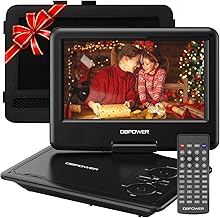
The DBPOWER is a portable DVD player with a 9-inch swivel screen, a built-in rechargeable battery listed for up to five hours, and support for CD, DVD, SD card, and USB media. The name also lists a remote control, a car charger, a power adapter, and a car headrest. Unlike a simple external CD drive, it has its own screen for viewing supported video discs.
- Best for: Passengers who want a portable screen for travel and want a device that supports both CDs and DVDs.
- Why it was selected: Its screen, rechargeable battery, and listed car accessories make it the most viewing-oriented product in this selection.
- Useful distinction: It is a portable DVD player, not a USB CD drive that depends on the vehicle stereo for playback.
Limitation: The supplied product information does not state that it connects to a TV or plays CD audio through a car stereo. Confirm the specific playback and connection details you need before purchase.
Rechargeable CD Player With FM Transmitter

This portable Discman-style CD player is listed with a rechargeable battery, up to 20 hours of playtime, an FM transmitter, headphones, and USB MP3 player functionality. It is a personal listening option rather than a dedicated external drive designed to appear as a USB source on a vehicle stereo.
- Best for: Buyers who want a rechargeable, portable player for listening with headphones or using the listed FM transmitter.
- Why it was selected: Its battery-powered design offers an alternative to USB-powered car CD drives, and the FM transmitter is a listed way to use it in a vehicle audio setting.
- Comparison: Choose this if portability and personal listening matter more than direct USB integration with the car stereo.
Limitation: The supplied information does not explain the FM transmitter’s setup, supported radio bands, or how it connects to a particular car. Check the product instructions and local requirements before relying on that feature.
Portable USB CD Player With Dual Connection

This external player is designed for vehicles without built-in CD drives. Its listed features include a direct USB connection for car stereos that support WAV files, plus a Bluetooth decoder for other audio setups. The extended cable is intended to make it easier to place the player in a center console or glove box.
- Best for: Drivers who want a compact external player and have checked whether their stereo supports WAV over USB or can use the listed decoder.
- Why it was selected: The product description identifies two connection approaches and includes anti-skip and resume-playback features.
- Playback features: It is described as remembering the last track and resuming playback after the car restarts.
Limitation: The direct USB method depends on WAV support in the stereo. The listing does not establish that every car audio system will work, so verify the connection method for your specific vehicle before ordering.
Buying Guide: How to Choose a CD Player for a TV or Car
Does your car stereo support USB CD playback?
Start by checking the stereo manual, manufacturer specifications, or menu options. A USB port may be intended only for charging or for playing files from a flash drive. It does not automatically mean the stereo can control an external CD player. For the Jupiter and the dual-connection portable USB model, the supplied descriptions specify WAV support as a condition for direct USB playback.
Confirm how the stereo will recognize the device and whether its track list will appear on the display. If the product needs a decoder or another connection method, make sure that method is explained in the listing and supported by your audio system.
Do you want to play CDs on a TV?
TV compatibility is not the same as car stereo compatibility. A car CD player may use a USB data connection that a TV does not recognize as a disc player. Of these products, ENVYCLOUD explicitly lists TV use, but its supplied details do not identify the required TV port or supported models. Contact the seller or check the product instructions if TV playback is essential.
The DBPOWER has a built-in screen and supports CDs and DVDs, but the supplied information does not say that it connects to a separate TV. Choose it for its own portable display rather than assuming it will serve as an external TV drive.
Would a portable player or an external car drive suit you better?
An external USB CD player is intended to send audio to a compatible car stereo. It can be a practical choice when you want to use the vehicle’s speakers and controls, but compatibility depends on the stereo. A rechargeable portable CD player is more self-contained for personal listening and may use headphones or a listed transmitter instead.
A portable DVD player with a screen is a different category. It is better suited to passengers who want to watch supported video discs or use the built-in display. Compare the device type with your main task before focusing on accessories or portability.
Which connection details should you verify?
- USB port type: Check whether your vehicle has USB-A, USB-C, or both. The Jupiter listing includes a USB-A to USB-C adapter; do not assume that other models include one.
- Audio format support: Check whether the stereo supports WAV playback if the player requires it.
- AUX requirements: Confirm whether the player connects directly through AUX or needs a decoder.
- TV ports and recognition: Check the TV’s available inputs and whether it can recognize the specific player.
- Placement: Consider cable length and whether the player can be stored securely in a console or glove box.
Is anti-skip or resume playback important?
Anti-skip features can matter when using a portable disc player in a moving vehicle, while resume playback can be useful for audiobooks or longer listening sessions. The Jupiter listing mentions anti-skip and resume memory. The dual-connection portable USB player also lists anti-skip and track-resume features. These claims do not replace checking stereo compatibility, and the supplied information does not describe performance in every vehicle or road condition.
What should you compare before buying?
| Need | What to Check |
|---|---|
| Car stereo playback | USB data support, WAV compatibility, AUX or decoder requirements |
| TV use | Explicit TV compatibility and the connection method required |
| Personal listening | Battery life listed by the seller, headphones, and transmitter details |
| Passenger viewing | Built-in screen, disc formats, power options, and included accessories |
| Easy installation | Cable length, adapters, placement options, and the setup instructions |
Frequently Asked Questions
Can I connect any USB CD player to my car?
No. The car stereo must support the type of USB playback the player uses. Check the stereo manual and the player’s format requirements before buying.
Will a car CD player work with a TV?
Not necessarily. A car USB connection may not be recognized by a TV. The ENVYCLOUD listing names TV use, but buyers should confirm the required port and TV compatibility.
Does a portable DVD player play music CDs?
The DBPOWER product information lists support for both CD and DVD. Check its instructions for the specific disc types and playback functions you need.
What is the difference between a USB CD player and a rechargeable Discman?
A USB CD player is intended to connect to a compatible system such as a car stereo. A rechargeable Discman-style player is designed for portable listening and may use headphones or a transmitter.
Do I need a WAV-compatible car stereo?
You need WAV support for direct USB playback on models whose listings specify that requirement. Check the product details and the car stereo manual to confirm compatibility.