
The best wireless TV listener headphones let you hear a show at your own volume without raising the television for everyone else. The LEVN model is best for shoppers who want clearly stated connection choices and low-latency performance; the first model is suited to viewers who value ready-paired operation and a charging dock. The other picks emphasize stereo sound, senior-friendly volume control, or flexible connections. Check your TV’s audio outputs before choosing, since the included transmitter must connect to a compatible port.
| Product | Best suited for | Notable features |
|---|---|---|
| Wireless TV Headphones with Charging Dock | Simple daily listening | Ready-paired, 40mm drivers, up to 100-foot open-area range |
| LEVN Wireless TV Headphones | Multiple connection options | Optical, AUX, RCA, Bluetooth, stated latency under 40ms |
| Wireless TV Headphones, 65-Hour Playtime | Stereo-focused viewing | Optical, AUX, RCA, Bluetooth, stated latency under 40ms |
| Dytole Wireless TV Headphones | Personal volume and dialogue clarity | Vocal enhancement, charging dock, stated range up to 100 feet |
| Wireless TV Headphones with Bluetooth 5.4 | Flexible setup and device connections | Optical, AUX, RCA, Bluetooth, stated range up to 100 feet |
Wireless TV Headphones with Charging Dock

This model is best for viewers who want a straightforward routine for private TV listening. The headset and transmitter dock arrive paired, according to the product details, so users do not need to search for the headphones in the television’s Bluetooth menu each time. The system is intended to reconnect automatically after the base and headphones are turned on.
Its listed features include 40mm drivers, headset volume controls, low-latency audio, and a wireless range of up to 100 feet in an open area. Personal volume adjustment can help one person listen comfortably while others in a shared room keep the television quieter. The dock also provides a dedicated place to store and charge the headset.
Why it was selected: It combines ready-paired operation, personal volume controls, and a transmitter dock, making it a practical option for repeat daily use and for viewers who prefer not to manage Bluetooth settings.
Limitation: The listed range is specified for an open area, so walls and other obstacles may affect real-world coverage. Confirm that your TV has an audio output supported by the transmitter before buying.
LEVN Wireless TV Headphones

LEVN is best for shoppers who want several ways to connect the TV and transmitter. The listed package includes optical, 3.5mm AUX, and RCA audio cables. The product also says Bluetooth can be used if the TV does not have those listed ports, subject to the device’s Bluetooth capability.
The manufacturer lists Bluetooth 5.2, latency under 40ms, and a connection range up to 30 meters or 100 feet. The transmitter setup is described as plug-and-play: connect the audio cables to the TV and transmitter, then power on the system. The headphones are positioned for private listening and adjustable personal volume, including for people who have difficulty hearing TV dialogue.
Why it was selected: Its supplied cable choices and stated setup instructions make it a useful comparison point for households with different TV audio outputs. Choose it if you want a dedicated transmitter rather than relying only on a direct Bluetooth connection.
Limitation: The advertised range is a maximum, and the actual connection can vary with the home layout. Check which audio output your television provides before setup.
Wireless TV Headphones with 65-Hour Playtime
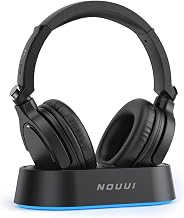
This model is best for viewers who prioritize stereo sound and flexible TV connections. Its product details describe HiFi stereo audio and list optical, 3.5mm AUX, and RCA connections through the transmitter. Bluetooth is also mentioned as an option when a TV lacks those ports, depending on the television’s capabilities.
The listed wireless features include Bluetooth 5.3, latency under 40ms, and a range up to 100 feet or 30 meters. The headphones are intended for watching shows, movies, and sports without relying on the TV’s built-in speakers. The product name also states 65-hour playtime; battery performance can depend on use and operating conditions.
Why it was selected: It is a better fit for buyers comparing multiple audio inputs alongside a stated long-playtime specification. The transmitter-based setup can be useful when a direct Bluetooth connection is not the preferred arrangement.
Limitation: The product description does not establish that every TV supports every connection method. Check your TV’s ports and the supplied setup instructions, particularly if you plan to use Bluetooth.
Dytole Wireless TV Headphones

Dytole is best for viewers who want personal volume adjustment and a product specifically described as enhancing vocals. The product details emphasize dialogue clarity for seniors and people who want to hear speech at their own comfortable level without turning up the room’s main TV speakers.
Its listed features include high-fidelity drivers, a transmitting charging dock, latency under 40ms, and a wireless range up to 30 meters or 100 feet. The manufacturer describes the sound as suitable for dialogue as well as music and movie effects. A dock can make charging and storage more convenient between viewing sessions.
Why it was selected: The emphasis on vocal clarity and individualized volume makes it a relevant option for households where dialogue is harder to follow at the volume preferred by other viewers.
Limitation: The listed 100-foot range is a maximum claim, not a guarantee for every room. Compare the sound controls and transmitter connection with your TV’s available outputs before choosing.
Wireless TV Headphones with Bluetooth 5.4

This model is best for buyers seeking several connection choices and a stated newer Bluetooth version. The product lists optical, 3.5mm AUX, and RCA connections, plus Bluetooth for compatible devices. It is designed to work with a transmitter for TV listening, while Bluetooth may provide another connection route when the source device supports it.
The listed features include HiFi stereo sound, Bluetooth 5.4, low-latency audio, and a range up to 100 feet or 30 meters. The product description says the low-latency design is intended to keep sound and picture closely synchronized for dialogue and sports. A charging base is included according to the product name.
Why it was selected: It offers a broad set of stated connection methods, making it a useful option for shoppers whose TV setup may change or who want to compare transmitter and Bluetooth listening.
Limitation: Bluetooth availability does not mean every television will connect directly in the same way. Confirm your source device supports the intended connection method and check for any audio-output settings that need adjustment.
Buying Guide: How to Choose Wireless Headphones for TV
Which TV audio connection should you check first?
Look at the TV’s audio output ports before selecting a wireless headset. Common options listed for these products are optical audio, 3.5mm AUX, and RCA. The transmitter must connect to an output that is available on your television. A port labeled for input may not serve as an audio output, so check the TV manual or its settings if the labeling is unclear.
Some products also describe Bluetooth as an option. That does not guarantee that every TV supports Bluetooth audio output or that it will connect to a particular headset. If your TV lacks the listed wired outputs, verify its Bluetooth audio capability and the product’s setup instructions before purchase.
Do you need a transmitter and charging dock?
A transmitter-based system sends audio from the TV to the headphones and can avoid repeated Bluetooth pairing steps. Some of the products above describe ready-paired or plug-and-play operation. A charging dock provides a designated place to charge or store the headset, but the exact charging routine depends on the model.
Direct Bluetooth can reduce the need for an additional transmitter when both devices support the required connection. However, compatibility and setup vary by TV. Choose a transmitter system if you prefer a dedicated TV connection; choose Bluetooth only after confirming that the TV can send audio to Bluetooth headphones.
How important is audio delay?
Latency is the delay between the picture and the sound. Noticeable delay can make dialogue look out of sync or reduce the immediacy of sports commentary. Several products in this selection state latency below 40ms or describe their audio as low-latency. These are manufacturer specifications, not a guarantee of identical results in every setup.
Connection method, TV audio processing, and device settings may affect synchronization. If voices do not match lip movements, check the TV’s audio delay or synchronization settings and the headset instructions. Do not assume that a Bluetooth version number alone guarantees a particular latency.
What wireless range is enough for a living room?
Some models list a range up to 100 feet or 30 meters, and one specifies an open-area range. These figures indicate a stated maximum rather than assured coverage through walls, floors, or furniture. For ordinary couch viewing, a shorter distance may be sufficient; moving to another room makes obstacles and layout more important.
Consider where the transmitter will sit and whether you plan to walk around while listening. A longer claimed range may provide more flexibility, but actual performance can vary with the home environment. Keep the transmitter positioned according to the product instructions.
What matters for seniors or people who have trouble hearing dialogue?
Look for controls that make personal volume easy to adjust, along with product descriptions that specifically mention vocal clarity or dialogue enhancement. Headphones let one listener choose a different volume from the room’s TV speakers, which may help households with different listening preferences. They do not replace professional hearing care.
Comfort and ease of operation also matter for frequent use. Check the product’s control layout, charging arrangement, and connection steps. If the headset will be used by someone who prefers simple routines, ready-paired operation or a clearly described plug-and-play setup may be useful.
How should you compare battery and sound claims?
Compare stated battery life only when the manufacturer provides a figure, and remember that actual runtime can vary with volume, use, and other conditions. One product here lists 65-hour playtime. A charging dock may simplify charging, but it does not by itself confirm a specific runtime.
Sound descriptions such as HiFi stereo, balanced sound, or high-fidelity drivers are product claims rather than standardized comparisons. For TV use, consider whether you value dialogue, music and effects, personal volume control, or a combination. Prioritize the features that match your listening needs instead of relying on broad sound labels alone.
Frequently Asked Questions
Can wireless TV headphones let one person listen without raising the TV volume?
Yes. A TV headphone system lets the wearer hear audio through the headset at a personal volume, so the television does not need to be turned up for everyone in the room. The exact effect on the TV speakers depends on the television’s audio settings and connection method.
Will these headphones work with every television?
No single connection method works with every TV. Check whether the television has an optical, 3.5mm AUX, or RCA audio output supported by the transmitter. If using Bluetooth, confirm that the TV can transmit audio to Bluetooth headphones.
Are low-latency headphones useful for watching sports?
They can help keep commentary and other sounds closer to the action on screen. Several products listed here state latency below 40ms or describe low-latency performance, but actual synchronization can depend on the TV, connection, and settings.
Can I walk around while wearing wireless TV headphones?
Yes, within the usable range of the connection. Some listed products claim up to 100 feet or 30 meters, but walls and other obstacles can reduce range. Treat the figure as a stated maximum, not a guaranteed distance in every home.
Do TV headphones help when other people want the room quiet?
They can provide private listening through the headset, allowing the wearer to hear a program without relying on louder TV speakers. This is useful for late-night viewing or shared rooms, although the television’s speaker behavior depends on its audio configuration.