
The best USB 5.1 channel audio adapter depends on the connections and channel support you need. The StarTech.com adapter is the most flexible listed option, with 5.1, 7.1, and stereo output plus several analog and digital connections. Vantec is a straightforward choice for USB 7.1 playback and recording, while SENECESLI and Optimal Shop are options for six-channel 5.1 audio. FANTIA is better suited to buyers who mainly want convenient headphone and microphone jacks.
| Product | Best For | Notable Listed Features |
|---|---|---|
| StarTech.com ICUSBAUDIO7D | Connection flexibility | 5.1, 7.1, and stereo output; analog and digital connections |
| Vantec USB External 7.1 | USB 7.1 playback and recording | USB 2.0; 44.1/48 kHz support |
| SENECESLI 6 Channel Adapter | Basic 5.1 USB audio | Plug and Play; 44/48 kHz support |
| FANTIA Virtual 5.1 Adapter | Convenient headphone and mic access | USB connection; headphone and microphone jacks |
| Optimal Shop 6 Channel Adapter | Analog and digital recording options | Six-channel analog playback and SPDIF functions |
StarTech.com 7.1 USB Audio Adapter
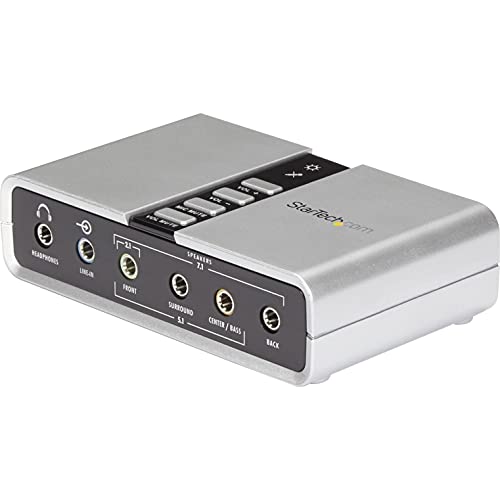
The StarTech.com ICUSBAUDIO7D is the best fit for buyers who want more than a basic USB 5.1 adapter. It supports 7.1, 5.1, and two-channel output through 3.5 mm jacks, and it includes a headphone port, line-in, and stereo microphone inputs. That range makes it a flexible choice for desktop or laptop audio setups that need multiple connection types.
The adapter is bus-powered and connects through USB. Its listed analog playback and recording rates are 44.1 kHz and 48 kHz. Digital SPDIF output supports 48 kHz playback, while optical input passthrough supports up to two-channel audio at 48 kHz. A one-meter USB cable is included.
- Best for: Buyers who need 5.1 or 7.1 output and a variety of analog and digital connections.
- Why it stands out: It explicitly lists 5.1, 7.1, and stereo modes, along with dedicated input and headphone connections.
- Limitation: SPDIF optical input passthrough is listed for up to two-channel audio, not multichannel input.
Vantec USB External 7.1 Channel Adapter

The Vantec adapter is a suitable choice for buyers looking for a simple USB connection with listed support for 7.1-channel surround sound. It connects over USB 2.0 and is backward compatible with USB 1.1, according to the product details. Its stated sampling rates are 44.1 kHz and 48 kHz for both playback and recording.
Compared with the StarTech model, the Vantec feature list is more concise. It identifies channel support, USB connection, and sampling rates, but does not specify the same variety of input and output jacks in the supplied details. Buyers should check the product listing and their speaker or headset connection requirements before choosing it.
- Best for: Buyers prioritizing a straightforward USB adapter with listed 7.1-channel support.
- Why it was selected: It supports the target surround-sound use and provides playback and recording at common listed sampling rates.
- Limitation: The supplied feature details do not describe its full jack layout or explicitly list a 5.1 mode.
SENECESLI USB 6 Channel 5.1 Adapter

The SENECESLI adapter is a direct match for shoppers seeking a USB 2.0 external sound card described as a six-channel 5.1 surround adapter. Its feature list states that it complies with USB audio device class specifications 1.0 and 1.1 and supports hot swapping and Plug and Play use. Playback and recording are listed at 44 kHz and 48 kHz.
This is a reasonable option when the priority is a compact external USB audio device with stated 5.1 support and basic setup features. The supplied information also mentions a digital optical SPDIF output, which may matter when connecting compatible digital audio equipment. Confirm the needed connectors and operating-system requirements before purchase, because the feature details do not specify a complete compatibility list.
- Best for: Buyers seeking a 5.1-oriented USB adapter with Plug and Play and hot-swap features listed.
- Why it was selected: Its product name directly identifies six-channel 5.1 surround use, and its features state 44/48 kHz playback and recording.
- Limitation: The supplied details do not provide a full breakdown of the analog jack layout or supported operating systems.
FANTIA External USB 5.1 Sound Card
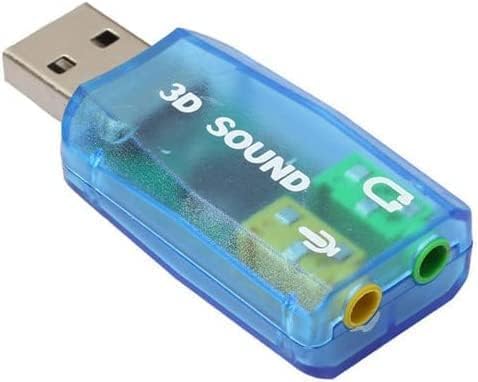
FANTIA is the best fit in this selection for buyers who want easy access to headphone and microphone connections. Its feature list describes a USB 5.1 sound card with a microphone input and audio output. It is designed to provide these connections from a USB port, so a user does not have to reach behind a PC to use the audio jacks.
The product name describes virtual 5.1-channel audio and mentions Windows and Mac. However, the supplied features focus on microphone input and audio output rather than a detailed multi-speaker connection layout. Buyers who need discrete connections for a full 5.1 speaker system should verify that the adapter’s actual ports and audio mode meet their setup requirements.
- Best for: Buyers who value convenient front-of-desk headphone and microphone access.
- Why it was selected: It specifically identifies a USB 5.1 sound card and highlights the practical benefit of accessible audio jacks.
- Limitation: Its listed features do not detail separate outputs for connecting each channel of a physical 5.1 speaker system.
Optimal Shop USB 6 Channel 5.1 Adapter
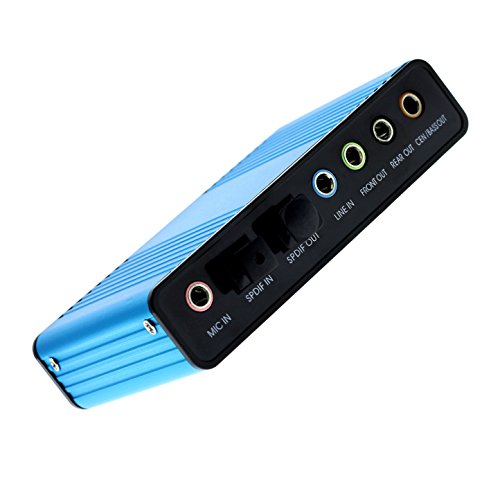
The Optimal Shop adapter is a candidate for buyers who want a six-channel 5.1 device with both analog and digital audio functions. Its listed features describe six-channel analog playback, digital recording through SPDIF input, and digital or analog audio recording and playback. The feature list gives sampling-rate details for several modes, including 48 kHz for analog recording and 48 kHz digital playback.
The product description names older Windows versions, including Windows 98, XP, 2000, Vista, and Windows 7/8. It also notes that some sampling-rate functions may require driver or application software support. This level of detail can help buyers compare connection modes, but it also means checking current system requirements is important.
- Best for: Buyers comparing analog six-channel playback with SPDIF recording and playback features.
- Why it was selected: Its description specifically includes six-channel 5.1 analog playback and several digital audio functions.
- Limitation: The listed operating-system support focuses on older Windows versions, and some functions may need software support.
Buying Guide: How To Choose A USB 5.1 Audio Adapter
A USB audio adapter can add audio connections to a computer, but the term “5.1” does not always tell you exactly how the device connects to speakers. Check the listed outputs, input options, channel modes, and software requirements against your existing equipment. The right choice depends on whether you need discrete analog speaker outputs, digital SPDIF connections, a headset jack, microphone input, or only a basic external sound interface.
Do You Need True 5.1 Output Or Virtual Surround?
Start by identifying what your speakers or headset require. A six-channel 5.1 adapter may be intended for separate analog channels, while a product described as virtual 5.1 may process or present audio differently. The FANTIA description emphasizes virtual 5.1 and headphone and microphone access. The Optimal Shop listing explicitly describes six-channel analog playback. If your speaker system uses several 3.5 mm input plugs, verify that the adapter provides the matching outputs before buying.
Which Connections Should You Check?
- Analog 3.5 mm outputs: These may be needed for multichannel speakers or headphones. Confirm the number and purpose of the jacks.
- SPDIF optical connections: Check whether the adapter has digital input, output, or both. The StarTech feature list distinguishes SPDIF output from optical input passthrough.
- Microphone and line-in: These matter for voice chat, recording, or connecting another audio source. StarTech lists stereo microphone inputs and line-in; FANTIA highlights a microphone input.
- USB connector and cable: Confirm the adapter can connect to an available USB port and that any included cable length suits the setup.
Is 5.1 Enough, Or Should You Choose 7.1?
Choose the channel count based on the audio equipment and applications you plan to use. A 5.1 adapter is appropriate when the goal is a six-channel surround setup. A 7.1 model may be preferable when the product explicitly supports that mode or when you want more channel flexibility. StarTech lists 5.1, 7.1, and stereo output, while Vantec and LAISANIM list 7.1 support. Do not assume that a higher channel number guarantees compatibility with every speaker or program.
What Do Sampling Rates Tell You?
Sampling-rate specifications describe supported digital audio rates for particular playback or recording functions. Several products here list 44.1 kHz and 48 kHz, but the details can vary by connection mode. For example, StarTech lists 44.1/48 kHz analog playback and recording, while its SPDIF output is listed for 48 kHz playback. Compare the specification for the exact function you will use rather than treating one rate as a universal description of the adapter.
Will It Work With Your Computer?
Check the product’s current operating-system and driver information before purchasing. The supplied listings do not provide the same level of system detail for every adapter. Optimal Shop names older Windows versions, while FANTIA mentions Windows and Mac in its product name. USB connection alone does not confirm that every feature works on every computer. Also check whether your computer can select the adapter as its audio output and whether any required software is available for your system.
How Should You Compare Setup Convenience?
For a basic setup, look for clearly stated USB connection and Plug and Play support. SENECESLI lists Plug and Play and hot swapping. Vantec specifies USB 2.0 and backward compatibility with USB 1.1. If the computer’s audio jacks are difficult to reach, an external adapter with accessible headphone and microphone connections may be more convenient. If you use several audio devices, prioritize models that clearly identify their inputs and outputs.
Frequently Asked Questions
What Does A USB 5.1 Channel Audio Adapter Do?
It connects to a computer through USB and provides an external audio interface. Depending on the model, it can offer 5.1-channel output, headphone or microphone connections, and analog or digital audio functions.
Can A 7.1 Adapter Be Used For 5.1 Audio?
Some adapters explicitly list both 7.1 and 5.1 modes. The StarTech.com model is one example in this guide. Check the individual product’s listed channel modes rather than assuming all 7.1 adapters support 5.1.
Does USB 5.1 Automatically Mean Six Speaker Outputs?
No. Product descriptions may refer to physical six-channel output or virtual surround processing. Check the number and type of audio jacks and confirm that they match the speakers you intend to connect.
Do I Need SPDIF For A 5.1 Adapter?
Only if your audio setup uses a compatible digital connection or you need the adapter’s specified digital input or output functions. If your speakers connect through analog jacks, compare the adapter’s analog outputs instead.
Should I Check Drivers Before Buying?
Yes. Operating-system support and software requirements vary by product and function. Review the listing for your computer’s operating system, and check whether any stated recording or sampling-rate features require a driver or application.
Which Adapter Is Best For Easy Headphone And Microphone Access?
FANTIA is the clearest match in this selection for convenient headphone and microphone access because its feature list highlights those connections through USB. Verify its channel and jack details if you also need to connect a multichannel speaker system.