
The best USB 5.1 surround sound option depends on whether you need a computer audio adapter or a complete speaker system. The Cubilux is best for buyers who want 5.1/7.1 outputs and high-resolution headphone playback; StarTech is better for varied analog and digital connections; and SteelSeries Arena 9 is designed as a complete 5.1 desktop gaming speaker system. Vantec offers a simpler USB adapter, while the ULTIMEA is a TV-focused soundbar system rather than a clearly specified USB sound solution.
| Product | Best suited for | Key connection or format detail |
|---|---|---|
| Cubilux 7.1 USB Surround Sound Card | Computer users needing multiple audio inputs and outputs | 5.1/7.1 output; USB-A |
| StarTech 7.1 USB Audio Adapter | Buyers wanting analog connections plus SPDIF | 3.5 mm jacks and digital SPDIF |
| VANTEC USB External 7.1 Adapter | Buyers seeking a basic USB audio adapter | USB 2.0; 44.1/48 kHz |
| SteelSeries Arena 9 | PC gamers wanting a speaker-based 5.1 system | 5.1 over one USB connection on PC |
| ULTIMEA Poseidon M100 | TV viewers wanting a multi-speaker soundbar setup | 7.1 Dolby Atmos system; USB audio connection not specified |
Cubilux 7.1 USB Surround Sound Card

Best for: Laptop and PC users who want a compact external sound card with surround outputs, headphone playback, and separate input connections. The listed features include 5.1 and 7.1 output, stereo headphone output, line-in, and stereo microphone input.
The Cubilux supports 44.1 kHz/16-bit through 384 kHz/24-bit for headphone output. Its 7.1 surround audio supports sampling rates up to 48 kHz. That distinction matters: the highest listed sampling rate applies to headphone output, not surround playback.
The full aluminum-alloy case is described as helping isolate electronic interference and reduce static or ground noise. This makes it a practical choice for buyers who want a sturdier external adapter with several audio connections.
Why it was selected: It explicitly lists both 5.1 and 7.1 output, plus the input and headphone connections that can make an external computer sound card more versatile.
Limitation: Its 7.1 surround mode is listed at up to 48 kHz, so buyers seeking high-resolution surround playback should not assume it matches the higher headphone-output specification.
StarTech 7.1 USB Audio Adapter
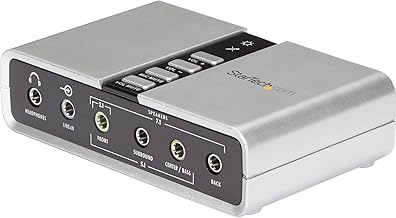
Best for: Buyers who need an external USB sound card with both analog connections and digital SPDIF. The adapter provides up to 7.1 channels through 3.5 mm jacks and supports 7.1, 5.1, and two-channel output.
Listed connections include a headphone port, line-in, stereo microphone input, and SPDIF digital output. A one-meter USB cable is included, and the adapter is bus-powered. It is presented as an upgrade for a desktop or laptop’s integrated audio, without requiring a separately listed power supply.
For analog playback and recording, the adapter supports 44.1 kHz and 48 kHz sampling rates. SPDIF digital output supports 48 kHz playback. SPDIF optical input passthrough is listed for up to two-channel audio at 48 kHz.
Why it was selected: It offers a clearly described mix of surround-channel support and connection types, making it a strong comparison choice for people who need more than a basic USB-to-headphone adapter.
Limitation: The SPDIF input passthrough specification is limited to two-channel audio; do not assume it provides multichannel input through that connection.
VANTEC USB External 7.1 Audio Adapter

Best for: Buyers who want a straightforward USB-connected adapter and do not need a long list of specialized connection features. VANTEC lists 7.1-channel surround sound and a simple USB 2.0 connection.
The adapter is stated to be backward compatible with USB 1.1. It supports 44.1 kHz and 48 kHz sampling rates for both playback and recording. Those specifications make it easy to compare with other basic external sound cards when the main goal is to add USB audio functionality to a computer.
Why it was selected: Its listed 7.1-channel support covers the requested 5.1 surround category, and the USB connection makes it relevant to shoppers comparing external computer audio adapters.
Limitation: The supplied product information does not list specific input and output ports beyond the USB connection, so check the product details to confirm that its connections match your speakers, microphone, or other equipment.
SteelSeries Arena 9 5.1 Gaming Speakers

Best for: PC gamers looking for a complete 5.1 speaker system rather than a standalone USB sound card. The product description specifies true 5.1 surround sound over a single USB connection on PC, with two front speakers, two rear speakers, a dedicated channel speaker, and a subwoofer.
The rear speakers connect wirelessly to the subwoofer, which avoids the need for rear-speaker cables crossing the gaming space. They are also described as wall-mountable. The speaker design uses separate silk-dome tweeters and organic-fiber woofers, and the subwoofer has a 6.5-inch driver.
Why it was selected: Unlike the USB adapters, Arena 9 includes the speaker components for a desktop surround setup. It is the most directly relevant option for shoppers whose goal is to hear 5.1 sound from PC speakers through USB.
Limitation: The listed single-USB 5.1 connection is specified for PC. Buyers planning to connect another device should verify its supported connection and surround formats before choosing this system.
ULTIMEA Poseidon M100 Soundbar System

Best for: TV viewers who want a multi-component home theater system with a soundbar, wireless subwoofer, and two wireless surround speakers. The listed system is a 7.1 Dolby Atmos soundbar setup intended for movies, shows, sports, games, and music.
The two wireless surround speakers are designed to place sound behind or beside the listening position. A 6.5-inch wireless subwoofer and BassMX technology are listed as features for low-frequency sound. The product also lists HDMI eARC, Bluetooth 6.0, and app control.
Why it was selected: It provides a useful comparison for buyers searching broadly for USB 5.1 surround sound but who may actually want a complete surround-style system for a TV rather than a computer adapter.
Limitation: The supplied features do not specify USB audio input or 5.1 USB computer playback. Choose it for its listed TV-oriented connections and system design only after confirming that its connections suit your setup.
Buying Guide: How To Choose USB 5.1 Surround Sound
Do you need an adapter or a complete speaker system?
A USB sound adapter adds audio connections to a computer; it does not automatically include surround speakers. The Cubilux, StarTech, and VANTEC products are external sound adapters. You need compatible speakers or headphones in addition to the adapter if you want to hear the output.
A speaker system is a different purchase. SteelSeries Arena 9 includes front and rear speakers, a dedicated channel speaker, and a subwoofer, with 5.1 over one USB connection on PC. The ULTIMEA is a soundbar and wireless speaker system aimed at TV use, and the supplied details do not identify USB audio as an input.
Which connection types should you check?
Start by checking the ports on both the computer and the audio equipment. The Cubilux lists USB-A, headphone output, line-in, stereo microphone input, and 5.1/7.1 output. StarTech lists 3.5 mm connections and SPDIF in addition to USB. VANTEC’s provided information is more limited, so verify its available audio ports before purchasing.
Also confirm whether your computer has the USB connection required by the product and whether your speakers use compatible inputs. For a TV setup, compare the TV’s available outputs with the sound system’s listed inputs. The ULTIMEA description lists HDMI eARC and Bluetooth, but does not list USB audio input.
What does 5.1 or 7.1 mean for a buyer?
These channel labels describe the intended surround-audio layout. A 5.1 system is the relevant format if your goal is conventional five-channel surround with a subwoofer. A 7.1-capable adapter may support both 5.1 and 7.1 output, as the Cubilux and StarTech descriptions state. Actual playback also depends on the source content, computer settings, connection method, and connected audio equipment.
Do not assume that a product labeled 7.1 will make every music track or video play as discrete surround sound. Check the audio format of the content and the settings used by the computer or playback application.
How should you compare sample-rate specifications?
Compare the sample rate for the specific output you plan to use. Cubilux lists headphone playback from 44.1 kHz/16-bit to 384 kHz/24-bit, while its 7.1 surround audio is listed at up to 48 kHz. StarTech lists 44.1 kHz and 48 kHz for analog playback and recording, and 48 kHz for SPDIF output. VANTEC lists 44.1 kHz and 48 kHz for playback and recording.
A higher headphone sample-rate figure does not necessarily mean surround output uses that same rate. Read each specification alongside its connection type and channel mode.
Are wireless rear speakers the same as wireless audio input?
No. A product can use wireless connections between some of its speakers while using a separate wired connection to the source device. Arena 9 describes wireless rear speakers that connect to its subwoofer, while its 5.1 USB connection is specified for PC. The ULTIMEA lists wireless surround speakers and a wireless subwoofer, but its listed source connections include HDMI eARC and Bluetooth.
Check both sides of the setup: how the system connects to the computer or TV, and how its speakers connect to one another. This distinction helps prevent choosing a wireless speaker system that does not accept the desired source connection.
Which option fits a smaller or simpler computer setup?
For a compact external adapter, compare the Cubilux, StarTech, and VANTEC based on the ports you need. VANTEC has a short feature list focused on USB and 7.1 audio. Cubilux adds line-in and microphone input, while StarTech adds SPDIF and specifies more connection and sampling-rate details.
For a desktop gaming area where speakers are the priority, Arena 9 is the more complete option among these products. Its listed speaker layout includes front and rear speakers, a dedicated channel speaker, and a subwoofer. Consider room layout and speaker placement before choosing a multi-speaker system.
Frequently Asked Questions
Can a USB sound card provide 5.1 surround sound?
Yes, if the adapter supports multichannel output and the computer, audio content, settings, and connected speakers also support the intended 5.1 format. Cubilux and StarTech list both 5.1 and 7.1 output.
Is 7.1 USB audio compatible with 5.1 speakers?
Some adapters explicitly support both formats. Cubilux and StarTech list 5.1 as well as 7.1 output. Confirm that the selected output mode and speaker connections match your equipment.
Does a USB sound adapter include speakers?
Not necessarily. Cubilux, StarTech, and VANTEC are listed as audio adapters, not complete speaker packages. SteelSeries Arena 9 is the product in this selection described as a complete 5.1 desktop speaker system.
Can I use the ULTIMEA Poseidon M100 as a USB 5.1 computer system?
The supplied product information does not specify USB audio input or 5.1 USB computer playback. It lists a 7.1 Dolby Atmos soundbar system with HDMI eARC and Bluetooth. Confirm the system’s supported inputs and your computer’s output requirements before buying for that use.
What should I check before buying a USB surround sound adapter?
Check the USB connection, audio ports, supported channel formats, sampling rates for the output you plan to use, and compatibility with your speakers or headphones. Also confirm that your computer and playback source can deliver the surround format you want.