
Best USB Analog and Digital Audio Adapters for Easy Audio Capture
Looking for a reliable USB analog and digital audio adapter to capture, convert, or enhance audio? This guide highlights five well-suited options for everyday use, from preserving vinyl and cassette memories to boosting PC sound with external interfaces. Each pick targets a different user type—home archivists, students, content creators, and casual listeners—so you can choose the best fit for your needs. Below is a quick reference table to compare essentials and where each product shines.
| Product | Best For | Key Benefit |
|---|---|---|
| DriverGenius AudioXfer USB A/C Audio Capture Card Device | Casette, LP, and old media preservation | Simple 3.5mm and RCA inputs with included Audacity workflow |
| Fly Kan USB 2.0 Audio Grabber with USB-C Adapter | Versatile device collection (USB-A & USB-C) | Dual inputs and easy plug-and-play with modern adapters |
| StarTech 7.1 USB Audio Adapter (ICUSBAUDIO7D) | Enhanced PC sound for 7.1/5.1 setups | Digital and analog outputs with SPDIF support |
| Oassuose VHS to Digital Converter | Video capture with RCA/S-Video to USB | 1080P capture for family memories |
| Cubilux USB A to TOSLINK Optical Audio Adapter | SPDIF connection to home audio systems | Hi-Res digital audio with easy plug-and-play |
DriverGenius AudioXfer USB A/C Audio Capture Card Device

Inputs include a 3.5mm and RCA options, enabling easy capture from cassette tapes, LPs, FM radios, and other analog sources. The device converts to digital formats such as MP3 and WAV, allowing playback on MP3 players, computers, or car and home stereos. It ships with a simple plug-and-play LED indicator and Audacity included or available on the official site. Use for DIY music projects and memory preservation. Note: 64-bit Mac users should install Audacity 2.3.1+ and update LAME for compatibility.
Best for: Home archivists and hobbyists recording from old media. Why selected: It provides straightforward analog-to-digital capture with familiar editing software and broad device compatibility.
Caution: Mac users may need specific Audacity and LAME updates to ensure full functionality.
Fly Kan USB 2.0 Audio Grabber With USB-C Adapter

This versatile unit supports analog-to-MP3/WAV conversion with dual inputs: 3.5mm and RCA, suitable for turntables, cassette players, and mixers. It includes a USB-C adapter to connect to USB-C devices, enabling broad compatibility across modern laptops and desktops. Plug-and-play design makes it immediate to use with software like Audacity. It’s reliable for everyday archiving, not specialized studio work.
Best for: Casual collectors and educators digitizing lectures or music. Why selected: Flexible inputs plus USB-C support makes it easy to digitize a range of gear without extra cables.
Caution: Note that dual inputs cannot be used simultaneously; plan your setup accordingly.
DriverGenius AudioXfer USB A/C Audio Capture Card Device

This model mirrors the A/C capture concept with 3.5mm and RCA inputs, enabling direct PC recording of analog signals into digital MP3 or WAV formats. The package emphasizes plug-and-play with LED indicators and Audacity support. It’s designed for DIY audio projects and memory preservation, with Mac users advised on Audacity and LAME updates to ensure full compatibility.
Best for: Users who want a compact, easy setup for converting old media. Why selected: Strong compatibility with common analog sources and a familiar editing workflow.
Caution: Mac users may require specific software updates for full compatibility, especially with older Audacity versions.
StarTech 7.1 USB Audio Adapter (ICUSBAUDIO7D)

This external sound card adds up to 7.1 channels through a single USB connection, including 7.1, 5.1, and 2-channel outputs via 3.5mm jacks, plus a headphone port, line-in, and mic inputs. It supports analog and digital stereo output with 44.1KHz and 48KHz sampling; SPDIF digital output is 48KHz, and SPDIF optical input passthrough handles two-channel audio. It ships with a 1m USB cable.
Best for: PC users seeking improved multi-channel sound and simple upgrade of built-in audio. Why selected: Offers higher-channel support and clear pathways for both input and output options.
Caution: SPDIF features are limited to 48KHz; those needing higher-resolution digital audio may need alternative hardware.
Oassuose VHS to Digital Converter

This USB-A/USB-C video capture card digitizes from VHS, VCR, DVD, Hi8, DV tapes, camcorders, or other sources via RCA or S-Video. It converts analog signals to 1080P/30fps USB output. It’s designed for easy plug-and-play use without drivers, though software is required for acquisition. It’s ideal for preserving family memories and sharing digital copies with friends and relatives.
Best for: Families and hobbyists preserving older video collections. Why selected: Combines simple USB capture with high-definition output and broad source compatibility.
Caution: Requires compatible acquisition software to complete the digitization workflow.
Cubilux USB A To TOSLINK Optical Audio Adapter

This unidirectional USB A to SPDIF digital converter enables connecting a USB-equipped computer to a S/PDIF sound system, DAC, amplifier, or soundbar. It delivers 48KHz/24-bit, 96KHz/24-bit, or 192KHz/24-bit audio with clear fidelity. It’s plug-and-play and requires no external power, supporting Windows and Mac OS.
Best for: Users needing a straightforward link to digital audio systems. Why selected: Clean digital transmission with broad compatibility and no extra power requirements.
Caution: It is unidirectional, so it outputs audio only; verify your setup needs before purchasing.
USB A To S/PDIF Optical Audio Converter Cable
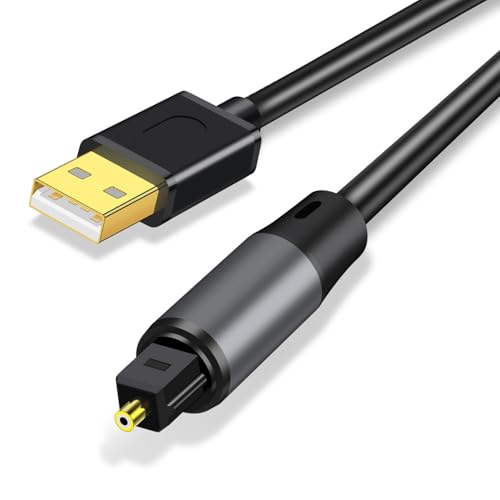
This USB A to S/PDIF optical adapter provides a straightforward path from USB-equipped PCs to home audio or external DACs. It emphasizes 24-bit, 48KHz or higher resolutions for clear digital audio. It’s driver-free and plug-and-play, supporting both home entertainment setups and professional audio chains. This option suits those prioritizing lossless digital transmission.
Best for: Home audio enthusiasts and casual home theater users. Why selected: Simple, driver-free setup with high-resolution digital output for compatible systems.
Caution: Ensure your device supports S/PDIF input and the intended sampling rates before use.
Buying Guide: Key Considerations For USB Analog & Digital Audio Adapters
What will you connect, and what do you want to capture? If the goal is preserving old records or tapes, prioritize devices with RCA and 3.5mm inputs and clear software compatibility. For PC sound upgrades or multi-channel setups, look for units offering 5.1/7.1 outputs and SPDIF options. If video needs accompany audio, consider combined video capture with robust support for analog-to-digital conversion.
Input compatibility matters: Always check whether the unit supports line-level inputs versus phono-level, and whether a preamp is required for turntables. Output formats and sampling rates affect compatibility with your speakers, DAC, or receiver. USB-C adapters improve future-proofing on newer machines, while plug-and-play features simplify setup for non-technical users.
Software and drivers: Some products include Audacity or recommend specific versions. Verify OS compatibility, especially macOS, and note any caveats about 64-bit Mac software or codec requirements for MP3/WAV encoding.
Portability and power: External USB sound cards are bus-powered in most cases. If you need high-fidelity or professional-grade performance, consider models designed for studio use with wider compatibility and better latency control.
FAQ
- Do I need a driver for these USB adapters? Many are plug-and-play, but some may require drivers or software, especially on older systems or Macs. Check the manufacturer guidance for your OS.
- What sources can I capture with these adapters? Common sources include cassette players, turntables, radios, VHS players, and other analog audio devices with RCA or 3.5mm outputs. Some models also support video capture via S-Video or RCA inputs.
- Is SPDIF the same as analog stereo? No. SPDIF is a digital audio interface. If you need pure analog sound from a device, ensure the adapter has analog outputs and inputs suitable for your gear.
- Can I connect USB-C devices to older USB-A adapters? Some adapters include a USB-C adapter or you can use a USB-C to USB-A dongle. Verify compatibility before purchasing.
- Will these work with a Mac or Windows PC? Most support both, but some Mac users may need specific software versions or updates (for example, Audacity with LAME).
- Are these suitable for professional studio use? They are generally aimed at consumer and archival tasks. For critical studio work, consider equipment designed for professional-grade latency, preamps, and higher fidelity standards.