
The right USB and aux cord depends on your phone’s port and whether you need audio only or audio while charging. For USB-C phones with a 3.5mm audio input, JXMOX is a 4-foot braided option, while Seulliya is a shorter 3.3-foot cable. MAXAUX includes two 4-foot cables. For Lightning devices, UWOXX combines aux audio with USB-A charging, but its listing says it is not for calls. The products provided cover four distinct choices, so this guide compares all four rather than adding an unverified fifth.
| Product | Best for | Connector and notable detail |
|---|---|---|
| UWOXX | Lightning devices needing music and charging | Lightning to 3.5mm audio plus USB-A charging |
| JXMOX | USB-C users who want extra cable length | 4 feet; nylon braided design |
| Seulliya | USB-C users preferring a shorter cable | 3.3 feet; supports up to 16-bit/48 kHz |
| MAXAUX | Buyers who want a two-cable set | Two 4-foot USB-C-to-3.5mm cables |
UWOXX Lightning Aux And Charging Cable

Best for: Owners of listed Lightning devices who want to play audio through a 3.5mm aux input while charging from USB-A. This cable combines a Lightning connection for the phone, a 3.5mm audio plug, and a USB-A charging connection.
The listing describes compatibility with devices including iPhone 14 through iPhone 6, iPod touch, and several iPad lines. It says the cable requires no app and uses a Realtek DAC chip, with advertised audio support up to 24-bit/96 kHz. That makes it the only option here designed specifically to provide audio and charging together for Lightning devices.
Limitation: The product listing explicitly says it is not for calls. Check the device’s connector and the car or speaker’s input before buying; this is not a USB-C cable.
JXMOX 4-Foot USB-C Aux Cable
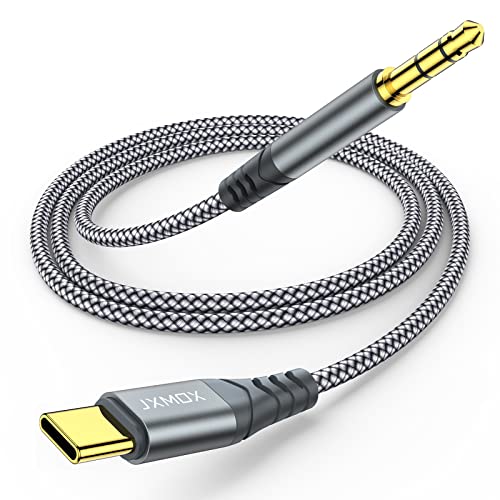
Best for: USB-C device owners who want a 4-foot connection to a car stereo, home stereo, speaker, headphones, or another device with a standard 3.5mm input. The extra length can be useful when the phone and audio jack are not close together.
JXMOX lists an advanced DAC smart chip for high-definition audio and noise reduction. Its nylon-braided construction and strain-relief design are intended to handle repeated bending; the listing claims more than 12,000 bending tests. The product is presented for a range of USB-C phones and tablets, including named iPhone, Samsung Galaxy, Pixel, and iPad models.
Limitation: This is an audio cable, not a charging cable. Confirm that the device has a compatible USB-C port and that the other equipment has a 3.5mm audio jack or aux input.
Seulliya 3.3-Foot USB-C Aux Cable

Best for: USB-C users who want a relatively short, straightforward cable for a nearby car stereo, speaker, or pair of wired headphones. At 3.3 feet, it is shorter than the 4-foot JXMOX and MAXAUX options, which may help keep extra cable out of the way.
The listing describes plug-and-play operation without software, drivers, or complicated installation. It also identifies a built-in DAC decoding chip and support up to 16-bit/48 kHz. The cable is intended to connect Type-C devices to equipment with a standard 3.5mm jack or aux-in port.
Limitation: Its shorter length offers less reach than the 4-foot alternatives. The listed audio specification is up to 16-bit/48 kHz, so buyers comparing advertised audio support should account for that difference.
MAXAUX Two-Pack USB-C Aux Cables

Best for: Buyers who want two USB-C-to-3.5mm cables, such as someone keeping one in the car and another at home. Each cable is listed as 4 feet long, and the product is described as connecting Type-C devices to car stereos, speakers, headphones, and other 3.5mm equipment.
MAXAUX describes a nylon-braided jacket, reinforced wire joints, and an advanced DAC chip. The listing says the cable is plug and play and does not require software or a complicated setup. Its two-cable format is the clearest differentiator from the single-cable options in this selection.
Limitation: These are audio cables, not USB charging cables. The listing does not state a specific supported bit depth or sample rate, so do not assume it matches the audio specifications stated for other products.
Buying Guide: How To Choose A USB And Aux Cord
Which connector does your phone use?
Start by checking the port on the phone or tablet. The products here use either Lightning or USB-C at the device end. A cable with the wrong connector will not fit, even if its 3.5mm end matches the car stereo. UWOXX is the Lightning option; JXMOX, Seulliya, and MAXAUX are USB-C options.
Do not treat “USB” as a single interchangeable connector type. USB-A is the rectangular connector used for charging in the UWOXX product, while USB-C is the smaller, reversible connector used by the other three products to connect to a device. These cables are not all general-purpose USB cables.
Does the audio system have a 3.5mm input?
A USB-C-to-3.5mm cable requires the receiving device to have a compatible standard 3.5mm audio jack or aux input. Look for an aux port on the car stereo, speaker, or other playback equipment. If the audio system has no 3.5mm input, these products may not provide the connection you need.
Check both ends before ordering: the phone’s output port and the playback equipment’s input. A cable’s product title may mention cars, speakers, and headphones, but the actual connection still depends on the ports available on your equipment.
Do you need to charge while listening?
Choose based on whether charging during playback is necessary. UWOXX is listed as a 2-in-1 Lightning-to-3.5mm audio cable with USB-A charging. Its charging connection requires a suitable USB-A power source, and its listing says it is not for calls.
The JXMOX, Seulliya, and MAXAUX products are described as USB-C-to-3.5mm audio cables. Their listed features focus on audio, not simultaneous charging. Choose one of them for an audio connection, not as a replacement for a charging cable.
How much cable length is useful?
Measure the distance between where the phone will sit and the aux input. Seulliya is 3.3 feet long, while JXMOX and each MAXAUX cable are listed at 4 feet. A shorter cable can reduce slack in a nearby connection; a longer cable can offer more placement flexibility. Avoid assuming that a small difference in length will suit every car or room setup.
How should you compare DAC and audio specifications?
A DAC converts digital audio from a device into an analog signal that can travel through a 3.5mm connection. Product listings mention DAC chips in all four options. UWOXX advertises up to 24-bit/96 kHz, and Seulliya lists up to 16-bit/48 kHz. JXMOX and MAXAUX describe DAC features without giving the same specific bit-depth and sample-rate figures in the supplied product details.
These listed figures help distinguish the stated specifications, but they do not establish how a particular setup will sound. The connected phone, playback equipment, audio source, and connection can all matter. Compare the details that the manufacturer actually provides rather than assuming every cable has identical specifications.
Is a single cable or a two-pack better?
A single cable may be suitable if you need one connection for a particular car or room. MAXAUX is the only two-pack in this selection, with two 4-foot cables. It may suit buyers who want separate cables for different locations or a second cable available. Check the connector and intended use of each cable before deciding that a multipack fits your needs.
What should you check before ordering?
- Confirm that the phone has the connector used by the cable: Lightning or USB-C.
- Confirm that the stereo, speaker, or headphones have a 3.5mm jack or aux input.
- Decide whether you need audio only or audio while charging.
- Compare cable length with the distance between the device and the audio input.
- Review any stated limitations, including UWOXX’s “not for call” note.
- Check the product’s current device compatibility details before purchase.
Frequently Asked Questions
Can a USB-C aux cable connect a phone to a car stereo?
It can connect a compatible USB-C device to a car stereo with a standard 3.5mm aux input. Check that both ports match the cable before buying.
Can I use a USB-A port as the phone’s audio connection?
Not with the USB-C-to-3.5mm audio cables described here. In the UWOXX product, USB-A is listed as the charging connection; the audio connection is Lightning to 3.5mm.
Which option supports listening while charging?
UWOXX is the product in this selection specifically described as supporting music playback while charging. Its listing says it is not for calls and uses USB-A for charging.
Which cable is shortest?
Seulliya is listed at 3.3 feet. JXMOX and the MAXAUX cables are listed at 4 feet.
Are USB-C and Lightning aux cables interchangeable?
No. USB-C and Lightning are different device connectors. Choose the cable that matches the port on the phone or tablet, and verify that the other end matches the audio equipment.