
The best USB audio digital output device depends on which direction you need the signal to travel. For sending computer audio to an optical input, consider the Cubilux USB-to-TOSLINK adapter; for converting a TV’s optical output to analog speakers, choose an optical-to-RCA or 3.5 mm DAC. The products below cover those different jobs, plus one video capture device that is not a standard USB digital audio output adapter.
| Product | Best suited for | Signal direction |
|---|---|---|
| Cubilux USB A to TOSLINK Adapter | Sending audio from a computer or listed console to optical equipment | USB to optical |
| Cubilux USB A to TOSLINK Cable | Computer audio output to a digital audio connection | USB to optical |
| eSynic Digital-to-Analog Adapter | Connecting an optical source to analog audio equipment | Optical to RCA or 3.5 mm |
| PROZOR Digital-to-Analog Converter | Optical audio output to RCA equipment | Optical to RCA |
| USB Video Capture Device | Capturing analog video and audio on a computer | RCA A/V to USB capture |
Cubilux USB A To TOSLINK Adapter

This Cubilux adapter is designed to send digital audio from a USB Type-A source to a TOSLINK optical connection. Its listed use includes computers, laptops, and PS5 or PS4 consoles. It is a signal transmitter, not an optical-to-USB receiver or a converter for analog speaker outputs.
- Best for: A user who needs an optical digital audio output from a listed USB-A computer or console source.
- Why it was selected: Its USB-to-SPDIF direction directly matches the common need to add a TOSLINK output to a compatible source.
- Important limitation: The product listing specifically says it is not for TVs or other devices. Check the source device and USB audio support before buying.
Choose this if your source is a computer or one of the listed consoles and the receiving equipment has a TOSLINK input. Avoid it if you need to connect a TV’s optical output to a computer, since that is the reverse signal direction.
Cubilux USB A To TOSLINK Optical Cable

The Cubilux cable is described as a USB A-to-TOSLINK optical audio cable for computer use, with stereo and surround sound in its product name. It is intended to provide digital audio output from a compatible computer connection to an optical audio destination.
- Best for: Computer users looking for a direct USB-A-to-optical audio connection.
- Why it was selected: The listed digital audio output and computer compatibility make it relevant to a USB audio output search.
- Important limitation: The provided product details do not specify supported audio formats, operating systems, or other source devices. Confirm those requirements before choosing it.
This option may suit a simpler setup when you want a USB-to-optical connection in cable form. Compare the exact connection type with your source and receiver: USB A is on the source side, while TOSLINK is for an optical audio input. Do not treat it as a device that converts an optical signal into USB audio.
eSynic Optical-To-Analog Audio Adapter

This eSynic converter performs the opposite job from a USB digital output adapter: it accepts optical digital audio and provides left/right RCA and 3.5 mm analog outputs. The listing describes a built-in DAC chip, USB power, an aluminum alloy case, and support up to 192 kHz.
- Best for: Connecting a compatible optical digital source, such as a listed HDTV or DVD player, to analog audio equipment.
- Why it was selected: It addresses a frequent related need: converting a digital audio output into analog connections for speakers or other audio equipment.
- Important limitation: The listing says to set the source audio format to PCM first. It is not a USB-to-optical transmitter.
Choose this when the source has an optical output and the destination uses RCA or 3.5 mm analog input. Avoid it if your goal is to create a TOSLINK digital output from a computer’s USB port. The direction and connectors determine whether it fits; the listed 192 kHz capability does not change that signal direction.
PROZOR Optical-To-RCA Converter
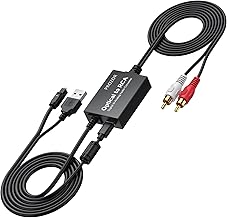
The PROZOR converter changes an optical digital audio signal into RCA analog output. Its listed features include a built-in audio amplifier chip, a 7-foot or 2.1-meter cable, and a 192 kHz digital-to-analog conversion specification. The product name lists HDTV, amplifier, Blu-ray, DVD, PS3, and PS4 as intended source contexts.
- Best for: A user connecting an optical audio output to RCA-equipped audio equipment.
- Why it was selected: It provides a clearly stated optical-to-RCA conversion path and includes a cable in the product description.
- Important limitation: It converts digital audio to analog; it does not provide USB digital output. Check that your source has optical output and that your receiving device accepts RCA input.
Choose this over a USB-to-TOSLINK adapter when the source is a TV or other device with optical audio out and the destination requires RCA. The listed conversion rate is a capability, not a guarantee that every source setting or audio format will work. Set the source output to a format the converter supports.
USB Video Capture Device

This device is an RCA-to-USB audio-video capture converter, not a conventional digital audio output adapter. It is intended to connect analog sources such as VHS, Mini DV, VCR, Hi8, DVD players, or camcorders to a computer for digitizing. Listed features include PAL/NTSC support and compatibility with Mac and Windows Vista.
- Best for: A buyer who wants to capture analog video and accompanying audio on a computer.
- Why it was selected: It handles USB-connected audio and video digitization, a related use case that may appear in searches for USB audio conversion.
- Important limitation: It is not a USB-to-TOSLINK output device. Avoid it if you need to send computer audio to an amplifier or soundbar.
Choose this only when the goal is analog A/V capture. Its RCA-to-USB direction makes it fundamentally different from a digital audio transmitter, and the listed features do not establish that it provides optical or coaxial digital audio output.
Buying Guide: How To Choose A USB Audio Digital Output
Which direction does the audio need to travel?
Start by identifying the source and destination. A USB-to-optical adapter sends audio from a USB source toward equipment with an optical input. An optical-to-analog DAC takes digital audio from a TV or other source and provides analog RCA or 3.5 mm output. These products are not interchangeable, even if both are called audio converters.
Write down the signal path before buying: source output, converter input, converter output, and receiving-device input. For example, a computer USB port leading to a receiver’s TOSLINK input calls for USB-to-optical transmission. A TV optical output leading to RCA speakers calls for an optical-to-analog converter.
What connectors are on your devices?
Check the exact port names rather than relying only on broad terms such as “digital audio.” USB-A, optical TOSLINK, coaxial digital audio, RCA, and 3.5 mm are different connections. Confirm both ends of the proposed path. A product with USB-A on one end will not necessarily fit a USB-C-only source without an appropriate connection solution, which is not specified for the products listed here.
Also check whether the receiving device expects an input or provides an output. An optical input on a sound system cannot send sound back to a converter. A TV’s optical output, by contrast, can feed an optical-to-analog DAC when the desired destination has analog inputs.
Do you need digital output or analog conversion?
Choose a USB-to-TOSLINK transmitter when you need an optical digital output from a compatible computer or console. Choose a DAC when a digital optical source must connect to analog equipment. The eSynic model provides RCA and 3.5 mm outputs; the PROZOR product is described as optical-to-RCA.
“Digital-to-analog” and “analog-to-digital” describe opposite operations. A capture card can digitize analog A/V for a computer, but that does not make it a digital audio output adapter. Match the product’s stated direction to your use rather than assuming any USB converter will work.
Will the source device support the adapter?
Look for explicit source-device guidance. The Cubilux USB A-to-TOSLINK adapter lists computers, laptops, and PS5/4, while also stating that it is not for TVs or other devices. The separate Cubilux cable is described for computer compatibility, but the supplied details do not specify other sources or operating systems.
For a USB-connected audio device, verify that the source can send audio over the relevant USB port and that the operating system or console recognizes the connection as needed. Product details provided here do not establish universal compatibility, so check the listing’s current requirements before purchasing.
Which audio format settings matter?
Digital audio converters may depend on the source’s output format. The eSynic listing specifically instructs users to set PCM audio format first. This is a practical troubleshooting step if a connected system produces no sound or fails to play audio, but it should not be assumed to resolve every format or device mismatch.
For products listing a 192 kHz capability, treat that figure as a stated specification, not proof that every connected source supports every sample rate. Check the source’s available output settings and the converter’s supported formats when those details are important to your setup.
When is a video capture device the right choice?
A capture device is suitable when your objective is to record or digitize analog sources such as VHS or a camcorder through RCA connections. It is not the right category for sending computer audio to an optical receiver. Separate the capture task from audio playback: one moves analog A/V into a computer, while the other sends or converts audio between devices.
Frequently Asked Questions
What is a USB audio digital output adapter?
It is a device or cable that sends digital audio from a USB source to another digital audio connection, such as optical TOSLINK. Compatibility depends on the source, connection type, and product design.
Can I connect a TV’s optical output to a USB port with these products?
The listed USB-to-TOSLINK products are described in the opposite direction, and the capture device is for RCA audio/video capture. The eSynic and PROZOR products convert optical audio to analog outputs, not USB.
What should I buy to connect optical TV audio to RCA speakers?
Choose an optical-to-RCA digital-to-analog converter, such as the listed PROZOR model. Check the TV’s audio output settings and the speaker’s RCA input requirements before connecting.
Does USB-to-TOSLINK mean the adapter works with every device?
No. The Cubilux adapter specifically lists computer, laptop, and PS5/4 use and excludes TVs and other devices. Check the product’s stated compatibility for your exact source.
Why might an optical converter produce no sound?
Check that the source is connected to the converter’s input, that the receiving device is connected to its output, and that the source uses a compatible audio setting. For the eSynic converter, the listing says to set the source to PCM.