
Best USB Audio Interfaces for Android: Easy, Portable Recording on the Go
Answering the need for mobile, Android-friendly recording, these USB audio interfaces deliver reliable gain, low latency, and easy plug-and-play use with Android devices. They suit hobbyists and creators who want cleaner guitar, vocal, or podcast tracks without a computer. The top picks below are chosen for Android compatibility, portability, and clear sound quality. Each section explains who it’s best for and why it’s a strong fit for Android workflows.
Summary of selected products:
| Product | Best For | Why It Stands Out |
|---|---|---|
| Focusrite Scarlett Solo 3rd Gen | Studio-quality recording on Android via USB | Excellent preamps and 24-bit/192kHz conversion |
| JOYO MOMIX CAB | Mobile guitar recording with zero-latency monitoring | Direct monitoring, ultra-compact, USB-C/Lightning ready |
| KYXAIN Guitar Audio Interface | Beginner-friendly Android streaming | Plug-and-play, Type-C USB for Android |
| Synido USB C Audio Interface | 2-channel versatile Android setup | Three monitoring modes, clear LED indicators |
| BOMGE mini 2 Channel USB Audio Interface | Compact, versatile Android-friendly interface | 2 in/2 out, phantom power option |
Focusrite Scarlett Solo 3rd Gen USB Audio Interface

The Focusrite Scarlett Solo 3rd Gen is best for solo artists recording vocals or guitar with high-quality preamps. It features switchable Air mode to add brightness and clarity on acoustic recordings. This interface has two high-headroom instrument inputs and Gain Halos to prevent clipping, supporting up to 24-bit/192kHz recording. It’s ideal for Android users who connect via USB-C adapters or compatible cables, delivering studio-grade sound in a compact package.
Who it’s best for: solo singers, songwriters, and podcasters who want pro preamps and studio-grade conversion on Android. Why selected: renowned Scarlett preamps and the Air mode provide a clear, expansive sound for home studios.
Caution: Android device compatibility can require appropriate OTG/adaptor options and compatible recording apps. Data sheet focuses on computer workflows, so verify app support on your device.
JOYO MOMIX CAB: Guitar Audio Interface for Phone

The MOMIX CAB is a pocket-sized direct-monitoring interface designed for mobile guitar recording. It provides zero-latency monitoring by passing the dry guitar signal straight to headphones while sending the signal to the connected device for recording. It’s plug-and-play with USB-C and Lightning adapters, making it convenient for Android users who want fast, on-the-go ideas and practice sessions. Note: It’s not intended for real-time amp sims or effects processing inside apps.
Who it’s best for: mobile guitar players and content creators who want immediate, dry guitar tracking with no driver installs. Why selected: its ultra-compact form and true direct monitoring simplify on-the-go ideas and livestreams.
Caution: Dry signal cannot be muted; it’s optimized for capturing clean guitar tracks rather than full-tonal processing in real time.
M-AUDIO M-Track Solo USB Audio Interface

The M-AUDIO M-Track Solo provides a flexible setup with XLR/Line input plus a dedicated instrument input, plus a basic software bundle. It supports 48kHz audio resolution for clear recordings and offers a simple monitoring path with headphones and line outputs. Its Android compatibility is enhanced by its straightforward, bus-powered design and minimal driver requirements, making it a solid choice for beginners or on-the-go creators using Android devices.
Who it’s best for: beginners and travelers who want a simple, reliable entry point into USB audio with Android compatibility. Why selected: it balances ease of use with essential recording features and portable form factor.
Caution: The software suite is helpful but may require additional setup for advanced Android workflows.
KYXAIN Guitar Audio Interface

The KYXAIN interface targets Android and iPad users with Type-C USB for Android compatibility. It supports low-latency operation and is designed as a plug-and-play option for live streaming and practice. The device uses a 1/4″ guitar input and 3.5mm headphone output for monitoring. This makes it well-suited for beginners who want a straightforward tool to share guitar tracks directly from Android devices.
Who it’s best for: Android players and content creators seeking a simple, low-latency interface for live streaming. Why selected: broad compatibility with Type-C devices and a clear, beginner-friendly workflow.
Caution: It emphasizes ease over advanced features; users seeking multi-track or heavy processing may want a more feature-rich model.
Bolanle DAC USB OTG Audio Interface
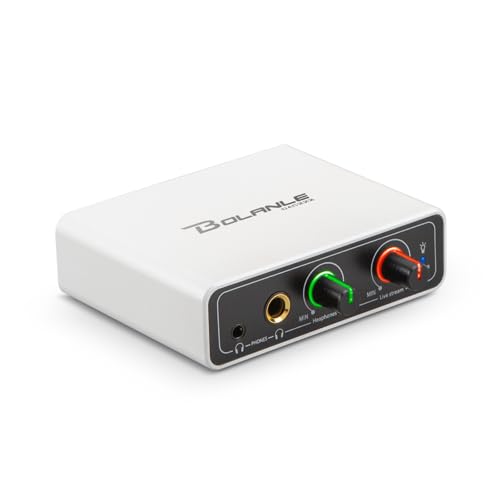
The Bolanle DAC OTG interface focuses on turning a mobile device into a streaming setup. It supports 3.5mm AUX input, USB-C OTG audio to iPhone, iPad, or Android devices, and dual headphone outputs for zero-latency monitoring. It’s useful for live streaming and quick setups where you want to balance monitoring with streaming audio on Android. It’s best for those prioritizing mobile livestream quality over extended studio use.
Who it’s best for: mobile streamers and performers who need dual monitoring and easy connection to phones. Why selected: strong emphasis on live streaming workflow and cross-device compatibility.
Caution: It’s optimized for streaming rather than studio-level multi-track recording; not ideal for heavy post-production work.
Buying Guide
- What to look for in Android-friendly interfaces: USB-C compatibility, OTG support, and low-latency monitoring. Ensure the device can connect with your preferred Android recording app.
- Input options: If you plan to record guitar or vocals, prioritize at least one XLR input and a dedicated instrument input. Consider whether you need phantom power for condenser mics.
- Monitoring and latency: Look for zero-latency monitoring or low-latency monitoring modes. This makes live tracking and streaming smoother.
- Portability vs. features: Portable interfaces are ideal for mobile creators, but ensure they provide the essential features you need (gain control, headphone output, and adequate bit depth/sample rate).
- Software and compatibility: Some interfaces include software bundles; verify that any included software or drivers support Android workflows or can be used with your preferred Android DAW or recording app.
FAQ
- Can all USB audio interfaces work with Android phones?
Most work with Android via USB-C OTG adapters or USB-C connections, but compatibility depends on the device and app support. Check your phone’s OTG capabilities and the app’s audio interface support. - Do I need drivers for Android?
Many Android-friendly interfaces are plug-and-play and require no extra drivers. Some may need a driver or app compatibility check for full feature use. - Is phantom power necessary for guitar recording?
Phantom power is required for condenser microphones but not for most dynamic mics or instrument-level inputs. If you plan to use condensers, ensure phantom power is available. - What latency should I expect on Android?
Latency varies by device and app, but low-latency monitoring interfaces are designed to minimize it for real-time recording and monitoring. - Is a 2-in/2-out interface sufficient for me?
For solo recording or small duo tracks, 2-in/2-out is typically enough. If you plan to record multiple inputs, consider an interface with more inputs. - Can I use these interfaces for live streaming?
Yes. Several interfaces in this list support streaming setups by providing direct monitoring and stable audio paths to mobile apps.