
Best USB-C Audio Input Solutions for Modern Laptops and Devices
Looking for a reliable USB-C audio input option? This guide highlights top USB-C audio adapters that handle 3.5mm inputs with quality sound, ideal for laptops, tablets, and phones that rely on USB-C for audio. Best for: creators needing external sound cards, travelers with limited ports, and gamers seeking better mic and headset support. The list below focuses on devices that deliver clear mono or stereo input, plus convenient output, without confusing jargon.
| Product | Best For | Key Benefit |
|---|---|---|
| SABRENT AU-UCMA | Budget setups with separate mic and headphone jacks | 24-bit/96kHz performance |
| CableCreation USB-C Audio Adapter | Broad compatibility, simple two-port use | TRS/TRRS support for mic and headphones |
| SABRENT AU-PACM | High-quality audio with PD charging | 100W PD pass-through |
| Apple USB-C to 3.5 mm | Apple ecosystem users | Lossless audio compatibility |
| UGREEN USB-C to 3.5 mm | Hi-Res audio, inline controls | 24bit/96kHz + in-line controls |
SABRENT USB-C to 3.5mm Audio Adapter AU-UCMA

The AU-UCMA provides a dedicated USB-C audio path with two distinct 3.5mm jacks: one stereo headphone output and one mono microphone input. It’s designed for devices with USB-C ports only, not USB-A. It uses a 24-bit/96kHz capable chipset, allowing higher fidelity than many basic adapters. Best for users with USB-C laptops or tablets who need a simple external sound card for calls or streaming. If your device only has USB-A, consider the AU-MMSA model instead.
Who this is for: creators and professionals who want separate mic and headphone connections for clearer voice capture and monitoring. Limitation: the mic input is mono, so it’s not ideal for stereo microphone sources or certain stereo mics.
CableCreation Type C External Sound Card

This USB-C external sound card adapts USB-C or Thunderbolt 3 devices to 3.5mm audio for mics and headphones. It supports both TRS and TRRS connections, which means you can use standard headsets or headsets with built-in mics. Broad compatibility includes many MacBooks, iPads, and select Android devices. Best for users who want flexibility across devices and who may need to switch between microphone-only and combined headset use. Note: Some Apple AirPods and earphones may not support microphone input via this adapter.
Who this is for: students, remote workers, and travelers who need a versatile two-port solution without buying multiple dongles. Limitation: microphone input support may vary with certain devices and headsets.
SABRENT USB-C to 3.5mm Audio Adapter with 100W PD

AU-PACM extends the concept with 100W Power Delivery pass-through, enabling you to listen and charge simultaneously. It supports 16/24-bit audio with up to 96kHz sampling, handling stereo output and mono input so you can monitor or record with minimal latency. Best for power users who need to keep a device charged while using high-quality audio, especially on the go. A caution: ensure your PD charger and cable are compatible to achieve the full 100W output.
Who this is for: professionals and gamers who require uninterrupted power while using USB-C audio. Limitation: PD performance depends on the host and charger compatibility.
Apple USB-C to 3.5 mm Audio Cable

Designed for Apple devices, this cable enables direct connection from iPhone or iPad to car stereos or speakers with an audio-in port. It supports lossless audio formats when used with compatible hardware, offering minimal latency for Apple ecosystems. Best for Apple users who prefer a compact, cable-based approach rather than a dongle. Limitation: may not provide as broad device support as generic USB-C adapters, and some configurations require additional apps or settings for optimal lossless playback.
Who this is for: users within the Apple ecosystem seeking straightforward, reliable audio connections. Choose this if you primarily use Apple devices and want a simple cable solution. Limitation: ecosystem-dependent features and compatibility considerations with non-Apple gear.
JXMOX USB C to 3.5mm Audio Aux Jack Cable
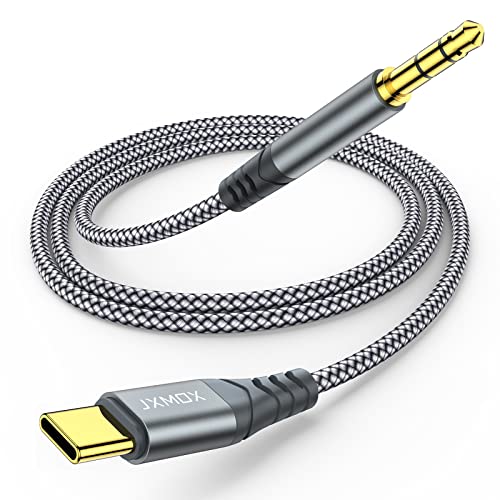
This USB-C to 3.5mm cable is designed for direct vehicle or home stereo connections and supports high-fidelity audio with a DAC chip. It is flexible, with a nylon-braided design and strong bending resistance. Best for users who want a straightforward, durable cable to link Type-C devices to any 3.5mm jack. Limitation: not a full sound card—no independent mic input or USB audio processing features.
Who this is for: drivers and music enthusiasts who want a durable, simple cable solution. Choose this if you primarily need a pass-through audio cable rather than a separate mic or power features.
UGREEN USB C to 3.5mm Audio Adapter

UGREEN’s USB-C to 3.5mm adapter emphasizes Hi-Res audio up to 24bit/96kHz with low-noise performance. It supports in-line control for some devices and works with a wide range of 3.5mm headphones and headsets. Best for users who want higher fidelity audio and built-in inline controls for volume and calls. Limitation: some inline controls may not function across all devices or with all headsets.
Who this is for: commuters and gamers who value higher-resolution sound and convenient in-line controls. Choose this if you want 3.5mm compatibility with strong DAC performance and easy control access.
UGREEN Magnetic 2-in-1 USB C to 3.5mm Adapter with PD 60W

This 2-in-1 adapter lets you listen to audio and fast-charge simultaneously with PD 60W, combining Hi-Res audio up to 32bit/384kHz with a charging port. It does not support data transfer through the USB-C side while in use for the 3.5mm audio path. Best for users who need to stay powered while enjoying Hi-Res audio on the go. Caution: not all devices support 32bit/384kHz output depending on settings and peripherals.
Who this is for: power users who rely on both uninterrupted charging and high-fidelity audio. Choose this if you need both audio and charging in a single dongle. Limitation: no data transfer support through the USB-C port during audio use.
Buying Guide
What should I look for in a USB-C audio input adapter?
- Port compatibility: Confirm you have a USB-C port (not USB-A). Some adapters come with dual port options or require specific host devices.
- Input/output configurations: Decide whether you need separate mono mic input and stereo headphone output or a single combined path. Consider TRS vs TRRS compatibility for mics and headsets.
- Audio quality: Look for chips that support 24-bit/96kHz or higher. This generally yields better fidelity and lower latency for real-time communication.
- Power delivery: If you need charging while using audio, consider PD pass-through options (e.g., 60W or 100W as supported).
- Device ecosystem: Apple-centric users may prefer cables or adapters designed for iOS devices, while others may prioritize broad compatibility with Android, Windows, and Mac.
- Durability and design: Consider braided cables, strain relief, and overall build quality for portability and longevity.
FAQ
- Do USB-C audio adapters work with all laptops?
- Can I use a USB-C audio adapter to connect a microphone to my iPad?
- Is 24-bit/96kHz audio noticeably better than 16-bit/44kHz for voice calls?
- Will PD charging affect audio quality or latency?
- Do these adapters support inline microphone control?
- Which adapter is best for gaming with a headset?