
Best USB Car Audio Interface Solutions for in-Car Entertainment
Answering the demand for seamless in-car connectivity, these USB car audio interface options are selected for drivers who want easy, plug-and-play integration with their existing stereos. The top picks here are best for different vehicle makes and user needs, from seamless USB playback to high-quality CD-like sound. Ideal buyers include DIY enthusiasts, commuters upgrading factory systems, and drivers who want better sound without professional installation.
Quick comparison
| Product | Best For | |
|---|---|---|
| Jet Black Audio Player and USB Receptacle Interface Module | GM/Ford-like ecosystems and DIYers seeking seamless USB integration | USB interface, optimized audio, easy installation |
| Honda USB Aux Interface Adapter | Honda Accord/CR-V/Pilot owners needing CD-quality playback | Direct CD changer port connection, CD-quality sound |
| Keple USB Cable Adapter Vehicle Radio | Compact USB audio payloads for Honda models and similar | USB interface, control via steering wheel, easy install |
| ELONN Music Interface Cable | Audi/Volkswagen/Mercedes legacy systems needing AMI compatibility | Wide compatibility, USB memory playback, no iPhone support |
| Eanetf USB to Aux Adapter 2PCS | Cars with 3.5mm aux and MP3-capable decoding | 3.5mm aux, MP3 decoding, plug-and-play |
Jet Black Audio Interface for Chevrolet/GMC/Buick
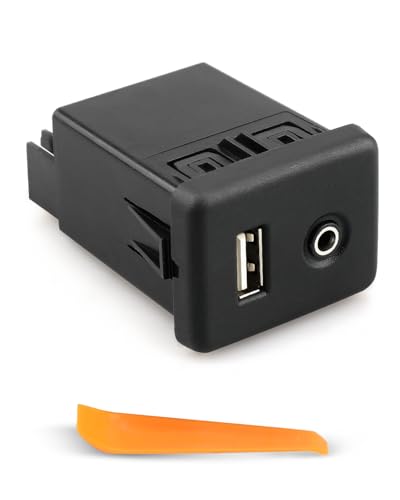
The Jet Black Audio Player and USB Receptacle Interface Module is designed for in-car use with Chevrolet Cruze, GMC, Cadillac, and Buick models. It emphasizes seamless USB connectivity and optimized audio performance, delivering clearer sound from digital music sources. Best for drivers who want a straightforward, do-it-yourself upgrade without complex tools. A notable limitation is that installation completeness depends on the vehicle’s existing wiring and available space, so some trim variations may require additional steps.
Honda USB Aux Interface Adapter

This adapter is crafted for Honda models, including Accord, CR-V, Pilot, Odyssey, and Civic from various years. It provides a direct connection via the CD changer port to deliver CD-quality sound into the car stereo, avoiding the signal degradation common with cassette adapters or FM transmitters. It’s best for Honda owners seeking best-possible audio fidelity with minimal setup. A potential constraint is compatibility with non-CD changer-equipped Hondas, where this interface may not fit the existing port layout.
Keple USB Cable Adapter for Honda and Similar Models

The Keple USB Cable Adapter provides a USB audio interface that works with many Honda models, enabling playback from USB drives and portable players. It supports control via an interface dial and steering wheel controls, which can improve usability. It’s best for drivers who want USB audio while keeping control from the wheel. A limitation is that it requires a vehicle with compatible USB input alignment and may not support all radio head units.
ELONN USB Music Interface Cable for AMI/MDI/AMI
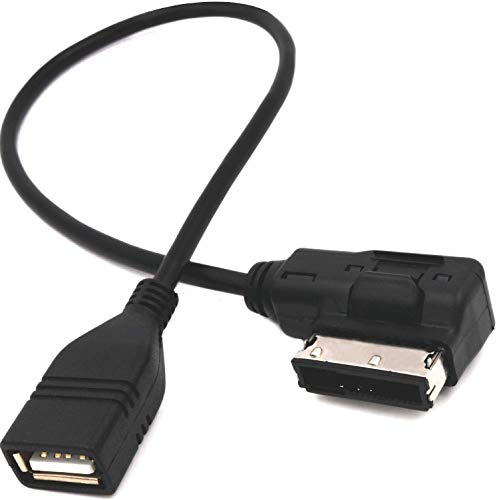
This cable targets Audi, Volkswagen, and Mercedes vehicles with AMI/MDI interfaces, offering USB memory playback and broad compatibility with recognized formats. It’s best for owners of these luxury brands who want a dedicated USB path to their multimedia system. Caution: not compatible with iPhone devices or all audio formats across all models; check your car’s AMI interface compatibility before purchase.
Eanetf USB to Aux Adapter for Car Audio

The Eanetf USB to Aux Adapter provides a 3.5mm aux path and MP3 decoding for cars with an auxiliary port. It’s best for vehicles that lack native USB playback but have a functional aux input, allowing MP3 playback from a USB drive. The key limitation is that it relies on MP3 decoding support by the car’s aux input; if decoding is not supported, playback may not work as expected.
Buying Guide
What should you consider when choosing a USB car audio interface?
- Vehicle compatibility: Check the port type (CD changer, USB, AMI/MDI, or aux input) and how the interface wires into your specific model. Some adapters fit certain years or trims better than others.
- Playback quality: Look for devices that claim CD-quality or higher audio fidelity and support common formats (MP3, WMA, AAC). Some interfaces emphasize signal integrity or reduced noise.
- Ease of installation: Prioritize plug-and-play solutions when possible. Some may require basic wiring or trimming; others install without tools.
- Control integration: Consider whether you want steering wheel control compatibility or head-unit control for volume, track selection, and playback.
- Limitations and compatibility caveats: Be mindful of devices that do not support iPhone, or those that can’t operate with certain AMI/MDI configurations. Some interfaces restrict simultaneous use of multiple outputs.
FAQ
- Is a USB car audio interface universal for all cars?
Answer: No. Compatibility depends on the vehicle’s audio ports, head unit, and model year. Always verify the specific port type and required wiring for your car. - Can I use a USB stick for playback in my car with these adapters?
Answer: Many support USB memory sticks containing MP3 or WMA files, but formats and file systems may vary. Confirm supported formats in the product listing. - Will these interfaces affect car audio tuning or radio reception?
Answer: They are designed to route audio through the existing system with minimal impact, but some models may experience subtle changes in signal path or noise if not installed correctly. - Do these adapters preserve CD-quality sound?
Answer: Some advertise CD-quality playback by delivering digital audio directly through the CD changer port, while others focus on USB playback through auxiliary routes. Check the product claims and intended port. - Are there any safety considerations during installation?
Answer: Yes. Disconnect the vehicle battery if required by the installation steps and avoid routing wires near moving parts or hot surfaces. Follow the manufacturer’s installation guidance.