
The best USB microphone for recording lectures depends on where you record and how much control you need: the CMTECK G009 is suited to straightforward classroom or desk use, while the ZealSound K66 offers more recording controls and device adapters. The FIFINE K669B is a simple computer-connected option, and the Sennheiser Profile adds direct monitoring and physical controls. The Sunlan recorder is not a USB microphone, but it may suit people who need a standalone lecture recorder instead.
| Product | Best suited for | Key feature |
|---|---|---|
| CMTECK G009 | Simple desktop lecture recording | Noise cancellation and mute indicator |
| ZealSound K66 | Flexible recording setups | Noise-reduction mode and device adapters |
| FIFINE K669B | Basic computer recording | Plug-and-play USB-A connection |
| Sennheiser Profile | Hands-on audio adjustment | Gain, mix, volume, and headphone controls |
| Sunlan Digital Voice Recorder | Standalone lecture capture | Portable recording and playback |
CMTECK G009 USB Microphone

The CMTECK G009 is a desktop condenser microphone with an omnidirectional pickup pattern. Its listed uses include dictation and online classrooms, making it a practical option for students, instructors, or remote learners who want a simple computer microphone for spoken material.
The microphone includes an active noise-cancelling feature, a pop filter, and a mute button. A built-in LED indicates status: green means connected, while red indicates mute mode. These visible controls can help users check whether the microphone is active before a lecture or recording begins.
- Best for: Desk-based lecture recording, online classes, and dictation where a simple mute control is useful.
- Why it stands out: Its listed noise-cancelling features and clear mute indicator address common classroom and home-office recording needs.
- Consideration: The omnidirectional pattern is designed to pick up sound from multiple directions, so it may also capture nearby room noise.
Choose this if you want a desktop microphone with straightforward status feedback. It is less suited to users specifically seeking a directional cardioid pickup pattern.
ZealSound K66 USB Microphone

The ZealSound K66 is a condenser USB microphone with a cardioid pickup pattern, which focuses more on sound in front of the mic than an omnidirectional design. Its listed uses include online classes, meetings, voice-over, and podcast recording. This makes it a strong choice for a lecturer or student recording at a desk who wants a more focused pickup pattern.
The K66 offers a noise-reduction mode intended to help reduce sounds such as keyboard clicks, computer fan noise, air-conditioner hum, and background chatter. A blue indicator identifies that mode. The product description also lists a default mode for a natural vocal tone, a mute button, gain and volume adjustment, monitoring, and echo control.
- Best for: Users who want to adjust microphone settings or record across different devices.
- Why it stands out: It includes noise-reduction and default modes, plus USB-C and Lightning adapters for listed mobile-device use.
- Consideration: The listed features and controls may be more than needed for a buyer who only wants a basic desktop mic.
The product description lists plug-and-play use with Windows, Mac, and several other devices, but users should confirm that the included connection options fit their exact setup before buying.
FIFINE K669B USB Microphone

The FIFINE K669B is a USB condenser microphone with a metal construction and a stable tripod stand. Its listed uses include meetings, voice-overs, livestreaming, singing, and podcasting. For lecture recording, it is best suited to someone who wants a compact desk setup and a physical volume control without a more elaborate control panel.
The microphone connects directly to a computer’s USB-A port, and the listing specifies a 5.9-foot USB cable. Its built-in volume knob lets users adjust the microphone level, including turning it down to zero. A direct USB-A connection can make setup simple when the computer has the appropriate port.
- Best for: Basic lecture or meeting recordings on a computer with USB-A.
- Why it stands out: It combines a tripod stand, a physical volume knob, and a stated plug-and-play setup.
- Consideration: The product information says it is not compatible with Xbox or phones, so it is not the right choice for those devices.
Choose this if your recording setup is computer-based and you prefer a simple level adjustment. If you need listed compatibility with mobile devices or more recording modes, compare it with the ZealSound K66.
Sennheiser Profile USB Microphone

The Sennheiser Profile is a USB cardioid condenser microphone supplied with a table stand and a 1.2-meter USB-C cable. Its product description emphasizes natural, warm voice reproduction and a simple plug-and-play connection. For lecture recording, the cardioid pattern and tabletop format suit a speaker seated in front of the microphone.
Physical controls are a key distinction. The Profile includes a mute button, headphone jack, and gain, mix, and volume controls. These can help a user manage microphone level and listen through headphones without relying entirely on software settings.
- Best for: Instructors, students, or presenters who want hands-on control and headphone monitoring.
- Why it stands out: Its listed controls provide more direct adjustment than a basic USB mic with only a volume knob or mute button.
- Consideration: The listed cable is USB-C and 1.2 meters long, so check whether that connection and cable reach suit your computer and desk.
Choose this if you value physical audio controls and a focused pickup pattern. It may be less appealing if your priority is the fewest possible controls or a different cable connection.
Sunlan Digital Voice Recorder
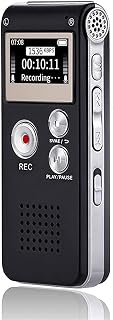
The Sunlan is a 16GB digital voice recorder, not a USB microphone. It is included as an alternative for buyers who want to record a lecture without keeping a USB microphone connected to a computer. The listing describes one-button recording, playback through an internal speaker, and an option to repeat a selected section.
Its listed voice-activated recording starts when sound is detected and enters standby when sound is absent, which is intended to save recording time and power. The product description also says it has noise reduction and a sensitive microphone for lectures, meetings, and interviews.
- Best for: Users looking for a standalone lecture-capture device with on-device playback.
- Why it stands out: Its record, stop, and play controls are designed for direct operation, rather than recording through computer software.
- Consideration: It is not a USB desktop microphone, so choose a listed USB mic instead if you need to record directly into a computer.
Consider this option when portability and simple operation matter more than using a computer-based microphone setup. Confirm that a standalone recorder matches your intended recording and file-transfer workflow.
Buying Guide: How To Choose A USB Microphone For Lectures
Which pickup pattern is better for lecture recording?
A pickup pattern affects how a microphone captures sound around it. The CMTECK G009 is listed as omnidirectional, meaning its design captures sound from multiple directions. That can be useful when the sound source is not always directly in front of the microphone, but it may also capture more surrounding room sound.
The ZealSound K66 and Sennheiser Profile are listed as cardioid microphones. This pattern focuses more on sound from the front, which can help when one person speaks from a fixed position. Place the microphone facing the speaker and keep it close enough for clear voice pickup, while avoiding bumps and desk noise.
Do you need noise reduction?
Noise-reduction features may help in a home office or study with consistent background sounds. The CMTECK lists active noise-cancelling technology, while the ZealSound K66 offers a selectable noise-reduction mode. These features do not remove the need to choose a quiet space: nearby conversations, room echo, and loud interruptions can still affect a recording.
For the cleanest lecture audio, reduce background noise at the source when possible. Turn off avoidable noise, close the door, and position the microphone near the speaker. A microphone’s stated features are not a guarantee that every room sound will disappear.
What controls matter during a class or recording?
A mute button is useful when you need to pause audio without unplugging the microphone. The CMTECK includes a mute button with an LED status indicator, while the Sennheiser Profile also lists a mute control. The FIFINE K669B has a physical volume knob, and the ZealSound K66 lists gain, volume, monitoring, and echo controls.
If you need to check audio while recording, consider whether headphone monitoring is important. The Sennheiser Profile lists a built-in headphone jack, and the ZealSound K66 lists monitoring. Buyers who prefer a simple setup may be better served by fewer controls.
How should you check computer and device connections?
Match the microphone connection to the device you plan to use. The FIFINE K669B connects through USB-A and is not listed as compatible with phones. The Sennheiser Profile includes a USB-C cable. The ZealSound K66 listing describes USB-C and Lightning adapters for mobile devices, as well as computer connections. Check the port and included accessories for your exact device before ordering.
Consider the cable’s reach and your desk layout, too. A microphone placed too far away may pick up less direct voice sound. If you plan to record in different locations or on different devices, portability and included connection adapters may matter as much as sound controls.
Should you buy a USB microphone or a voice recorder?
A USB microphone is appropriate when you want to capture audio on a connected computer or device. A standalone voice recorder is a different category: the Sunlan listing describes built-in recording and playback controls. Choose a USB microphone for computer-based recording workflows, and consider a recorder when you want to capture audio without relying on a desktop microphone connection.
Frequently Asked Questions
What is the best USB microphone for recording lectures?
The best choice depends on your setup. The CMTECK G009 suits simple desktop recording with a mute indicator, while the ZealSound K66 suits users who want a cardioid pattern and selectable noise reduction.
Is a cardioid microphone good for recording a lecturer?
A cardioid microphone can suit a lecturer speaking from a fixed position because it focuses more on sound from the front. Position it toward the speaker and check the room setup before recording.
Does the FIFINE K669B work with phones?
The product information says the FIFINE K669B is not compatible with phones. It connects directly to a computer’s USB-A port.
Can I use the Sunlan recorder as a USB microphone?
The Sunlan product is described as a digital voice recorder, not a USB microphone. Its listed features include standalone recording and playback.
Why does a lecture recording sound unclear?
Room noise, distance from the speaker, and microphone placement can affect clarity. Move the microphone closer to the speaker, point it toward the voice, and reduce avoidable background noise.