
The best USB microphone with gain control lets you adjust recording level directly on the mic, without relying only on software. The FIFINE AmpliGame A6V is a strong fit for gaming and streaming, while the Sennheiser Profile offers hands-on gain, mix, and volume controls for voice work. The TONOR TC310+ and FIFINE A6T are gaming-focused options with onboard controls, and the FIFINE AM8 is better for creators who want USB convenience and the option to move to XLR.
| Microphone | Best For | Notable Controls or Features |
|---|---|---|
| FIFINE AmpliGame AM8 | USB users who may upgrade to XLR | Tap-to-mute; USB/XLR connections |
| FIFINE AmpliGame A6V | Gaming and streaming | On-mic gain knob; tap-to-mute |
| TONOR TC310+ | Creators wanting a boom-arm set | Gain control listed; RGB controls |
| Sennheiser Profile | Podcasts and voice recording | Gain, mix, and volume controls |
| FIFINE AmpliGame A6T | Plug-and-play gaming setups | On-mic volume knob; tap-to-mute |
FIFINE AmpliGame AM8 USB/XLR Dynamic Microphone

The FIFINE AM8 is best for a streamer or podcaster who wants a straightforward USB setup now and the option to use an XLR connection later. Its dynamic capsule uses a cardioid pickup pattern and a listed frequency response of 50 Hz to 16 kHz. The manufacturer recommends keeping the sound source 2 to 6 inches from the microphone and pointing its end toward the voice.
For USB use, the AM8 offers plug-and-play operation and tap-to-mute with an LED mute reminder. Its USB and XLR options make it more flexible than a USB-only mic if the recording setup changes. The listed features do not identify a dedicated gain knob, so it is not the clearest choice for buyers who require physical gain adjustment on the microphone.
Choose this if connection flexibility and a dynamic microphone matter more than a documented onboard gain control. XLR use requires a separate XLR cable and an audio interface or mixer. RGB lighting and function keys are inactive in XLR mode.
FIFINE AmpliGame A6V USB Gaming Microphone

The FIFINE A6V is best for PC gamers and streamers who want to adjust microphone level without opening software controls. Its listed features include a convenient gain knob and a tap-to-mute button. The microphone has a cardioid polar pattern, a 192 kHz sampling rate, and a stated 70 dB signal-to-noise ratio.
The mute control also turns off the RGB lighting to show that the microphone is muted. Its gradient lighting cycles through seven colors, with fixed light modes also described in the product features. These controls make the A6V a direct match for buyers who prioritize quick physical adjustments and a gaming-oriented design.
Best for: users who want an explicitly listed gain knob and a quick mute control in a USB gaming microphone. Its listed features focus on gaming and streaming; buyers seeking an XLR upgrade path should compare it with the AM8 instead.
TONOR TC310+ Gaming Microphone Set
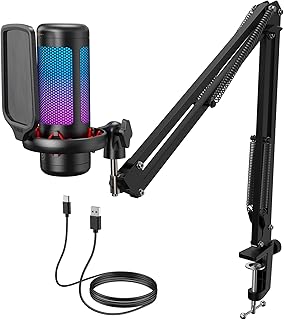
The TONOR TC310+ is best for gaming or streaming buyers looking for a microphone set with a boom arm. The product name lists gain control, and the supplied feature information describes a condenser microphone with a USB connection, tap mute, and a set of RGB controls. Its stated audio features include a chip and core intended to provide clear sound for team communication.
The lighting has four described modes: static colors, a single-color gradient, breathing, and a mixed-color gradient. A long tap on the RGB icon adjusts brightness, which gives users a way to reduce lighting intensity. The boom-arm set format can suit a desk-based setup where positioning the mic off the desktop is preferred.
Choose this if you want a gaming-oriented kit with a boom arm and the product listing’s stated gain control. The supplied details do not explain the gain control’s range or adjustment method, so confirm those specifics in the current listing if exact control behavior matters.
Sennheiser Profile USB Cardioid Condenser Microphone

The Sennheiser Profile is best for podcasting, voice recording, or streaming when direct control over several audio settings is useful. Its listed controls include gain, mix, and volume, each accessible by turning a dial. The cardioid condenser microphone is designed to emphasize the body and presence of the human voice, according to the product description.
The Profile is described as plug-and-play and includes a table stand and a 1.2-meter USB-C cable. A built-in headphone jack is also listed, making it a practical option for a simple desktop recording setup. Its combination of gain and mix controls distinguishes it from microphones that only provide a basic volume adjustment.
Best for: buyers who want physical control over microphone gain and the audio mix, along with a desktop stand. The included cable is 1.2 meters long, so check whether that reach suits the placement of your computer and microphone.
FIFINE AmpliGame A6T USB Gaming Microphone Kit

The FIFINE A6T is best for a gaming setup where easy installation and an on-microphone volume adjustment are priorities. The supplied features describe plug-and-play operation and compatibility with Windows, Mac OS, PS4, and PS5. Its bottom-mounted volume knob allows level adjustment at the mic, while the top-mounted touch control provides quick muting.
The kit includes an 8.2-foot USB-C-to-USB-A/C cable and a boom arm, according to the product details. Its two-tone automatic gradient RGB lighting is aimed at users who want colored lighting in a streaming or gaming setup. The touch mute control is described as operating without a mechanical clicking sound.
Choose this if you want a gaming microphone kit with a long listed cable, boom arm, and simple physical volume adjustment. The supplied feature details describe a volume knob rather than explicitly specifying a gain knob, so buyers who require a named gain control should compare the A6V or Sennheiser Profile.
Buying Guide: How to Choose a USB Microphone With Gain Control
Does the microphone have a true gain control?
Check the product details for an explicitly identified gain knob or gain dial. Gain controls the input level of the microphone signal. A volume knob may instead adjust listening volume or another output level, depending on the microphone. The supplied details identify gain controls on the FIFINE A6V and Sennheiser Profile, while the TONOR TC310+ product name also lists gain control.
If a listing only says “volume control,” do not assume it adjusts microphone input gain. The FIFINE A6T lists a volume knob, while the supplied AM8 features do not specify a gain knob. When the exact function is unclear, check the manufacturer’s current documentation before buying.
Which microphone suits gaming and streaming?
For gaming, prioritize quick mute access and controls you can reach during a session. The FIFINE A6V combines a listed gain knob with tap-to-mute. The A6T also offers tap-to-mute and a volume knob, with a boom arm and long cable listed as part of its kit. The TONOR TC310+ may suit buyers who want a boom-arm set and RGB lighting.
Consider where the microphone will sit and whether a boom arm is included. A microphone positioned near the speaker can make it easier to speak at a consistent distance, but the supplied product information does not give the same mounting details for every model.
Should you choose a dynamic or condenser microphone?
The AM8 is a dynamic microphone with a cardioid pickup pattern. Its listed guidance recommends speaking into the end of the mic from 2 to 6 inches away. The A6V, TONOR TC310+, and Sennheiser Profile are described as condenser microphones. Choose based on the microphone type and recording approach that suit your environment, rather than assuming one type is best for every room.
Cardioid pickup is described for the AM8, A6V, and Sennheiser Profile. A directional pattern focuses on sound arriving from the front, but microphone placement still matters. Position the microphone toward the speaker and consider nearby sources of unwanted sound.
Do you need USB only or USB and XLR?
A USB microphone is a straightforward choice for a desktop setup. The AM8 also supports XLR, which can offer a path to a different recording setup. Its XLR connection requires a separate cable and an audio interface or mixer, and its RGB and function key are inactive in XLR mode. Choose XLR only if you are prepared to use the additional equipment it requires.
What other controls are useful?
A mute button helps pause audio quickly, while an LED or lighting change can make muted status easier to see. Headphone, mix, and output-volume controls can also be useful, but they are different from microphone gain. The Sennheiser Profile lists gain, mix, and volume controls plus a headphone jack; the FIFINE A6V and A6T list quick-mute controls.
Check the cable length, included stand or arm, lighting controls, and device compatibility in the listing. These details affect how easily a microphone fits a desk and workflow. The A6T lists Windows, Mac OS, PS4, and PS5 compatibility; do not assume another model supports the same devices unless its documentation says so.
Frequently Asked Questions
What does gain control do on a USB microphone?
Gain adjusts the level of the microphone’s incoming audio signal. It can help set an appropriate recording level at the microphone, rather than relying only on computer software controls.
Which microphone in this list explicitly lists a gain knob?
The FIFINE AmpliGame A6V lists a handy gain knob. The Sennheiser Profile lists a gain dial, and the TONOR TC310+ product name also states that it has gain control.
Is a microphone volume knob the same as a gain knob?
Not necessarily. A volume control may adjust output or listening level, while gain adjusts microphone input level. Check the product documentation to confirm what a particular knob controls.
Which option offers both USB and XLR?
The FIFINE AmpliGame AM8 supports USB and XLR connections. XLR use requires a separate XLR cable and an audio interface or mixer, and some USB functions are inactive in XLR mode.
Which microphone includes a headphone jack?
The Sennheiser Profile product details list a built-in headphone jack, along with gain, mix, and volume controls.
Which option is described as plug-and-play?
The FIFINE A6T and Sennheiser Profile are both described as plug-and-play in the supplied product information. The AM8 is also described as connecting directly by USB without a complicated setup.