
The best choice depends on whether you need a true MIDI controller or a USB pedal that types keyboard and mouse commands. M-VAVE Chocolate Plus models are designed for MIDI control; iKKEGOL pedals are programmable USB HID switches and should not be mistaken for MIDI devices. Choose the four-button M-VAVE with USB and Bluetooth for flexible connections, the iKKEGOL triple pedal for several computer commands, or a single-pedal iKKEGOL for one hands-free action.
| Product | Best for | Connection or control type |
|---|---|---|
| M-VAVE Chocolate Plus, USB and Bluetooth listing | Flexible MIDI setups | Bluetooth MIDI and USB wired |
| M-VAVE Chocolate Plus, rechargeable listing | Wireless music-app control | Bluetooth MIDI |
| iKKEGOL Triple USB Pedal | Multiple computer commands | USB HID keyboard and mouse |
| iKKEGOL Single USB Pedal, mechanical | One configurable foot command | USB HID |
| iKKEGOL Single USB Pedal, 2-meter cable | Simple hands-free computer input | USB HID |
M-VAVE Chocolate Plus With USB And Bluetooth

This four-button controller is the strongest fit for buyers specifically looking for a USB MIDI foot switch. Its listed features include Bluetooth and USB wired connections, app-based settings, and MIDI messages including PC, CC, Note On/Off, and SysEx. The four programmable switches can control guitar effects, DAW software, loop pedals, and music apps.
Best for: Musicians who want four footswitches and a choice between wired USB and Bluetooth MIDI. The listed support for Windows, Mac, iOS, and Android makes it a flexible option across those platforms.
Why it was selected: This listing explicitly describes both USB wired and Bluetooth MIDI, unlike USB HID pedals that send keyboard or mouse commands rather than MIDI data.
Limitation: The listing describes app control and customization but does not specify the setup steps for each software or device. Check the product instructions for your intended configuration.
M-VAVE Chocolate Plus Rechargeable MIDI Controller

This compact controller has four assignable buttons, Bluetooth connectivity, app control, and support for PC, CC, Note On/Off, and SysEx messages. The product information lists Windows, Mac, iOS, and Android compatibility. Suggested uses include switching presets or effects and controlling playback, rewind, fast-forward, and loop functions in online videos.
Best for: Players who prefer wireless control of music apps and need several foot-operated commands in a portable layout. The built-in rechargeable battery is listed as providing up to 12 hours of use after a 2.5-hour charge.
Why it was selected: It offers MIDI-focused functions and four assignable switches in a compact design, making it more appropriate for music control than a general-purpose keyboard-emulation pedal.
Limitation: This listing describes Bluetooth wireless operation, not a USB wired MIDI connection. The product information also recommends reviewing the manual or setup videos before use.
iKKEGOL Triple USB HID Foot Pedal

This three-pedal iKKEGOL model is a programmable USB HID device. Its listed functions include keyboard and mouse control, and the optical switches are described as quiet. Example applications include push-to-talk, transcription, media playback, Zoom, gaming, and instrument control.
Best for: Users who want several separate foot-operated computer commands without using their hands. Three pedals can provide more direct control options than a single-switch model.
Why it was selected: It is the most suitable choice in this group when the priority is multiple USB-triggered actions, rather than sending MIDI messages to music equipment or software.
Limitation: The product is described as a standard HID keyboard and mouse device, not a MIDI controller. Buyers who need PC, CC, or Note messages should choose a MIDI-specific model instead.
iKKEGOL Mechanical Single USB Foot Switch

This single mechanical pedal connects by USB and can be configured for keyboard, mouse, string, multimedia, or game-controller inputs, according to the product details. The listed cable is 1.9 meters, or 6.2 feet. Rubber feet are intended to help keep the pedal from sliding on hardwood floors.
Best for: A buyer who needs one reliable foot-triggered command, such as push-to-talk, muting, page control, or a keyboard shortcut. It suits a simpler setup than a four-button MIDI controller.
Why it was selected: Its listed input options make it adaptable for hands-free computer tasks, including applications used by musicians and streamers.
Limitation: The pedal emulates computer input; the listing does not identify it as a MIDI device. It may also produce a plastic-on-plastic click when pressed lightly, according to the product information.
iKKEGOL USB Foot Pedal With 2-Meter Cable
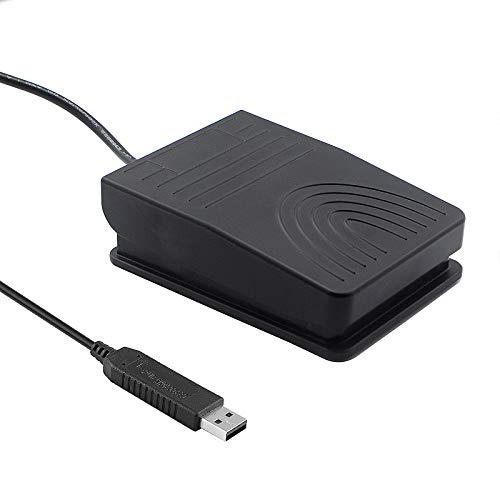
This single-pedal USB switch is described as a programmable HID device that can trigger keyboard or mouse actions. The product information lists free software for setup and example uses such as gaming, streaming, push-to-talk, transcription, Zoom, media playback, and instrument control. It also has a 2-meter cable and a wide pedal design.
Best for: Buyers who want one hands-free computer command and value a longer listed cable than the 1.9-meter option on the other mechanical iKKEGOL model.
Why it was selected: It provides a straightforward single-switch alternative for people who need a computer shortcut rather than a multi-button MIDI controller.
Limitation: This is a USB keyboard-and-mouse HID pedal, not a MIDI foot controller. Setup uses the manufacturer’s software, so it is not the best fit for buyers seeking a dedicated MIDI-message workflow.
Buying Guide: How To Choose A USB MIDI Foot Switch
Do you need MIDI messages or keyboard shortcuts?
Start by checking what your software or equipment expects. A MIDI controller sends music-control messages such as Program Change (PC), Control Change (CC), Note On/Off, or SysEx. A USB HID pedal acts like a keyboard or mouse and triggers an assigned computer input. These are different control methods, even though both products may be called foot switches.
Choose a MIDI-specific controller when your goal is to change presets, control effects, or operate music software through MIDI. Choose a USB HID pedal when you want a foot-operated keyboard shortcut, push-to-talk command, or playback key. Do not assume a standard USB connector means that a pedal sends MIDI.
Should you choose wired USB or Bluetooth?
A wired USB connection can be a practical choice when you prefer a direct physical connection and want to avoid relying on a wireless link. Among the products here, one M-VAVE listing explicitly describes both USB wired and Bluetooth connections. Other M-VAVE listings emphasize Bluetooth MIDI and rechargeable operation.
Wireless control can reduce cable clutter, but you should confirm that your intended device and app support the controller’s connection method. If you need a cable-free setup, check the product instructions for pairing and app configuration. If you specifically need wired USB MIDI, verify that the exact listing—not just the product family—states that capability.
How many pedals and commands do you need?
A single pedal is a straightforward option when one repeated action is enough. Examples include triggering a shortcut or push-to-talk command. A three-pedal HID unit may be better for several separate computer actions. A four-button MIDI controller gives music users multiple assignable switches for presets, effects, or other supported MIDI tasks.
Consider the action you will use most often and whether you need independent commands at the same time. More switches can provide more control, but only if the target software or device can be configured to use them.
What should you check for setup and comfort?
Check the listed setup method before buying. The M-VAVE products describe app control and MIDI customization, while the iKKEGOL HID models rely on programmable computer inputs. Review the instructions for your operating system and intended application; product descriptions alone may not establish the exact setup steps for every workflow.
For repeated use, compare the number and width of pedals, cable length, and listed physical details. The iKKEGOL triple pedal is described as having wide pedals and quiet optical switches. The mechanical single model lists rubber feet and a 1.9-meter cable. These details can help narrow a choice, but they do not replace checking the space available at your workstation or performance setup.
How can you compare products fairly?
- For MIDI over USB or Bluetooth: Look for an explicit MIDI connection description and the message types you need.
- For a computer shortcut: A USB HID pedal can be suitable if keyboard or mouse emulation meets your needs.
- For wireless operation: Confirm Bluetooth support, device compatibility, battery details, and required app setup.
- For multiple actions: Compare switch count and whether each switch can be assigned independently.
- For a wired setup: Check whether the specific model states USB wired support and whether its cable length works for your layout.
Frequently Asked Questions
Is a USB foot switch automatically a MIDI controller?
No. A USB foot switch may act as a keyboard or mouse through HID rather than sending MIDI messages. Check the product description for explicit MIDI support and the message types it can send.
Which option here supports USB wired MIDI?
The M-VAVE Chocolate Plus listing with four programmable switches explicitly lists both Bluetooth and USB wired connections, along with PC, CC, Note On/Off, and SysEx MIDI functions.
Can an iKKEGOL USB pedal control music software?
The listed iKKEGOL pedals can trigger programmable keyboard or mouse actions and include instrument-control examples. The product details do not identify them as MIDI controllers, so confirm that HID input works for your specific software task.
Which type is better for changing guitar effects?
A MIDI-specific foot controller is the more direct fit when the effects device or software accepts MIDI. Confirm the required MIDI messages and connection method before selecting a model.
What should I check before buying a wireless MIDI pedal?
Confirm that your computer, phone, tablet, or music app supports the listed Bluetooth MIDI connection. Also review pairing instructions, app requirements, battery information, and whether the listing includes a wired connection if you need one.