
The best USB mixer for a PC depends on how many audio sources you need to control and what microphone you own. The FIFINE SC3 is best for simple XLR streaming with separate channel controls, while the FIFINE SC8 is better for gaming features such as game/chat balancing and virtual surround sound. For sound effects, consider the PUPGSIS; for analog mixing with more inputs, consider the Behringer XENYX 802S.
| Product | Best For | Standout Feature |
|---|---|---|
| FIFINE AmpliGame SC3 | Single-mic streaming | Individual channel faders and front mute |
| PUPGSIS Gaming Audio Mixer | Voice effects and sound cues | Voice changer and effect pads |
| FIFINE AmpliGame SC3W | Basic PC audio adjustment | Four-channel control and XLR input |
| FIFINE SC8 | Gaming audio management | Game/chat balance and virtual 7.1 |
| Behringer XENYX 802S | Multi-source analog mixing | Eight inputs and USB streaming interface |
FIFINE AmpliGame SC3

The FIFINE AmpliGame SC3 is best for a PC streamer or podcaster who uses one XLR microphone and wants hands-on control of several audio channels. Its listed features include an XLR microphone input, built-in 48V phantom power, four independent volume controls, a front mute button, and real-time monitoring. These controls make it easier to adjust mic, line-in, headphone, and line-out levels without relying only on software.
Choose this mixer if you want a direct-control layout for a compact streaming setup. The phantom-power feature supports compatible condenser microphones without an additional power supply, according to the product details. A voice changer and RGB lighting are also listed.
Limitation: The listed XLR input is for XLR microphones; the feature description specifically says the phantom-power function is not available for USB microphones. Avoid this option if your main microphone is USB and you need to connect it through the mixer.
PUPGSIS Gaming Audio Mixer

The PUPGSIS mixer is best for creators who want voice effects and sound cues available during gaming, streaming, or podcasting. Its listed features include a microphone input, built-in reverb, four customizable sound-effect pads, and a voice changer. The product description also identifies noise reduction as a feature for reducing unwanted background sounds such as fan noise and hum.
Choose this model if creative effects are more important than a plain, minimal audio interface. Its sound pads and voice changer provide options for changing or adding audio during a live session. The product information describes the unit as an all-in-one audio hub for streaming and gaming.
Limitation: The listing says it does not support USB microphones and specifies XLR microphone use. It also says a 1/4-inch TRS-to-XLR cable is required and may need to be added separately. Check the microphone connection and cable requirements before choosing it.
FIFINE AmpliGame SC3W
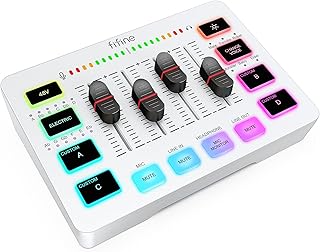
The FIFINE AmpliGame SC3W is best for PC users who want straightforward, separate level controls for a streaming or recording setup. Its four-channel design allows individual adjustment of connected devices, and its XLR microphone input is supported by built-in 48V phantom power. The listed basic controls include mute, volume adjustment, and real-time monitoring.
Choose the SC3W if you want an XLR-focused mixer with practical controls for managing audio while recording or streaming. Its fader-style adjustment is useful when you want to change levels directly on the device rather than make every adjustment inside a game or streaming program. The product listing presents it as an all-in-one option for common mixer functions.
Limitation: The provided features do not describe sound-effect pads, voice-changing options, or a dedicated game/chat balance dial. If those functions are central to your setup, compare it with a model that lists them explicitly.
FIFINE SC8 Gaming Audio Mixer

The FIFINE SC8 is best for PC gamers who want physical control over microphone, game, and chat audio. Its dedicated Game/Chat balance dial helps adjust the relative emphasis of game sound and teammate communication. The product also lists virtual 7.1 surround sound, three EQ presets, USB-C plug-and-play operation, and smart knobs with push-to-mute controls.
Choose this mixer if gaming audio management is a priority and you want more than basic microphone level adjustment. Its listed connections and platform support include USB-C for PC, PS5, Switch, and mobile, plus optical and AUX connections for other audio sources. The XLR input has 48V phantom power, and the description lists a dynamic/condenser toggle.
Limitation: The SC8’s extra gaming and connection features may be unnecessary for someone who only needs simple XLR microphone control. The product description also identifies virtual 7.1 as a feature; buyers seeking a basic mixer rather than gaming processing may prefer a simpler model.
Behringer XENYX 802S

The Behringer XENYX 802S is best for PC users who want an analog mixer with more inputs for combining several sources. The product is described as an eight-input analog mixer with USB streaming capability. Its listed features include analog mixing and equalization, direct mixing of PC or gaming audio into a streaming output, and low-noise operation for streaming, podcasting, and recording.
Choose this mixer if your setup needs a more traditional mixing format or if you want to combine computer audio with other sources. Its eight-input design distinguishes it from the more gaming-oriented compact options in this list. The USB streaming interface provides a way to incorporate the mixer into a PC recording or streaming workflow.
Limitation: The provided product details do not specify gaming-specific features such as a voice changer, sound-effect pads, or a game/chat balance dial. If those are required, choose a model that explicitly lists them.
Buying Guide: How To Choose A USB Mixer For PC
What will you connect to the mixer?
Start by listing every audio source you plan to use: microphone, PC audio, headphones, and any additional devices. A compact mixer may be enough for one microphone and a small streaming setup. If you need to combine more sources, compare the number and types of inputs rather than relying only on a product’s overall description.
Input count and input type are not interchangeable. An XLR microphone connection will not serve the same purpose as a USB microphone port. Check the exact connection requirements for your microphone and any adapters or cables before buying. The PUPGSIS listing, for example, specifies an XLR microphone and a separately added TRS-to-XLR cable requirement.
Does your microphone need phantom power?
Some of the mixers listed here advertise 48V phantom power for compatible condenser microphones. This can be useful when selecting an XLR condenser mic, but it does not mean every microphone can connect to the mixer. Confirm that the microphone’s connector and power requirements match the mixer’s specifications.
Do not assume phantom power is appropriate for every microphone. If you use a USB microphone, check whether the mixer supports USB microphones as an input; the FIFINE SC3 description says its XLR/phantom-power function is not for USB microphones, and the PUPGSIS listing also excludes USB mics.
Do you need physical channel controls?
Separate faders or knobs can make it easier to adjust audio without opening software settings. This matters when you need to change microphone level while talking, balance a game against a voice chat, or mute quickly. The FIFINE SC3 and SC3W list independent channel controls, while the SC8 specifically lists a Game/Chat balance dial.
If you only need to set levels once and manage them in your PC software, a simpler control layout may be enough. If you often adjust multiple sources during a live session, prioritize a mixer that gives each important source its own clearly described control.
Are sound effects or voice processing important?
For live sound cues, reverb, or voice-changing effects, look for those features by name in the product details. The PUPGSIS lists four sound-effect pads, built-in reverb, and a voice changer. The FIFINE SC3 also lists a voice changer. Do not assume every USB mixer includes these effects simply because it is marketed for gaming or streaming.
For game audio rather than voice effects, the SC8 lists virtual 7.1 surround sound, EQ presets, and a game/chat control. These features serve a different purpose from soundboard pads. Choose based on whether you want to alter or cue your voice, manage game and chat levels, or simply combine audio sources.
How many sources do you expect to mix?
Match the mixer’s available inputs and controls to the setup you have now, while considering likely additions. A single-microphone streamer may prefer a compact device with direct controls. A creator combining several sources may benefit from a mixer with a higher input count, such as the Behringer XENYX 802S, which is described as an eight-input analog mixer.
Read the specific connection details before assuming an input can accept a particular device. A product’s total input count does not tell you whether it has the exact XLR, 1/4-inch, AUX, optical, or USB connection your equipment requires.
Which format fits your workflow?
Gaming-focused mixers emphasize quick control, mute buttons, chat balance, and effects. Traditional analog mixers emphasize input mixing and equalization. A USB interface connects the mixer to a computer, but the controls and supported sources differ by model. Consider whether you need fast gaming adjustments, a physical soundboard, or broader analog mixing.
Also consider where you will make adjustments. If you want to control levels directly from the desk, choose a model with the controls you will use most. If you prefer managing levels in streaming or recording software, basic hardware controls may be sufficient.
Frequently Asked Questions
What does a USB mixer do for a PC?
A USB mixer connects audio sources and controls to a computer-based setup. Depending on its features, it can help combine microphone and computer audio, adjust levels, monitor sound, and send a mixed signal to streaming or recording software.
Can I use a USB microphone with these mixers?
Do not assume so. The FIFINE SC3 description says its XLR input and phantom-power function are not for USB microphones, and the PUPGSIS listing excludes USB microphones. Check the specific model’s input options before buying.
Do all XLR microphones need 48V phantom power?
No. Phantom power is associated with compatible condenser microphones, but microphone requirements vary. Check the microphone’s documentation and the mixer’s instructions instead of enabling phantom power by default.
Which mixer is best for gaming chat control?
The FIFINE SC8 is the clearest fit in this list for game/chat balancing because its product details specify a dedicated Game/Chat balance dial. It also lists virtual 7.1 sound and EQ presets.
Which option has sound-effect pads?
The PUPGSIS Gaming Audio Mixer lists four custom sound-effect pads, along with built-in reverb and a voice changer. Check its microphone and cable requirements before choosing it.
Is an analog mixer useful for PC streaming?
An analog mixer can suit a PC streamer who wants to combine multiple sources and adjust their levels physically. The Behringer XENYX 802S is listed as an eight-input analog mixer with a USB streaming interface, but the provided features do not specify gaming effects or game/chat controls.