
The best USB sound adapter with 7.1-channel audio depends on the connections and controls you need. StarTech is best for buyers who want several input and output options, while Vantec suits shoppers seeking a straightforward USB 2.0 adapter with listed playback and recording rates. The compact adapters are better for basic headset use, and the 1Mii model adds a long braided cable and direct mute and volume controls.
| Product | Best For | Notable Detail |
|---|---|---|
| StarTech 7.1 USB Audio Adapter | Multiple audio connections | Analog jacks and digital SPDIF |
| VANTEC USB External 7.1 Channel Audio Adapter | Simple USB connection | 44.1 and 48 kHz playback and recording |
| 1Mii USB Sound Card | Headset and voice-chat use | 6-foot braided cable and inline controls |
| Hi-Speed USB 2.0 7.1-Channel Adapter | Compact, basic setup | Built-in volume and mute controls |
| FEMORO USB Sound Card | Durable, portable adapter | Aluminum-alloy shell |
StarTech 7.1 USB Audio Adapter
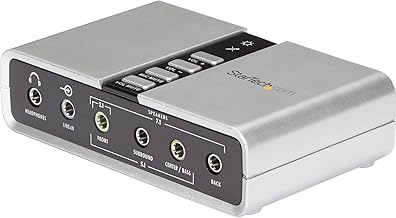
Best for: Buyers who need more connection choices than a basic USB-to-headset adapter provides. This StarTech external sound card supports 7.1-, 5.1-, and two-channel output through 3.5 mm jacks. It also lists a headphone port, line-in, and stereo microphone inputs.
The adapter connects through USB and is bus-powered. Its listed analog playback and recording sampling rates are 44.1 kHz and 48 kHz. For digital use, it includes SPDIF output and optical input passthrough. The digital output supports 48 kHz playback; the optical passthrough supports up to two-channel audio at 48 kHz. A one-meter USB cable is included.
Choose this model if you want analog and digital connection options in one adapter. Its range of ports makes it more flexible than a simple headset dongle. Limitation: SPDIF output is specified for 48 kHz, and optical input passthrough is limited to two channels, so it is not the same as multichannel digital passthrough.
VANTEC USB External 7.1 Channel Audio Adapter

Best for: Buyers looking for a USB-connected 7.1-channel adapter with specified playback and recording rates. Vantec lists 44.1 kHz and 48 kHz sampling rates for both playback and recording, making those details useful for comparing it with simpler adapters that do not provide rate information.
The unit uses USB 2.0 and is listed as backward compatible with USB 1.1. That makes its connection specification clear for shoppers checking an older USB port. The product is presented as a 7.1-channel audio adapter rather than a feature-rich hub with a long list of separate ports.
Choose this model if a straightforward USB connection and stated sample rates are your main priorities. It is a better fit for buyers who do not need the multiple analog and digital connections listed for the StarTech adapter. Limitation: The supplied product details do not specify individual input and output ports, controls, or platform compatibility, so confirm those requirements before choosing it.
1Mii USB Sound Card With Virtual 7.1

Best for: Buyers who want a compact adapter for gaming, meetings, or voice chat and value easily reached controls. The product listing describes virtual 7.1 audio, a 3.5 mm audio adapter, plug-and-play use without a driver, and direct volume and mute controls.
Its six-foot braided cable can be useful when the USB port and headset connection need some separation. The cable detail distinguishes this model from small adapters that connect directly to a USB port. Volume and mute controls are also a practical feature for calls, where users may need to silence a microphone or adjust sound quickly.
Choose this adapter if headset convenience and cable length matter more than a full set of separate surround-sound connections. Limitation: The supplied details do not identify specific audio sampling rates or a set of multichannel analog output jacks. The listing describes virtual 7.1, so buyers should not assume it provides seven discrete speaker outputs.
Hi-Speed USB 2.0 7.1-Channel Adapter

Best for: Buyers who want a compact USB audio adapter with basic headset connections and onboard controls. The product details list a USB Type-A connector, stereo output jack, and mono microphone input. Its listed dimensions are 57 by 25 by 12 mm.
The adapter is described as turning a USB port into a virtual 7.1-channel sound card. It also lists built-in volume and mute controls and support for virtual 7.1 audio output for Windows. Those details make it a practical option for shoppers who want controls on the adapter rather than relying only on software settings.
Choose this model if you need separate headphone and microphone connections in a small form. Limitation: The listed connector set is basic, and virtual 7.1 support is specified for Windows. Buyers who need several speaker outputs or confirmed support for another operating system should check the product details carefully.
FEMORO USB Sound Card Adapter

Best for: Buyers who want a portable USB-to-3.5 mm adapter with a metal shell. FEMORO describes an aluminum-alloy housing and a compact design. The listed functions include listening and microphone use through 3.5 mm connections, as well as plug-and-play operation.
The product description says audio travels from the USB port to the 3.5 mm port; the USB connection is an output, not an audio input. It also describes a noise-control chip intended to reduce electromagnetic interference. The listing names PC, laptop, Mac, and PS4 in its product title, but shoppers should verify that the adapter works with their specific setup.
Choose FEMORO if the shell material and portability are important considerations alongside basic headphone and microphone use. Limitation: The supplied details do not state sampling rates or describe discrete multichannel outputs. Its 7.1-channel wording should not be treated as proof of seven separate speaker connections.
Buying Guide: How to Choose a USB 7.1 Sound Adapter
Do you need real multichannel output or virtual 7.1?
Check how the adapter describes its surround sound. “Virtual 7.1” indicates a virtual surround feature in the product description; it does not by itself establish that the device has seven separate speaker outputs. If you plan to connect multiple speakers, look for explicit channel support and a clearly listed set of output connections. StarTech specifically lists 7.1-, 5.1-, and two-channel output through 3.5 mm jacks.
For a headset, a virtual surround feature may be more relevant than a bank of speaker jacks. Compare the adapter’s stated connectors with the plugs on your headset. A stereo headphone jack and a microphone input are not interchangeable with multiple analog speaker outputs.
Which connections should you check?
Start with the connections on your computer, headset, speakers, and microphone. USB Type-A adapters require a suitable USB port. On the audio side, check whether you need a combined headset connection, separate headphone and microphone jacks, line-in, or optical SPDIF. Do not assume an adapter includes a connection just because another model in the same category does.
StarTech lists a headphone port, line-in, stereo microphone inputs, analog jacks, and SPDIF. The compact Hi-Speed model lists a stereo output and mono microphone input. Vantec’s supplied details identify USB 2.0 and backward compatibility with USB 1.1, but do not spell out individual audio ports.
Does the adapter support your computer and software?
Read platform and operating-system information before buying, especially if you use a Mac or gaming console. The Hi-Speed adapter specifies virtual 7.1 output for Windows, while FEMORO’s product title names PC, laptop, Mac, and PS4. These listing details are not a substitute for checking support for your exact device, operating system, and intended application.
“Plug and play” or “no driver needed” may reduce setup steps, but it does not automatically confirm compatibility with every computer. If a product does not provide platform details, verify them with the seller or product documentation before relying on it for work or gaming.
How important are controls and cable length?
Inline or built-in controls can make volume changes and muting quicker during calls or gameplay. Both the 1Mii and Hi-Speed adapters list volume and mute controls. The 1Mii model also lists a six-foot braided cable, which may suit a setup where a short, directly connected adapter would be awkward.
If you prefer a small device with fewer parts, compare its size and cable arrangement with your available desk space. The Hi-Speed adapter lists dimensions of 57 by 25 by 12 mm. FEMORO describes its design as compact, while its aluminum-alloy shell may appeal to buyers prioritizing a metal housing.
What do audio sampling rates tell you?
Sampling rates provide a technical point of comparison, but they are not the only measure of sound quality. Vantec lists 44.1 kHz and 48 kHz for playback and recording. StarTech lists the same rates for analog playback and recording, and gives separate 48 kHz specifications for SPDIF digital output and optical input passthrough.
If you need a specific digital-audio path, read the input and output specifications separately. StarTech’s optical passthrough is specified for up to two-channel audio at 48 kHz; that is different from its analog multichannel output support.
Which adapter is best for calls, gaming, or speakers?
For calls, prioritize a microphone input, convenient mute control, and a cable length that fits your setup. For gaming with headphones, compare virtual surround wording, volume controls, and platform support. For a multichannel speaker system, focus on the number and type of outputs rather than the 7.1 label alone.
Among these options, StarTech has the most detailed connection information in the supplied specifications. Vantec is a straightforward choice when its USB connection and sample-rate details match your needs. The 1Mii and Hi-Speed models emphasize virtual 7.1 and controls, while FEMORO highlights portability and a metal shell.
Frequently Asked Questions
Does a USB 7.1 sound adapter provide seven speaker outputs?
Not necessarily. Some adapters describe virtual 7.1 audio, which is different from seven discrete physical outputs. Check the product’s listed connectors and channel support before buying for a multichannel speaker system.
Can I use a USB sound adapter with a headset?
Yes, if the adapter has the audio and microphone connections your headset requires. Check whether the adapter has a stereo output, microphone input, or the specific headset connection format you need.
Is virtual 7.1 the same as 5.1 or 7.1 speaker output?
No. Virtual 7.1 is a product feature described as simulated surround sound. Physical 5.1 or 7.1 output requires compatible output connections and explicit multichannel support.
Will these adapters work with every computer?
No universal compatibility is established by the supplied product details. Check the product’s operating-system and device support, USB connector requirements, and audio connections for your exact setup.
What is the advantage of a USB audio adapter?
A USB audio adapter provides an external audio connection through USB and may add ports or controls. The available features vary by model, so compare its audio jacks, microphone input, channel support, and control options with your needs.