
The KNA PAS-24 is the clearest fit for buyers seeking a USB audio interface whose product name specifies balanced outputs. The innomaker portable DAC lists 4.4mm and 3.5mm outputs, which may suit headphone listeners but should not be assumed to provide a balanced connection without confirming its specifications. The other adapters are aimed at standard stereo, gaming, or surround audio rather than documented balanced analog output.
| Product | Best For | Output Information |
|---|---|---|
| KNA PAS-24 USB Audio Interface | Recording and streaming | Balanced outputs stated in product name |
| innomaker Portable USB HiFi Sound Card | High-resolution headphone listening | 4.4mm and 3.5mm outputs listed |
| StarTech 7.1 USB Audio Adapter | Multichannel computer audio | Analog 3.5mm and digital SPDIF |
| 1Mii USB Sound Card | Gaming and voice chat | 3.5mm audio with virtual 7.1 |
| SABRENT USB External Stereo Sound Card | Simple headphone and mic connections | Stereo 3.5mm output |
KNA PAS-24 USB Audio Interface

Best for: Musicians and creators looking for a compact USB recording interface with balanced outputs identified in the product name. The listed description also specifies XLR/TRS inputs, phantom power, gain control, and headphone monitoring, making it more recording-oriented than a basic USB headphone adapter.
The PAS-24 is described as smaller than a smartphone and suitable for recording on the go. Its stated recording specification is 24-bit/192kHz. These details make it the most directly relevant option in this group for people comparing a USB interface with balanced-output capability.
- Choose this if your priority is recording or streaming and you need the product listing to specify balanced outputs.
- Limitation: The supplied details do not identify the balanced output connector type or explain the output routing. Confirm those details before matching it to studio monitors or other equipment.
innomaker Portable USB HiFi Sound Card

Best for: Listeners seeking a portable DAC and headphone amplifier with high-resolution format support. The product name lists dual 4.4mm and 3.5mm outputs, while the feature description states support for PCM up to 384kHz/32-bit and DSD256.
The stated compatibility includes Android, Windows, and Linux devices, as well as computers, smartphones, and laptops. Its impedance-adaptive amplifier design is described as working with most headphones. For balanced-output shoppers, the 4.4mm connection is a reason to investigate this model, but the provided features do not explicitly confirm that the output is wired or marketed as balanced.
- Choose this if you want a portable headphone-focused device and value the listed high-resolution format support.
- Limitation: Do not treat the 4.4mm jack alone as proof of a balanced signal. Check the manufacturer’s output specifications and your headphones’ cable requirements.
StarTech 7.1 USB Audio Adapter
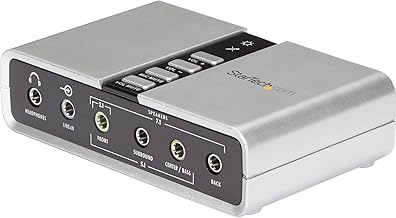
Best for: Desktop or laptop users who need multichannel audio options rather than a specifically balanced analog output. The adapter supports 7.1, 5.1, and two-channel output through 3.5mm connections, and it also offers digital SPDIF output.
StarTech lists analog playback and recording rates of 44.1kHz and 48kHz. SPDIF digital output supports 48kHz playback; optical input passthrough is specified for up to two-channel audio at 48kHz. A one-meter USB cable is included, and the device is bus-powered.
- Choose this if you need multiple channels, analog 3.5mm connections, or SPDIF for a compatible audio setup.
- Limitation: The provided specifications do not describe a balanced analog output. SPDIF is a digital connection, not a balanced analog output.
1Mii USB Sound Card for Gaming

Best for: PC gamers, meeting participants, and voice-chat users who want a simple inline controller. The listed features include virtual 7.1 surround sound, a six-foot braided cable, headphone and microphone volume adjustment, and a dedicated microphone mute button.
The product information lists compatibility with Windows 10, Windows 7, and Windows XP, and says it works with most desktop and laptop equipment and many 3.5mm headphones. It also specifies support for TRS and TRRS microphones. The LED indicator helps show the virtual surround and microphone mute status.
- Choose this if convenient volume and mute controls matter more than studio connections.
- Limitation: Virtual 7.1 is a gaming-oriented feature, not evidence of a balanced analog output. The listed compatibility does not establish support for every operating system or device.
SABRENT USB External Stereo Sound Card

Best for: Users who need a basic USB connection for separate 3.5mm headphones or powered speakers and a microphone. The plug-and-play adapter is USB bus-powered, requires no external power, and is described as working with class-compliant USB audio systems.
Its green jack is stereo output, and its pink jack is mono microphone input. The product details list Windows, Mac, and Linux support. This is a straightforward option for replacing a computer’s headphone and mic connections, but it is not a balanced-output interface.
- Choose this if you need simple stereo playback and a separate microphone input.
- Limitation: It does not support a single-plug four-pole headset, passive speakers, or surround sound. Its output is stereo, two-channel audio.
Buying Guide: How to Choose a USB Sound Card With Balanced Output
What does balanced output mean?
A balanced analog connection carries an audio signal over a pair of signal conductors, typically with a ground or shield, to help reject noise picked up along a cable. It is commonly used between audio interfaces, mixers, and powered studio monitors. A connector’s shape alone does not establish whether a signal is balanced: the device’s specifications and the connected equipment both matter.
Balanced output is different from stereo output. A stereo headphone jack sends left and right channels, but that does not automatically mean either channel is balanced. Likewise, a USB connection describes how the device connects to a computer; it does not tell you whether its analog outputs are balanced.
Which listed product is the strongest match?
The KNA PAS-24 is the most direct match because its product name explicitly mentions balanced outputs and its listed purpose is recording and streaming. Before buying, confirm the output connector type, number of outputs, and whether the signal is balanced at the connector you plan to use. Those details determine whether the interface can connect correctly to your monitors or other equipment.
The innomaker is a different kind of candidate. It is positioned as a portable DAC and headphone amplifier, and the product name lists a 4.4mm output. That may be relevant to headphone users, but the available feature details do not explicitly state that the 4.4mm output is balanced. Verify the manufacturer’s documentation rather than relying on connector format alone.
Do you need an interface, a DAC, or a basic adapter?
- Choose a USB audio interface when recording inputs, microphone connections, monitoring, and balanced equipment connections are part of the setup. The KNA listing includes XLR/TRS inputs, phantom power, gain control, headphone monitoring, and balanced outputs.
- Choose a DAC or headphone amplifier when the main goal is listening through headphones. The innomaker lists high-resolution PCM and DSD support and 4.4mm and 3.5mm outputs.
- Choose a basic USB adapter when you only need to restore or add standard headphone and microphone jacks. The SABRENT adapter provides stereo output and a separate mono mic input.
- Choose a multichannel adapter when surround playback or SPDIF matters more than balanced studio connections. The StarTech model lists 7.1, 5.1, two-channel, and SPDIF options.
What should you check before connecting studio monitors?
First, confirm that the USB device has balanced analog outputs, not only a headphone jack or digital output. Then check the connector type on both the interface and the monitors. A balanced output must connect to an input that can accept the relevant balanced connection; using an adapter does not create a balanced signal when the source output is unbalanced.
Also check how many outputs are available and how the interface routes audio to them. The supplied KNA information states that it has balanced outputs but does not specify their connector type or routing. Those are practical details to verify before purchase.
When do sample rates and bit depth matter?
Sample rate and bit depth describe supported digital audio formats, not whether an analog output is balanced. The KNA PAS-24 lists 24-bit/192kHz recording, and the innomaker lists PCM up to 384kHz/32-bit and DSD256. These numbers can help narrow choices for particular recording or playback workflows, but they do not replace checking outputs, inputs, operating-system support, or connection requirements.
Is virtual 7.1 the same as balanced audio?
No. Virtual 7.1 is a surround-processing feature intended to create a multichannel listening effect, such as for games. Balanced output is an analog connection method used to reduce noise over compatible equipment and cables. The 1Mii adapter’s virtual 7.1 feature does not make it a balanced studio interface.
Frequently Asked Questions
Can I use any USB sound card with balanced studio monitors?
No. Check that the sound card specifically provides balanced analog outputs and that its connector type matches the monitor inputs. A USB connection or stereo headphone output does not guarantee balanced output.
Does a 4.4mm output always mean balanced audio?
No. A 4.4mm connector may be used for balanced headphone output, but the connector alone is not conclusive. Confirm that the manufacturer identifies the output as balanced and that your headphones use a compatible cable.
Is SPDIF a balanced analog output?
No. SPDIF carries digital audio. It can be useful for connecting compatible digital equipment, but it is not a balanced analog signal for studio monitor inputs.
Which product is best for simple headphone and microphone use?
The SABRENT adapter is suited to basic use with separate 3.5mm headphone and microphone connections. Its listed limitations include no support for a single-plug four-pole headset and no surround sound.
Which listed option is most suitable for recording?
The KNA PAS-24 is the most recording-oriented option in this selection. Its listed features include XLR/TRS inputs, phantom power, gain control, headphone monitoring, 24-bit/192kHz recording, and balanced outputs.