
The best USB sound system speakers depend on whether you need USB audio, USB power, stronger bass, or a compact desktop setup. The Sanyun SW208 is best for buyers who want USB digital audio plus Bluetooth, while the OROW S211 and cinnkeyi 2.1 system are better for bass-focused listening. For a compact monitor-mounted option, consider the XKX soundbar; the 1Mii is a straightforward choice for devices with a 3.5mm audio output.
| Product | Best For | Connection Detail |
|---|---|---|
| Sanyun SW208 | USB audio and Bluetooth | USB with built-in 24-bit DAC; Bluetooth 5.0 |
| OROW S211 | Compact bass-focused 2.1 audio | USB-powered; 3.5mm audio input |
| cinnkeyi 2.1 Speakers | Multiple listening modes | USB PC mode, 3.5mm line-in, Bluetooth |
| XKX USB Soundbar | Small desktop and monitor setups | USB; includes USB-C adapter |
| 1Mii Computer Speakers | Simple wired stereo sound | 3.5mm audio; USB power adapter recommended |
Sanyun SW208 USB Bookshelf Speakers
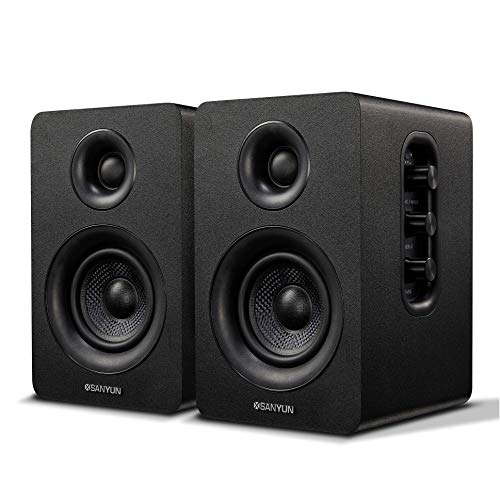
The Sanyun SW208 is the best fit for listeners who want bookshelf-style desktop speakers with USB digital audio and a separate Bluetooth option. Its built-in 24-bit DAC receives digital audio over USB, while Bluetooth 5.0 provides wireless playback. The listed speaker units are rated at 30 watts by two, and the product description highlights carbon-fiber drivers.
Choose this model if USB audio is important, rather than USB serving only as a power source. It may suit music, movies, and general computer listening where a pair of separate speakers is preferable to a single soundbar. The bookshelf design is intended to create a stereo presentation.
- Best for: Desktop listeners seeking USB DAC audio and Bluetooth in one speaker system.
- Why it stands out: It combines wired digital audio with wireless playback and separate left-right speakers.
- Consideration: The listing describes bookshelf speakers, so check available desk space before choosing them.
OROW S211 USB-Powered 2.1 Speakers

The OROW S211 is best for buyers who want a compact 2.1 system with a dedicated subwoofer and a stated 16-watt output. Its wooden enclosures are described as 9 millimeters thick, and the subwoofer design is intended to spread bass vibration toward the floor. The system also lists 3.5mm audio inputs.
Choose this system if you want a subwoofer for computer audio without moving to a larger home-theater setup. It is a better match for users who prioritize bass presence over a one-piece speaker bar. The product description calls it USB-powered, so distinguish its USB power connection from a USB audio connection when checking your computer’s ports.
- Best for: Desktop users who want a compact 2.1 layout and a dedicated subwoofer.
- Why it stands out: It combines 16 watts of stated system power, a wooden cabinet design, and 3.5mm audio input.
- Consideration: The listed audio input is 3.5mm; the product details do not describe USB as the audio input.
cinnkeyi 2.1 Speakers With Three Modes

The cinnkeyi system is best for people who want to switch among USB PC audio, 3.5mm line-in, and Bluetooth. It pairs two speakers with a subwoofer and lists multiple speaker units plus a passive bass diaphragm. A multifunction knob controls mode selection and volume.
In PC mode, the product description says one USB cable carries power and audio. In line-in mode, the 3.5mm jack carries audio while USB supplies power. Bluetooth mode connects wirelessly, with the listed device name “C5212.” These distinctions make it useful for buyers who plan to use more than one audio source.
- Best for: Users who want a 2.1 setup with wired USB, 3.5mm, and Bluetooth modes.
- Why it stands out: It offers different connection paths and a separate subwoofer in one system.
- Consideration: Line-in mode requires both a 3.5mm audio connection and USB power.
XKX USB-C Desktop Soundbar

The XKX soundbar is best for buyers who want a compact speaker that clips onto a monitor or fits beneath a display. Its listed features include dual drivers, dual passive radiators, adaptive-channel switching, and a USB-C adapter. The seller lists compatibility with Windows, macOS, ChromeOS, and Linux devices.
Choose this model if desk space is limited or you prefer a single bar over separate speakers. The USB-C adapter may be useful for devices that have USB-C ports, but the product listing specifically says the speakers are not compatible with monitors, TVs, or projectors. Check the connection and device requirements before purchase.
- Best for: Computer users seeking a compact, clip-on desktop soundbar.
- Why it stands out: Its stated features include USB-C support through an adapter and passive radiators for bass response.
- Consideration: The listing excludes monitors, TVs, and projectors as direct compatible devices.
1Mii 3.5mm Computer Speakers

The 1Mii speakers are best for buyers who need a basic wired stereo pair for a device with a standard 3.5mm audio output. The product lists dual 3-watt speakers and a front rotary volume control. Its compatibility information names Windows and Linux PCs, macOS laptops, desktop monitors, and other devices with a 3.5mm AUX audio output.
This is a practical option when direct analog audio is more important than Bluetooth or a USB DAC. The manufacturer recommends using a USB power adapter for the best audio quality to reduce static. That means buyers should check both the audio output and the available USB power source.
- Best for: Users who want simple 3.5mm stereo speakers with a physical volume knob.
- Why it stands out: The connection is straightforward, and the listed compatibility covers a range of computers and devices.
- Consideration: Audio is through 3.5mm, not USB; USB power is recommended by the product description.
Buying Guide: How To Choose USB Sound System Speakers
Does USB carry audio, or only power?
This is the first detail to confirm. Some speakers use USB to receive digital audio and power, while others use USB only for power and rely on a 3.5mm cable for sound. The Sanyun SW208 specifies USB audio through a built-in DAC. The OROW S211 is described as USB-powered with 3.5mm audio input. The 1Mii also takes audio through 3.5mm and recommends USB power.
For a single-cable computer setup, look for wording that explicitly says USB audio or USB plug-and-play audio. If the listing says USB power, plan on a separate audio connection unless it also identifies USB as an audio input.
Do you need a subwoofer?
A 2.1 system includes two main speakers and a subwoofer. That layout can be a better fit for bass-focused music, movies, and games than a small speaker bar, but it also takes more desk or floor space. The OROW S211 and cinnkeyi system both include a subwoofer.
For a simpler desk arrangement, a compact soundbar or a pair of bookshelf speakers may be easier to position. The XKX is designed as a one-piece bar, while the Sanyun SW208 uses separate bookshelf-style speakers. Compare the physical layout you want with your available space.
Which connection fits your computer or device?
Check the available ports on the source device before choosing speakers. A computer with USB-A, USB-C, or a 3.5mm headphone output may support different connection types. The XKX listing includes a USB-C adapter, while the 1Mii depends on a standard 3.5mm audio output. A USB-C adapter does not by itself establish that every USB-C device will support audio playback, so confirm the product’s stated compatibility.
For phones, tablets, or multiple devices, Bluetooth can add flexibility. The Sanyun and cinnkeyi listings both describe Bluetooth, but their wired connection options differ. Choose according to how you expect to connect most often.
Are separate speakers or a soundbar better for a desk?
Separate speakers can be positioned on either side of a screen, which may suit listeners looking for a stereo arrangement. A soundbar takes less width across the desk and may attach to a monitor, depending on its design. The XKX is listed as clip-on, while the Sanyun is a bookshelf-style pair.
Measure the space around your monitor, keyboard, and other equipment. Also consider where cables will run and whether you can place a subwoofer without blocking legroom or storage.
What should you check for volume and everyday controls?
A physical control can make quick adjustments easier than changing volume through a computer menu. The 1Mii has a front rotary knob, and the cinnkeyi system lists a multifunction knob and independent volume adjustment. The LENRUE A39PRO also lists a top-mounted volume knob, although its connection requires separate USB power and 3.5mm audio.
For regular use, review the location of the controls and the connection steps. A setup with multiple modes may offer flexibility, but it can involve more switching than a simple wired pair.
Frequently Asked Questions
Are all USB speakers powered and connected through one cable?
No. Some models use USB for both power and audio, while others use USB for power and a separate 3.5mm cable for audio. Check the connection details for the specific model.
Can I use USB speakers with a phone or tablet?
It depends on the speaker and the device’s connection support. The listed products vary: some provide Bluetooth, some include a USB-C adapter, and others require a 3.5mm audio output. Confirm device compatibility before buying.
What is the difference between 2.0 and 2.1 speakers?
A 2.0 system has two main speakers. A 2.1 system adds a subwoofer for low-frequency sound. The OROW S211 and cinnkeyi products are listed as 2.1 systems.
Is a USB-powered speaker necessarily a USB audio speaker?
No. USB can supply power without carrying audio. For example, the OROW S211 is described as USB-powered and lists 3.5mm audio inputs. Look for an explicit USB audio connection if you want sound transmitted through USB.
Which type is best for a small desk?
A compact soundbar is often easier to position than separate speakers and a subwoofer. The XKX is described as a monitor-clipping soundbar. Check the device compatibility notes and available mounting space before choosing it.
Do I need Bluetooth if I already use USB?
Bluetooth is optional. It can help when you want wireless playback from a phone or tablet, while USB or 3.5mm connections may be preferable for a fixed computer setup. Choose a model with Bluetooth only if you expect to use that connection.