
Best USB to Audio Port Adapters for Clear, Plug-and-Play Sound
Looking for a reliable USB to 3.5mm audio adapter to add a headphone jack and mic input? This guide highlights five solid options that deliver clear audio, simple setup, and broad compatibility for Windows, Mac, Linux, and more. Each pick targets different buyer needs—from gaming and video calls to travel and budget-friendly upgrades. Best for gamers and remote workers who need reliable mic plus audio support; best for general listening and light recording; best for cross‑platform use; best value two-pack option for multiple devices; best for compact, travel-friendly setups.
Summary table of top picks
| Product | Best For | Key Benefit |
|---|---|---|
| MOSWAG USB to 3.5mm Jack Audio Adapter | All‑rounder | Stable 16-bit/48kHz output with noise reduction |
| AUXNIU USB to 3.5mm Audio Adapter | Gaming and calls | Hi‑Fi sound with 2‑in‑1 audio & mic |
| SABRENT USB External Stereo Sound Card Adapter | Plug‑and‑play on many systems | Driverless, two jacks, standard USB audio device |
| Fidioto USB to 3.5mm Audio Jack Adapter | Noise reduction & shielding | EMI shielding with Hi‑Fi sound |
| JXMOX USB to 3.5mm Audio Adapter (2‑Pack) | Budget two‑pack | Unidirectional USB output, easy plug‑and‑play |
MOSWAG USB to 3.5mm Jack Audio Adapter External Stereo Sound Card

This MOSWAG adapter adds a 3.5mm TRRS port that supports both audio out and microphone inputs. It uses a built‑in DAC to deliver 16‑bit/48kHz sound and reduces noise for clearer listening and speaking. It is widely compatible with Windows, Mac, Linux, Raspberry Pi, PS4/PS5, and Chrome OS devices. A good choice for users who need a simple, driver‑free solution for headsets or external mics on a range of devices.
AUXNIU USB to 3.5mm Jack Audio Adapter
The AUXNIU adapter features a built‑in high‑resolution DAC and a TRRS 4‑pole port for combined audio out and microphone in. It emphasizes precise decoding, noise reduction, and a richer, immersive sound experience for gaming, media, and music. It offers plug‑and‑play compatibility with Windows, Mac, Linux, Raspberry Pi, PS4/PS5, and Chromebooks. Note that microphone compatibility can vary with some Apple EarPods, so test with your specific headset.
SABRENT USB External Stereo Sound Card Adapter

This SABRENT model uses a USB bus‑powered design with separate 3.5mm stereo out and mono mic inputs. It requires no drivers or software and is recognized as a standard USB audio device. It is compatible with Windows, Mac, and Linux. It does not support 4‑pole headsets on a single plug or standalone powered speakers, but it’s a solid plug‑and‑play option for generic listening and voice chat on multiple systems.
Fidioto USB to 3.5mm Audio Jack Adapter

The Fidioto adapter focuses on EMI shielding and Hi‑Fi sound. It adds a TRRS port for combined microphone and audio out, aiming to minimize interference and static. It is compatible with a wide range of devices and emphasizes a clean sound profile with a DAC that preserves fidelity. Some Apple devices may have limited mic compatibility; test with your headset to confirm performance in your setup.
JXMOX USB to 3.5mm Audio Adapter (2-Pack)

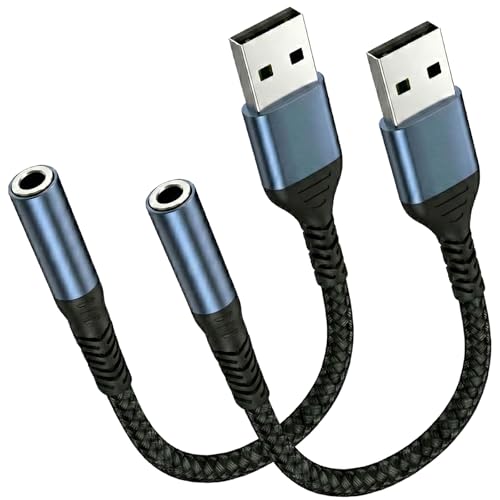
The JXMOX two‑pack provides affordable, simple USB to 3.5mm TRRS adapters suitable for multiple devices without requiring software. It uses a DAC to deliver Hi‑Fi audio with lower noise and supports plug‑and‑play operation. Note that the USB port is typically output only, so it’s best for listening to audio through the 3.5mm jack rather than transmitting from mic to USB audio input. It’s ideal for budget needs across several devices.
Buying Guide
What is the main purpose of a USB to audio port adapter?
To add a 3.5mm headset port to devices lacking a dedicated audio jack, enabling both listening and voice input. Use cases include gaming, video conferencing, and general media playback on laptops, desktops, single‑board computers, and consoles that support USB audio devices.
What should I consider when choosing between DAC quality, compatibility, and form factor?
Look for a reliable DAC with 16‑bit/44.1kHz or higher performance, noise reduction features, and stable operation across Windows, Mac, Linux, and consoles. If you travel or have limited space, choose a compact, bus‑powered model with a simple plug‑and‑play setup and minimal drivers.
Do I need two jacks or just one for my setup?
Two‑jack adapters provide separate outputs for headphones and microphones, reducing crosstalk and enabling reliable mic input. If you only need listening, a single output may suffice, but two jacks offer greater versatility for calls and gaming.
Are there any platform limitations to watch for?
Most adapters support Windows, Mac, Linux, Raspberry Pi, PS4/PS5, and Chromebooks. Some may have limited microphone compatibility with certain Apple devices or specific headsets. Always verify compatibility with your headset’s mic and the target device’s USB port type.
What are practical tips to maximize performance?
Use a powered, reliable USB port on your computer or console. If interference occurs, try shielding or moving away from electromagnetic sources. For microphones, test your headset on a different USB port to ensure consistent input levels. Update device firmware if available from the manufacturer.
Who should choose each product?
- MOSWAG: Best for users who want balanced, stable sound with broad device support and simple use.
- AUXNIU: Best for gamers and teamwork calls that need both audio and mic in a single dongle with high‑quality decoding.
- SABRENT: Best for systems where driverless, quick setup is essential and users need two distinct jacks.
- Fidioto: Best for users prioritizing EMI shielding and clean audio with strong noise suppression.
- JXMOX: Best for budget-conscious buyers needing a two‑pack to cover multiple devices.
FAQ
Can these adapters work with a MacBook that only has USB‑C ports?
Many adapters use USB‑A. If your device is USB‑C only, use an appropriate USB‑C to USB‑A adapter or choose a USB‑C compatible model.
Will this enable microphone input for online meetings?
Yes, most TRRS adapters support microphone input, enabling voice chat and online meetings when selected as the input device in your system settings.
Do any of these require drivers?
Most listed options are driverless and plug‑and‑play, but some systems may require basic configuration changes in sound settings.
Is the 3.5mm jack compatible with all headsets?
Likely compatible with most TRRS headsets, but some Apple EarPods or specialty headsets may have limited microphone support. Check compatibility if your headset relies on a specific connector standard.
Can I use these adapters with gaming consoles?
Yes, several models support PS4/PS5 and other platforms that recognize USB audio devices. Verify console compatibility with your headset and USB port.
Do these adapters affect battery life?
USB audio adapters are bus‑powered and rely on the host device for power, so there is no separate battery use in most cases.