
The best USB-to-S/PDIF converter depends on your device’s USB port and whether you need optical, coaxial, or both digital outputs. The Cubilux USB-A adapter is a straightforward choice for computers and supported consoles; the Cubilux USB-to-optical/coaxial adapter offers more output options; and the SMSL PO100 is a USB-C option with optical and coaxial outputs. Check the signal direction before buying: a USB-to-S/PDIF transmitter sends audio out from a USB source to an audio system.
| Product | Best For | Output | Listed Format Support |
|---|---|---|---|
| Cubilux USB-A to TOSLINK | USB-A computers and specified consoles | Optical | Up to 192 kHz/24-bit |
| Cubilux USB to Toslink & Coaxial | Systems needing either or both output types | Optical and coaxial | Up to 192 kHz/24-bit PCM |
| Cubilux USB-C Dual SPDIF | USB-C devices feeding two optical receivers | Two optical outputs | Listed as 192 kHz/24-bit |
| PROZOR Optical/Coaxial to Analog | Converting digital inputs to analog audio | RCA and 3.5 mm analog | Up to 192 kHz/24-bit input |
| SMSL PO100 | USB-C sources needing optical and coaxial | Optical and coaxial | PCM up to 192 kHz |
Cubilux USB-A To TOSLINK Adapter

This Cubilux model converts audio from a USB-A source to a TOSLINK optical S/PDIF system. The listed supported sources include Windows and Mac computers, laptops, and PS5 or PS4 consoles. It is a transmitter, not an optical input adapter, so it sends digital audio from the USB device to an optical-equipped receiver, soundbar, amplifier, or DAC.
Best for: Buyers with a USB-A computer or a listed gaming console who need a simple optical output. It is selected for its direct USB-A-to-optical design and stated support for 48, 96, and 192 kHz at 24-bit. The listing also says no driver or external power is needed for supported Windows and Mac computers.
Limitation: This model has optical output only, not coaxial. The product listing says it is not for TVs or other devices, so do not assume every USB-A device will work.
Cubilux USB To Optical And Coaxial SPDIF

This USB digital audio adapter provides both TOSLINK optical and coaxial S/PDIF outputs. The listed outputs can be used separately or at the same time, and the adapter supports PCM up to 192 kHz/24-bit. The product description also specifies stereo and 5.1 pass-through when the content and receiving AV equipment support the format.
Best for: Buyers whose receiver or DAC may use optical or coaxial input, or who want to connect two compatible receivers. It is a stronger fit than an optical-only adapter when the audio system’s available inputs are uncertain. Its aluminum-alloy housing and stated signal-shielding features may also suit a desktop or home-theater setup.
Limitation: The 5.1 feature is pass-through, not a guarantee that every computer, application, file, or receiver will produce surround sound. Confirm format support across the entire signal chain.
Cubilux USB-C Dual Optical Adapter

This USB-C adapter sends digital audio from a USB-C source to two TOSLINK optical outputs. The manufacturer describes it as a splitter for connecting two receivers simultaneously. Listed source types include USB-C smartphones, laptops, and computers, while potential receiving devices include soundbars, home audio systems, external DACs, amplifiers, preamps, and speakers.
Best for: Buyers with a USB-C source who need to feed two optical audio devices. It is selected for its dual-output layout, which differs from the single-output adapters in this list. The listing identifies 192 kHz/24-bit support, but buyers should confirm that their source and receiving equipment accept the desired format.
Limitation: This device is output-only. It cannot receive S/PDIF from a DAC or amplifier and is not for recording audio. It has optical outputs rather than coaxial output.
PROZOR Digital-To-Analog Audio Converter
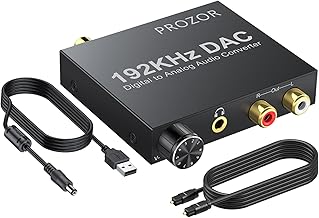
This PROZOR product is different from a USB-to-S/PDIF transmitter. It accepts optical or coaxial digital PCM audio and converts it to analog left/right RCA and 3.5 mm outputs. Its listed input support includes sampling rates through 192 kHz and 24-bit S/PDIF on left and right channels. A volume control knob adjusts the analog output level.
Best for: Buyers who already have an optical or coaxial digital audio source and need analog RCA or 3.5 mm output. It is included as a useful comparison because “SPDIF converter” can describe either direction, but it does not convert USB audio to S/PDIF.
Limitation: The signal direction cannot be reversed. Choose another product if your goal is to send USB audio to an optical or coaxial input.
SMSL PO100 USB-C To SPDIF Adapter

The SMSL PO100 uses a USB-C input and provides optical and coaxial outputs. Its listing identifies an XMOS XU316 chip and asynchronous transmission, and says optical and coaxial outputs can operate at the same time. The listed PCM support reaches 192 kHz. The product also specifies DOP64 support and distinguishes the PO100 from the PO100 Pro by noting that this model does not support IIS output.
Best for: Buyers with a USB-C source who want both optical and coaxial connections in a compact digital-audio adapter. It is a relevant alternative to the USB-C optical splitter when the audio system needs a coaxial input as well as an optical one.
Limitation: It does not provide IIS output, according to the listing. Its stated 192 kHz support refers to PCM; check the source and receiving device for support of any other format you plan to use.
Buying Guide: How To Choose A USB-To-S/PDIF Converter
Does the converter send audio in the right direction?
Start by identifying the audio source and destination. A USB-to-S/PDIF converter takes audio from a USB-connected source and sends it to an optical or coaxial S/PDIF input. A digital-to-analog converter, such as the PROZOR model above, does the reverse kind of job: it takes optical or coaxial digital audio and produces analog outputs. The word “converter” alone does not establish signal direction.
Look for wording such as “USB input” and “optical output” or “coaxial output.” If the product description says “optical input” and “RCA output,” it is not the right tool for sending computer audio to a digital input.
Should you choose USB-A or USB-C?
Match the adapter’s USB connector to an available port on the source device. The Cubilux USB-A model is listed for computers with USB-A and specified PS5 or PS4 use. The USB-C products are intended for compatible USB-C sources, including computers and, in one listing, smartphones. A connector match is only the first check: confirm the operating system and source-device support described by the seller.
If your computer has a different port, do not assume that a separate adapter will preserve compatibility. Check the source device’s audio-output behavior and the converter’s requirements before purchasing.
Do you need optical, coaxial, or both?
Choose optical when the receiving device has a TOSLINK input. Choose coaxial when it has a coaxial S/PDIF input. If your audio system has one type today but you may connect to equipment with the other type later, a model with both outputs can offer more flexibility. The Cubilux USB-A adapter has optical output; the other Cubilux USB adapter and SMSL PO100 list optical and coaxial outputs.
Optical and coaxial are different physical connections, even when they carry S/PDIF audio. Check the input labels on the receiver, DAC, or sound system rather than relying on a general “digital audio” label.
What does 24-bit/192 kHz support mean?
A listing that states 24-bit/192 kHz identifies a supported digital audio format. It does not mean every source will output that format or every receiver will accept it. The computer’s audio settings, playback software, content, converter, and receiving device all affect the available signal format.
For the best chance of using a particular sample rate, verify that both ends of the connection support it and set the source appropriately. Some products list a maximum rate while supporting additional rates below it; check the detailed specifications for the formats you actually use.
Will 5.1 surround sound work?
Surround output depends on more than the adapter. The Cubilux USB-to-optical/coaxial product lists 5.1 pass-through when used with compatible content and an AV receiver that accepts the format. The source device and software must also send a supported surround signal. Do not infer 5.1 support solely from a 192 kHz/24-bit stereo specification.
If your main use is movies or games, check the source’s audio-output settings and the receiver’s supported formats. If your use is music playback, confirm the stereo formats you want to send.
Is a dual-output adapter the same as a splitter?
Not always. The USB-C Cubilux model is specifically described as a dual optical output splitter, while the USB-to-optical/coaxial Cubilux and SMSL listings say their outputs can operate together. If you plan to feed two devices simultaneously, verify that the particular product supports simultaneous output and that both receiving devices accept the source format.
Also consider whether both destinations need the same audio signal. A digital splitter generally does not give you independent volume or separate program audio for each receiver unless the product specifically says it can.
Frequently Asked Questions
Can a USB-to-S/PDIF adapter convert audio to 24-bit/192 kHz?
Some adapters in this guide list support up to 24-bit/192 kHz. The source and receiving equipment must also support the format, and the source must be configured to output it.
Can I use an optical-to-RCA converter as a USB-to-S/PDIF adapter?
No. An optical-to-RCA converter accepts optical digital audio and outputs analog audio. It does not take USB audio and transmit it over S/PDIF.
Does every USB-C adapter work with a phone?
No. USB-C describes the connector, not guaranteed audio compatibility. Check the product’s supported source devices and confirm that the phone can send digital audio over its USB-C port.
Should I buy optical or coaxial output?
Choose the connection that matches the receiving device’s digital input. If you need to connect to systems with both input types, consider an adapter that lists both optical and coaxial outputs.
Does 192 kHz support guarantee better sound?
No. It indicates a supported sample rate, not a guaranteed sound-quality improvement. The source recording, playback settings, converter, and receiving equipment all matter.
Can I record S/PDIF audio with an output-only adapter?
No. Output-only USB-to-S/PDIF adapters send audio from the USB source to a digital audio system. Recording requires an input device designed to receive digital audio.