
The best USB tape adapter depends on whether you want to play cassette audio through a newer device or transfer tape recordings to digital files. For a car cassette deck, the arsvita adapter sends audio from a device with a 3.5 mm jack to the stereo. For cassette digitizing, DIGITNOW and ClearClick offer different USB-based approaches. For VHS and camcorder tapes, choose a video capture card instead.
| Product | Best For | How It Works |
|---|---|---|
| arsvita Cassette-to-Aux Adapter | Playing device audio through a car tape deck | Connects a 3.5 mm audio source to a cassette player |
| DIGITNOW Cassette-to-MP3 Player | Capturing cassette audio on a computer | Connects by USB and uses conversion software |
| ClearClick Cassette-to-USB | Saving cassette audio to a flash drive | Records MP3 files directly to USB storage |
| VIXLW RCA-to-USB Capture Card | Digitizing VHS and other video tapes | Captures analog video and audio on a computer |
| GGrozza VHS Capture Card | Capturing VHS through RCA or S-Video | Transfers analog video and audio over USB |
arsvita Cassette-to-Aux Adapter

Best for: Playing audio from a phone, tablet, MP3 player, or other device with a standard 3.5 mm audio jack through a car cassette deck. This is an audio playback adapter, not a USB digitizer: it does not convert cassette recordings into computer files.
The cassette-shaped adapter fits into a tape player, while its cable and 3.5 mm plug connect to an audio source. The listed features include a metal shell, gold-plated connectors, a silver wire core, and shielding intended to reduce signal loss. It is designed for people who want to keep using a vintage car stereo rather than replace or modify it.
Why it was selected: It directly addresses the common meaning of a tape adapter: connecting a modern audio source to a cassette player. Choose it if your source has a 3.5 mm jack and the tape deck works. Limitation: It is not described as having a USB connector, and a device without a headphone jack will need an appropriate audio output solution.
DIGITNOW Cassette-to-MP3 Player
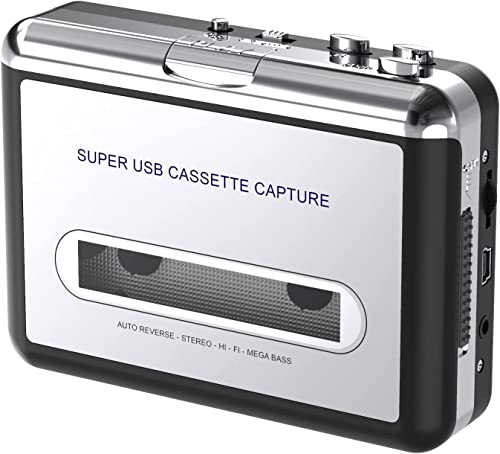
Best for: Transferring cassette audio to a computer and converting it into MP3 files. Unlike a car cassette adapter, this product is intended to play tapes and send audio to a computer through USB for capture.
The listed features describe using Audacity software to convert cassette recordings to MP3. The player also has an audio output for listening through headphones or another speaker system, and it includes a 3.5 mm earphone. Its compact portable design is intended to make it practical for listening as well as digitizing.
Why it was selected: It is a fit for buyers who want a computer-based workflow and software control over their recordings. The product information says no installation or drivers are required. Choose it if you are comfortable using recording software to capture and save audio. Limitation: Unlike a standalone USB recorder, it relies on a computer and conversion software; the product listing specifically names Audacity as the software approach.
ClearClick Cassette-to-USB Converter

Best for: Saving cassette recordings as MP3 files on a USB flash drive without using a computer. The listed package includes a 16 GB USB drive, and the product description says setup does not require software or drivers.
ClearClick converts audio cassette tapes to digital MP3 files and saves them to USB storage. Its automatic track-splitting feature is designed to separate a recording into individual MP3 files, which can make a collection easier to browse than one long recording. This suits buyers who want a direct transfer workflow rather than connecting a tape player to a PC.
Why it was selected: It offers a distinct alternative to computer-dependent cassette capture devices: record directly to a flash drive, with automatic track splitting listed as a feature. Choose it if convenience and file separation are priorities. Limitation: The provided features specify MP3 output and USB storage; they do not describe advanced editing or manual track cleanup tools.
VIXLW RCA-to-USB Video Capture Card

Best for: Capturing video and audio from VHS, VCR, Hi8, Mini DV, DV, or DVD equipment with RCA composite output. This is the relevant choice when “tape” means a video cassette, not an audio cassette.
The capture card converts analog RCA composite input to USB output, with the listed output described as 720p. It captures audio without requiring a separate sound card, and the product description says the driver installs automatically when connected to a PC. It does not require external power, according to the provided features.
Why it was selected: It is a straightforward option for transferring supported analog video sources to a computer. Choose it if your playback device has RCA outputs and your goal is to make digital video files. Limitation: Its listed input is RCA composite, so it is not a direct USB cassette-audio adapter; you also need a working tape player and a computer for capture.
GGrozza VHS Capture Card

Best for: Digitizing VHS and similar analog video when a playback device provides RCA composite or S-Video output. The listed inputs give it an alternative connection choice for compatible video equipment.
This USB 2.0 capture device transfers analog audio and video to a computer for previewing, recording, saving, and archiving. The product details list support for NTSC/PAL, UVC 1.0, and output formats YUV422 and MJPEG. It also lists capture up to 1920×1080 at 30 Hz using MJPEG encoding, adjustable picture controls, and no need for external power.
Why it was selected: It is a better fit than an RCA-only capture card when the source equipment offers S-Video and that connection is preferred. Choose it if you need video capture and want listed picture adjustments. Limitation: The listed 1080p figure describes capture capability; it does not establish that the original tape contains 1080p detail. A computer and compatible playback device are still needed.
Buying Guide: How To Choose A USB Tape Adapter
Do you want to play audio or digitize a tape?
Start by deciding whether you want to listen to a tape, play newer audio through an old cassette deck, or create digital files from a tape. These are different tasks. A cassette-to-aux adapter sends audio from a 3.5 mm source into a tape deck. A cassette digitizer transfers recorded cassette audio to a computer or USB drive. A video capture card converts output from a VCR or camcorder into computer files.
Search terms such as “USB tape adapter” can blur these categories. Check the product’s input and output connections before buying. A USB plug alone does not mean a device will play cassette tapes, and a cassette-shaped car adapter does not necessarily connect to USB.
What kind of tape are you transferring?
Audio cassettes and video tapes require different playback and capture equipment. For an audio cassette, choose a cassette player or converter designed for audio. For VHS, Hi8, or other camcorder tapes, you need a playback device for that tape format plus a capture device that accepts the playback device’s output.
Confirm the tape format and the ports available on the player. RCA composite connections are commonly listed for video capture devices; the GGrozza product also lists S-Video. Do not assume a capture card can play a tape on its own. It receives a signal from separate playback equipment.
Should you use a computer or record directly to USB?
A computer-based converter can be useful when you want to record and manage files on a PC or Mac. It may require capture software, as the DIGITNOW cassette product describes. A direct-to-flash-drive unit such as the ClearClick option is intended to avoid a computer and software during recording. Consider whether you want editing control or a simpler transfer process.
Check the supported file type and storage method. The listed ClearClick features specify MP3 files and a USB flash drive. Video capture devices transfer analog video through USB to a computer, so the computer’s recording workflow and available storage matter.
Which connections should you verify?
- For a car cassette deck: Confirm that the audio source has a 3.5 mm output compatible with the adapter’s plug.
- For cassette digitizing: Confirm the device’s USB connection and whether it needs a computer or records to a flash drive.
- For VHS capture: Check whether the VCR or camcorder output matches the capture card’s RCA or S-Video input.
- For video transfers: Verify that you have a working player for the exact tape format you own.
What should you expect from video capture resolution?
A capture card’s stated output or maximum capture mode is not the same as the detail recorded on an old tape. A 720p or 1080p capture setting describes a digital output capability; it cannot restore information that was not present in the original recording. For useful transfers, stable playback, correct connections, and recording settings are important.
Is plug-and-play enough?
“Plug and play” can refer to automatic driver installation, but it does not always mean every step is automatic. Computer-based transfers may still require recording software, file naming, and time to play each tape in real time. Before starting a large project, check the instructions and test a short section to confirm that picture and sound are being captured.
Frequently Asked Questions
Can a USB tape adapter play cassette tapes?
Some products play audio cassettes and connect to a computer or USB storage for digitizing. A car cassette-to-aux adapter has a different purpose: it plays audio from an external source through a cassette deck. Check the product description for the intended use.
Can I connect a cassette player directly to a USB port?
Only if the player or converter is designed to transfer audio over USB. A basic cassette deck may need a compatible audio capture device and recording software. A USB connector by itself does not guarantee that the computer can capture the audio.
What is the difference between a cassette adapter and a cassette converter?
A cassette adapter usually routes audio from another device into a cassette player, such as a car stereo. A cassette converter is intended to transfer cassette recordings into digital files such as MP3s.
Can these video capture cards transfer VHS audio too?
The listed VIXLW and GGrozza capture cards capture audio along with video from compatible analog video sources. They are designed for video equipment with supported analog outputs, not for transferring ordinary audio cassettes.
Do I need a VCR to digitize VHS tapes?
You need a working playback device for the tape format, such as a compatible VCR or camcorder, to supply the video and audio signal. A capture card receives that signal and transfers it to a computer; it does not play the tape by itself.
Will digitizing an old tape make its quality better?
Digitizing changes the format but does not automatically improve the source recording. Capture settings can affect the digital file, but the result remains limited by the tape’s original image or audio quality and playback condition.