
For vinyl-to-CD recording, choose a device that explicitly supports audio capture or a turntable with a recording output; then verify that it can create files or discs in the format you need. The Music Digitizer is the most directly relevant listed option because its name identifies it as a CD recorder with 3.5mm and RCA inputs. The DIGITNOW and FEKTIK combo systems offer vinyl playback and digital recording features, but the supplied details do not confirm that either burns audio CDs.
| Product | Best suited for | What to verify |
|---|---|---|
| Music Digitizer CD Recorder | Capturing audio from a turntable’s line output | Whether it records to a CD, and what media it requires |
| DIGITNOW Bluetooth Record Player | All-in-one vinyl playback and USB/SD encoding | Whether its recording feature creates files or CDs |
| FEKTIK 10-in-1 Turntable | Multi-format playback with MP3 recording | Recording destination and connection options |
| WOCKODER Record Player | Vinyl playback with external speakers | How to connect it to a separate recorder |
| Hi-Fi Belt-Drive Record Player | Turntable playback with built-in phono preamp | How to route audio to a recording device |
Music Digitizer CD Recorder

This is the most directly relevant product for a vinyl-to-CD workflow. Its listed name describes it as a music digitizer and CD recorder, with 3.5mm and RCA line inputs. Those connections may suit a turntable or stereo component that provides a compatible audio output, but the supplied product details do not specify the exact recording process.
- Best for: Buyers seeking a dedicated audio-capture device with analog inputs.
- Why it was selected: It is the only listed product explicitly named as a CD recorder and includes RCA and 3.5mm inputs.
- Check before buying: Confirm whether it burns audio CDs directly, what blank media it accepts, and whether it needs a computer or other equipment.
Choose this if CD creation is the priority and its full instructions confirm your intended workflow. Avoid assuming that the phrase “CD recorder” means it can connect to every turntable or record without additional components.
DIGITNOW Bluetooth Record Player

The DIGITNOW combines a turntable with a stereo speaker and several playback or input options, including CD, cassette, radio, and auxiliary input. Its product name also lists USB and SD encoding, which makes it a candidate for digitizing records to storage. The provided details do not establish that it writes recordings to an audio CD; USB or SD encoding should not be treated as CD burning.
- Best for: Buyers who want a multi-format player and a way to encode audio to USB or SD.
- Why it was selected: It pairs vinyl playback with stated USB/SD encoding in one system.
- Limitation: The listed features do not confirm direct vinyl-to-CD recording.
Choose this if creating digital files is acceptable or if you plan to transfer files to a computer for CD authoring. Check the manual for supported recording formats and whether recording from vinyl is available.
FEKTIK 10-In-1 Bluetooth Turntable

The FEKTIK is described as a 10-in-1 system with a built-in speaker, vinyl playback, CD and cassette functions, FM radio, AUX input, USB MP3 recording, and a headphone jack. Its MP3 recording feature may serve buyers who want digital copies of records, but the supplied name does not specify whether vinyl is among the recordable sources or whether the system burns CDs.
- Best for: Buyers looking for a multi-format home stereo with stated MP3 recording.
- Why it was selected: It combines record playback and a digital recording feature in one product listing.
- Limitation: MP3 recording is not the same as writing an audio CD.
Choose this if MP3 files are a suitable first step and you want other listed playback formats in the same unit. Verify the recording source, storage destination, and controls before relying on it to digitize records.
WOCKODER Turntable With Speakers
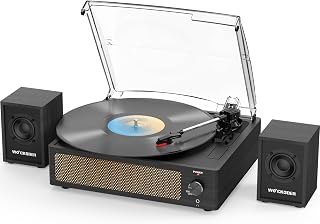
This WOCKODER model is a vinyl playback option rather than a listed recording system. Its named features include a belt-drive design, two external passive speakers, three playback speeds, Bluetooth wireless input, AUX, a headphone connection, and auto stop. The provided product details do not mention USB encoding or CD recording.
- Best for: Buyers who need a turntable source with speakers and want to connect a separate recorder if the outputs support it.
- Why it was selected: It can fill the playback-source role in a separate recording setup.
- Limitation: No recording or CD-burning feature is stated in the supplied details.
Choose this only after confirming how its audio can be routed to your recording equipment. Do not assume that its AUX or headphone connection is an output; the listing describes these as connection features without specifying direction.
Hi-Fi Belt-Drive Record Player
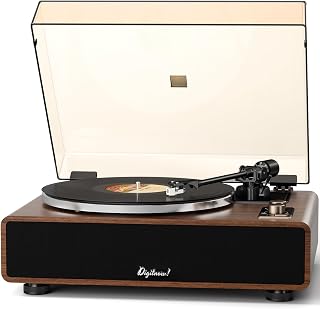
This turntable is described with built-in speakers, a phono preamp, a magnetic cartridge, wireless playback, AUX input, and auto off. These features relate to playing records and connecting audio devices; the supplied description does not state that it records vinyl or creates CDs.
- Best for: Buyers who need a turntable with a built-in phono preamp as part of a separately assembled recording setup.
- Why it was selected: A phono preamp may be relevant when planning connections to recording equipment, provided the actual output and signal path are confirmed.
- Limitation: No recording function or CD writer is listed.
Choose this if you already have a compatible way to capture the turntable’s audio. Check the product documentation for a suitable output; the listed AUX-in function indicates an input and should not be mistaken for a recording output.
Buying Guide: How To Record Vinyl To CD
Do you need a CD recorder or a computer?
A direct CD recorder can be a simpler setup if it accepts the turntable’s audio signal and writes standard audio CDs. A computer-based method typically captures vinyl as digital audio first, then uses CD-authoring software and a disc-writing drive to create a playable audio CD. The listed products do not provide enough detail to confirm every connection or workflow, so check their manuals before purchase.
Does USB or MP3 recording create a CD?
No. USB or SD recording generally refers to saving digital files to storage, while MP3 describes an audio file format. Neither feature alone proves that a device can burn a disc. If you choose a USB/SD or MP3-capable player, confirm that it records from vinyl and plan how you will transfer the files to CD-authoring equipment.
Which connections should you check?
Match the turntable’s actual audio output to the recorder’s input. The Music Digitizer is listed with RCA and 3.5mm line inputs, but the supplied information does not specify all required cables or whether an additional preamp is needed. Check connector type, signal level, and whether the turntable provides a compatible output. An AUX input is not necessarily an audio output.
Should you choose an all-in-one system?
An all-in-one system can reduce the number of separate devices and may offer several playback formats. The DIGITNOW and FEKTIK listings mention vinyl playback and digital recording features, but neither supplied description confirms CD burning. Choose an all-in-one model if its documented recording function meets your goal; otherwise, consider a separate turntable and recorder.
What affects the finished recording?
Records can contain clicks, surface noise, and level differences. Clean the record and stylus as appropriate, keep the source and recording device stable, and check recording levels before capturing a full side. If you create files first, listen to them before authoring a disc. These steps help identify clipping, dropouts, or connection problems early.
How should you compare these five options?
- For a potential direct CD workflow: Investigate the Music Digitizer first because its name explicitly identifies it as a CD recorder.
- For digital-file recording: Compare the DIGITNOW USB/SD encoding and FEKTIK MP3 recording claims, then verify supported sources and destinations.
- For a turntable-only source: Consider the WOCKODER or Hi-Fi model only if you confirm a compatible output path to separate recording equipment.
- For the fewest assumptions: Buy only after checking the manual for a complete vinyl-to-CD connection diagram or a clearly stated direct-recording function.
Frequently Asked Questions
Can I record vinyl directly to a CD with these products?
The supplied details do not confirm a complete direct vinyl-to-CD workflow for any product. The Music Digitizer is named as a CD recorder, but buyers should verify its recording method, media, and turntable connections.
Can a turntable with USB recording burn an audio CD?
Not necessarily. USB recording may create audio files on storage. Burning those files to an audio CD requires a compatible CD-writing device and software unless the product explicitly documents direct CD recording.
Is MP3 suitable for making a CD?
MP3 files can be used in some CD-authoring workflows, but an MP3 data disc is not the same as a standard audio CD. Confirm the intended disc format and the playback equipment you want to use.
Do I need a phono preamp to record a turntable?
It depends on the turntable’s output and the recorder’s input. The Hi-Fi model is listed with a built-in phono preamp, but check its available outputs and the recording device’s requirements before connecting them.
What is the most important feature to verify before buying?
Verify that the device can capture audio from vinyl and record it to your intended destination. For CD recording, confirm whether it writes standard audio CDs directly or requires a computer, files, or additional equipment.