
A voice audio USB recorder can make it easier to capture lectures, interviews, and meetings, then transfer recordings for storage or review. The MayBest Store model is best for simple one-button recording, while the VEVARUN model adds a stated voice-activation threshold and recording-time details. The Tonfarb is better for buyers who want playback controls and long continuous recording. Compare storage, operating style, and transfer details before choosing.
| Recorder | Best For | Standout Detail |
|---|---|---|
| MayBest Store 64GB | Simple recording | One-button operation and low-battery auto-save |
| VEVARUN 64GB | Voice-activated recording | Starts at a stated 45 dB threshold |
| Critters 64GB | Students | One-button design and 800+ hours stated storage |
| TensaOne 128GB | High-capacity recording | Manual and sound-activated modes |
| Tonfarb 136GB | Playback and long sessions | USB-C transfer and up to 68 hours continuous recording |
MayBest Store 64GB USB Voice Recorder

The MayBest Store recorder is a straightforward option for buyers who want a compact digital recorder with simple controls and substantial built-in storage. Its listed 64GB capacity is stated to hold up to 750 hours of recording files. Recording starts by moving the switch to the on position, which can suit users who prefer a physical control over navigating menus.
The product listing describes an upgraded noise-canceling microphone, a recording chip, and 360-degree sound pickup. It also states that the battery takes about two hours to charge and that recordings are automatically saved when the battery is low. These features make it a practical choice for capturing classes, interviews, or meetings when quick setup matters.
- Best for: Buyers who want one-button operation and a stated 750-hour storage capacity.
- Why it stands out: Its simple switch operation and low-battery auto-save address common recording concerns.
- Limitation: The provided product details do not specify continuous recording time per charge.
VEVARUN 64GB Voice-Activated Recorder

The VEVARUN model is best for buyers who want the recorder to pause during quiet periods. Its voice-activated mode is described as starting when sound reaches 45 dB or above and pausing below that level. This can reduce silent gaps in a file, though the threshold means quieter speech or distant voices may not always trigger recording as intended.
The listing states that the recorder has 64GB of memory, stores up to 750 hours at 512 kbps, and can record continuously for up to 14 hours. It also describes a 160mAh rechargeable battery, a charge time of about two hours, low-battery file saving, and a noise-canceling microphone. Listed computer support includes Windows 2000 through Windows 10 and Mac.
- Best for: Students and meeting attendees who want automatic recording with pauses during silence.
- Why it stands out: The product description provides a specific sound threshold and continuous-recording estimate.
- Limitation: Voice activation depends on sound reaching the stated threshold, so it may be less suitable for very quiet speakers.
Critters 64GB One-Button Audio Recorder

The Critters recorder is aimed at users who want a minimal-control device for lectures and voice memos. The listing describes a built-in 64GB memory, more than 800 hours of audio capacity, and a switch-based recording process without apps or menus. Its lightweight design is listed at 15 grams, which may appeal to students carrying it between classes.
The product description also names voice-activated recording, noise reduction, 360-degree pickup, and low-battery auto-save. It says no microSD card is needed because memory is built in. This makes the model a good fit for buyers who value a simple workflow and want to avoid managing a separate storage card.
- Best for: Students or first-time users who want a simple recorder for lectures and memos.
- Why it stands out: The one-button operation, built-in memory, and stated 800+ hour capacity keep setup uncomplicated.
- Limitation: The listed features do not provide a battery runtime or file-transfer connection specification.
TensaOne 128GB Voice-Activated Recorder

The TensaOne is best for buyers who prioritize stated storage capacity and a choice between automatic and manual recording. Its listed 128GB capacity is larger than the 64GB options in this roundup. In voice-activated mode, it starts when it detects sound and stops when the environment is quiet. Manual mode is also described for users who want to control recording themselves.
The product listing highlights AI-powered voice clarity intended to filter background hum and chatter in settings such as classrooms, meetings, and cafes. Its magnetic design is part of the product name, but the provided features do not explain mounting details or how the recorder connects to a computer. Buyers seeking a clearly specified USB transfer method should verify that detail before selecting it.
- Best for: Buyers who want a higher stated storage capacity and both automatic and manual recording modes.
- Why it stands out: The two recording approaches accommodate both hands-off capture and full user control.
- Limitation: The supplied details do not state battery runtime, recording hours, or a USB transfer specification.
Tonfarb 136GB Recorder With Playback
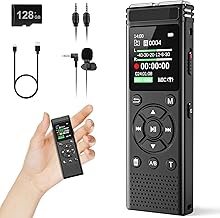
The Tonfarb is a stronger match for buyers who want playback functions, a stated long recording duration, and a specified computer connection. The listing describes 8GB of built-in storage plus an included 128GB TF card, for 136GB total capacity. It claims up to 9,775 hours of recordings in MP3 format or WAV format; actual file capacity can depend on recording settings and file format.
For capture, the recorder supports one-click recording and saving, voice activation, automatic noise reduction, and PCM recording at up to 1536 kbps. The listing also mentions A-B repeat, an MP3 player, and password protection. Its 1100mAh battery is stated to support up to 68 hours of continuous recording. USB-C is specified for transferring recordings to a computer.
- Best for: Users who want playback features, USB-C transfer, and a stated long continuous-recording time.
- Why it stands out: Its listed feature set covers recording, playback, file transfer, and storage expansion through an included TF card.
- Limitation: The maximum storage-hour figure is tied to MP3 recording in the listing and should not be assumed for every audio setting.
Buying Guide: How To Choose A Voice Audio USB Recorder
How much storage do you need?
Storage determines how many recordings a device can hold before files need to be transferred or deleted. The products here list capacities from 64GB to 136GB. Compare the stated capacity with how often you record and how regularly you plan to move files to a computer. Hour estimates are not directly interchangeable because recording quality, format, and bitrate affect file size.
For occasional lectures or meetings, a 64GB recorder may be enough if you transfer files periodically. A higher-capacity option can be more convenient for frequent or extended recording, but check whether the storage is built in or relies partly on a memory card. The Tonfarb, for example, lists 8GB built in and an included 128GB TF card.
Should you use voice activation or manual recording?
Voice activation can reduce long stretches of silence and may make files faster to review. It can also miss quiet speech if the sound does not meet the recorder’s trigger threshold. The VEVARUN listing specifies a 45 dB trigger point; the other products describe voice activation without giving a numeric threshold.
Manual recording is more direct when you need to capture a full session, including pauses, audience questions, or soft speech. Some models offer both approaches. Choose a recorder with manual operation if you need predictable control, or consider voice activation when saving silent gaps is a priority.
What does USB connectivity mean for file transfer?
A USB recorder is useful only if its recordings can be moved to a device you can access. Check the listed connection type and supported computer systems before buying. The Tonfarb listing specifies USB-C transfer, while some other product descriptions identify a USB recorder or USB flash-drive style design without detailing the connection method. Confirm the exact transfer process if you need a particular port or computer workflow.
Also consider how recordings are organized and played back. A recorder with playback controls may let you review files directly, while a simpler model may be intended primarily for recording and later transfer. The supplied feature descriptions do not provide complete file-management details for every option.
How important are battery runtime and auto-save?
For long classes, interviews, or back-to-back meetings, compare continuous recording time rather than charging time alone. VEVARUN lists up to 14 hours of continuous recording, and Tonfarb lists up to 68 hours. The other product descriptions do not give a comparable runtime. These are manufacturer-provided figures, not a guarantee for every use condition.
Low-battery auto-save is a useful data-protection feature because it is intended to preserve files when power is running low. MayBest Store, VEVARUN, and Critters list this feature. If a recording is important, transferring or backing up files after the session remains a sensible practice.
Which sound features matter for your setting?
Noise reduction and sensitive microphones can help capture speech in busy rooms, but a feature label cannot guarantee that every voice will be clear. Room size, distance from the speaker, background noise, and recorder placement all affect results. For a lecture, place the device where it can capture the speaker clearly, while following venue rules and obtaining consent when required.
PCM or high-bitrate recording may be relevant when audio quality is a priority, but higher-quality files can use more storage. Tonfarb lists PCM recording at up to 1536 kbps. For routine note-taking, buyers may care more about simple operation, sufficient storage, and reliable file transfer than maximum recording specifications.
What should you check before ordering?
- Recording controls: Decide whether a physical switch, voice activation, or both suit your routine.
- Storage: Compare built-in memory, included cards, and the stated recording-hour estimates.
- Battery: Look for continuous runtime when available, not only charging time.
- Transfer method: Confirm the USB connection and computer support needed for your setup.
- Playback and file tools: Check whether you need on-device playback, repeat functions, or password protection.
- Recording conditions: Consider speaker distance, background noise, and whether automatic activation could miss quiet speech.
Frequently Asked Questions
Can a USB voice recorder transfer audio to a computer?
Many USB voice recorders are designed for file transfer, but the exact connection varies. Check the product details for a specified port and computer support. The Tonfarb listing specifically identifies USB-C for transferring recordings to a computer.
Is voice-activated recording better than manual recording?
Neither mode is best for every situation. Voice activation can reduce silent gaps, while manual recording gives the user control over when capture starts and stops. A recorder with both modes offers more flexibility.
How many hours can a 64GB voice recorder store?
It depends on the recording format, bitrate, and settings. The listed 64GB models claim around 750 hours or more than 800 hours, but those estimates may use different recording conditions and should not be treated as directly comparable.
What does low-battery auto-save do?
Low-battery auto-save is intended to save recordings automatically when the battery level becomes low. It can help reduce the risk of losing an active file, but it does not replace transferring or backing up important recordings.
Which listed recorder is best for long sessions?
The Tonfarb model lists up to 68 hours of continuous recording on one charge. VEVARUN lists up to 14 hours. These are product-stated figures, so compare them with your planned session length and recording settings.