
The best voice-over microphone for a computer depends on your recording space and how much control you need. The ZealSound K66 is best for users who want noise-reduction mode and device adapters; the FIFINE K669B is a straightforward USB-A option for computer recording; and the Blue Yeti is a choice for creators seeking multiple pickup patterns. The NEEWER UM01 emphasizes AI noise canceling, while the CMTECK G009 offers a mute button and an omnidirectional pickup pattern.
| Microphone | Best For | Key Listed Features |
|---|---|---|
| ZealSound K66 | Flexible recording across supported devices | Noise-reduction mode, gain and volume controls, adapters |
| FIFINE K669B | Simple desktop voice recording | USB-A connection, tripod stand, volume knob |
| Blue Yeti | Creators who want pickup-pattern options | Four pickup patterns, USB, Blue VO!CE effects |
| NEEWER UM01 | Noise-canceling and streaming features | AI noise canceling, cardioid pattern, app control |
| CMTECK G009 | Calls, dictation, and desktop use | Omnidirectional pickup, noise canceling, mute indicator |
ZealSound K66 USB Microphone

The ZealSound K66 is best for voice-over creators who want adjustable controls and a choice of sound modes. Its listed condenser capsule and cardioid pickup pattern are designed to focus on sound in front of the microphone. The manufacturer lists a 40Hz–18kHz frequency response and a 46kHz sampling rate.
A noise-reduction mode is activated by pressing and holding the mute button, with a blue indicator identifying that mode. The product description says this mode helps reduce sounds such as keyboard clicks, computer fan noise, and air-conditioner hum. Default mode is intended to retain a natural vocal tone in quieter spaces.
- Best for: People who record in more than one environment or switch between computer and supported mobile devices.
- Why it stands out: The listed package features include USB-C and Lightning adapters, gain and volume adjustment, monitoring, and a mute button.
- Choose this if: You want multiple controls and connections described in the product details.
Limitation: Noise reduction is a processing mode, not a replacement for a quiet recording space. Check that the included connection type suits your particular setup.
FIFINE K669B USB Microphone

The FIFINE K669B is best for computer users who want a simple USB microphone with a desktop stand and an onboard volume control. The listed setup is plug and play through a USB-A port, and the included cable is 5.9 feet long. Its metal construction and tripod stand make it a practical desktop format for voice-overs, meetings, and streaming.
The microphone has a volume knob that lets users adjust the microphone level, including turning it down to zero for privacy. The product listing describes it as a condenser microphone with a cardioid pattern. Those details make it a straightforward option for a speaker recording from in front of the mic.
- Best for: Voice-over beginners recording on a compatible Windows or Mac computer.
- Why it was selected: It combines direct USB-A setup, a stand, and an on-mic control without requiring a more elaborate listed feature set.
- Better for: Buyers who value simple desktop controls over mobile-device flexibility.
Limitation: The product information says it is not compatible with Xbox or phones. It connects directly to USB-A, so confirm that your computer has a suitable port.
Blue Yeti USB Microphone
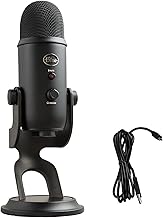
The Blue Yeti is best for computer creators who want a microphone identified in the product name as having four pickup patterns. Multiple patterns can be useful when recording formats vary, such as a single speaker, a conversation, or other arrangements. The listing also names Blue VO!CE effects and plug-and-play USB operation.
The product is presented for PC and Mac use, as well as gaming, recording, streaming, podcasting, and studio work. Its USB connection makes it a computer-focused choice for people who want to connect a microphone directly rather than start with a separate audio interface, subject to the computer’s available connection and setup.
- Best for: Creators who want the option to select among several pickup patterns.
- Why it was selected: Four listed pickup patterns distinguish it from the single-pattern models in this roundup.
- Choose this if: You expect to record different types of content and want pattern choices available.
Limitation: The supplied product information does not specify the individual pattern names, controls, or included accessories. Check the current product details if those specifics matter to your recording workflow.
NEEWER UM01 AI Noise-Canceling Microphone

The NEEWER UM01 is best for buyers looking for a computer microphone whose listed features include AI noise canceling and app control. The product name also identifies a cardioid condenser design, USB plug-and-play setup, RGB lighting, a mute function, and music-sync features.
The listing describes use with Android, Windows PC, Mac, PS4, and PS5, alongside gaming, recording, streaming, podcasting, and studio applications. The combination of a cardioid pickup pattern and noise-canceling feature makes it relevant to voice-over users who want a directional microphone with noise-related controls. Confirm the exact connection and operating requirements for your device before ordering.
- Best for: Streamers and voice-over users interested in noise canceling, RGB, and app control.
- Why it was selected: Its named controls and features target users who want more than a basic USB microphone.
- Better for: Buyers who specifically want the listed lighting and music-sync options alongside voice recording.
Limitation: The supplied details do not explain how the AI noise canceling or app controls work, or which settings are available. Review the product information for those specifics before choosing it.
CMTECK G009 USB Computer Microphone

The CMTECK G009 is best for desktop users who want a microphone for online chatting, dictation, classes, or general voice capture. Its listed omnidirectional condenser pattern is intended to capture sound from around the microphone, rather than focusing only on a speaker directly in front of it.
The product features an active noise-canceling chip and a pop filter intended to help reduce plosive sounds. A mute button provides quick muting, and the LED indicates status: green means connected and red means muted. The product is listed for Windows and Mac use.
- Best for: Users who need visible mute status for calls, classes, or desktop voice tasks.
- Why it was selected: Its mute indicator, pop filter, and noise-canceling feature are clearly described in the supplied details.
- Choose this if: You want an omnidirectional microphone rather than a cardioid model.
Limitation: An omnidirectional pattern can pick up sound from multiple directions. It may be less suitable when the goal is to emphasize one speaker while minimizing nearby sounds.
Buying Guide: How To Choose A Computer Voice-Over Microphone
Which pickup pattern suits voice-over recording?
A pickup pattern describes the directions from which a microphone captures sound. A cardioid pattern is designed to favor sound from the front, which can help when one person speaks into a desktop microphone. The ZealSound K66, FIFINE K669B, and NEEWER UM01 are described as cardioid models in the supplied product information.
An omnidirectional microphone captures sound from around the microphone. That can suit dictation or situations where voices come from different directions, but it may also capture more of the room. The CMTECK G009 is listed as omnidirectional. The Blue Yeti’s listing specifies four patterns but does not name them in the supplied details.
Do you need noise cancellation or a quieter room?
Noise-reduction features can help manage certain background sounds, but they do not guarantee a noise-free recording. The K66 describes a selectable noise-reduction mode and identifies examples such as fan and keyboard noise. The NEEWER UM01 lists AI noise canceling, while the CMTECK G009 lists active noise canceling. The supplied details do not provide enough information to compare the processing methods directly.
For voice-over work, consider the environment as well as the microphone. A quiet room, a consistent speaking distance, and careful placement can help produce more controlled recordings. If your space is noisy, compare the products’ listed noise-related functions and check how each one is activated.
What computer connection should you check?
Confirm that the microphone’s connection matches your computer and intended workflow. The FIFINE K669B is described as connecting to USB-A, with a 5.9-foot cable. The ZealSound K66 includes USB-C and Lightning adapters according to its listing. The Blue Yeti and NEEWER UM01 are described as USB microphones. Check current product details for exact cable, adapter, and port requirements.
Do not assume that a microphone supported on a computer will also work with every phone, console, or tablet. The FIFINE listing specifically excludes phones and Xbox. The K66 names mobile-device adapters, while the NEEWER listing names several operating platforms. Verify the exact model and connection before purchase.
Which controls are useful during recording?
On-microphone controls can make common adjustments easier without opening recording software. The K66 lists gain and volume adjustment, a mute button, and monitoring. The FIFINE K669B has a volume knob that can be turned down to zero. The CMTECK G009 includes a mute button and an LED that indicates whether it is connected or muted.
If you record live or attend frequent calls, a clearly visible mute control may be especially practical. If you mainly record voice-over takes for later editing, a straightforward connection and suitable pickup pattern may matter more than lighting or music-sync functions.
Should you choose plug-and-play or app features?
A plug-and-play description suggests that the manufacturer intends setup to be direct, but it does not remove the need to check your operating system and connection. The K66 and FIFINE K669B are described as plug-and-play. The Blue Yeti listing also describes plug-and-play USB operation. The NEEWER UM01 includes app control in its product name, so buyers should check which app functions and device requirements are supported.
How should you compare microphones for voice-over work?
Start with the recording format, then compare pickup pattern, computer connection, controls, and noise-related features. For a single speaker, a cardioid model may be a sensible starting point. For several people or sound sources around the mic, an omnidirectional design may be more appropriate. Consider adapters if you switch between computers and mobile devices, and check compatibility details rather than relying on the phrase “USB microphone” alone.
- For noise-mode flexibility: Compare the ZealSound K66 and NEEWER UM01 based on their listed noise-reduction features.
- For a basic desktop setup: Consider the FIFINE K669B if USB-A suits your computer and you do not need phone compatibility.
- For pickup-pattern choice: Consider the Blue Yeti, whose listing specifies four patterns.
- For visible muting: Consider the CMTECK G009, which lists an LED mute indicator.
Frequently Asked Questions
What type of microphone is suitable for computer voice-over?
A USB condenser microphone with a pickup pattern suited to your space is a common computer voice-over option. A cardioid pattern is designed to favor sound from the front, while an omnidirectional pattern captures sound from multiple directions.
Is a cardioid microphone better for one-person voice-over?
A cardioid microphone can be a practical fit for one person speaking from in front of the mic because it is designed to favor front-facing sound. Room noise, mic placement, and the specific model still affect the recording.
Can noise cancellation eliminate every background sound?
No. Noise-reduction and noise-canceling features may help with some background sounds, but the supplied product information does not claim complete noise elimination. A quieter room and sensible microphone placement remain useful.
Does the FIFINE K669B work with phones?
The supplied FIFINE product details state that the K669B is not compatible with phones. It connects directly to a computer’s USB-A port, according to the listing.
Which microphone has an LED mute indicator?
The CMTECK G009 lists an LED status indicator. Its product details say green indicates connected status and red indicates mute mode.
What should I verify before buying a USB microphone?
Check the computer’s available ports, operating-system support, included cables or adapters, and any stated device exclusions. If you need a particular feature, such as monitoring or app control, confirm that it is listed for the exact model.