
The best voice recognition car stereo for most drivers is one that works with the voice assistant on their phone, such as Siri or Google Assistant, and provides a simple way to activate it. The Jensen MPR210 is a straightforward choice for assistant access; the AINAVIGO touchscreen adds wireless CarPlay and Android Auto; and the SJOYBRING is a double-DIN option with voice control and expanded audio outputs. Compare the stereo’s voice features and installation format before choosing.
| Product | Best For | Voice Feature | Format |
|---|---|---|---|
| Jensen MPR210 | Simple phone assistant access | Dedicated Siri and Google button | Single DIN |
| AINAVIGO 6.36-inch Stereo | Touchscreen navigation and phone integration | One-touch voice control | Single DIN |
| SJOYBRING Wireless Stereo | Wireless phone integration and audio expansion | Siri and Google Assistant support | Double DIN |
| JVC KD-SR87BT | Physical media and audio adjustments | Voice recognition dialing | Single DIN |
| REAKOSOUND Single DIN | Basic Bluetooth calling and music | Push-to-talk phone assistant access | Single DIN |
Jensen MPR210 Bluetooth Car Stereo

The Jensen MPR210 is best for drivers who want a dedicated way to access Siri or Google Assistant from a single-DIN receiver. Its voice-assistant button can summon either supported assistant to handle tasks such as playing music, opening podcasts, or requesting turn-by-turn navigation. The stereo also supports Bluetooth hands-free calling and audio streaming.
Its high-contrast, seven-character LCD keeps the display compact, while the dedicated button makes the voice-assistant feature easy to identify. This combination makes the MPR210 a practical choice for drivers who prefer a conventional receiver rather than a large touchscreen.
- Best for: Drivers seeking simple, button-activated Siri or Google access.
- Why it stands out: It explicitly lists both voice assistants and includes Bluetooth calling and streaming.
- Consider: The seven-character display is smaller than a touchscreen and is not intended to show a full navigation map.
Choose this if voice access and familiar radio controls matter more than a large visual interface. The listed features do not specify wireless CarPlay or Android Auto, so buyers seeking those systems should compare a model that names them explicitly.
AINAVIGO 6.36-Inch Touchscreen Stereo

The AINAVIGO is best for drivers who want a touchscreen interface with wireless CarPlay and Android Auto. Its listed one-touch voice control can be used for contacts, notifications, music, and other phone functions. The product description also identifies GPS navigation access through a paired smartphone, making it a more screen-focused option than a traditional button-and-display receiver.
Although the unit uses a single-DIN format, it has a 6.36-inch capacitive IPS touchscreen. It also lists USB, USB-C, AV-in, RCA output, backup-camera input, and steering-wheel-control support. Those connections may matter to shoppers planning a broader in-car system, but vehicle and accessory fit should be checked before purchase.
- Best for: Drivers who want wireless phone integration, navigation display, and voice control.
- Why it stands out: It combines a large touchscreen with one-touch voice functions in a single-DIN design.
- Consider: The listed voice features depend on smartphone pairing, and the product data does not identify a particular voice assistant by name.
Choose this if visual navigation and phone-based controls are priorities. Drivers who mainly want a basic hands-free calling receiver may not need its larger screen or range of connections.
SJOYBRING Wireless Double-DIN Stereo
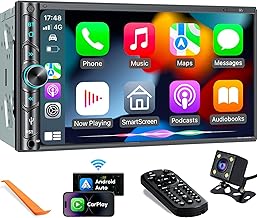
The SJOYBRING is best for drivers with a double-DIN opening who want wireless CarPlay or Android Auto and voice control. Its listed voice functions work with Siri or Google Assistant, allowing drivers to use spoken commands without touching the screen. Bluetooth and Wi-Fi are used for wireless phone connection, while the built-in microphone supports calls and voice control.
This model also suits shoppers planning to connect multiple audio components. Its stated outputs include front and rear speaker channels and two subwoofer outputs, along with tone control. These audio connections distinguish it from simpler receivers focused mainly on calls and radio.
- Best for: Drivers seeking wireless phone integration, assistant control, and subwoofer outputs.
- Why it stands out: It names Siri and Google Assistant and includes a seven-inch HD capacitive touchscreen.
- Consider: It is a double-DIN unit, so it is not the right format for a vehicle opening that only accepts a single-DIN receiver.
Choose this if the vehicle can accommodate a double-DIN stereo and you want its broader audio outputs. Check the vehicle’s dashboard opening and installation requirements rather than assuming that wireless features guarantee a direct-fit installation.
JVC KD-SR87BT CD And Bluetooth Receiver

The JVC KD-SR87BT is best for drivers who want a single-DIN stereo with a CD player, Bluetooth, and voice recognition dialing. Its listed Bluetooth functions include hands-free calling and audio streaming, and it can connect to two phones at once. The receiver also includes a microphone, AM/FM radio, USB, and an AUX input.
For music playback, the listed formats include MP3, WMA, WAV, AAC, and FLAC. A 13-band equalizer and digital time alignment provide sound-adjustment options, while the USB connection can charge devices. These features make it a more audio-focused alternative to basic voice-assistant receivers.
- Best for: Drivers who want CD playback, two-phone Bluetooth connection, and sound-shaping controls.
- Why it stands out: It combines voice recognition dialing with several wired and wireless music options.
- Consider: The listed voice feature is voice recognition dialing; the product details do not describe a dedicated Siri or Google Assistant button.
Choose this if phone calls and music playback are the main priorities, especially if CD support matters. If you want voice commands for navigation or a large touchscreen, compare it with a model that explicitly lists those functions.
REAKOSOUND Single-DIN Bluetooth Radio

The REAKOSOUND is best for drivers looking for a basic single-DIN Bluetooth receiver with hands-free calling and push-to-talk access to a phone voice assistant. Its built-in microphone and answer/end button support calls through the vehicle’s speakers. After Bluetooth pairing, the dedicated push-to-talk button can access a supported phone assistant.
The receiver also supports wireless music streaming for playlists, podcasts, and audiobooks. Its FM tuner covers 87.5–108 MHz, offers automatic and manual station search, and can store up to 18 presets. This makes it a simple option for drivers who want Bluetooth functions alongside familiar FM radio.
- Best for: Drivers upgrading an older vehicle with Bluetooth music, hands-free calls, and basic assistant access.
- Why it stands out: It provides a physical push-to-talk control and an FM tuner with 18 presets.
- Consider: Assistant access is described as working with a supported phone assistant, so buyers should confirm their phone supports the intended function.
Choose this if a touchscreen and integrated navigation display are not necessary. The listed features focus on Bluetooth, calls, and FM radio rather than wireless CarPlay or Android Auto.
Buying Guide: How To Choose A Voice Recognition Car Stereo
Which voice-control feature do you need?
“Voice recognition” can refer to more than one function. Some stereos provide a button that opens Siri or Google Assistant, while others identify voice recognition dialing specifically. A touchscreen receiver may offer voice control through CarPlay or Android Auto. Check the product description for the exact feature you need rather than treating all voice functions as interchangeable.
If you want to request music, navigation, or other phone tasks, look for explicit assistant support or smartphone integration. If your main goal is hands-free calling, Bluetooth calling and a microphone may be sufficient. The Jensen lists Siri and Google Assistant access, while the JVC specifically lists voice recognition dialing.
Does the stereo fit your dashboard?
Check whether your vehicle takes a single-DIN or double-DIN receiver before selecting a model. The REAKOSOUND, Jensen, JVC, and AINAVIGO products are listed as single-DIN. The SJOYBRING is double-DIN. A screen that extends beyond the receiver’s mounting format does not remove the need to verify the available space and installation requirements.
Vehicle fit can also depend on the dashboard opening and the connections needed for installation. Review the stereo’s listed inputs and outputs, and confirm vehicle-specific requirements before buying. The product descriptions do not establish compatibility with every vehicle.
Would a touchscreen or a physical button work better?
A physical assistant button can be straightforward to locate without navigating an on-screen menu. It may suit drivers who want a conventional receiver and use voice commands mainly for calls or audio. A touchscreen can display more information, including navigation on compatible smartphone systems, but screen size and interface preference are personal considerations.
The Jensen uses a seven-character LCD, while the AINAVIGO and SJOYBRING list touchscreen displays. Compare the kind of information you want visible while driving, not only the display size. Follow safe-driving practices and set up phone connections before starting a trip.
Do you need wireless CarPlay or Android Auto?
Wireless CarPlay or Android Auto can provide phone-based access to supported apps and voice control without a cable connection. The AINAVIGO and SJOYBRING explicitly list wireless support for these systems. The other product descriptions emphasize Bluetooth streaming, calls, or voice functions and do not list wireless CarPlay or Android Auto.
Bluetooth alone is not the same as CarPlay or Android Auto. If you want a particular phone interface, verify that the stereo specifically names it and check that your phone supports the system.
Which audio connections and sources matter?
Consider whether you use FM radio, CDs, USB music, AUX input, or external audio equipment. The REAKOSOUND highlights FM presets and Bluetooth streaming. The JVC adds a CD player, USB, AUX, multiple audio formats, and equalizer controls. The SJOYBRING lists speaker and subwoofer outputs for expanded audio setups.
More connections are useful only when they match your intended system. Compare the listed ports and outputs with the equipment you plan to use, and avoid assuming that a receiver includes accessories or connections not stated in its product details.
Frequently Asked Questions
What does voice recognition mean on a car stereo?
It may mean access to a phone assistant, voice-operated calling, or voice recognition dialing. Product descriptions differ, so check which specific function the receiver supports.
Can a car stereo use Siri or Google Assistant?
Some models include a button or phone integration for assistant access. The Jensen lists Siri and Google Assistant, and the SJOYBRING lists both through wireless CarPlay or Android Auto voice control.
Does Bluetooth by itself provide voice recognition?
Bluetooth can support hands-free calling and audio streaming, but it does not guarantee assistant access. Look for a dedicated voice-control feature or stated compatibility with a phone assistant.
Is single DIN or double DIN better?
Neither format is universally better; the right choice depends on the vehicle’s dashboard opening and the features desired. Single-DIN models may offer conventional controls, while some double-DIN models include a larger touchscreen.
Can I use voice commands for navigation?
Navigation voice commands depend on the stereo’s phone integration and the connected smartphone. The AINAVIGO lists wireless CarPlay and Android Auto with navigation access, and the Jensen description identifies turn-by-turn navigation through a supported assistant.
What should I check before purchasing?
Verify the receiver format, vehicle installation requirements, smartphone support, and the exact voice feature. Also compare the display, radio and media sources, microphone, and audio connections against your needs.